
1. Introduction
Welcome to the user manual for your Godox IT32 TTL Flash and X5F Wireless Trigger. This system is designed to provide versatile and reliable lighting solutions for Fujifilm camera users. This manual will guide you through the setup, operation, and maintenance of your new equipment, ensuring you can maximize its potential for creative photography.
2. Product Overview
The Godox IT32 is a compact TTL speedlight featuring a flexible flash head, LED modeling lamp, and a magnetic interface. It pairs with the X5F trigger, which acts as both a hotshoe mount and a wireless transmitter, enabling seamless transitions between on-camera and off-camera flash setups. The system supports 2.4GHz wireless communication, TTL, and High-Speed Sync (HSS).
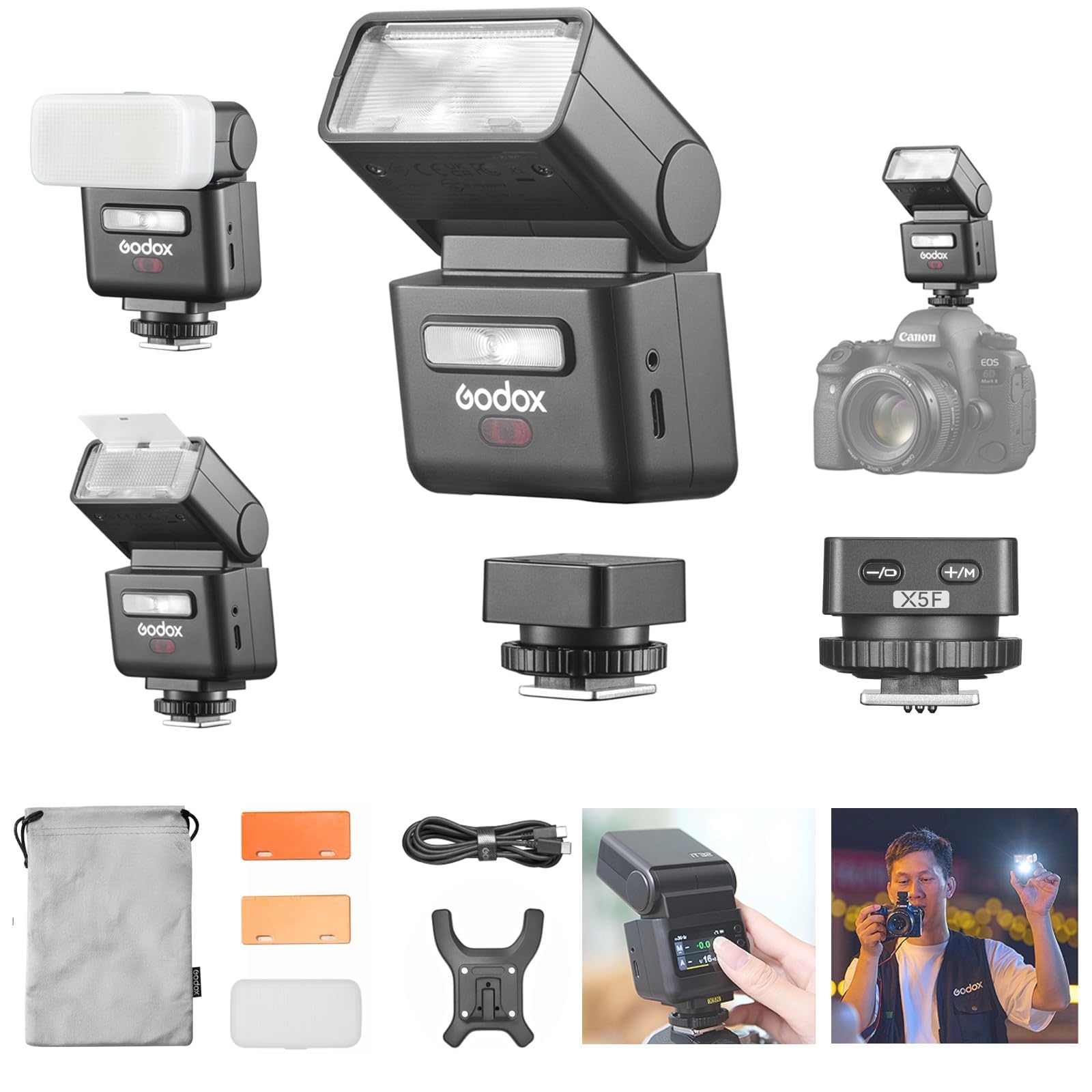
Figure 2.1: The Godox IT32 TTL Flash and X5F Trigger system, showcasing its compact design and the X5F mounted on a Fujifilm camera.
What's in the Box
- Godox IT32 Flash Unit
- Godox X5F TTL Flash Trigger (for Fujifilm)
- Diffuser
- Magnetic Base
- USB Type-C Charging Cord
- 1/2 CTO Color Filter
- 1/1 CTO Color Filter
- Storage Bag

Figure 2.2: All components included in the Godox IT32 and X5F package, including the flash, trigger, diffuser, color filters, and charging cable.
3. Features
- Universal System Compatibility: The IT32 and X5 offer a universal solution for photographers across different camera systems. The interchangeable magnetic X5 hotshoe allows instant switching between brands by changing the X5 version. This design enhances flexibility and reduces equipment compatibility concerns.
- Dual Identity: Hotshoe & Trigger in One: The X5 functions as both a hotshoe mount and a wireless transmitter. When attached to the IT32, it serves as the hotshoe for on-camera shooting. Once detached, it automatically switches to trigger mode, wirelessly controlling the IT32 or other Godox Wireless X System flashes.
- Effortless Multi-Light Sync: Equipped with a built-in 2.4GHz receiver in the IT32 and a 2.4GHz sender in the X5, the system ensures instant wireless communication without manual pairing. When used together, the IT32 and X5 act as a master unit to trigger multiple Godox flashes simultaneously.
- Intelligent Recognition and Real-Time Display: The IT32 automatically identifies the attached X5 version, displaying key information such as model type, battery level, and charging status on its screen. This smart detection keeps photographers informed of the system status.
- Magnetic Mounting, Fast and Secure: The magnetic interface between the IT32 and X5 ensures a stable, one-click connection that is firm yet quick to detach. This significantly speeds up setup compared to traditional locking mechanisms.
- Refined Design for Practical Use: Features include an intuitive touchscreen control, a flexible flash head, built-in reflector and diffuser, and USB-C charging.

Figure 3.1: Various X5 trigger versions, demonstrating the system's adaptability to different camera brands by simply swapping the X5 hotshoe.

Figure 3.2: The IT32 flash shown both mounted on a camera via the X5 and detached for off-camera wireless triggering.

Figure 3.3: A photographer utilizing the IT32 and X5 system to control multiple off-camera flashes for a multi-light setup.

Figure 3.4: The IT32's touchscreen interface showing real-time information about the connected X5 trigger, including model and battery status.

Figure 3.5: A close-up view of the magnetic connection between the IT32 flash and the X5 trigger, highlighting its ease of attachment and detachment.

Figure 3.6: A composite image illustrating the IT32's key design elements: a touch color screen, a rotatable flash head, built-in reflector and diffuser, and USB-C fast charging capability.
4. Setup
4.1 Attaching the X5F Trigger to Your Camera
- Ensure your camera is powered off.
- Slide the X5F trigger onto your camera's hotshoe.
- Tighten the locking mechanism on the X5F to secure it firmly to the hotshoe.
4.2 Attaching the IT32 Flash to the X5F Trigger
- Align the magnetic base of the IT32 flash with the top of the X5F trigger.
- The magnets will automatically snap the IT32 into place, creating a secure connection.
4.3 Charging the X5F Trigger
The Godox X5F trigger does not have a separate charging port. It must be attached to the IT32 flash unit to charge via the IT32's USB-C port. Ensure the IT32 is connected to a power source using the provided USB-C cable for the X5F to charge.
5. Operating Instructions
5.1 Powering On/Off
- To power on the IT32, press and hold the power button until the screen illuminates.
- To power off, press and hold the power button again.
- The X5F trigger powers on automatically when attached to the camera and the IT32 is powered on.
5.2 Basic On-Camera Flash Operation
When the IT32 is mounted on the X5F, which is on your camera's hotshoe, the system functions as a standard on-camera flash. Use the IT32's touchscreen and control dial to adjust settings.
- TTL Mode: For automatic exposure, select TTL mode. The flash will communicate with your camera to determine the appropriate flash output.
- Manual Mode: For precise control, select Manual (M) mode. Adjust the flash power output (e.g., 1/1 to 1/128) using the touchscreen or control dial.
- HSS (High-Speed Sync): Enable HSS for flash photography at shutter speeds faster than your camera's native flash sync speed.
5.3 Off-Camera Trigger Mode
When the IT32 is detached from the X5F, the X5F automatically switches to trigger mode. It can then wirelessly control the detached IT32 or other compatible Godox Wireless X System flashes.
- Ensure both the X5F and the off-camera IT32 (or other Godox flash) are set to the same channel and group for wireless communication.
- Adjust flash settings for the off-camera unit directly on the IT32's touchscreen or remotely via the X5F (if supported by the X5F's interface).
5.4 Adjusting the Flash Head
The IT32's flash head can be rotated 270 degrees horizontally and tilted 90 degrees vertically. This allows for bouncing flash off ceilings or walls to create softer, more natural lighting.
5.5 Using Built-in Reflector and Diffuser
The IT32 includes a built-in wide panel diffuser and a reflector card. Pull these out from the flash head as needed to soften light or create catchlights in your subject's eyes.
5.6 Compatibility with Fujifilm Camera Models
The IT32+X5F system is compatible with various Fujifilm camera models. Refer to the table below for specific compatibility and supported flash functions.

Figure 5.1: Compatibility chart detailing supported flash functions (TTL, Manual, HSS, Multi Flash) for various Fujifilm camera models (A, B, C) with the Godox IT32+X5F.
5.7 Product Video Guide
For a visual demonstration of the Godox IT32 and X5F's features and operation, please watch the official product video below.
Video 5.1: Official product video demonstrating the Godox IT32 camera flash and X5 flash trigger, highlighting their features and usage scenarios.
6. Maintenance
6.1 Cleaning
- Use a soft, dry cloth to clean the flash body and trigger.
- For the touchscreen, use a microfiber cloth specifically designed for electronics.
- Avoid using harsh chemicals or abrasive materials, which can damage the surfaces.
6.2 Storage
- Store the flash and trigger in a cool, dry place, away from direct sunlight and high humidity.
- Use the provided storage bag to protect the units from dust and scratches.
- If storing for an extended period, ensure the battery is partially charged (around 50%) to prolong its lifespan.
6.3 Battery Care
- Charge the IT32 and X5 (when attached) using the supplied USB-C cable and a compatible power adapter.
- Avoid fully discharging the battery frequently, as this can reduce its overall lifespan.
- If the unit will not be used for a long time, charge it every three months to maintain battery health.
7. Troubleshooting
- Flash Not Firing:
- Check if the flash and trigger are powered on.
- Ensure the battery is charged.
- Verify the X5F is securely mounted on the camera's hotshoe.
- Confirm the IT32 is correctly attached to the X5F (for on-camera) or that wireless settings (channel/group) match (for off-camera).
- Check camera flash settings to ensure external flash is enabled.
- Incorrect Exposure:
- In TTL mode, ensure your camera's exposure compensation is not set too high or low.
- In Manual mode, adjust the flash power output.
- Check ambient light conditions and adjust camera ISO, aperture, and shutter speed accordingly.
- Ensure the flash head is pointed correctly (not blocked or aimed away from the subject unintentionally).
- Wireless Communication Issues:
- Ensure both the X5F and the remote IT32 are on the same 2.4GHz channel and group.
- Check for potential interference from other wireless devices.
- Ensure the remote flash is within the effective wireless range.
- Touchscreen Unresponsive:
- Restart the IT32 unit.
- Ensure the screen is clean and free of moisture or debris.
8. Specifications
| Feature | Specification |
|---|---|
| Brand | GODOX |
| Model Name | iT32 |
| Compatible Mountings | Hotshoe |
| Camera Flash Type | External |
| Flash Sync Speed | 1/8000s (HSS) |
| Connectivity Technology | Wired, Wireless (2.4G RF) |
| Number of Batteries | 1 Nonstandard Battery (included) |
| Continuous Shooting Speed | 100 FPS |
| Mount Type | Hot Shoe Mount |
| Shooting Modes | High Speed Sync, First Curtain Sync, Second Curtain Sync |
| Exposure Control Type | TTL, Manual |
| Water Resistance Level | Not Water Resistant |
| File Format (Charging) | USB Type-C |
| Viewfinder Type | LCD screen |
| Compatible Devices | Fujifilm cameras |
| Maximum Shutter Speed | 1/8000 seconds |
9. Warranty and Support
Godox products are designed for reliability and performance. For warranty information, please refer to the documentation included with your purchase or visit the official Godox website. If you encounter any issues or require technical assistance, please contact Godox customer support through their official channels. Keep your proof of purchase for warranty claims.


