
Introduction
This manual provides detailed instructions for the installation, operation, and maintenance of your Rosewill ACA501B ATX Mid Tower Gaming PC Case. Please read this manual thoroughly before beginning assembly to ensure proper setup and optimal performance. Keep this manual for future reference.
Product Features
- Motherboard Compatibility: Supports ATX, Micro ATX (mATX), and Mini ITX (ITX) motherboard installations, offering versatile build options. Features a convenient 32mm space behind the motherboard tray for efficient cable management.
- Cooling System: Equipped with 3 pre-installed ARGB fans and a 4+4 port fan hub for immediate cooling and lighting control. The case supports a maximum of 9 fans and allows for a 360mm AIO liquid cooler installation on the top panel.
- Dual Tempered Glass Panels: Features two panoramic tempered glass side panels with a buckle design for easy access and showcasing your internal hardware.
- Optimized Airflow: Mesh panel designs on the PSU chamber and the right side panel ensure comprehensive airflow for effective PC cooling.
- Magnetic Dust Filters: Includes magnetic dust filters on the top and bottom plates, made from PVC, providing excellent dust protection and easy removal for cleaning.
- High-Speed I/O Ports: Conveniently located on the front of the PSU chamber, the I/O panel includes USB 3.0, USB 2.0, and HD audio ports for easy connectivity.

Image: Overview of the Rosewill ACA501B PC case highlighting ample hard drive bays, USB 3.0, support for up to 9 fans, and 360mm liquid cooling.
Specifications
| Brand | Rosewill |
| Model Name | ACA501B |
| Case Type | Mid Tower |
| Motherboard Compatibility | ATX, Micro ATX, Mini ITX |
| Color | Black |
| Material | Alloy Steel, Aluminum |
| Item Weight | 13.7 pounds |
| Product Dimensions (LxWxH) | 18.1 x 8.7 x 19.1 inches |
| Number of USB 3.0 Ports | 1 |
| Cooling Method | Air |
| Power Supply Mounting Type | Bottom Mount |

Image: Diagram illustrating motherboard compatibility (ATX, M-ATX, ITX) and component clearance limits for CPU cooler height (165mm) and graphics card length (427mm).
Installation Guide
1. Preparing the Case
Before installing components, ensure the case is placed on a stable, flat surface. Remove the tempered glass side panels by gently unbuckling them. This provides full access to the interior for easier installation.
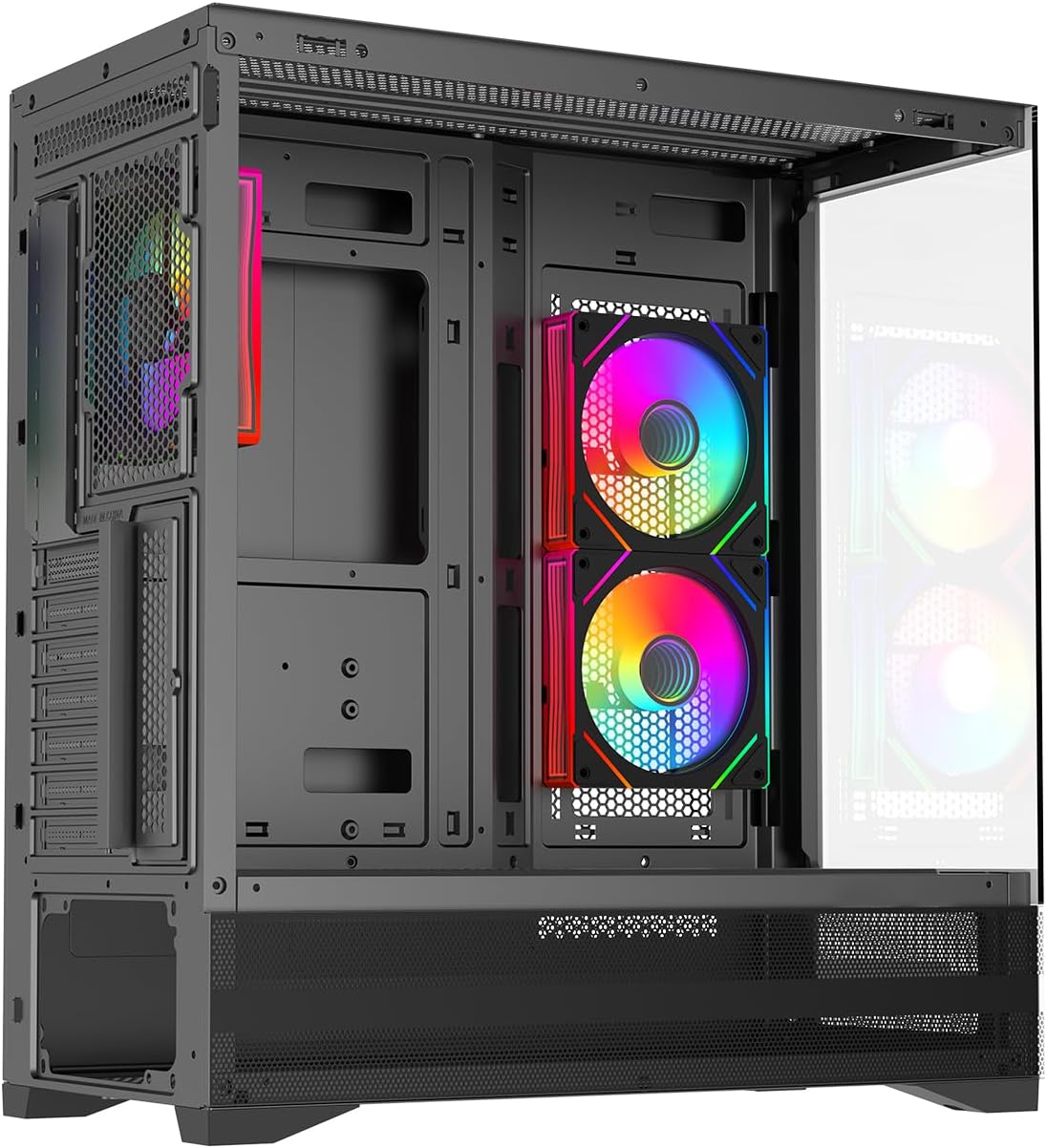
Image: An internal view of the PC case with the side panel removed, showing the spacious interior and pre-installed fans.
2. Motherboard Installation
Align your ATX, mATX, or ITX motherboard with the standoffs inside the case. Secure the motherboard using the provided screws. Ensure all necessary cables can reach their respective ports for optimal cable management.
3. Storage Device Installation (HDD/SSD)
The case supports 2x 3.5" HDDs and 1x 2.5" SSD in the bottom hard drive rack. The design allows flexibility to choose between SSD and HDD based on your needs. Secure your storage devices in the designated bays.

Image: A diagram illustrating the placement of 3.5" HDDs and 2.5" SSDs within the case's bottom drive rack.
4. Fan and Cooling System Setup
The case comes with 3 pre-installed ARGB fans and a fan hub. Additional fans can be installed to maximize cooling. The top panel supports up to a 360mm AIO liquid cooler.

Image: An internal layout overview showing fan and liquid cooler support locations: Top (3x 120mm/2x 140mm fans, 240/280/360mm AIO), Rear (1x 120mm fan), PSU Chamber (3x 120mm fans), and Motherboard (2x 120mm fans).

Image: Details on the 3 pre-installed Infinity Space ARGB fans, including specifications (61.5CFM ±10%, 600-1600RPM ±10%) and connectivity (4PIN PWM + 5V AURA 3PIN).
5. Connecting Front I/O Ports
Connect the USB 3.0, USB 2.0, and HD audio cables from the front I/O panel to their corresponding headers on your motherboard. The convenient placement of these ports on the front of the PSU chamber makes them easily accessible when the PC is on a desk.

Image: A diagram highlighting the front I/O ports, including the Power Button, LED button, 2-in-1 HD Audio jack, USB 2.0, and USB 3.0 ports.
6. Cable Management
Utilize the 32mm space behind the motherboard tray to route and organize cables. Proper cable management improves airflow and the aesthetic appeal of your build.
Video: A demonstration of RGB lighting effects in a black PC case, showcasing various color patterns and the visual impact of internal components. This video provides a general idea of RGB customization in a gaming PC case.
Operating Instructions
Once all components are securely installed and connected, replace the tempered glass side panels. Connect your monitor, keyboard, mouse, and power cable. Press the power button on the front I/O panel to start your PC. The pre-installed ARGB fans will illuminate, and you can manage their lighting effects via your motherboard's RGB software or the dedicated LED button on the front panel.
Maintenance
Regular maintenance is crucial for the longevity and performance of your PC. The Rosewill ACA501B case is designed for easy cleaning:
- Dust Filter Cleaning: The magnetic dust filters on the top and bottom panels can be easily removed for cleaning. Gently pull them off, clean with compressed air or a soft brush, and reattach.
- Interior Cleaning: Periodically open the side panels and use compressed air to remove dust from internal components, especially fans, heatsinks, and the mesh panels.
- Exterior Cleaning: Wipe the exterior surfaces, including the tempered glass panels, with a soft, damp cloth. Avoid abrasive cleaners that could scratch the surfaces.
Troubleshooting
If you encounter issues with your PC build, consider the following common troubleshooting steps:
- No Power: Ensure the power supply unit (PSU) is switched on and all power cables (24-pin motherboard, CPU, GPU) are securely connected. Check the front panel power switch connection to the motherboard.
- No Display: Verify that your monitor is connected to the graphics card (GPU) and not the motherboard's integrated graphics ports (unless you are using integrated graphics). Reseat the graphics card and RAM modules.
- Fan Issues: If fans are not spinning or RGB is not working, check their connections to the fan hub and ensure the fan hub is powered. Consult your motherboard manual for RGB software control.
- Overheating: Ensure all fans are correctly oriented for optimal airflow (intake/exhaust). Verify that CPU cooler is properly seated and thermal paste is applied. Clean dust filters and internal components regularly.
Warranty and Support
For warranty information and technical support, please refer to the official Rosewill website or contact their customer service. Keep your proof of purchase for any warranty claims. Rosewill provides support for product-related inquiries and assistance with troubleshooting.
Contact Information: Please visit the official Rosewill website for the most up-to-date support resources and contact details.


