
GODOX IT32+X5S
Contents
Godox IT32 TTL Camera Flash with X5S Trigger for Sony Cameras Instruction Manual
Model: IT32+X5S
Introduction
This manual provides detailed instructions for the safe and effective use of your Godox IT32 TTL Camera Flash and X5S Wireless Trigger. Please read this manual thoroughly before use and keep it for future reference.
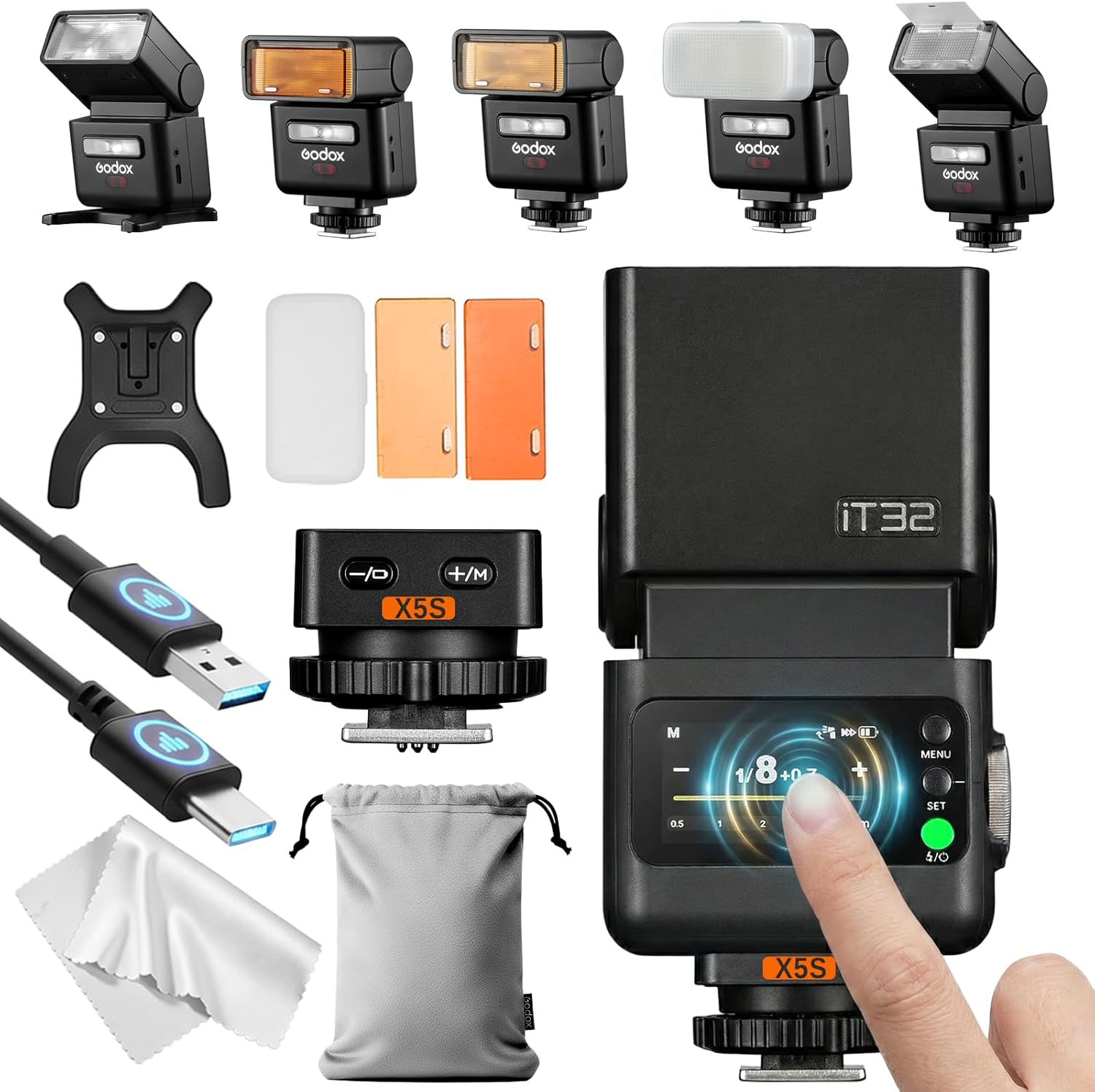
Image: Overview of the Godox IT32 flash unit and X5S trigger, along with included accessories like USB cable, magnetic mini stand, diffuser, and color filters.
Product Features
- Detachable Design: The iT32 flash unit can be detached from the X5 hotshoe trigger for flexible on-camera or off-camera use.
- Magnetic X5 Hotshoe: Allows instant switching between camera brands by changing the X5 version.
- Dual Identity (Hotshoe & Trigger): The X5 module functions as a hotshoe mount when attached to the iT32 and automatically switches to wireless trigger mode when detached.
- Godox 2.4GHz Wireless X System: Built-in 2.4GHz receiver in iT32 and X5 as sender for seamless wireless communication and multi-light setups.
- Intelligent Recognition: iT32 automatically identifies the attached X5 version and displays system information.
- TTL & HSS Support: Provides accurate exposure and high-speed sync up to 1/8000s.
- Rotatable Flash Head: 90° up and 270° left/right rotation for versatile light direction.
- Built-in Reflector and Diffuser: For soft and stunning lighting effects.
- LED Modeling Lamp: Integrated LED for continuous lighting or focus assist.
- USB-C Fast Charging: Convenient charging for both the iT32 and X5 (when attached).

Image: Visual representation of key features including detachable design, TTL & HSS, rotating head, diffuser/panel, LED lamp, and magnetic mounting.
Setup
1. Installing the X5S Trigger
- Locate the X5S trigger unit.
- Slide the X5S trigger into your Sony camera's hotshoe.
- Secure the trigger by rotating the locking wheel clockwise until it is firmly in place.
2. Attaching the IT32 Flash Unit
- Align the magnetic base of the IT32 flash unit with the top of the installed X5S trigger.
- The flash unit will magnetically snap into place, establishing a secure connection.
3. Powering On
- Long-press the power button on the IT32 flash unit until the screen illuminates.
- The unit will display the current mode and settings.

Image: The Godox iT32 flash unit magnetically attached to the X5 trigger on a camera hotshoe, demonstrating the integrated design.
Operating the Flash
1. Touchscreen Control
The IT32 features a colorful touch screen for intuitive control. Swipe and tap to navigate menus and adjust settings.
2. Flash Modes
- TTL (Through-The-Lens) Mode: Automatically adjusts flash output for optimal exposure. Access by swiping down on the touchscreen and selecting TTL. Adjust exposure compensation by sliding the yellow bar.
- Manual (M) Mode: Allows precise control over flash power (1/1 to 1/256). Tap the "+" or "-" icons for 0.3-stop increments, slide the bar for rapid changes, or use the dial for fine-tuning.
- Multi (Stroboscopic) Mode: Fires a series of rapid flashes for creative effects. Adjust flash count and frequency (Hz).
3. High-Speed Sync (HSS)
The IT32 supports HSS up to 1/8000s, enabling flash use with fast shutter speeds to freeze motion or overpower ambient light.
4. Wireless X System (Sender & Receiver Mode)
The IT32 can function as both a sender (master) and receiver (slave) within the Godox 2.4GHz Wireless X System. When the X5 is attached, the IT32 acts as a master. When detached, the X5 becomes a dedicated transmitter to control the IT32 or other Godox flashes.
Video: An operation video demonstrating the various functions and modes of the Godox iT32 flash and X5 trigger, including touchscreen navigation, flash modes, and wireless control.
5. Modeling Light
The integrated LED modeling lamp provides continuous light for focus assist or pre-visualization. Adjust its brightness via the menu.
6. Reflector and Diffuser
The flash head includes a built-in reflector and a wide-angle diffuser. Pop them out as needed to soften and spread the light.

Image: Close-up of the Godox iT32 flash head showing the built-in reflector and diffuser extended for soft lighting.
Maintenance
1. Battery Charging
The IT32 flash unit has a built-in lithium battery. Charge it using the provided USB-C cable. The X5S trigger charges automatically when attached to the IT32 unit while the IT32 is charging.

Image: The Godox iT32 flash unit connected to a USB-C charging cable, with battery indicators visible on the screen.
2. Cleaning and Storage
- Use a soft, dry cloth to clean the flash unit and trigger. Avoid harsh chemicals.
- Store the unit in a cool, dry place away from direct sunlight and extreme temperatures.
- Always use the hotshoe protector when the flash is not mounted on a camera to prevent damage to the contacts.
Troubleshooting
- Flash not firing: Ensure the unit is powered on, fully charged, and securely mounted or properly paired in wireless mode. Check camera flash settings.
- Incorrect exposure: Verify TTL exposure compensation settings or adjust manual power output. Check camera ISO, aperture, and shutter speed.
- Wireless connection issues: Ensure both the IT32 and X5S are in the correct mode (sender/receiver) and on the same channel and ID.
- X5S battery status: Long-press the "+/-" button on the X5S to check its battery status. Red indicator lights flash: 1 flash = low battery, 4 flashes = fully charged.
Specifications
| Feature | Detail |
|---|---|
| Brand | GODOX |
| Model Number | iT32+X5S |
| Compatible Mountings | Sony Cameras |
| Camera Flash | Hotshoe |
| Flash Sync Speed | 1/200 (HSS up to 1/8000s supported) |
| Item Weight | 13 ounces |
| Batteries | 1 Nonstandard Battery (Built-in Lithium) |
| Package Dimensions | 5.47 x 4.41 x 3.07 inches |
Warranty and Support
For warranty information and technical support, please refer to the official Godox website or contact your local distributor. Keep your purchase receipt as proof of purchase.
Included Components: 1x Godox IT32 Flash with X5S Flash Trigger; 1x USB Charging Cable, 1x Magnetic Mini Stand; 1x Diffuser; 1x Magnetic Color Filter (1/2 Orange); 1x Magnetic Color Filter (1/1 Orange), 1x Storage Bag; 1x Instruction Manual; 1x Cleaning Cloth.
Ask a question about this manual
Ask about setup, troubleshooting, compatibility, parts, safety, or missing instructions. Manuals+ will review the question and use this page’s manual context to help answer it.