RENPHO MorphoScan Base Body Composition Scale R-MSC02 User Manual
Model: R-MSC02
1. Introduction
The RENPHO MorphoScan Base Body Composition Scale R-MSC02 is an advanced smart scale designed to provide comprehensive body composition data. Utilizing eight-electrode dual-frequency and segmental Bioelectrical Impedance Analysis (BIA) technology, this device offers detailed insights into various body metrics. This manual provides essential instructions for setting up, operating, and maintaining your scale to ensure accurate and consistent measurements.
3. Package Contents
Upon unboxing your RENPHO MorphoScan Base, please verify that all items are present:
- RENPHO MorphoScan Base Body Composition Scale
- User Manual
- Quick Start Guide
- 4 x 1.5V AAA Batteries (pre-installed)

Image: The RENPHO MorphoScan Base Body Composition Scale, showing its main unit with the retractable handle. The scale features a black glass surface with blue accents and silver electrode pads. The packaging is also visible.
4. Initial Setup
4.1. Battery Installation
The scale comes with 4 AAA batteries pre-installed. To activate the scale, pull the plastic insulation tab from the battery compartment located on the underside of the scale. If replacing batteries, open the battery compartment cover and insert 4 new AAA batteries, ensuring correct polarity.

Image: Underside of the RENPHO MorphoScan Base scale, showing the battery compartment and four circular feet. The plastic insulation tab is visible, ready to be pulled to activate the pre-installed AAA batteries.
4.2. App Download and Pairing
The RENPHO MorphoScan Base scale syncs with the RENPHO Health App. Download the app from the App Store (iOS) or Google Play (Android).
- Download and install the "RENPHO Health" App.
- Register an account and log in.
- Turn on Bluetooth on your smartphone.
- Open the RENPHO Health App, tap the '+' icon in the upper right corner, and select "Body Composition Scale (8-Electrode Scale)".
- Step onto the scale to activate it. The app will automatically detect and connect to the scale via Bluetooth.
5. Operating Instructions
To obtain accurate body composition measurements, follow these steps:
- Place the scale on a hard, flat floor.
- Step onto the scale with bare, dry feet. Ensure your feet are positioned on the four electrode pads on the scale's surface.
- Grasp and pull up the handle. Hold the handle with both hands, ensuring your thumbs are on the curved spots and fingers on the other electrodes.
- Keep your arms straight and at a 30°-45° angle away from your body.
- Ensure continuous contact with all 8 electrode pads (4 on the scale, 4 on the handle) throughout the measurement.
- Hold this position until the measurement is complete and the report is generated in the app.
- Return the handle to its resting position and step off the scale.
- View your Body Composition Report on your phone via the RENPHO Health App.

Image: A person standing on the RENPHO MorphoScan Base scale, holding the retractable handle with arms extended. The image highlights the segmental muscle and fat analysis capabilities of the scale.
6. Understanding Your Body Composition Measurements
The RENPHO MorphoScan Base provides over 50 body metrics, including:
- Weight, BMI, Body Fat Percentage, Body Fat Mass
- Muscle Percentage, Muscle Mass, Skeletal Muscle Percentage, Skeletal Muscle Mass
- Bone Percentage, Bone Mass, Protein Percentage, Protein Mass
- Body Water Percentage, Body Water Mass, Fat-Free Mass
- Subcutaneous Fat, Visceral Fat, BMR (Basal Metabolic Rate)
- Metabolic Age, WHR (Waist-to-Hip Ratio), Optimal Weight, Weight Level, Body Type
- Segmental Fat Analysis (Left Arm, Right Arm, Trunk, Left Leg, Right Leg)
- Muscle Balance (Left Arm, Right Arm, Trunk, Left Leg, Right Leg)
While the scale provides a wealth of data, it's important to understand that BIA technology infers body composition based on electrical impedance. For absolute accuracy, medical-grade scans like DEXA are recommended. However, the RENPHO scale is highly effective for tracking trends and changes in your body composition over time. Consistent measurement (e.g., same time of day, similar clothing) is key for reliable trend analysis.
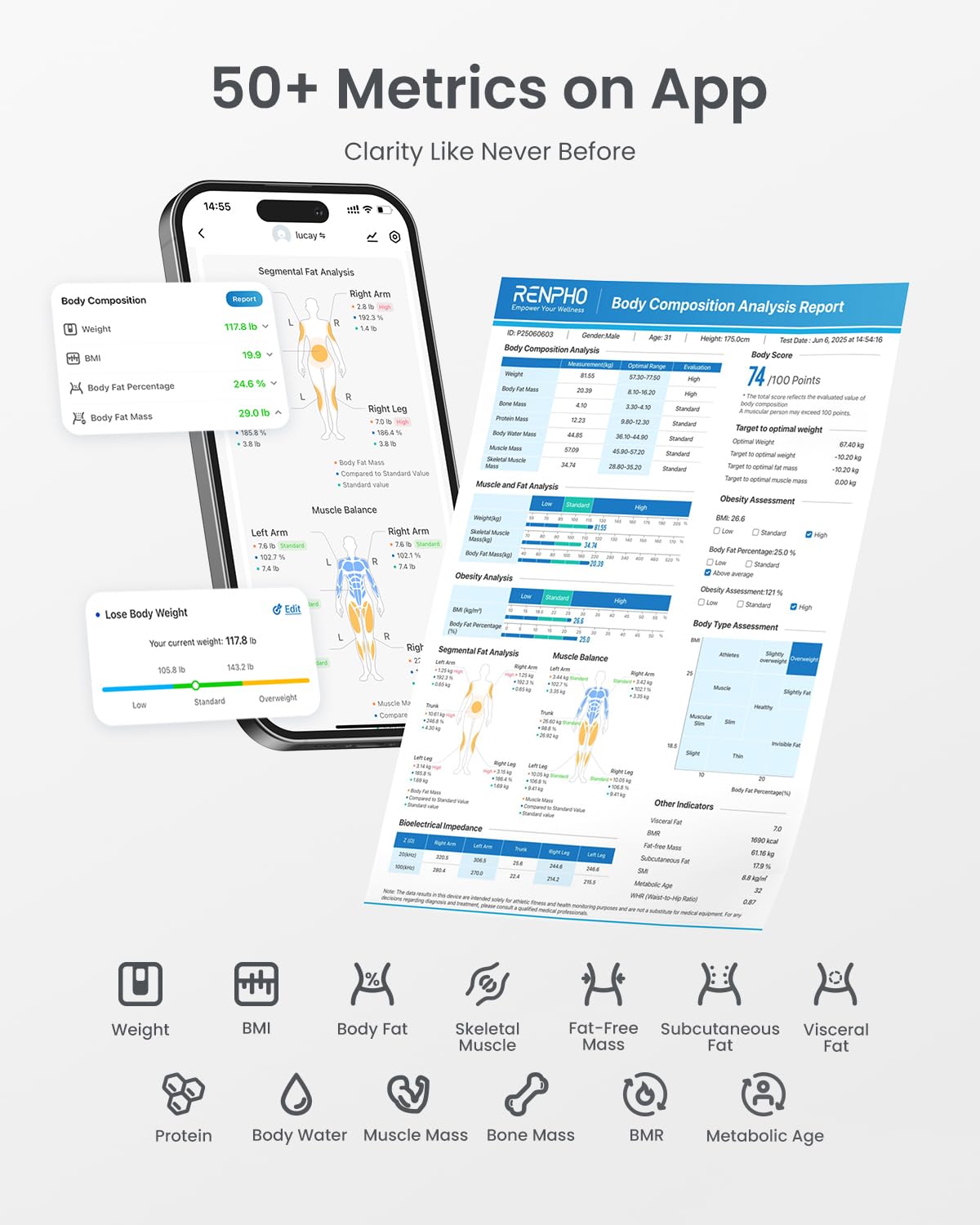
Image: Screenshot of the RENPHO Health App displaying over 50 body metrics, including detailed segmental analysis and a comprehensive body composition report.

Image: The RENPHO MorphoScan Base scale's LED display showing various body metrics like weight, body fat, BMI, and 7-day trends instantly on screen.
7. Maintenance
7.1. Cleaning
To clean the scale, use a soft, damp cloth. Avoid abrasive cleaners or harsh chemicals that could damage the surface or electrodes. Ensure the scale is dry before storage or next use.
7.2. Battery Replacement
The scale uses 4 AAA batteries. When the battery indicator appears on the display or in the app, replace all four batteries with new ones. Open the battery compartment on the underside of the scale, remove the old batteries, and insert new ones, observing polarity markings.
8. Technical Specifications
- Product Name: Body Composition Scale
- Model: R-MSC02
- Maximum Capacity: 400 lbs / 180 kg
- Division: 0.2 lb / 0.05 kg
- Dimensions: 11 x 12.1 x 1.4 in / 280 x 308 x 35 mm
- Batteries: 4 x 1.5V AAA (included)
- Special Features: Auto Shut Off, Body Fat, Eight electrodes, Large Display, Smart
- Display Type: LED
9. Troubleshooting
- Inaccurate Readings: Ensure the scale is on a flat, hard surface. Make sure your feet are bare and dry, and that you maintain continuous contact with all electrode pads. Avoid moving during measurement.
- No Display/Power: Check if the battery insulation tab has been removed. If batteries are low, replace them with new AAA batteries.
- App Connection Issues: Ensure Bluetooth is enabled on your smartphone and the scale is activated (step on it briefly). Restart the app or your phone if issues persist.
- "Handle not picked up in time" error: This indicates the handle was not held correctly or continuously during the measurement. Ensure a firm grip on the handle electrodes and maintain the recommended arm position throughout the process.
10. Warranty and Support
For warranty information, technical support, or any inquiries regarding your RENPHO MorphoScan Base scale, please refer to the official RENPHO website or contact their customer service directly. The user manual included in the package also contains detailed warranty policy information.


