
1. Important Safety Information
Read all instructions carefully before installation and use. Keep this manual for future reference. Improper installation, adjustment, alteration, service, or maintenance can cause property damage, injury, or death. Consult a qualified installer, service agency, or the gas supplier for information or assistance.
- Professional Installation Required: For optimal performance, safety, and warranty compliance, this unit must be installed by a certified HVAC professional.
- Electrical Safety: Ensure the power supply matches the unit's requirements (208/230V). All electrical work must comply with local and national electrical codes.
- Refrigerant Handling: This unit contains refrigerant. Only qualified personnel should handle refrigerant.
- Clearances: Maintain adequate clearances around both indoor and outdoor units for proper airflow and service access.

Image: A technician installing the indoor unit of the Garvee mini split air conditioner, emphasizing the importance of professional installation for safety and optimal performance.
2. Product Overview
The Garvee 18000 BTU Mini Split Air Conditioner is a 4-in-1 system providing cooling, heating, dehumidification, and fan-only modes. Featuring a 19 SEER2 rating and inverter technology, it offers efficient climate control for spaces up to 1250 sq ft.

Image: A family enjoying a comfortable living room, illustrating the Garvee mini split AC's ability to cool up to 1250 sq ft rapidly.

Image: Visual representation of the Garvee mini split's dual function, highlighting its 18000 BTU cooling and 18400 BTU heating capabilities.
3. Setup and Installation
3.1 What's in the Box
The Garvee Mini Split Air Conditioner ships in two separate packages, which may arrive at different times. Ensure all components are present before beginning installation.
Image: Detailed diagram illustrating the contents of the two shipping boxes, including the indoor unit, outdoor unit, remote control, and all necessary installation accessories.
- Box 1: Indoor Unit, Remote Control, Mounting Plate, Power Cord, Signal Cable (12.47 ft), Bracket Template.
- Box 2: Outdoor Unit, Mesh Cover, Screws, Tape, Sealing Gum, Wall Cap, Drain Hose (6.56 ft), Copper Line Set (9.84 ft x 2).
3.2 Installation Guidelines
Professional installation is mandatory for this unit. The outdoor unit features a compact design, 23% smaller than standard models, allowing for flexible placement on balconies or rooftops. Refer to the detailed installation manual provided with the product for specific instructions, diagrams, and safety protocols. Ensure proper wiring, refrigerant line connections, and drainage setup are completed by a certified technician.
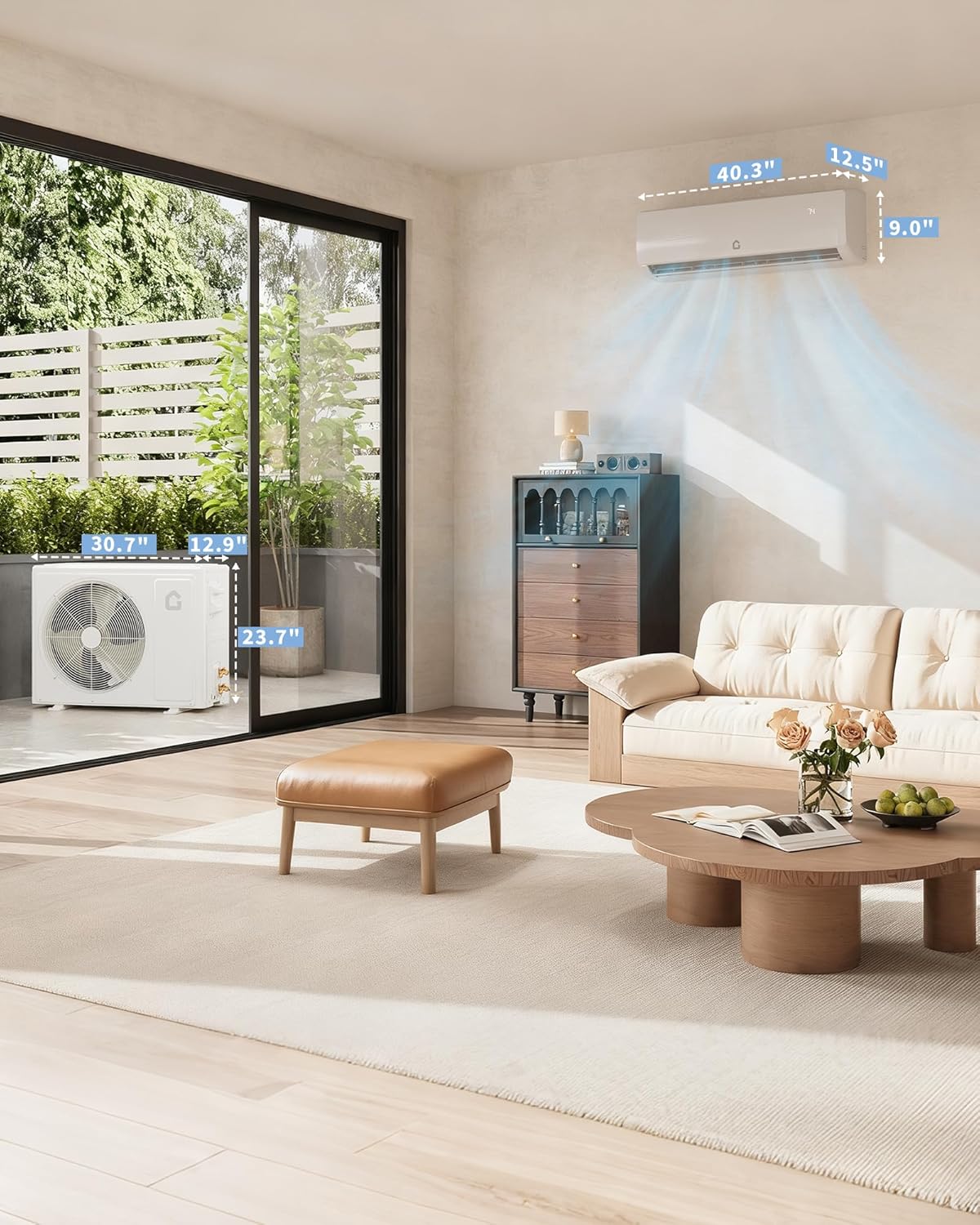
Image: Diagram displaying the compact dimensions of both the indoor and outdoor units, highlighting their space-saving design.
4. Operating Instructions
The Garvee Mini Split AC offers versatile climate control through its remote control. Familiarize yourself with the remote's functions for optimal use.
4.1 Operating Modes
- Cooling Mode: Provides rapid cooling, achieving desired temperatures quickly.
- Heating Mode: Delivers turbo-heating for comfortable warmth in colder conditions.
- Dry Mode: Reduces humidity in the air, ideal for damp environments.
- Fan-Only Mode: Circulates air without heating or cooling.
4.2 Advanced Features
- 4-Way Air Swing: Ensures uniform air distribution throughout the room.
- Sleep Mode: Operates at a whisper-quiet 28 dB, adjusting temperature for comfortable sleep and energy saving.
- Mute Mode: Further reduces operational noise for maximum tranquility.
- 0-24H Timer: Program the unit to turn on or off automatically.
- Eco Energy Saving: Optimizes performance to minimize energy consumption.

Image: A bedroom setting demonstrating the Garvee mini split AC's quiet operation in Sleep Mode, with a noise level of 28dB.

Image: Visual representation of the unit's functional features, including dehumidification, multi-directional air swing, and eco-friendly operation.
5. Maintenance
Regular maintenance ensures the longevity and efficiency of your Garvee Mini Split Air Conditioner. Always turn off the power supply to the unit before performing any maintenance.
5.1 Air Filter Cleaning
- Clean the air filters every two weeks or more frequently if the unit is used heavily or in dusty environments.
- Open the front panel of the indoor unit and remove the filters.
- Wash filters with lukewarm water and a mild detergent. Rinse thoroughly and allow them to dry completely before reinserting.
5.2 Outdoor Unit Care
- Keep the area around the outdoor unit clear of debris, leaves, and other obstructions to ensure proper airflow.
- Periodically clean the outdoor coil fins with a soft brush or vacuum cleaner to remove dirt and dust.
- Ensure the drain pan and drain hose are free from blockages.
5.3 Professional Servicing
It is recommended to have a certified HVAC technician inspect and service your unit annually to check refrigerant levels, electrical connections, and overall system performance.
6. Troubleshooting
Before contacting customer service, review the following common issues and solutions. Always turn off the power supply before attempting any inspection or repair.
| Problem | Possible Cause | Solution |
|---|---|---|
| Unit does not turn on | No power, circuit breaker tripped, remote control batteries low | Check power supply, reset breaker, replace remote batteries |
| Insufficient cooling/heating | Dirty air filters, blocked outdoor unit, incorrect mode setting, low refrigerant | Clean filters, clear obstructions, select correct mode, contact technician for refrigerant check |
| Unusual noise | Loose parts, fan obstruction, refrigerant flow noise | Inspect for loose parts, clear obstructions, some refrigerant noise is normal. If persistent or loud, contact technician. |
| Water leakage from indoor unit | Clogged drain hose, improper installation angle | Clear drain hose, ensure proper slope. Contact technician if issue persists. |
For issues not listed here or if solutions do not resolve the problem, please contact Garvee customer service.
7. Specifications
| Feature | Detail |
|---|---|
| Brand | Garvee |
| Model Name | CS/CU-KU18VKYTF |
| Cooling Capacity | 18000 BTU |
| Heating Capacity | 18400 BTU |
| Coverage Area | Up to 1250 Sq. Ft |
| SEER2 Rating | 19 |
| Voltage | 230V (208/230V) |
| Noise Level (Min) | 28 Decibels (in Sleep Mode) |
| Inverter Type | Yes |
| Special Features | Cooling, Heating, Dry, Fan-Only, 4-Way Swing, Sleep Mode, Mute Mode, 0-24H Timer, Eco Energy Saving |
| Product Dimensions (Outdoor Unit) | 35.1"D x 28.2"W x 16.5"H |
| Included Components | Installation Kit |
| UPC | 199913288787 |
8. Warranty and Support
Your Garvee Mini Split Air Conditioner is backed by a 5-year manufacturer's warranty. This warranty covers shipping damage, normal-use part failures, and any functional defects.
For installation guidance, troubleshooting assistance, or replacement parts, please contact our customer service team first. This ensures you receive accurate support and helps avoid unnecessary third-party fees.
We are committed to providing prompt and helpful support for your Garvee product.