
Introduction
The OBDResource BM550 Ultra Car Battery Tester with Printer is an advanced automotive battery diagnostic tool designed for both professional mechanics and DIY enthusiasts. This device provides accurate readings of your vehicle's battery health, including voltage, state of charge, and overall condition. Its integrated thermal printer allows for instant documentation of test results. The BM550 Ultra supports a wide range of battery types and voltage systems, making it a versatile addition to any automotive toolkit.
Key Features
- Built-in Thermal Printer: Prints instant test reports for convenient record-keeping and sharing.
- Wide Compatibility: Supports 6V, 12V, and 24V battery systems, and 100–2000 CCA. Compatible with common lead-acid, AGM flat plate, AGM spiral, and GEL batteries.
- Comprehensive Test Results: Displays detailed battery information including voltage, State of Health (SOH), internal resistance, State of Charge (SOC), and CCA value on a 1.8-inch color screen.
- CCA/AH Value Conversion: Allows testing by entering a known AH value (2AH-220AH supported), eliminating the need for manual lookups.
- Real-Time Voltage Monitor: Features a built-in voltage waveform display to show actual voltage fluctuations and provide warnings for battery or automotive tool issues.
What's in the Box
The package for your OBDResource BM550 Ultra Car Battery Tester includes the following items:

Image: Contents of the product packaging, including the BM550 Ultra Battery Tester, Quick Guide, Instruction Manual, two rolls of Thermal Paper, and the Packaging Box. Product dimensions are also shown: 7.32 inches x 3.31 inches x 1.73 inches.
- Quick Guide
- Instruction Manual (this document)
- Thermal Paper (x2 rolls)
- OBDResource BM550 Ultra Battery Tester
- Packaging Box
Setup
Before using the BM550 Ultra, ensure the battery terminals are clean and free of corrosion. Follow these steps to connect the tester:
- Identify the positive (+) and negative (-) terminals on your vehicle's battery.
- Connect the red clamp of the BM550 Ultra to the positive (+) battery terminal.
- Connect the black clamp of the BM550 Ultra to the negative (-) battery terminal.
- Ensure both clamps are securely attached to prevent inaccurate readings or damage. The device will power on automatically once connected.

Image: The BM550 Ultra connected to a car battery, ready for testing.

Image: The tester's screen displaying options for battery voltage (6V, 12V, 24V) and indicating a fast test result.
Operating Instructions
1. Battery Test
This function assesses the overall health and charge of your battery.
- After connecting the tester, select "Battery Capacity" from the main menu.
- Choose the correct battery type (e.g., Regular Flooded, AGM Flat Plate, AGM Spiral, GEL, EFB).
- Input the CCA (Cold Cranking Amps) rating of your battery. If you only know the AH (Ampere-Hour) value, use the built-in CCA/AH conversion feature.
- The tester will perform the analysis and display results such as State of Health (SOH), State of Charge (SOC), voltage, and internal resistance.
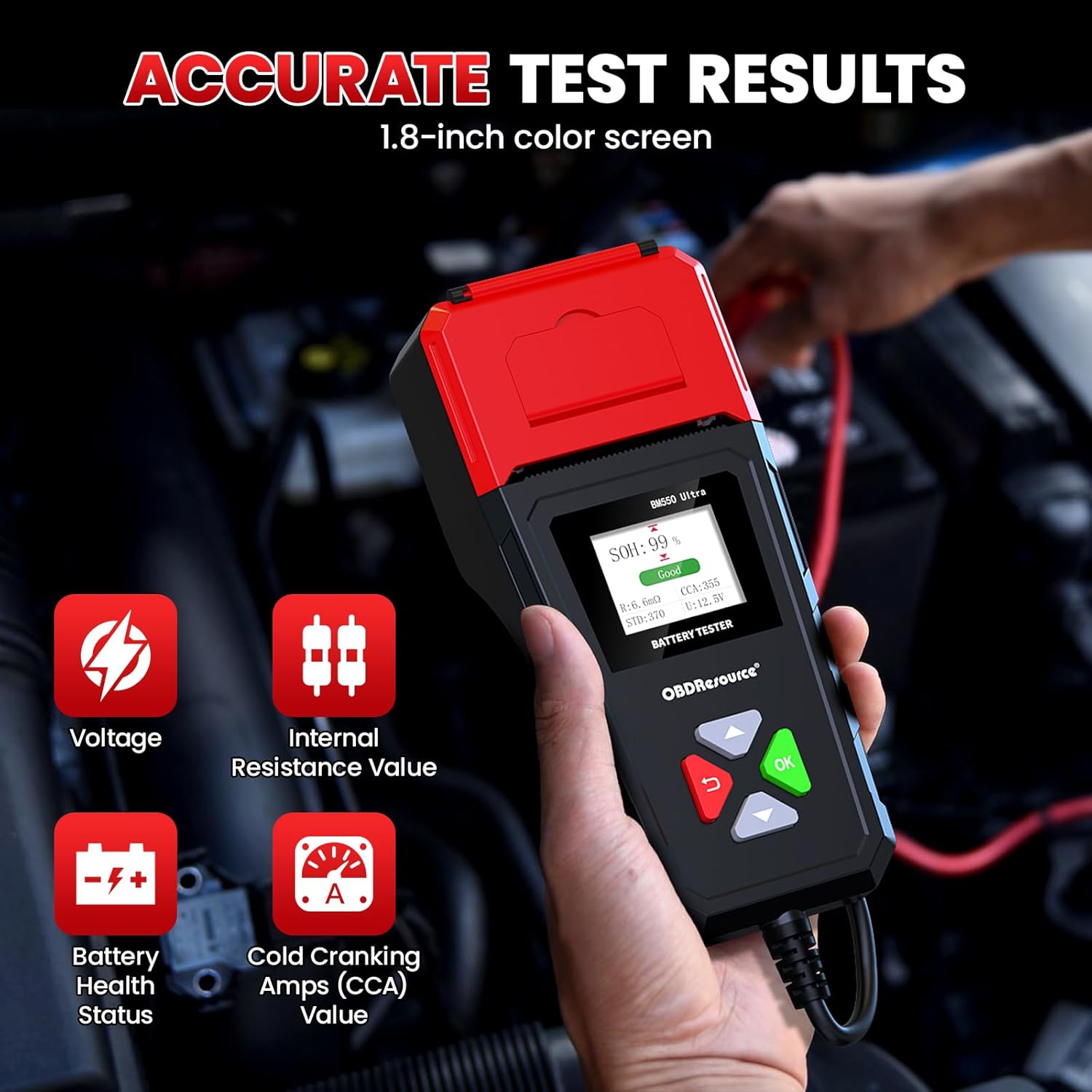
Image: The BM550 Ultra displaying comprehensive battery test results, including SOH, SOC, voltage, internal resistance, and CCA.

Image: The tester's screen showing the CCA/AH value conversion option.
Video: Demonstration of a battery test using a similar battery tester with printing functionality. The video shows selecting battery type, inputting CCA, performing the test, and printing the report.
2. Cranking Test
This test evaluates the battery's ability to provide sufficient current to start the engine.
- From the main menu, select "Cranking Test".
- Follow the on-screen prompts to start the engine.
- The tester will analyze the cranking voltage and time, providing a result indicating the battery's cranking performance.
Video: A demonstration of battery testing, including cranking and charging tests, using a UNI-T battery tester. This video illustrates the process of performing these tests on a vehicle battery.
3. Charging System Test
This test checks the vehicle's charging system, including the alternator and voltage regulator.
- Select "Charge System" from the main menu.
- Follow the on-screen instructions, which typically involve starting the engine and increasing RPMs.
- The tester will measure the output voltage and ripple, providing a diagnosis of the charging system's performance.
4. Printing Test Results
The BM550 Ultra features a built-in thermal printer for immediate documentation of test results.
- After completing a battery, cranking, or charging test, the device will typically prompt you to print the report.
- Select "YES" to print. The thermal paper will feed out with the detailed test results.
- Ensure the thermal paper is correctly loaded in the printer compartment.
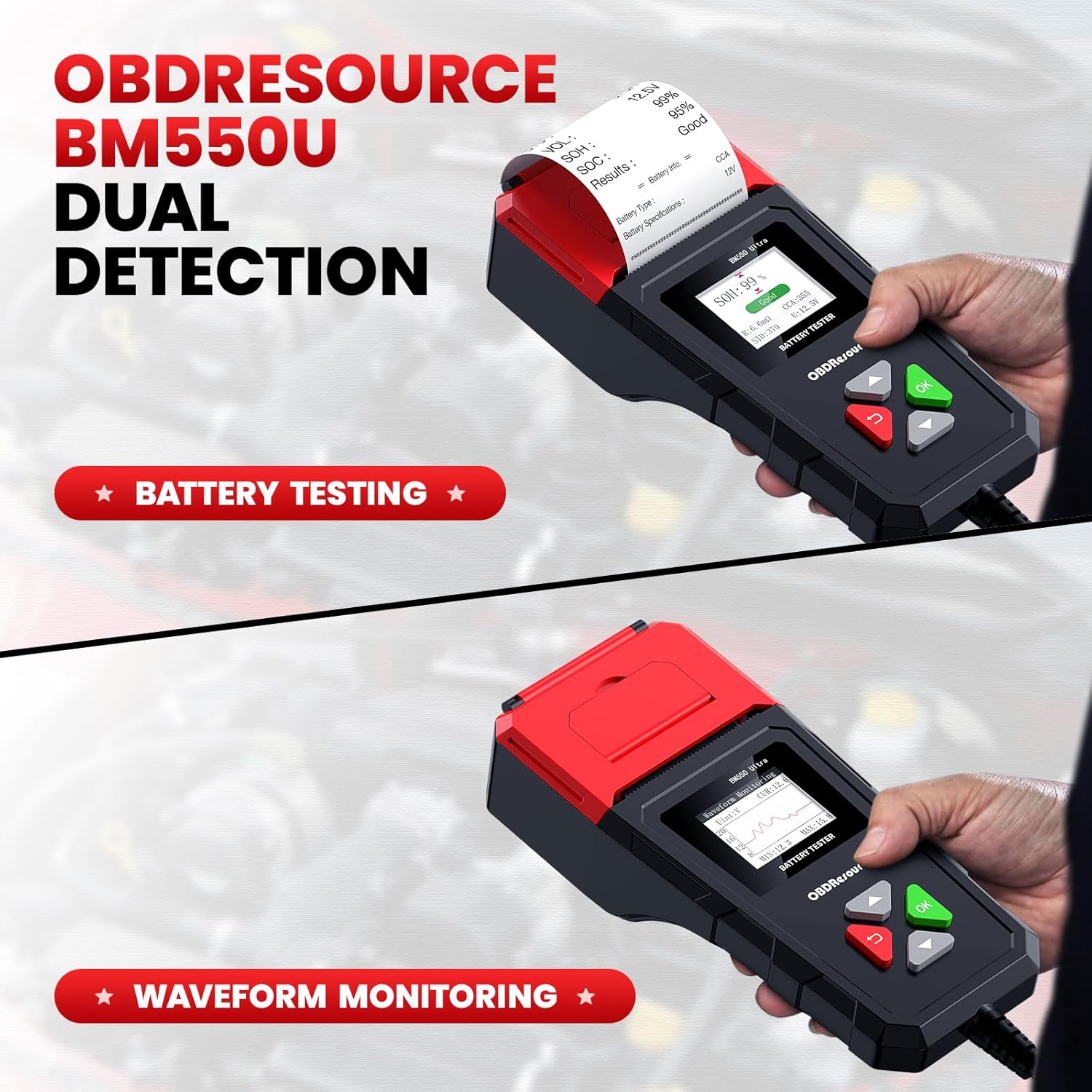
Image: The BM550 Ultra printing a detailed battery test report.
Video: Demonstration of a battery test using a similar battery tester with printing functionality. The video shows selecting battery type, inputting CCA, performing the test, and printing the report.
Maintenance
- Cleaning: Wipe the device with a soft, dry cloth. Do not use abrasive cleaners or solvents.
- Storage: Store the BM550 Ultra in a cool, dry place away from direct sunlight and extreme temperatures.
- Cable Care: Inspect the test cables and clamps regularly for any signs of damage. Replace if necessary.
- Thermal Paper: Ensure you have spare thermal paper rolls for continuous printing.
Troubleshooting
| Problem | Possible Cause | Solution |
|---|---|---|
| Device does not power on. | Incorrect or loose battery connection. | Ensure clamps are securely connected to the correct battery terminals. Check battery voltage (must be within 8V-32V). |
| Inaccurate test results. | Corroded battery terminals; incorrect battery type/CCA input. | Clean battery terminals. Verify correct battery type and CCA/AH values are entered. |
| Printer not working. | No thermal paper; paper loaded incorrectly; printer jam. | Check and replace thermal paper. Ensure paper is loaded correctly. Clear any paper jams. |
| "Poor Contact Prompt" displayed. | Loose connection of test clamps. | Re-secure the test clamps firmly to the battery terminals. |
Specifications
| Feature | Detail |
|---|---|
| Brand | OBDResource |
| Model Number | BM550 Ultra |
| Supported Battery Voltages | 6V, 12V, 24V |
| CCA Range | 100-2000 CCA |
| Supported Battery Types | Lead-acid, AGM Flat Plate, AGM Spiral, GEL |
| Display | 1.8-inch Color Screen |
| Printer | Built-in Thermal Printer |
| Measurement Accuracy | +/-0.5% |
| Min. Operating Voltage | 8 Volts |
| Maximum Operating Voltage | 32 Volts |
| Item Weight | 435 g |
| Parcel Dimensions | 24 x 15 x 6 cm |
| Certifications | CE, RoHS |
Warranty and Support
For warranty information, technical support, or service inquiries regarding your OBDResource BM550 Ultra Car Battery Tester, please refer to the contact information provided in the product packaging or visit the official OBDResource website. Keep your purchase receipt as proof of purchase for warranty claims.
