
SUNKTA FV23-D
SUNKTA Smart Watch FV23-D User Manual
Model: FV23-D
Introduction
This manual provides comprehensive instructions for the setup, operation, and maintenance of your SUNKTA Smart Watch FV23-D. Please read this manual thoroughly before using your device to ensure proper function and longevity.
Package Contents
Verify that all items are present in your package:
- SUNKTA Smart Watch FV23-D x 1
- Silicone Strap x 1
- Mesh Metal Strap x 1
- Magnetic Charging Cable (USB-A) x 1
- Magnetic Charging Cable (Type-C) x 1
- User Manual x 1
- Warranty Card x 1

Image: The SUNKTA Smart Watch FV23-D, showcasing the watch body, a silicone strap, a mesh metal strap, and two magnetic charging cables (USB-A and Type-C).
Setup
1. Initial Charging
Before first use, fully charge the smartwatch. Connect one of the provided magnetic charging cables to the charging points on the back of the watch and to a USB-A or Type-C power adapter (not included). The watch display will indicate charging status.

Image: The SUNKTA Smart Watch FV23-D connected to a magnetic charging cable, illustrating the dual USB-A and Type-C charging options.
2. App Installation
Download and install the Fit CloudPro app on your smartphone. The app is compatible with iOS 9.0 and Android 5.0 or above.
- Search for "Fit CloudPro" in the Apple App Store or Google Play Store.
- Install the app and grant necessary permissions.
3. Device Pairing
- Ensure Bluetooth is enabled on your smartphone.
- Open the Fit CloudPro app and create an account or log in.
- Navigate to the "Device" section within the app.
- Tap "Add Device" or "Search for Device".
- Select "FV23-D" from the list of available devices.
- Confirm the pairing request on both your smartphone and the smartwatch.
Operating Instructions
Basic Navigation
- Touchscreen: Swipe left, right, up, or down to navigate through menus and functions. Tap to select.
- Side Button: Press to return to the home screen or wake the display.
Customizing Watch Faces
The watch features a 1.32-inch AMOLED display with 466x466 resolution. You can change watch faces directly on the watch or through the Fit CloudPro app. The app offers over 200 watch face options and allows for custom designs.

Image: The SUNKTA Smart Watch FV23-D's 1.32-inch AMOLED display, highlighting its high resolution and a selection of customizable watch faces.
Bluetooth Calling and Notifications
Once paired, the watch supports Bluetooth calling. You can answer, reject, or make calls directly from your wrist using the built-in microphone and speaker. The watch also displays notifications from social media platforms and other apps.
- Answering Calls: Tap the green phone icon on the watch screen.
- Making Calls: Access the dial pad or contact list via the watch interface.
- Notifications: Swipe down from the top of the watch face to view recent notifications.

Image: A visual representation of the smartwatch's Bluetooth calling feature, real-time weather updates, music control, and various app notifications.
Sports Modes and Activity Tracking
The watch offers over 100 sports modes, including walking, running, yoga, and tennis. It automatically records daily steps, distance, calories burned, and active minutes. The watch is IP68 waterproof, suitable for daily use and shallow swimming.
- Accessing Sports Modes: Swipe to the sports menu and select your desired activity.
- Tracking: The watch will display real-time data during your workout.

Image: The smartwatch showcasing its 110+ sports modes, real-time workout tracking for steps, distance, and calories, and its IP68 waterproof capability.
Health Monitoring
The watch continuously tracks various health metrics:
- Heart Rate: Monitors heart rate throughout the day.
- Stress Levels: Provides insights into stress.
- Sleep Quality: Tracks sleep patterns and duration.
- Women's Health Tracking: Features a physiological cycle reminder for menstrual and ovulation periods, and pregnancy tracking.

Image: The smartwatch interface showing women's health tracking features, including period, gestation, ovulation, and prediction.
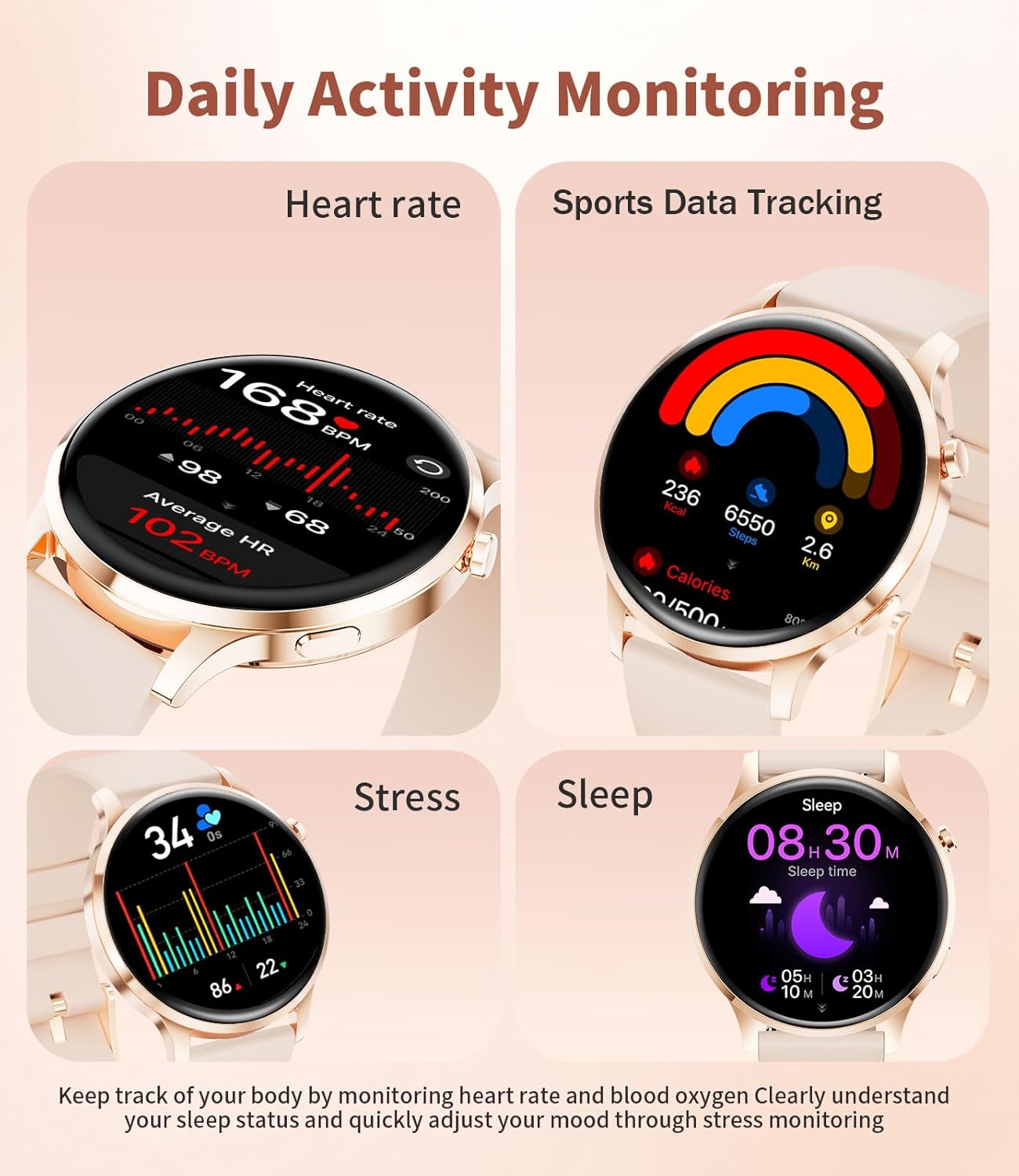
Image: The smartwatch displaying various daily activity monitoring screens, including heart rate, sports data (calories, steps, distance), stress levels, and sleep duration.
Additional Functions
The SUNKTA Smart Watch FV23-D includes several other useful features:
- Music Control: Play, pause, skip tracks on your smartphone.
- Remote Camera Control: Trigger your phone's camera remotely.
- Weather Updates: Real-time weather information.
- Alarm Clock: Set alarms directly on the watch.
- Voice Assistant: Interact with your phone's voice assistant.
- Reminders: Sedentary reminders, hydration prompts.
- Phone Finder: Locate your paired smartphone.
- Raise-to-Wake: Automatically illuminates the screen when you raise your wrist.

Image: A collage of the smartwatch's additional functions, including music control, mobile phone search, weather display, alarm, voice assistant, and reminder functions for hydration and sedentary alerts.
Maintenance
- Cleaning: Wipe the watch and straps regularly with a soft, dry cloth. For stubborn dirt, use a slightly damp cloth and mild soap, then rinse and dry thoroughly.
- Charging: Use only the provided magnetic charging cables. Avoid exposing the charging contacts to water or corrosive liquids.
- Storage: Store the watch in a cool, dry place when not in use.
- Water Resistance: The watch is IP68 waterproof. It is suitable for hand washing, rain, and shallow swimming. Avoid hot water, saunas, or diving.
Troubleshooting
| Issue | Solution |
|---|---|
| Watch does not turn on | Ensure the watch is fully charged. Connect it to the charger for at least 30 minutes. |
| Cannot pair with smartphone |
|
| Inaccurate health data |
|
| Notifications not received |
|
Specifications
| Feature | Detail |
|---|---|
| Model | FV23-D |
| Display | 1.32-inch AMOLED, 466x466 resolution |
| Memory Storage Capacity | 128 MB |
| Operating System | Compatible with Android 5.0+ / iOS 9.0+ |
| Connectivity | Bluetooth |
| Battery Capacity | 200 Milliamp Hours (Lithium Polymer) |
| Charging Time | Approximately 2 Hours |
| Water Resistance | IP68 |
| Human Interface Input | Buttons, Touchscreen |
| Special Features | Bluetooth Calling, Notifications, Activity Tracker, Women's Health Tracker, Calorie Tracker, Heart Rate Monitor, Stress Level Tracker, Sleep Monitor, Always-On Display, Music Player, Sedentary Reminder, Dual Straps, Dual Chargers |

Image: Detailed dimensions of the SUNKTA Smart Watch FV23-D, showing both the watch body and the interchangeable straps.
Warranty and Support
The SUNKTA Smart Watch FV23-D comes with a 24-month worry-free product warranty. This warranty covers replacement, return, or accessory replacement services for manufacturing defects.
For any questions or concerns regarding your smartwatch, please contact SUNKTA customer support. Refer to the warranty card included in your package for specific contact details and warranty claim procedures.
Related documentsFV23-D


Ask a question about this manual
Ask about setup, troubleshooting, compatibility, parts, safety, or missing instructions. Manuals+ will review the question and use this page’s manual context to help answer it.