
1. Introduction
Thank you for choosing the Racingreat Ergonomic Gaming Chair, Model X25F00K042. This chair is designed to provide comfort and support for extended periods of gaming or office work. It features flexible adjustments, an ergonomic design, and high-quality materials to enhance your experience. Please read this manual carefully before assembly and use to ensure proper function and safety.
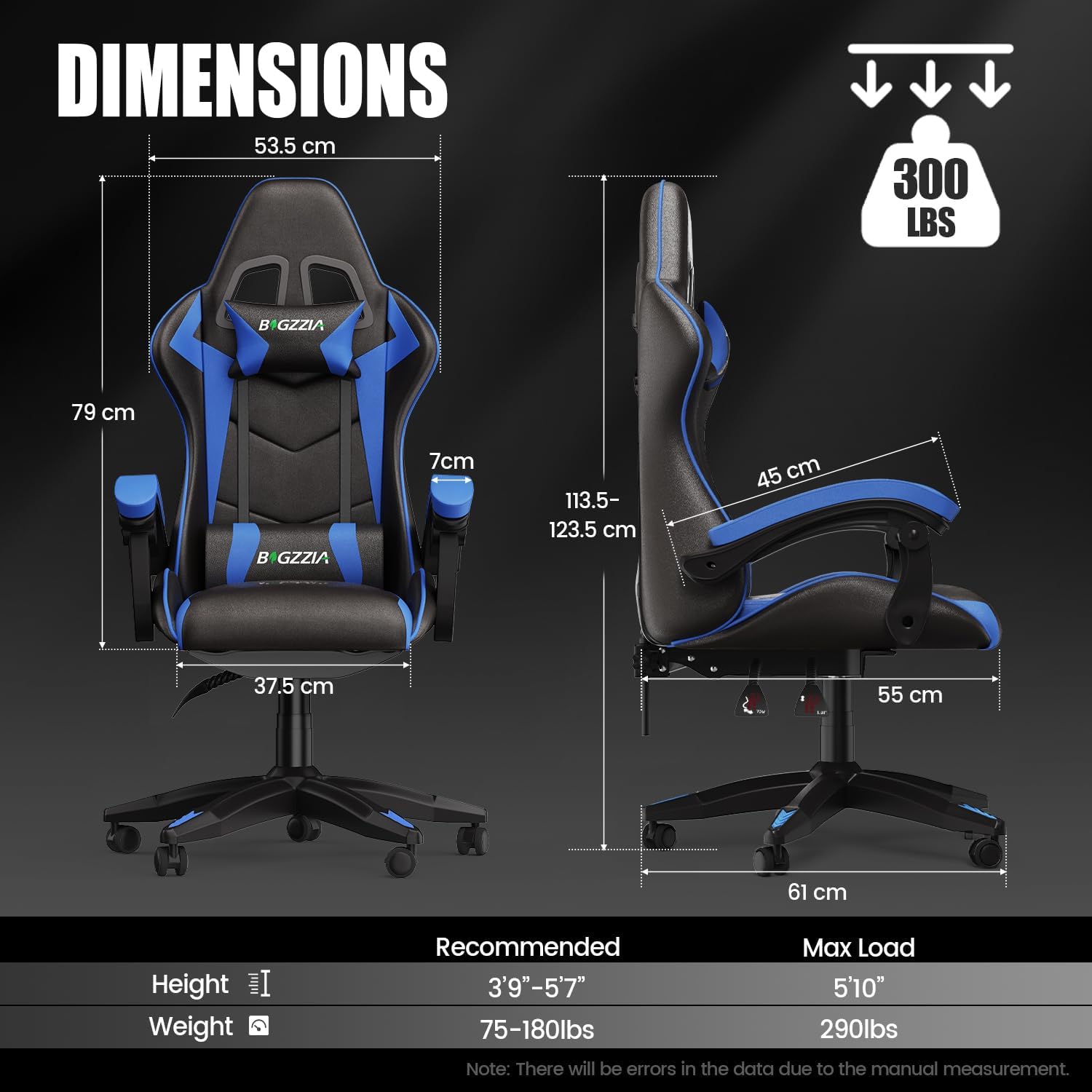
Image 1.1: The Racingreat Ergonomic Gaming Chair in a typical gaming environment.
2. Safety Information
- Ensure all components are securely fastened before use.
- Do not stand on the chair or use it as a step stool.
- Do not exceed the maximum weight capacity of 130 kg (290 lbs).
- Keep children away from moving parts during adjustment.
- Avoid exposing the chair to direct sunlight or extreme temperatures to prevent material degradation.
- Use only original Racingreat replacement parts if needed.
3. Package Contents
Before assembly, please verify that all components are present and undamaged. Refer to the detailed assembly instructions provided in the package for a complete list of parts and hardware.
- Backrest
- Seat Cushion
- Armrests (2)
- Star Base
- Casters (5)
- Gas Lift Cylinder
- Gas Lift Cover
- Mechanism Plate
- Headrest Pillow
- Lumbar Support Cushion
- Hardware Pack (screws, washers, Allen key)
- Assembly Instructions
4. Setup and Assembly
The Racingreat Gaming Chair requires assembly. Detailed step-by-step instructions and all necessary tools are included in the package. Please follow the provided assembly guide carefully to ensure correct and safe setup.
- Unpack Components: Carefully remove all parts from the packaging and lay them out on a clean, soft surface to prevent scratches.
- Attach Casters to Base: Insert the five casters into the holes on the star base until they click into place.
- Install Gas Lift: Place the gas lift cylinder into the center hole of the star base, then cover it with the gas lift cover.
- Attach Mechanism to Seat: Secure the mechanism plate to the underside of the seat cushion using the provided screws. Ensure the front of the mechanism faces the front of the seat.
- Attach Armrests: Fasten the armrests to the seat cushion using the designated screws.
- Connect Backrest to Seat: Attach the backrest to the seat cushion and armrests, securing it with screws.
- Assemble Chair onto Gas Lift: Carefully place the assembled seat and backrest onto the gas lift cylinder.
- Attach Cushions: Position the headrest pillow and lumbar support cushion as desired.
If you encounter any difficulties during assembly, please refer to the troubleshooting section or contact customer support.
5. Operating Instructions
The Racingreat Gaming Chair offers several adjustment features for personalized comfort.
5.1. Seat Height Adjustment
To adjust the seat height, locate the lever on the right side beneath the seat. Pull the lever upwards:
- To raise the seat: Lift your weight off the seat while pulling the lever.
- To lower the seat: Remain seated and pull the lever.
The seat height can be adjusted between approximately 113.5 cm and 123.5 cm (from floor to top of backrest).
5.2. Backrest Recline Adjustment
The backrest can be reclined to various angles, from 90° (upright working position) to 135° (relaxed resting position). Locate the recline lever on the left side beneath the seat.
- To recline: Pull the lever upwards and lean back to your desired angle. Release the lever to lock the backrest in place.
- To return to upright: Pull the lever upwards and lean forward.
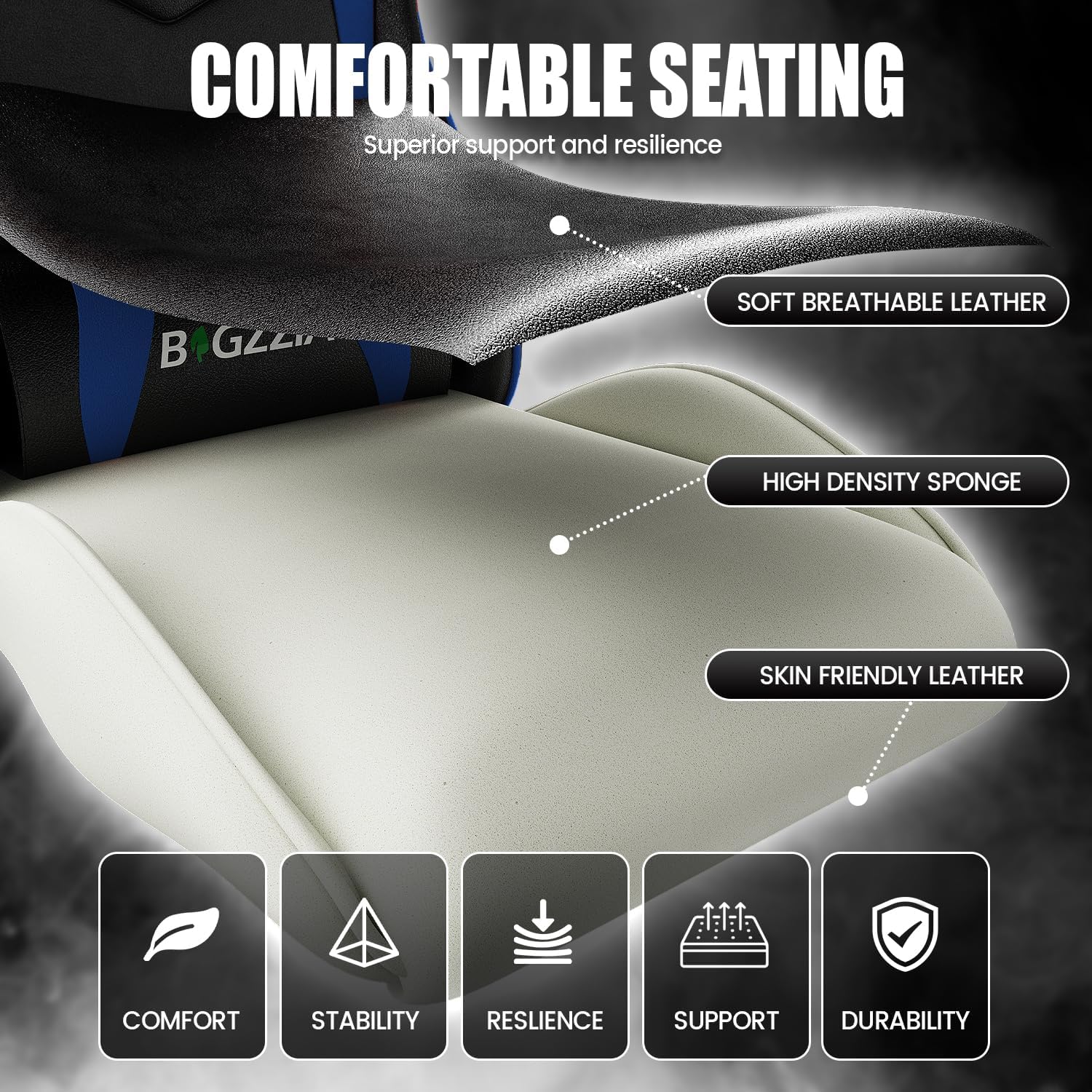
Image 5.1: Illustration of the chair's adjustable recline (90°-135°) and seat height features.
5.3. 360-Degree Swivel
The chair is equipped with a 360-degree swivel function, allowing for easy rotation and movement without needing to reposition the entire chair.
5.4. Armrest Functionality
The chair features linkage padded armrests that move with the recline of the backrest, providing continuous support for your arms. These armrests are designed to release body pressure effectively.

Image 5.2: Detail of the linkage padded armrest, illustrating its ergonomic movement.
5.5. Ergonomic Support
The chair includes a removable memory foam headrest and an adaptive lumbar support cushion. These components are designed to conform to the natural curves of your neck and lower back, reducing pressure and promoting a healthy sitting posture.

Image 5.3: Ergonomic design features, highlighting headrest and lumbar support.
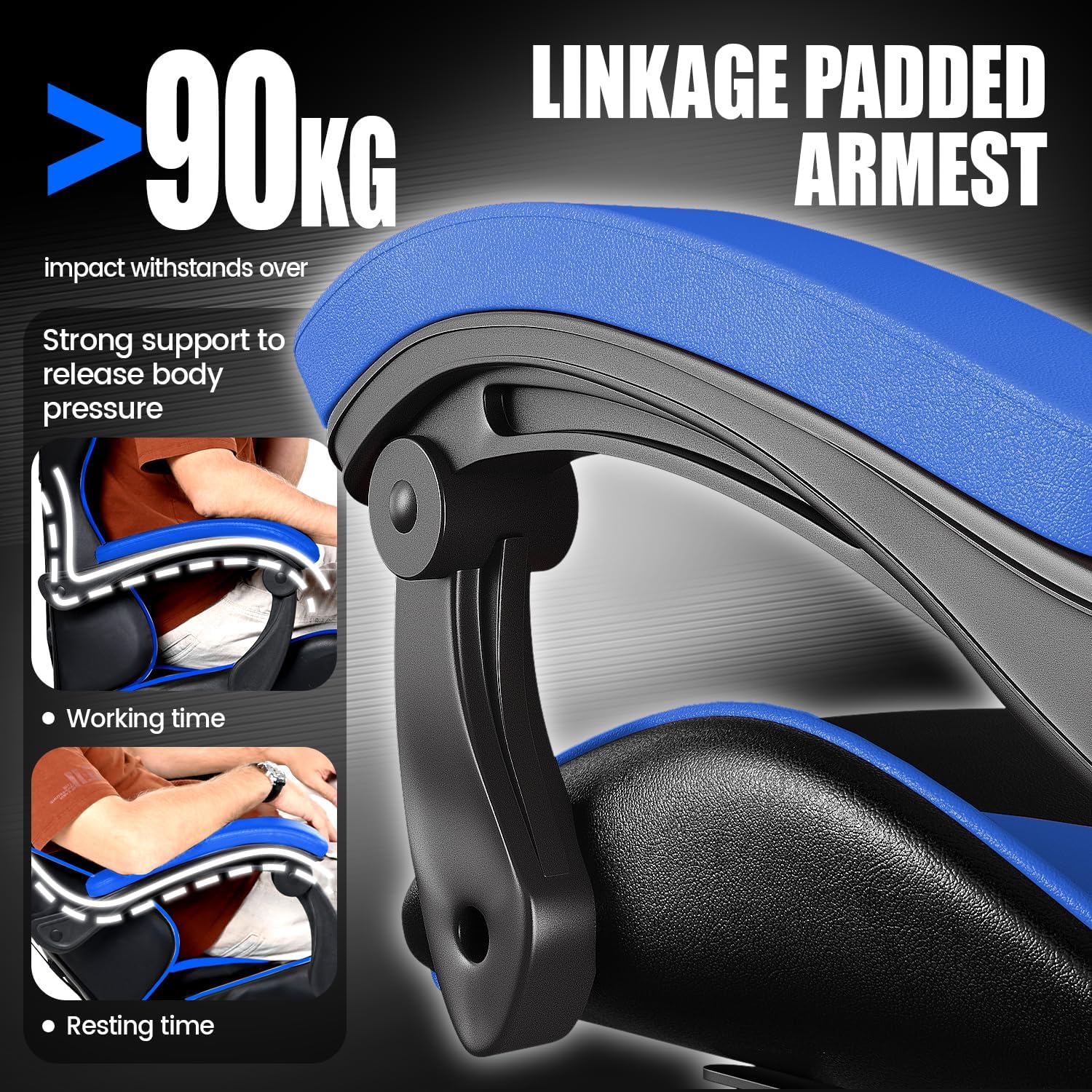
Image 5.4: Unique cushion shape providing pressure release and hip support.
6. Maintenance
Proper maintenance will extend the life and appearance of your Racingreat Gaming Chair.
6.1. Cleaning
The chair's surface is made of high-quality PU leather, which is waterproof and stain-resistant, making it easy to clean.
- For general cleaning: Wipe the surface with a soft, damp cloth.
- For stubborn stains: Use a mild soap solution and a soft cloth, then wipe dry immediately.
- Avoid using abrasive cleaners, harsh chemicals, or solvents, as these can damage the PU leather.
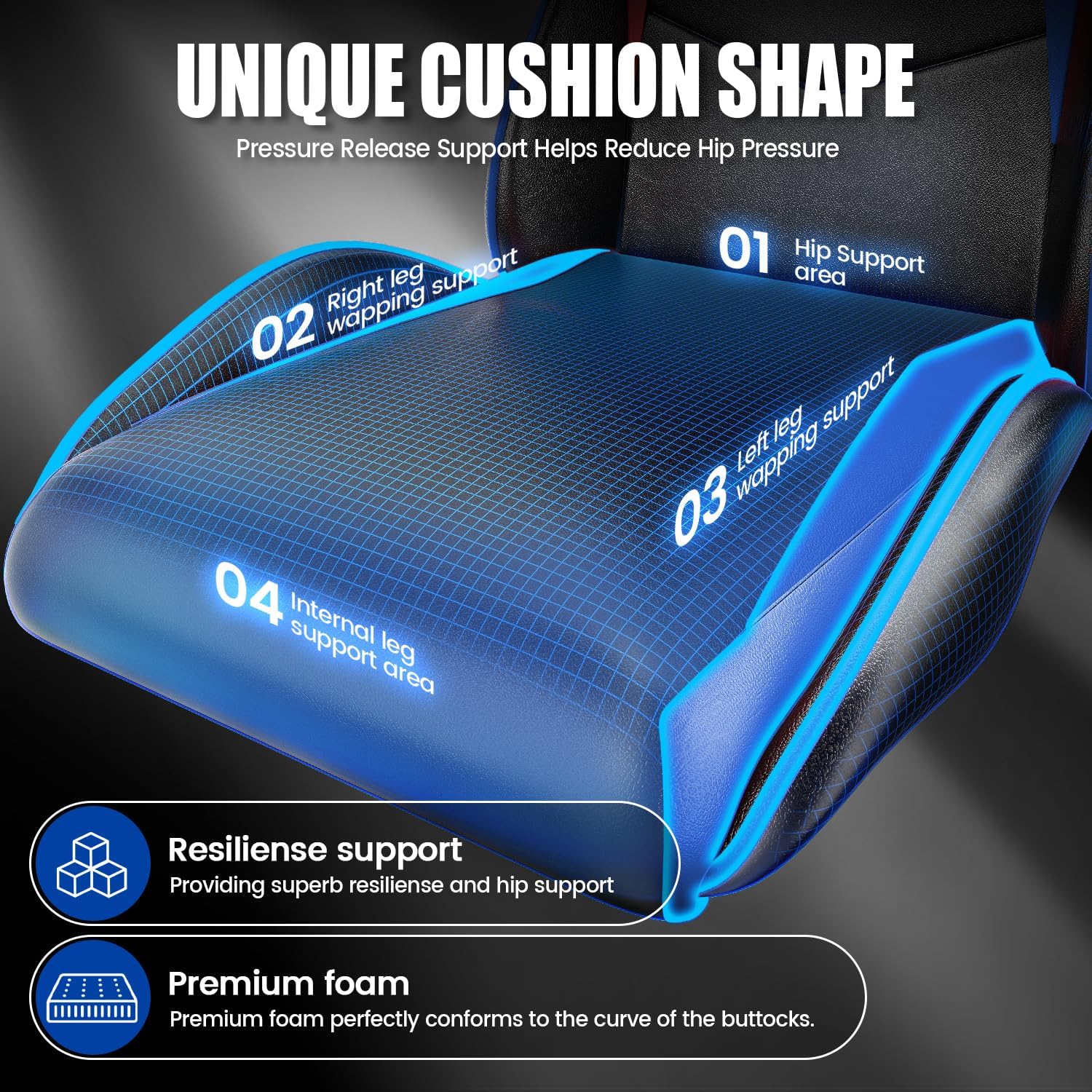
Image 6.1: Illustration of the comfortable seating materials, including soft breathable PU leather and high-density sponge.
6.2. General Care
- Periodically check all screws and bolts to ensure they are tight. Retighten if necessary.
- Avoid placing heavy objects on the chair or applying excessive force to the armrests.
- Keep the casters clean to ensure smooth movement.
7. Troubleshooting
If you encounter any issues with your Racingreat Gaming Chair, please refer to the following common solutions:
- Chair Squeaks: Check all bolted connections and tighten them. A small amount of silicone lubricant can be applied to moving parts if the squeaking persists.
- Height Adjustment Not Working: Ensure the gas lift lever is fully engaged. If the issue persists, the gas lift cylinder may need replacement.
- Backrest Not Reclining/Locking: Verify that the recline lever is functioning correctly and not obstructed. Check for any foreign objects preventing movement.
- Casters Not Rolling Smoothly: Clean any debris (hair, dust) from the caster wheels.
For issues not covered here, please contact Racingreat customer support.
8. Specifications
| Feature | Specification |
|---|---|
| Brand | Racingreat |
| Model Number | X25F00K042 |
| Color | Black/Blue |
| Material | High-quality PU Leather (surface), High-density molded sponge, Metal frame, Polyester fiber (internal components) |
| Total Height (Adjustable) | 113.5 cm - 123.5 cm |
| Backrest Height | 79 cm |
| Seat Width | 53.5 cm |
| Seat Depth | 55 cm |
| Base Diameter | 61 cm |
| Weight Capacity | Up to 130 kg (290 lbs) |
| Recline Angle | 90° to 135° |
| Gas Lift | SGS Certified Class 3 |
| Assembly | Required |

Image 8.1: Detailed dimensions of the Racingreat Ergonomic Gaming Chair.
9. Warranty and Support
Racingreat is committed to providing high-quality products and excellent customer service.
9.1. Warranty Information
Your Racingreat Gaming Chair comes with a 1-year quality guarantee on parts from the date of purchase. This warranty covers manufacturing defects and material flaws under normal use. It does not cover damage caused by misuse, accidents, or unauthorized modifications.
9.2. Product Exchange
We offer a 1-month product exchange policy. If you experience any issues with your product within one month of purchase, please contact our customer service for assistance with an exchange.
9.3. Customer Support
Our dedicated customer service team is available 24 hours a day to assist you. If you encounter any problems during the assembly or use of your Racingreat Gaming Chair, please do not hesitate to contact us. We are here to help ensure your satisfaction.
For support, please refer to the contact information provided on your purchase receipt or the Racingreat official website.