
1. Introduction
Thank you for purchasing the Airbition 10-inch Wall Mount Fan with Light and Remote Control. This manual provides important information regarding the safe installation, operation, and maintenance of your new fan. Please read it thoroughly before use and retain it for future reference.
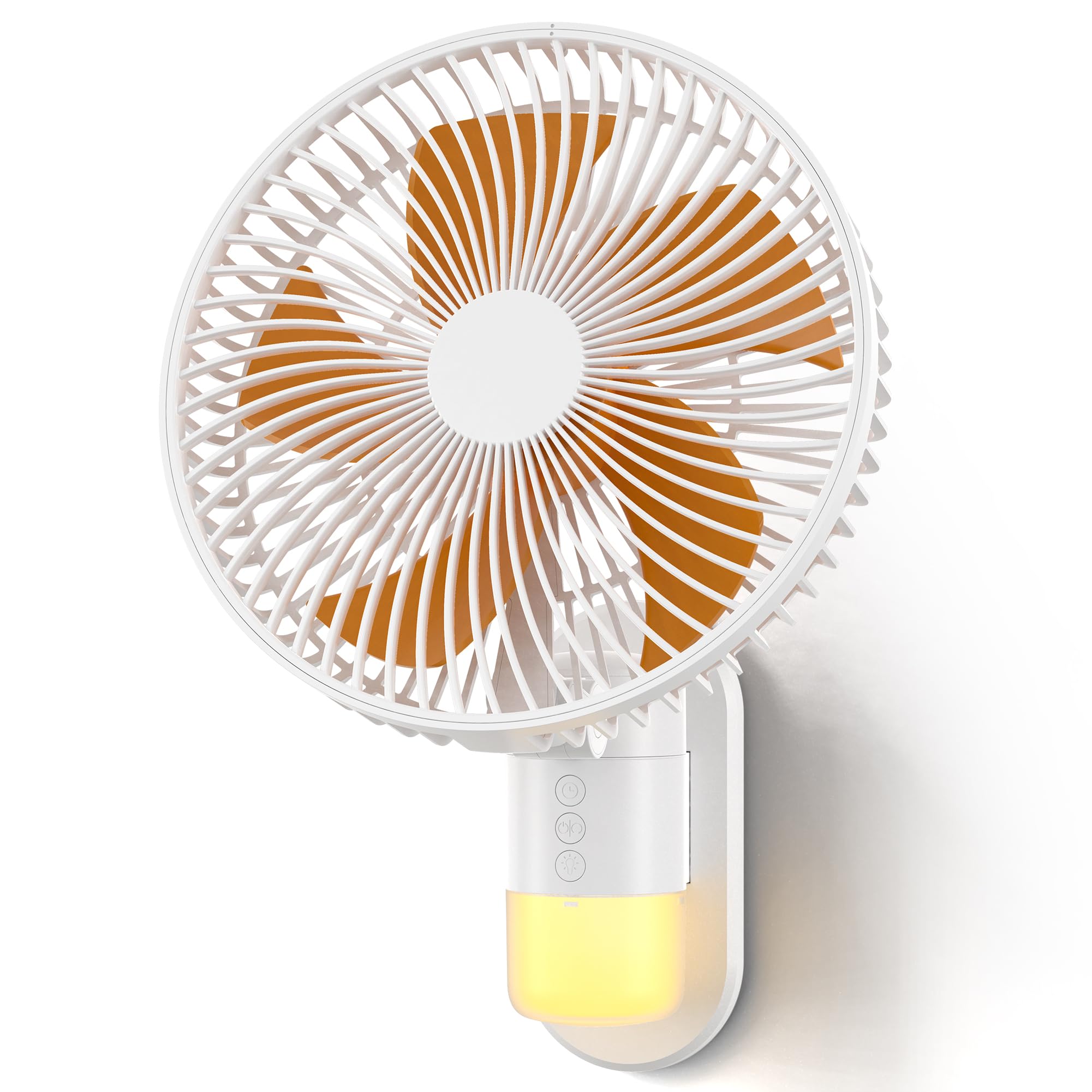
Image: The Airbition 10-inch Wall Mount Fan, showcasing its compact design and integrated light.
2. Safety Instructions
To reduce the risk of fire, electric shock, or injury, please observe the following safety precautions:
- Always unplug the fan before cleaning or performing any maintenance.
- Do not insert fingers or any objects into the fan grille when it is operating.
- Ensure the power cord is not damaged or pinched.
- Do not operate the fan in wet or damp locations.
- Keep the fan away from curtains, drapes, or any objects that may be drawn into the fan.
- This appliance is not intended for use by persons (including children) with reduced physical, sensory or mental capabilities, or lack of experience and knowledge, unless they have been given supervision or instruction concerning use of the appliance by a person responsible for their safety.
- Children should be supervised to ensure that they do not play with the appliance.
3. Package Contents
Verify that all items are present in the package:
- Airbition 10-inch Wall Mount Fan
- Remote Control
- Mounting Bracket
- Power Cord (78 inches / 6.56 ft)
- User Manual (this document)
4. Product Features
- Powerful Airflow: Equipped with a high-efficiency DC motor and 5 aerodynamic blades for strong, fast cooling.
- 4 Speed Modes: Choose from Low, Medium, High, and Turbo settings for customized comfort.
- Wide Air Circulation: Features 90° oscillation and 120° adjustable tilt to cover a broad area.
- Remote Control: Conveniently operate the fan from up to 13 feet away.
- Smart Timer: Set an auto-off timer for 2, 4, 6, or 8 hours to save energy.
- Built-in Night Light: Integrated light with 2 tones (Cool White & Warm) and 4 brightness levels for nighttime use.
- Space-Saving Design: Wall-mounted design ideal for bedrooms, RVs, home offices, and garages.
- Durable Construction: Made with durable ABS blades and reinforced neck support.
Video: An overview of the Airbition 10-inch Wall Mount Fan's features and benefits.

Image: A woman on a bed with the wall-mounted fan providing cooling airflow, highlighting its quiet operation and integrated light.

Image: A child sleeping in a bedroom with the fan's night light providing a soft glow, illustrating the "Cozy Glow for Peaceful Nights" feature.

Image: An illustrative diagram demonstrating how the wall mount fan efficiently circulates air throughout a living space.
5. Setup and Installation
Follow these steps for proper installation of your wall mount fan:
- Prepare the Fan: Attach the Type-C plug of the power cord to the rear power port of the fan's backplate.
- Mounting Plate Installation: Choose a suitable location on the wall. Use strong adhesive or screws (not included) to securely fix the mounting plate to the wall. Ensure the plate is level and can support the fan's weight.
- Attach the Fan: Align the fan with the installed mounting plate and slide it down until it clicks securely into place.
- Connect Power: Plug the power cord into a standard electrical outlet.
Video: A step-by-step guide on how to install the Airbition wall mount fan.
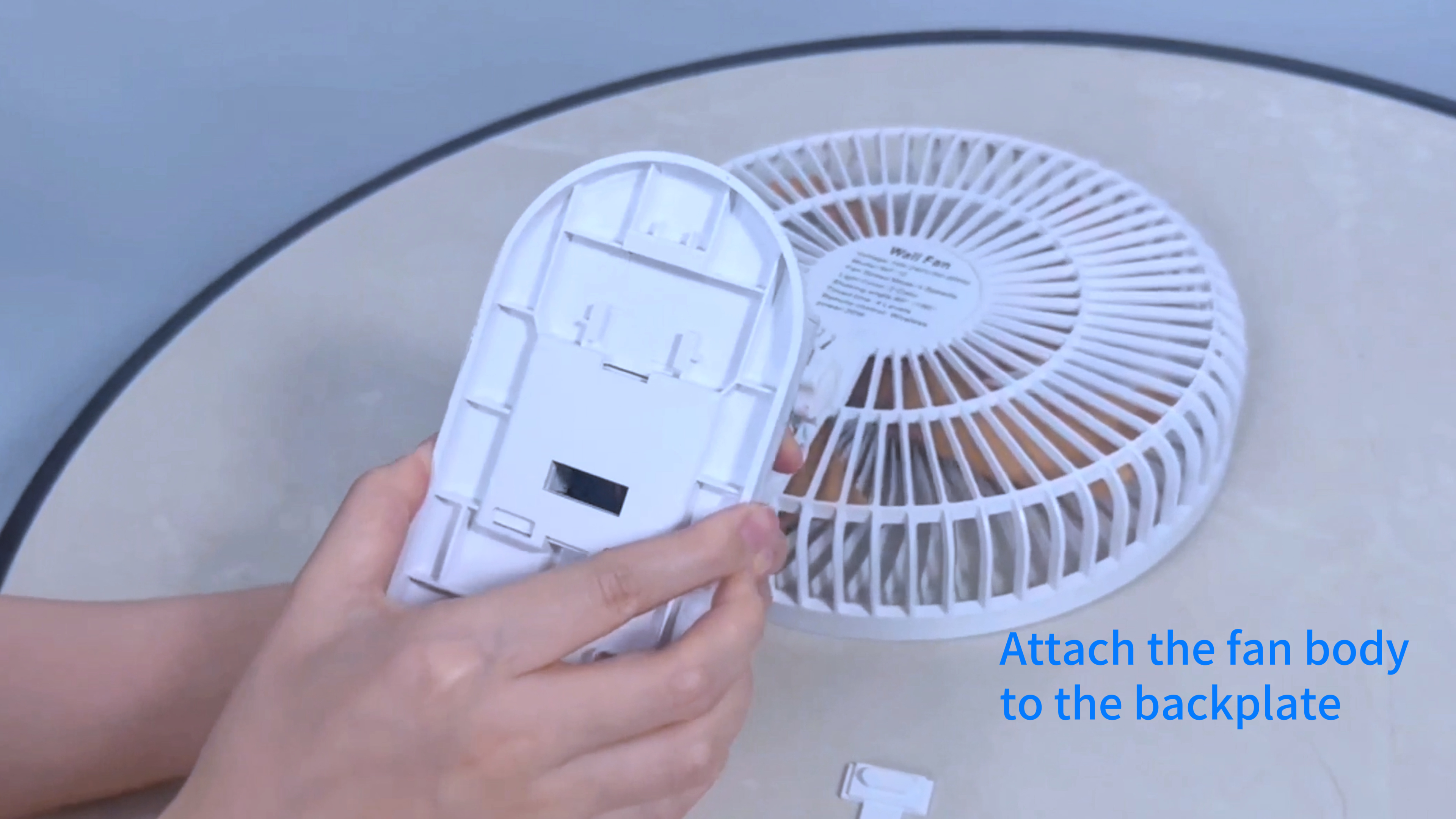
Image: Hands attaching the Type-C power plug to the back of the fan unit.

Image: The Airbition wall mount fan securely installed on a wall.
6. Operation
Your Airbition wall mount fan can be operated using the included remote control or the control panel on the fan unit.
Remote Control Functions:
- Power Button (⏻): Turns the fan ON or OFF.
- Speed Button (+/-): Adjusts fan speed through Low, Medium, High, and Turbo modes.
- Oscillation Button (↔): Activates or deactivates the 90° oscillation feature.
- Light Button (💡): Cycles through light tones (Cool White, Warm) and adjusts brightness levels (4 levels).
- Timer Button (⏱): Sets the auto-off timer for 2, 4, 6, or 8 hours.
Manual Control Panel:
The fan unit features a control panel with buttons for basic functions, mirroring the remote control. Refer to the icons on the fan for specific button functions.

Image: A woman demonstrating the use of the remote control with the wall-mounted fan.
7. Maintenance
Regular cleaning ensures optimal performance and extends the lifespan of your fan.
- Disconnect Power: Always unplug the fan from the power outlet before cleaning.
- Detachable Grille and Blades: The front grille and fan blades are detachable for easy cleaning. Gently twist or unclip the front grille to remove it.
- Cleaning: Use a soft, damp cloth to wipe down the exterior surfaces. For the blades and inside the grille, use a soft brush or vacuum cleaner to remove dust. The blades can be rinsed under water if heavily soiled, ensuring they are completely dry before reassembly.
- Reassembly: Ensure all parts are dry before reattaching the blades and front grille. Securely fasten the grille back into place.

Image: Detachable fan blades being cleaned under running water, demonstrating the "Clean with Ease" feature.
8. Troubleshooting
If you encounter issues with your fan, refer to the following common problems and solutions:
| Problem | Possible Cause | Solution |
|---|---|---|
| Fan does not turn on. | No power, loose connection, or remote battery dead. | Check if the power cord is securely plugged in. Ensure the outlet has power. Replace remote control batteries if necessary. |
| Fan is noisy. | Dust accumulation, loose parts, or fan not mounted securely. | Clean the fan blades and grille. Ensure all parts are securely fastened. Re-check mounting. |
| Light does not work. | Light function not activated, or electrical issue. | Press the light button on the remote or control panel. If still not working, contact customer support. |
| Remote control not responding. | Dead batteries, obstruction, or out of range. | Replace remote batteries. Ensure no obstructions between remote and fan. Operate within 13 ft range. |
9. Specifications
| Feature | Detail |
|---|---|
| Brand | Airbition |
| Model Name | Air401 |
| Product Dimensions (D x W x H) | 7.08"D x 10.24"W x 14.17"H |
| Size | 10 inch |
| Power Source | AC (Standard Electrical Plug) |
| Wattage | 50 watts |
| Voltage | 15 Volts |
| Number of Speeds | 4 |
| Number of Blades | 5 |
| Speed | 5.2 Meters per Second |
| Oscillation | 90° |
| Adjustable Tilt | 120° |
| Controller Type | Remote Control |
| Special Features | LED Light (2 tones, 4 brightness levels), Timer |
| Material | Plastic |
| Cord Length | 78 inches (6.56 ft) |
| Indoor/Outdoor Usage | Indoor |
10. Warranty and Support
Airbition products are designed for reliability and performance. For warranty information or technical support, please refer to the contact details provided with your purchase or visit the official Airbition website.
If you experience any issues not covered in the troubleshooting section, please contact our customer service team for assistance.
