
Introduction
This manual provides detailed instructions for the installation, operation, and maintenance of your Lordear 36-inch drop-in workstation kitchen sink. Please read this manual thoroughly before installation and use to ensure proper function and longevity of your product.
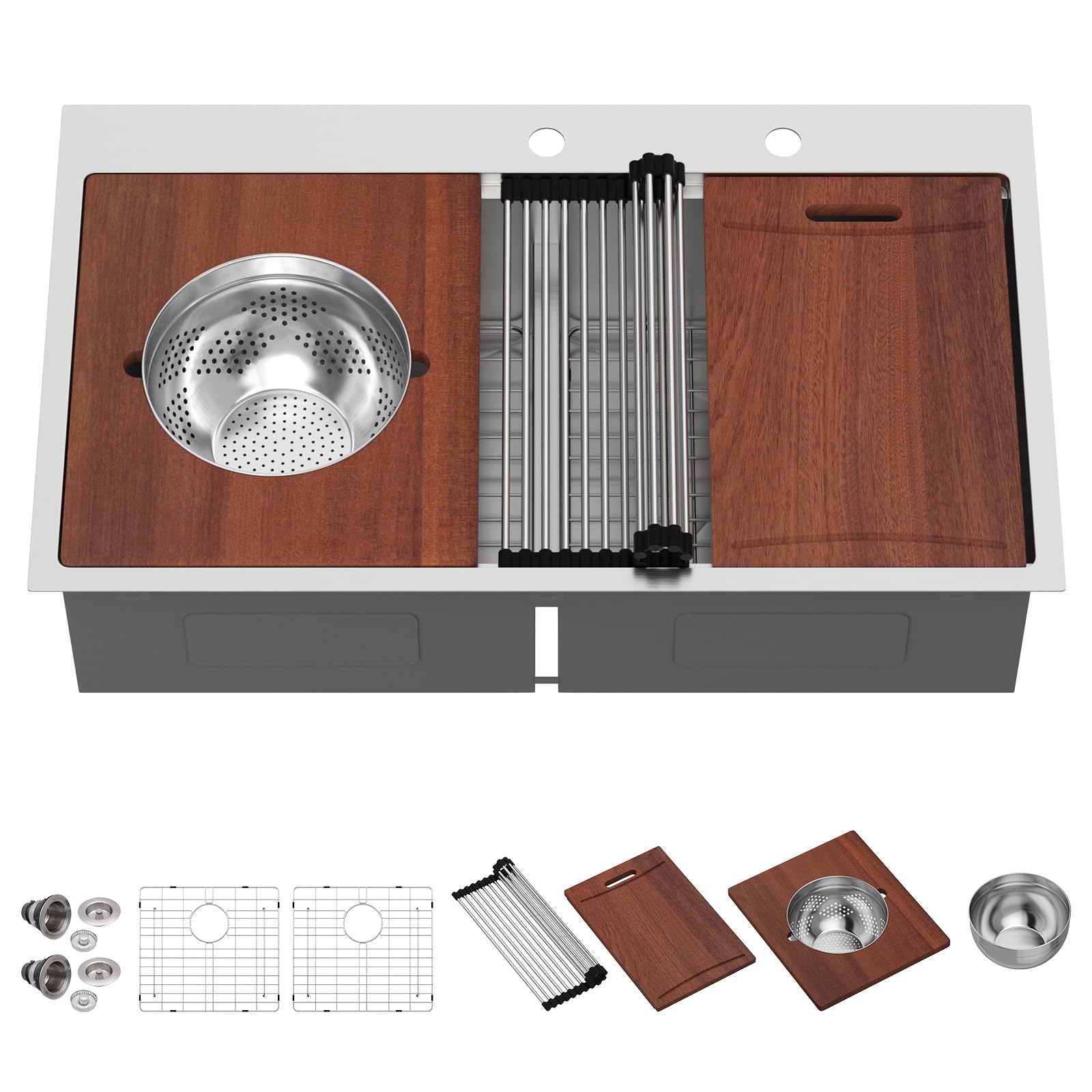
Image: Overview of the Lordear 36-inch drop-in workstation kitchen sink, showcasing its double bowl design and integrated accessories like the cutting board and mixing bowl.
Setup and Installation
The Lordear 36-inch drop-in kitchen sink is designed for topmount installation. Ensure your cabinet meets the minimum size requirements before proceeding.
Pre-Installation Checklist:
- Verify all included components are present: 2 bottom grids, 2 drain assemblies, clips, cutout template, and instructions.
- Confirm minimum cabinet base size is 39 inches.
- Ensure countertop opening dimensions are appropriate for a 36" x 22" sink.
Installation Steps:
- Prepare Countertop: Use the provided cutout template to mark the opening on your countertop. Carefully cut the opening according to the template.
- Apply Sealant: Apply a bead of silicone sealant around the perimeter of the cutout opening on the countertop.
- Position Sink: Carefully lower the sink into the prepared opening, ensuring it is centered and level.
- Secure Sink: Attach the mounting clips to the underside of the sink rim and tighten them against the countertop to secure the sink in place.
- Install Drain Assemblies: Assemble the drain strainers and install them into the sink's drain openings. Ensure a watertight seal using plumber's putty or silicone.
- Connect Plumbing: Connect the P-trap and drain lines to the installed drain assemblies.
- Install Faucet and Accessories: Install your faucet and any other desired accessories (e.g., soap dispenser) into the pre-drilled holes on the sink deck.

Image: Diagram illustrating the exterior dimensions (36"x22"x10"), interior bowl dimensions (34"x17"), and minimum cabinet base size (39") for installation.
Installation Video Guide:
Video: A step-by-step guide demonstrating the installation process for the Lordear drop-in kitchen sink.
Operating Your Workstation Sink
Your Lordear workstation sink is designed for enhanced kitchen efficiency with its integrated accessories and thoughtful design.
Workstation Features:
- Single-Tier Track: Allows for seamless integration and movement of accessories like the cutting board, mixing bowl, and pasta strainer.
- 50/50 Double Bowl: Provides versatile space for washing, soaking, and food preparation.
- Included Accessories:
- Cutting Board: Use for food preparation directly over the sink.
- Mixing Bowl: Fits into the workstation track for convenient mixing or holding ingredients.
- Pasta Strainer: Designed to fit within the mixing bowl or directly on the track for draining pasta or washing produce.
- Drying Rack: A roll-up rack for air-drying dishes, fruits, or vegetables over the sink.
- Bottom Grids: Protect the sink surface from scratches and allow water to drain freely.
- Drain Assembly: Features a push-close design that functions as a strainer, stopper, and odor blocker.

Image: Visual representation of the workstation design, highlighting the functionality of the cutting board, pasta strainer, mixing bowl, drying rack, bottom grid, and drain assembly.

Image: Close-up view demonstrating the mixing bowl and pasta strainer integrated into the sink's workstation track.
Care and Maintenance
Proper care will ensure the longevity and appearance of your stainless steel sink.
Daily Cleaning:
- Wipe the sink with a soft towel after each use to prevent water spots and mineral buildup.
- For general cleaning, use a mild dish soap and warm water. Rinse thoroughly and dry.
- Avoid abrasive cleaners, steel wool, or harsh chemicals, as these can scratch the brushed finish.
Addressing Stains and Yellowing:
- If yellowing or other stubborn stains occur, apply a small amount of toothpaste to a soft cloth and gently rub the affected area. Rinse thoroughly and dry.
- For tougher stains, a non-abrasive stainless steel cleaner can be used, following the product's instructions.
Preventative Measures:
- Keep the sink away from decoration materials during remodeling to prevent damage.
- The R10 round corners are designed for easier cleaning and to prevent corner stain accumulation.
- The X-shaped water guide line in the sink bottom promotes fast drainage and prevents standing water.
- The anti-condensation spray undercoating helps prevent condensation dripping, protecting your cabinet.

Image: Illustration of the X-grooves for easy draining and the R10 round corners designed for simplified cleaning.

Image: Diagram comparing a sink without undercoating (showing condensation) to one with anti-condensation spray undercoating (no dripping).
Troubleshooting
This section addresses common issues you might encounter with your kitchen sink.
| Problem | Possible Cause | Solution |
|---|---|---|
| Slow Drainage / Standing Water | Food scraps or debris in the drain strainer; improper slope. |
|
| Yellowing or Stains on Sink Surface | Mineral deposits from water; certain food residues; lack of regular cleaning. |
|
| Condensation on Underside of Sink | Temperature difference between sink contents and cabinet air. |
|
| Scratches on Sink Surface | Use of abrasive tools or materials; heavy objects dropped into the sink. |
|
Specifications
| Feature | Detail |
|---|---|
| Brand | Lordear |
| Model Number | LTSX3622A2-55-02 |
| Color | Stainless Steel |
| Material | 16 Gauge T304 Stainless Steel |
| Size | 36"-55 Drop In |
| Exterior Dimensions (D x W x H) | 22"D x 36"W x 10"H |
| Interior Bowl Dimensions | 34"X17" |
| Minimum Cabinet Base Width | 39 Inches |
| Installation Type | Topmount |
| Drain Type | Grid (Push-Close Strainer) |
| Drain Opening | 3.5 Inches |
| Finish Type | Brushed |
| Included Components | 2 bottom grids, 2 drain assemblies, clips, cutout template, instructions, kitchen sink with cutting board, mixing bowl, pasta strainer |
Warranty Information
Specific warranty details for the Lordear 36-inch drop-in workstation kitchen sink are not provided within this manual. For information regarding product warranty, please refer to the documentation included with your purchase or contact Lordear customer support directly.
Customer Support
If you have any questions, require assistance with installation, or need to report an issue, please contact Lordear customer support. Contact information can typically be found on the manufacturer's website or on the packaging of your product.
You may also visit the official Lordear store on Amazon for additional product information and support: Lordear Store