
1. Introduction
Thank you for choosing the Bestier 55-inch Office Desk with Drawers and Printer Space, Model H107014AUS. This manual provides essential information for the safe assembly, operation, and maintenance of your new desk. Please read these instructions thoroughly before beginning assembly and retain them for future reference.
2. Safety Information
To ensure safe use and prevent damage, please observe the following safety guidelines:
- Always follow the assembly instructions carefully.
- Do not exceed the weight limits of the desk to ensure stability and safety.
- Ensure all connections are secure before use.
- Keep small parts away from children during assembly.
- Avoid placing hot items directly on the desk surface without protection.
3. Product Overview and Dimensions
The Bestier 55-inch Office Desk is designed for home office and studio environments, featuring a spacious desktop, integrated storage, and modern conveniences. Its walnut finish provides a classic aesthetic.
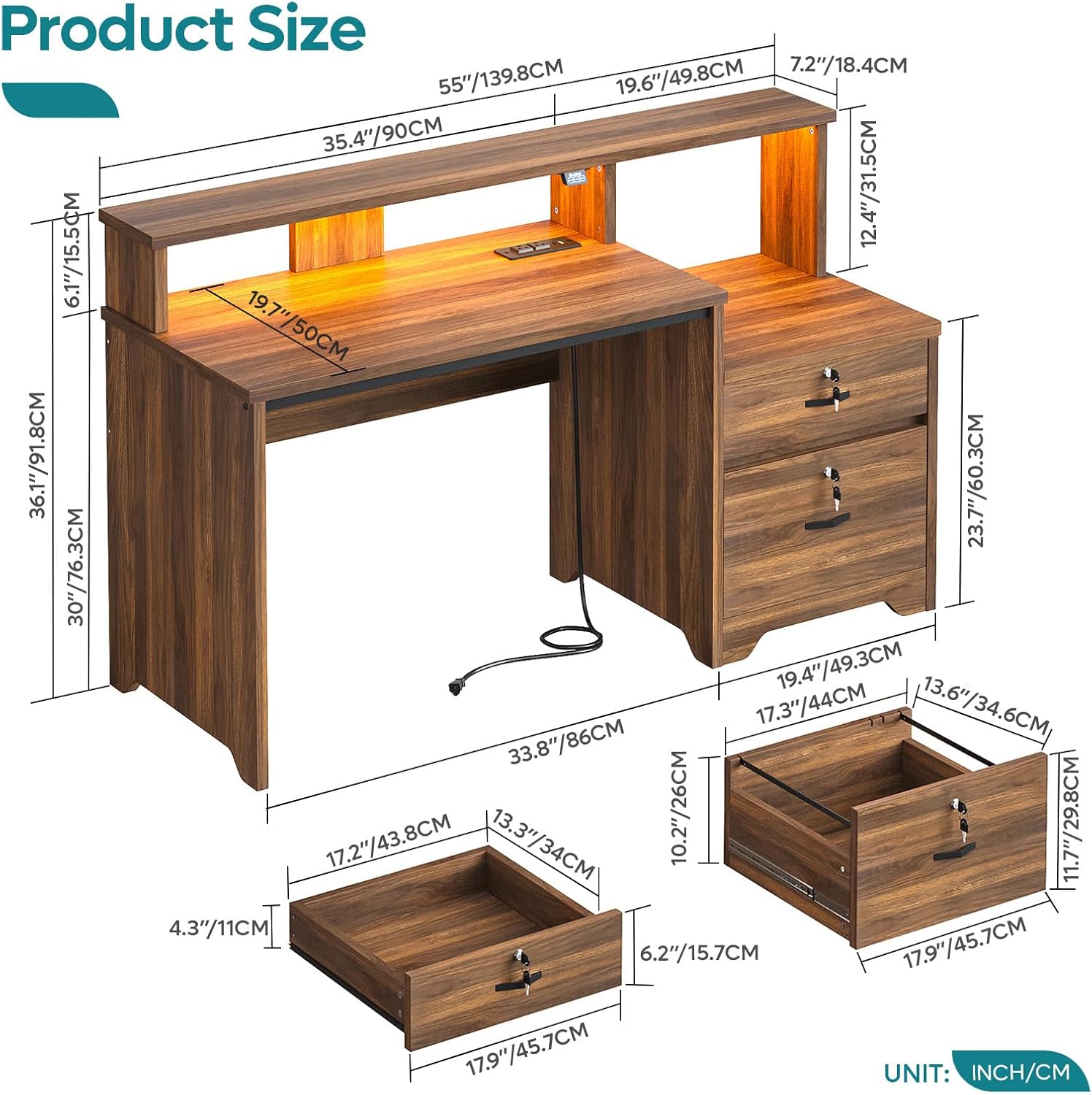
Figure 3.1: Product Dimensions. This diagram provides precise measurements for the Bestier 55-inch office desk, including the main desktop, monitor stand, and drawer unit, with dimensions clearly marked in both inches and centimeters.

Figure 3.2: Assembled Desk View. This image displays the Bestier 55-inch office desk in its walnut finish, set up with a computer monitor, keyboard, mouse, and various office accessories, highlighting its functional design.
4. Checking Components
Before starting assembly, unpack all components and verify that all parts listed in the included assembly guide are present and undamaged. If any parts are missing or damaged, please contact customer support immediately.
5. Assembly Instructions
Assembly of this desk requires approximately 2 people and a screwdriver. Please refer to the detailed assembly diagrams and step-by-step instructions provided in the separate assembly manual included with your product. Ensure you have adequate space and follow each step carefully to prevent damage or injury.
- Identify all components and hardware using the provided parts list.
- Assemble the main desk frame according to the diagrams.
- Attach the monitor stand and printer shelf.
- Install the drawers and their locking mechanisms.
- Connect the power strip and LED lighting system.
- Ensure all screws and fasteners are tightened securely.
6. Operating Features
6.1. Recessed Power Strip
The desk features a convenient recessed power strip to keep your devices charged and organized. It includes:
- 2 AC Outlets (125V/12A)
- 1 USB Port (5V/2.1A)
- 1 Type-C Port (5V/2.1A)
- 4.6 Feet Power Cord

Figure 6.1: Recessed Power Strip and Printer Shelf. This image highlights the integrated recessed power strip, featuring two AC outlets, one USB port, and one Type-C port for convenient device charging. It also shows the dedicated shelf designed to accommodate a printer or other office equipment.
6.2. Integrated LED Lighting
Enhance your workspace ambiance with the integrated LED lighting system. Control the lighting using the discreet panel located under the monitor stand.
- 22 Lighting Modes
- 16 Color Options
- Adjustable Speed
- Adjustable Brightness

Figure 6.2: LED Light Control. A detailed view of the LED light control panel, illustrating the various customization options available, including 22 lighting modes, 16 color choices, and adjustable speed and brightness settings to personalize your workspace ambiance.
6.3. Lockable Storage Drawers
The desk includes two drawers equipped with locking mechanisms, providing secure storage for your documents, valuables, and personal items. Use the provided keys to lock and unlock the drawers.

Figure 6.3: Lockable Drawers. This image showcases the two spacious drawers of the office desk, equipped with locking mechanisms and keys, providing secure storage for important documents, personal belongings, or office supplies.
6.4. Ergonomic Monitor Stand
The elevated monitor stand helps to position your screen at an optimal viewing height, promoting better posture and reducing strain on your neck and eyes during extended use.

Figure 6.4: Ergonomic Monitor Stand. This visual explains the ergonomic design of the monitor stand, showing how it elevates the screen to an optimal viewing height, which helps in maintaining correct posture and reducing neck and back strain during long working hours.
6.5. Dedicated Printer Shelf
A dedicated shelf is integrated into the desk design, providing a convenient and accessible space for your printer. This shelf can also be used for storing books, laptops, speakers, or decorative items.
7. Product Demonstration Video
Watch this video for a visual overview of the Bestier 55-inch computer desk's features and functionality.
Video 7.1: Desk Features Overview. This video provides a visual demonstration of the Bestier 55-inch computer desk's key features, such as the integrated LED lighting, the convenient recessed power strip, and the secure lockable drawers. Please note that the desk shown in this video is a light wood color variant, while this manual pertains to the Walnut finish model H107014AUS.
8. Maintenance and Care
To maintain the appearance and longevity of your Bestier office desk, follow these care instructions:
- Wipe surfaces with a damp cloth to remove dust and spills.
- For a thorough cleaning, wipe with a dry cloth after using a damp cloth.
- Avoid using harsh chemicals or abrasive cleaners, as these can damage the laminated finish.
- Keep the desk away from direct sunlight and extreme temperature changes to prevent warping or discoloration.
9. Product Specifications
| Feature | Detail |
|---|---|
| Brand | Bestier |
| Model Number | H107014AUS |
| Model Name | 55 Inch Office Desk-H107014AUS |
| Colour | Walnut |
| Product Dimensions (D x W x H) | 50D x 139.8W x 91.8H Centimetres |
| Item Weight | 76.57 Pounds |
| Material | Engineered Wood, Metal |
| Finish Type | Laminated |
| Special Features | Electric (Recessed Power Strip), Ergonomic (Monitor Stand), Monitor Stand |
| Number Of Drawers | 2 (Lockable File Drawers) |
| Number Of Shelves | 2 (Monitor Stand, Printer Shelf) |
| Assembly Required | Yes |
| Recommended People for Assembly | 2 |
| Tools Recommended For Assembly | Screw Driver |
| Included Components | Built-in Outlet |
10. Troubleshooting
If you encounter any issues with your Bestier office desk, please refer to the following general troubleshooting tips:
- Stability Issues: Ensure all screws and fasteners are securely tightened. Check that the desk is placed on a level surface.
- Drawer Malfunction: Verify that the drawer slides are correctly installed and free of obstructions. Ensure the locking mechanism is not jammed.
- Electrical Issues (Power Strip/LEDs): Check that the power cord is fully plugged into a functional wall outlet. For LED lights, ensure the control panel connections are secure.
- Missing Parts: If you discover missing parts during assembly, do not proceed. Contact customer support for assistance.
For more complex issues, please contact customer support.
11. Customer Support
For any questions, concerns, or assistance with your Bestier 55-inch Office Desk, please contact our customer support team. Refer to your purchase documentation for specific contact details or visit the official Bestier website.