
1. Safety Information
Please read and understand all instructions before assembly and use. Keep this manual for future reference.
- Weight Limits: Always follow the assembly instructions carefully. Do not exceed the weight limits of the desk to ensure stability and safety. The desktop supports up to 100 lbs.
- Assembly: Two people are recommended for assembly. Ensure all parts are correctly aligned and tightened before use.
- Electrical Safety: The integrated power station is designed for convenience. Do not overload the outlets. Ensure the power cord is not pinched or damaged during assembly or use.
- Stability: Use the adjustable foot pads to ensure the desk is level on uneven surfaces.
- Placement: Avoid placing the desk in direct sunlight or near heat sources to prevent material damage.
2. Product Overview
The Bestier 55-inch Computer Desk is designed for home office, gaming, and study environments, offering a blend of functionality and modern aesthetics. Key features include:
- Integrated Power Station: Includes 2 AC outlets, 1 USB-A port, and 1 Type-C port for convenient device charging.
- Lockable File Drawer: Secure storage for sensitive documents with a lock and key system, accommodating Letter, Legal, and A4 size files.
- RGB LED Light Strip: Built-in LED lighting with multiple colors and dynamic modes, controlled by a user-friendly switch.
- Ergonomic Monitor Stand: Elevates screens to eye level to improve posture and reduce strain.
- Dedicated Printer Shelf & Open Storage: Maximizes vertical storage for printers, scanners, books, and other items.
- Durable Construction: Crafted from P2-grade MDF board and a reinforced heavy-duty metal frame for stability.
- Spacious Work Surface: 55"L x 21.7"W desktop accommodates multiple monitors and peripherals.
- Reversible Design: Storage shelves and CPU stand can be configured to fit various room layouts.
Dimensions:
- Overall Dimensions: 19.69"D x 55.04"W x 36.14"H
- Item Weight: 76.57 Pounds

Figure 2.1: Detailed product dimensions in inches and centimeters.
3. Setup and Assembly
This desk requires assembly. All necessary tools and clear illustrated step-by-step instructions are provided with the product. Each part is individually labeled for quick identification.
- Recommended Tools: Screw Driver (not included).
- Assembly Time: Approximately 1-2 hours for two people.
Assembly Video Guide:
Video 3.1: Detailed assembly instructions for the Bestier 55-inch Office Desk with Drawers and Printer Space.
For detailed visual instructions, please refer to the assembly video above. Ensure all screws and connectors are securely fastened at each step.
4. Operating Instructions
4.1 LED Lights Operation
The desk features a built-in RGB LED light strip with various customization options.
- Control: The LED lights are controlled by a user-friendly switch located on the underside of the monitor stand.
- Modes & Colors: Choose from 22 dynamic modes and 16 colors to set your desired ambiance.
- Adjustments: Adjust the speed and brightness of the lights to suit your preference.

Figure 4.1: Close-up of the LED light control panel and various lighting options.
4.2 Integrated Power Outlets
The desk includes a recessed power strip for convenient charging.
- Outlets: 2 AC outlets (125V/12A) for standard devices.
- USB Ports: 1 USB-A port (5V/2.1A) and 1 Type-C port (5V/2.1A) for charging mobile devices.
- Power Cord: The power strip is connected via a 4.6-foot power cord.
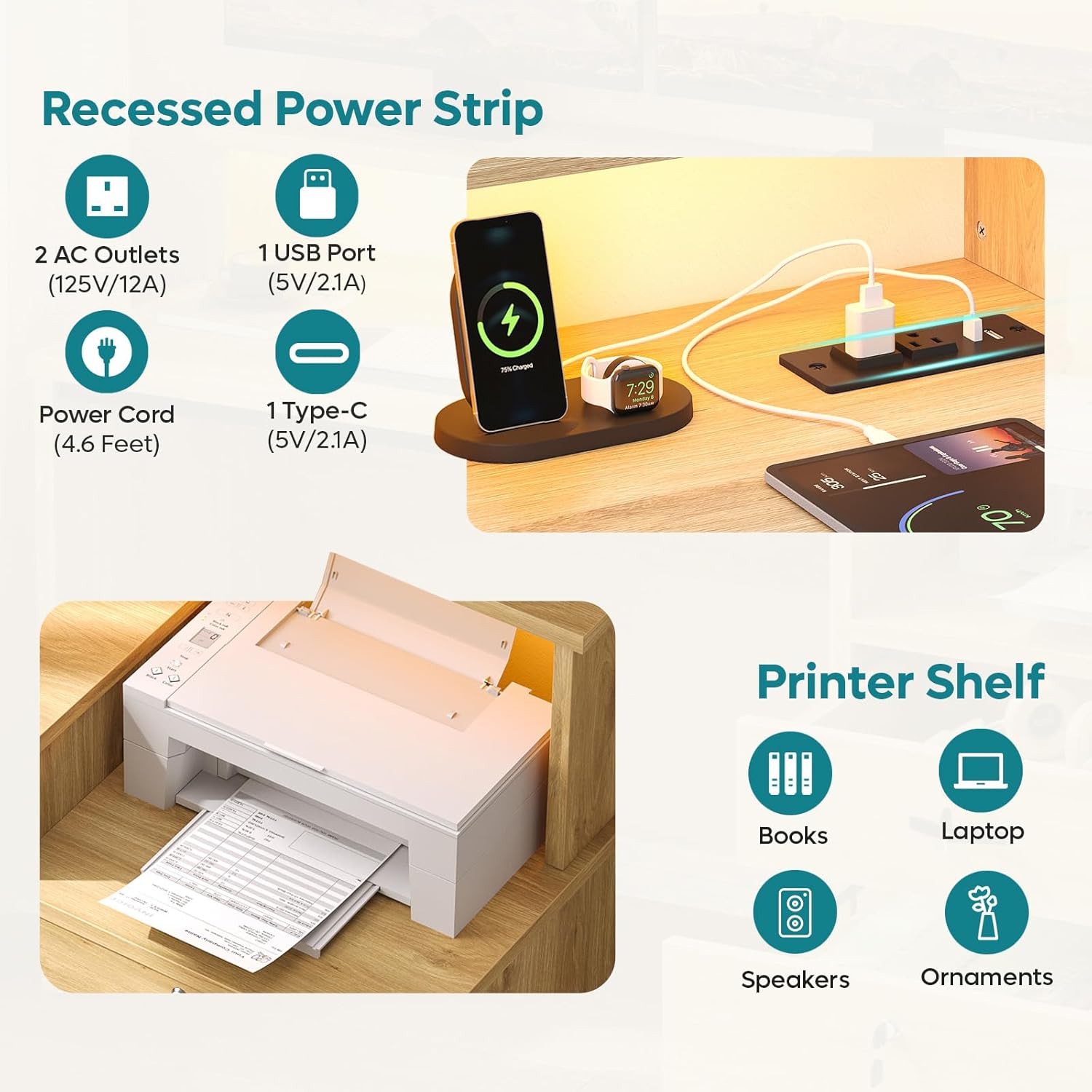
Figure 4.2: Illustration of the recessed power strip and printer shelf area.
4.3 Lockable File Drawer
The desk features a lockable file drawer for secure storage.
- Lock Mechanism: Use the provided key to lock and unlock the drawer.
- File Compatibility: Designed to hold Letter, Legal, and A4 size files using hanging bars.

Figure 4.3: Detail of the lockable file drawer and its key mechanism.
5. Maintenance
- Cleaning: Wipe with a damp cloth for general cleaning. For spills, wipe immediately with a dry cloth. Avoid harsh chemicals that may damage the finish.
- Hardware: Periodically check all screws and fasteners to ensure they remain tight. Re-tighten if necessary.
- Electrical Components: Ensure the power strip and LED lights are free from dust and debris. Do not attempt to repair electrical components yourself.
- Surface Protection: Use coasters or mats under hot items or drinks to protect the desk surface.
6. Troubleshooting
- Wobbly Desk: Check that all assembly screws are tightened. Adjust the foot pads on the bottom of the desk legs to stabilize it on uneven floors.
- LED Lights Not Working: Ensure the power cord for the LED strip is securely plugged into the power station and the wall outlet. Check the control switch for proper operation.
- Power Outlets Not Functioning: Verify the main power cord is plugged into a live wall outlet. Check if the power strip's circuit breaker (if present) has tripped. Test with another device.
- Drawer Sticking: Ensure the drawer slides are properly aligned and free of obstructions. Lubricate slides with a silicone-based spray if necessary.
If you encounter issues not listed here or require further assistance, please contact customer support.
7. Specifications
| Feature | Detail |
|---|---|
| Brand | Bestier |
| Model Number | H107014AUS |
| Product Dimensions | 19.69"D x 55.04"W x 36.14"H |
| Color | Natural Oak |
| Material Type | Engineered Wood, Metal |
| Item Weight | 76.57 Pounds |
| Power Outlets | 2 AC Outlets (125V/12A) |
| USB Ports | 1 USB-A (5V/2.1A), 1 Type-C (5V/2.1A) |
| LED Lights | RGB, 22 Modes, 16 Colors, Adjustable Speed & Brightness |
| Number of Drawers | 2 (1 lockable file drawer) |
| Assembly Required | Yes |
8. Warranty
Bestier provides an 18-month manufacturer's warranty for this product. This warranty covers defects in materials and workmanship under normal use. Please retain your proof of purchase for warranty claims.
For detailed warranty terms and conditions, please contact Bestier customer support.
9. Customer Support
Should you have any questions, concerns, or require assistance with your Bestier computer desk, please do not hesitate to contact our customer support team.
| Region | Contact Information |
|---|---|
| North American | Phone: 888-666-1086 Email: Service.US@bestier.net |
| Europe | Email: Service.UK@bestier.net, Service.DE@bestier.net, Service.FR@bestier.net, Service.IT@bestier.net, Service.ES@bestier.net |
| Asia | Phone: 04-8888-0283 Email: Service.JP@bestier.net |
| Global Support | Email: Service@bestier.net |