
1. Introduction
The Keychron Q6 Ultra 8K is a premium full-size wireless custom mechanical keyboard designed for high performance and versatility. This manual provides essential information for setting up, operating, maintaining, and troubleshooting your keyboard to ensure a seamless user experience across various operating systems including Mac, Windows, and Linux.
2. Package Contents
Please verify that all the following items are included in your package:
- 1x Keychron Q6 Ultra 8K Wireless Mechanical Keyboard
- 1x Type-A to Type-C Adapter
- 1x Extension Adapter for Receiver
- 1x Type-A 2.4 GHz Receiver
- 1x Keycap & Switch Puller
- 1x Screwdriver & Hex Key
3. Product Overview
The Keychron Q6 Ultra 8K features a robust all-metal aluminum chassis, providing exceptional durability and a premium feel. Its full-size layout includes a dedicated numpad and function keys, catering to both productivity and gaming needs. The keyboard's design incorporates a comfortable incline and a sleek, minimalist aesthetic with narrow bezels.

Image: The Keychron Q6 Ultra 8K keyboard, showcasing its full-size layout and premium metal body with dimensions of 446mm (17.56 inches) length and 137mm (5.39 inches) width.
A tactile knob is integrated at the top right, offering a satisfying user experience and customizable functionality via the Keychron Launcher software.
4. Keycaps and Switches
The Q6 Ultra 8K comes equipped with Keychron's KSA profile double-shot PBT keycaps. These keycaps are oil-resistant and designed to maintain their appearance over extended use. The KSA profile is slightly taller and more sculpted than standard keycaps, providing a unique feel that some users may find enhances typing accuracy.
The keyboard features hot-swappable Silk POM switches, available in tactile (Banana, Brown) and linear (Red) variants. These switches are pre-lubed and constructed from POM plastic, engineered for a smooth, silky typing experience with low friction. The switches have an operation life of up to 50 million cycles.

Image: An exploded diagram illustrating the components of a Keychron Silk POM switch, including the POM MX stem, upper housing, spring steel, and base.

Image: A close-up of the Keychron Q6 Ultra 8K keyboard with some keycaps and switches removed, highlighting its hot-swappable PCB design.
The PCB supports 3-pin and 5-pin MX-style mechanical switches, allowing for easy customization without soldering.
5. Connectivity
The Keychron Q6 Ultra 8K offers versatile tri-mode connectivity:
- 2.4 GHz Wireless: Provides an 8000 Hz polling rate for ultra-low latency and responsive performance.
- Bluetooth 5.3: Allows seamless connection to up to three devices (computer, phone, tablet) for multitasking. The polling rate is fixed at 125Hz in Bluetooth mode.
- Wired (Type-C): Offers an 8000 Hz polling rate for the lowest possible input lag.

Image: The Keychron Q6 Ultra 8K keyboard set up on a desk, highlighting its 2.4GHz, Bluetooth 5.3, and USB Wired connectivity options.

Image: A visual representation of the ultra-fast 8K polling rate, demonstrating its superior responsiveness compared to 4000 Hz and 2000 Hz.
6. Customization with Keychron Launcher
The Keychron Q6 Ultra 8K is fully programmable via the Keychron Launcher web app and ZMK firmware. This allows for extensive personalization without the need for software downloads.
Key Remapping and Macros
You can remap any key to any desired input and create custom macros to streamline your workflow or enhance your gaming experience.
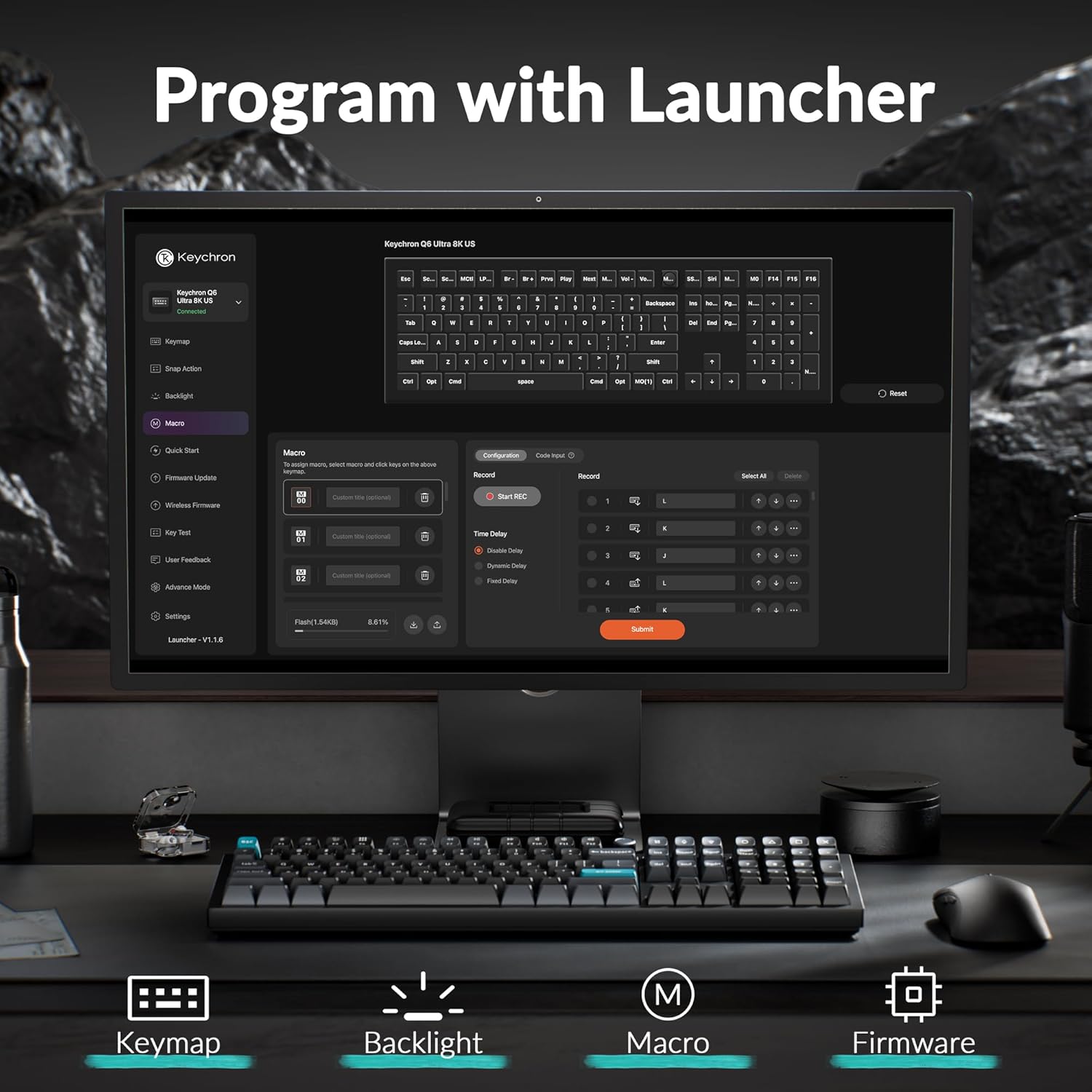
Image: The Keychron Launcher web application interface, displaying options for key remapping, backlight customization, macro creation, and firmware updates.
RGB Lighting Control
Personalize the per-key RGB lighting with a variety of effects and colors. You can also customize the indicator lights and even combine two RGB effects simultaneously. The backlight can be adjusted for brightness, though it may appear dim at maximum brightness in some environments.

Image: The Keychron Q6 Ultra 8K keyboard illuminated with dynamic RGB lighting, showcasing various color patterns. Note: Features non-shine-through PBT keycaps.
Polling Rate Settings
Adjust the polling rate from 125 Hz up to 8000 Hz for both wired and 2.4 GHz wireless modes. Separate polling rates can be configured for each mode.
Auto Sleep and Backlight Settings
Customize the auto-sleep mode and backlight off starting times down to the second to optimize battery usage.
7. Battery Life
The Q6 Ultra 8K is powered by a 4000mAh battery and utilizes ZMK firmware for efficient power management. It offers impressive battery longevity:
- Up to 660 hours of usage with the backlight off at 8KHz polling rate.
- Up to 200 hours with minimal backlight at 8KHz polling rate.

Image: A graphic illustrating the long-lasting battery performance of the Keychron Q6 Ultra 8K, showing up to 660 hours with backlight off and up to 200 hours with lowest brightness at 8KHz polling rate.
The keyboard can be charged via the USB-C port located on the back.
8. Stabilizers and Gasket Design
The Q6 Ultra 8K features pre-lubed, screw-in PCB stabilizers, which are more stable and reduce rattle compared to clip-in stabilizers. The spacebar, in particular, is well-lubed and includes foam to minimize hollowness, contributing to a consistent and satisfying typing sound.
The keyboard incorporates a double-gasket design, which provides a flexible and soft typing feel. Multiple layers of acoustic foam (Sound Absorbing Foam, IXPE Foam, PET Film, Latex Bottom Pad, Bottom Case Acoustic Foam, Bottom Case PET Film) are integrated to further tune the sound profile and enhance the typing experience.
9. Specifications
| Feature | Detail |
|---|---|
| Brand | Keychron |
| Model | Q6 Ultra |
| Connectivity Technology | 2.4 GHz, Bluetooth 5.3, Type-C wired |
| Keyboard Description | Mechanical |
| Recommended Uses | Gaming, Office |
| Special Features | 8000 Hz Polling Rate, Ergonomic, Hot-Swappable, Programmable Keys, Rechargeable |
| Color | Black (Banana Switch variant) |
| Keyboard Backlighting | RGB |
| Material | Aluminum |
| Power Source | Battery Powered |
| Switch Type | Tactile Banana (variant) |
| Keyboard Layout | QWERTY |
| Number of Keys | 104 |
| Compatible Operating Systems | Linux, Windows, Mac |
| Battery Capacity | 4000mAh |
10. Troubleshooting
Connectivity Issues
- Keyboard not connecting via 2.4 GHz: Ensure the 2.4 GHz receiver is securely plugged into your device and the keyboard is switched to 2.4 GHz mode. Try using a different USB port or the provided extension adapter.
- Bluetooth pairing failure: Make sure the keyboard is in Bluetooth pairing mode (usually indicated by a flashing light after pressing Fn + 1/2/3). Remove any previous pairings on your device and try reconnecting. Ensure your device's Bluetooth is enabled.
- Wired connection not recognized: Verify the USB-C cable is properly connected to both the keyboard and your computer. Try a different USB-C cable or port.
Key Functionality Problems
- Keys not responding: Check if the keyboard is powered on and connected. If hot-swappable, ensure switches are fully seated. Try resetting the keyboard to factory settings via the Keychron Launcher.
- Incorrect key output: Verify the keyboard is set to the correct operating system mode (Windows/Mac switch). Check Keychron Launcher for any accidental key remappings.
RGB Lighting Issues
- Backlight not working or dim: Ensure the backlight is enabled and brightness is adjusted. Check settings in Keychron Launcher. Low battery can also affect backlight brightness.
Battery and Charging
- Keyboard not charging: Ensure the USB-C cable is functional and connected to a working power source.
- Poor battery life: Adjust backlight settings to lower brightness or turn off when not needed. Review auto-sleep settings in Keychron Launcher.
11. Warranty and Support
Keychron products are manufactured to high-quality standards. For specific warranty details, please refer to the warranty card included with your product or visit the official Keychron website. The standard return policy allows for returns within 30 days of purchase.
For further assistance, technical support, or to explore additional products and accessories, please visit the official Keychron Store:
12. Official Product Videos
Keychron Q6 Ultra Wireless Mechanical Keyboard 8K
Video: An official video from the Keychron Store showcasing the Keychron Q6 Ultra Wireless Mechanical Keyboard 8K, highlighting its features and design. (Duration: 0:24)
Keychron Q6 Ultra 8K Aluminum Wireless Mechanical Keyboard
Video: An official video from the Keychron Store providing a detailed overview of the Keychron Q6 Ultra 8K Aluminum Wireless Mechanical Keyboard. (Duration: 1:10)


