1. Introduction
This manual provides detailed instructions for the assembly, operation, and maintenance of your Sedegn Printer Stand with Storage, Model Y-YC-6-B003BW1. Please read these instructions carefully before assembly and use to ensure proper function and longevity of the product. Keep this manual for future reference.

Image 1.1: The Sedegn 3-Tier Printer Stand in a home office setting, showcasing its design and storage capabilities.
2. Package Contents
Before beginning assembly, ensure all parts listed below are present and undamaged. If any parts are missing or damaged, please contact customer support.
- Power cord
- Storage box
- Various types of screws
- Hex key (included for assembly)
- Extra spare screws for each component type
3. Specifications
| Feature | Detail |
|---|---|
| Product Dimensions | 24 x 17.7 x 30.5 inches (L x W x H) |
| Item Weight | 24.2 pounds |
| Model Number | Y-YC-6-B003BW1 |
| Brand | Sedegn |
| Color | Rustic Brown |
| Material | High-quality particle board, powder-coated metal frame |
| Load Capacity (Top Shelf) | Up to 200 lbs |
| Power Outlets | 3 built-in AC outlets (125V/12A) |
| Power Cord Length | 59 inches |

Image 3.1: Detailed dimensions of the printer stand, showing height, width, and depth of shelves.
4. Features
- Large Capacity: This printer table measures 24" x 17.7" x 30.5", designed to accommodate most large printers, fax machines, scanners, shredders, and computer mainframes. It also provides ample storage for documents, books, binders, and office supplies.

Image 4.1: The printer stand organized with a printer on top, a shredder on the middle shelf, and paper trays on the bottom shelf, demonstrating its storage capacity.
- Sturdy & Durable Construction: Each shelf is supported by a solid steel tube frame, ensuring stability. The stand has a load capacity of up to 200 lbs. Constructed from water-resistant and scratch-resistant particle board with a strong powder-coated metal frame for lasting durability.

Image 4.2: Visual representation of the printer stand's stability, showing weight capacities for each shelf and close-ups of the high-quality particle board and sturdy metal frame.

Image 4.3: Illustration of the robust steel tubing used in the printer stand's construction, highlighting its strength and durability.
- Mobile Design with Locking Casters: Equipped with 5 industrial casters, including 2 with locking brakes, for easy mobility across various floor types. The brake design secures the cart in place when needed.
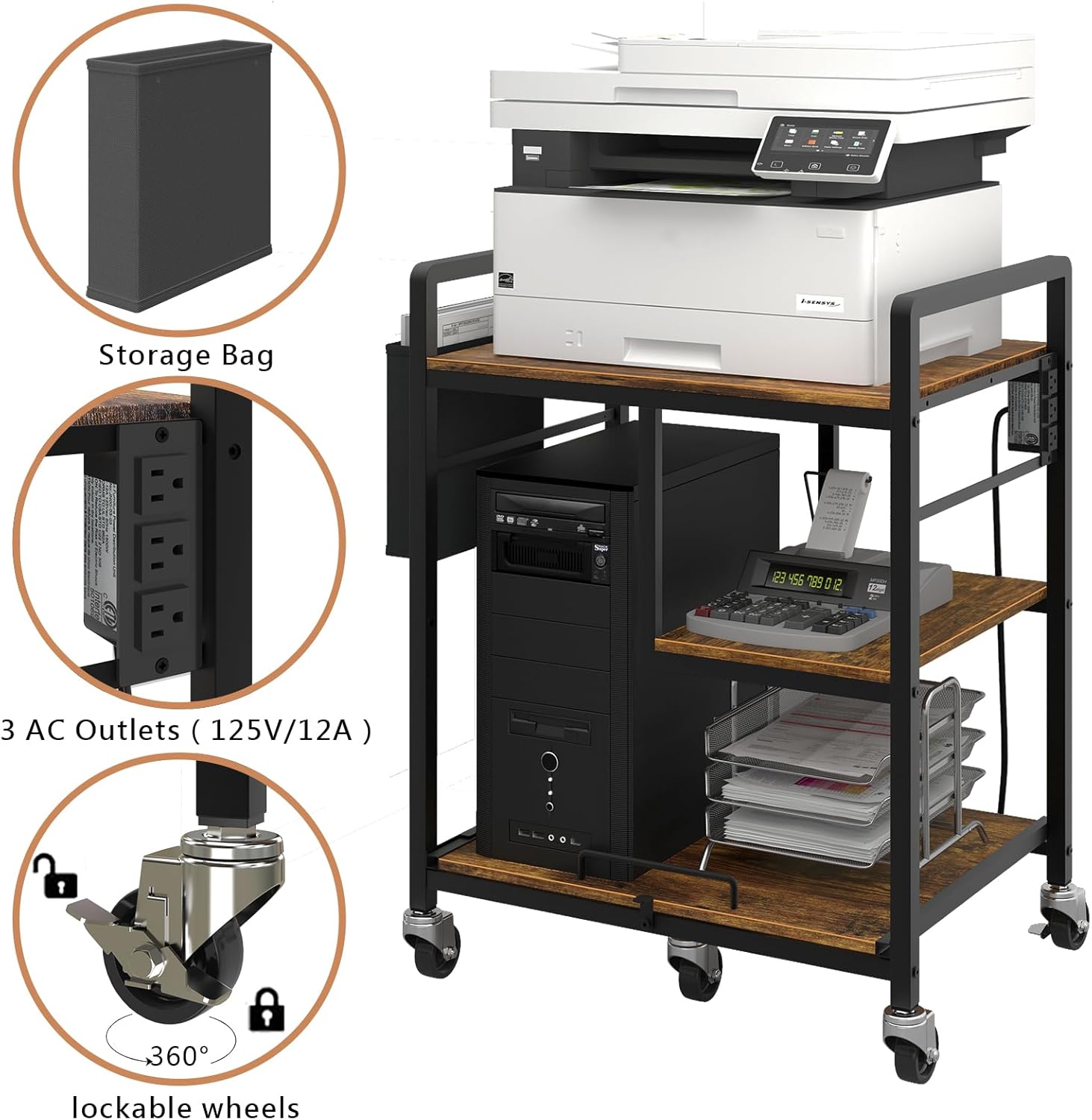
Image 4.4: Close-up of the printer stand's features, including the storage bag, 3 AC outlets, and 360-degree lockable wheels.

Image 4.5: The printer stand demonstrating its mobility with locking wheels, allowing for easy movement and stable positioning.
- Integrated Power Outlets: Features 3 built-in power outlets for convenient charging of printers, scanners, desktop computers, and other office electronics, reducing cable clutter.

Image 4.6: Detail of the printer stand's integrated power strip, featuring 3 AC outlets (125V/12A) and a 59-inch power cord.
- Upgraded Smooth Glide System: The middle shelf includes a precision shock-absorbing glide design with metal construction, tested over 40,000 times for durability and quiet operation. This allows for easy access to heavy items.

Image 4.7: The pull-out shelf feature, highlighting its heavy-duty and effortless glide system for easy access to items.
5. Assembly Instructions
Assembly of the Sedegn Printer Stand is designed to be straightforward. Please follow these steps carefully:
- Unpack Components: Carefully remove all parts from the packaging. Verify that all items listed in the "Package Contents" section are present.
- Identify Parts: Each part is clearly labeled. Refer to the included diagram for identification.
- Assemble Frame: Begin by connecting the metal frame components using the provided screws and hex key. Ensure all connections are secure but do not overtighten initially.
- Attach Shelves: Securely attach the particle board shelves to the assembled frame. Pay attention to the orientation of the middle shelf for the glide system.
- Install Casters: Attach the 5 industrial casters to the bottom of the stand. Ensure the 2 locking casters are positioned as desired for easy access.
- Install Power Strip: Mount the power strip to the designated area on the side of the frame.
- Attach Storage Box: Hang the fabric storage box on the side of the stand.
- Final Tightening: Once all components are in place, go back and securely tighten all screws.
Assembly typically takes approximately 30 minutes. If you encounter any difficulties, refer to the detailed step-by-step instructions provided in the product packaging or contact customer support.
6. Operating Instructions
6.1 Moving the Printer Stand
To move the printer stand, ensure the locking brakes on the casters are disengaged. Gently push or pull the stand to its desired location. Once positioned, engage the locking brakes on the two casters to prevent unintended movement.
Video 6.1: This video demonstrates the smooth movement of the Sedegn Printer Stand on its industrial-grade casters and highlights the integrated power strip for convenient device charging. It also shows the pull-out tray and multi-level storage in action.
6.2 Using the Power Outlets
The printer stand includes 3 built-in AC power outlets. Plug the stand's main power cord into a wall outlet. You can then plug your printer, scanner, computer, or other office electronics directly into the outlets on the stand for centralized power access.
6.3 Utilizing the Pull-Out Shelf
The middle shelf is designed with a smooth glide system. To access items on this shelf, gently pull the handle forward. To retract, push the shelf back until it is fully seated.
6.4 Storage Options
The multi-level shelves and side storage bag provide versatile storage. Organize your printer, paper, files, and other office supplies as needed. The top shelf is ideal for your main printer, while lower shelves can hold additional equipment or supplies.

Image 6.2: An illustration showcasing the versatility of the printer stand, capable of holding a printer, files, PC tower, paper shredder, microwave oven, and phone/tablet.
7. Maintenance
7.1 Cleaning
The particle board surfaces are water-resistant and scratch-resistant, making them easy to clean. Wipe down the surfaces with a soft, damp cloth. Avoid using harsh chemicals or abrasive cleaners, which can damage the finish.

Image 7.1: The printer stand's surface is shown to be easy to clean and scratch-resistant, maintaining its appearance even with frequent use.
7.2 Caster Maintenance
Periodically check the casters for any accumulated dust or debris that might hinder smooth movement. Clean as necessary. Ensure the locking mechanisms are functioning correctly.
7.3 General Care
Avoid placing excessively hot items directly on the surface. Do not overload the shelves beyond their specified weight capacity to maintain structural integrity.
8. Troubleshooting
- Stand is wobbly: Ensure all screws are securely tightened. Check that the stand is on a level surface.
- Casters not rolling smoothly: Check for debris (hair, lint) caught in the wheels. Clean the casters as needed. Ensure the locking brakes are fully disengaged.
- Power outlets not working: Verify that the stand's main power cord is securely plugged into a functional wall outlet. Check if the wall outlet itself is receiving power.
- Pull-out shelf is stiff: Check for any obstructions on the glide rails. Ensure the shelf is properly aligned within its tracks.
9. Warranty and Support
For any questions, concerns, or assistance with your Sedegn Printer Stand, please contact Sedegn customer support. Refer to your purchase documentation for specific warranty details and contact information.


