1. Introduction
This manual provides essential information for the safe assembly, operation, and maintenance of your Jasion RetroVolt Pro Electric Bike. Please read this manual thoroughly before your first ride and retain it for future reference. Understanding your e-bike's features and functions is crucial for a safe and enjoyable experience.
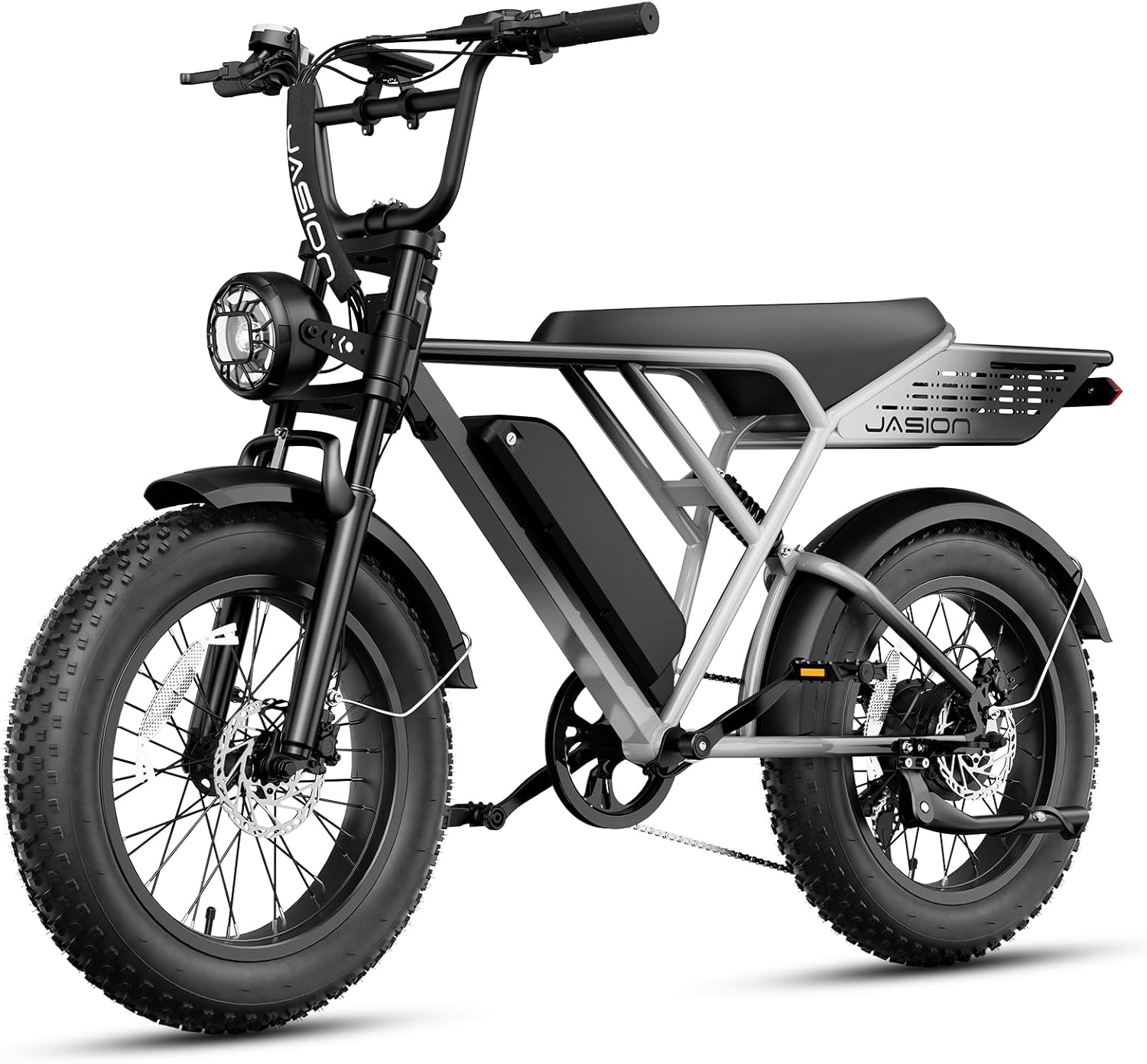
Image 1: The Jasion RetroVolt Pro Electric Bike, gray standard model, showcasing its robust frame, fat tires, and integrated battery.
2. Safety Guidelines
Always prioritize safety. Wear a helmet and appropriate safety gear. Ensure all components are securely fastened before each ride. Familiarize yourself with local e-bike regulations. Avoid riding under the influence of alcohol or drugs. Regular maintenance is key to safe operation.
3. Package Contents
Upon unboxing, verify that all components are present and undamaged. If any items are missing or damaged, contact Jasion customer service at support@jasionbike.com.
Video 1: This unboxing video demonstrates the contents of the Jasion RetroVolt Pro package and initial setup steps. It shows the bike frame, wheels, pedals, charger, keys, and tools included.
Included Items:
- Electric Bike (main frame with rear wheel)
- Front Wheel
- Battery
- Charger
- Pedals (Left & Right)
- Front Fender
- Headlight
- Keys (x2)
- Stem Cover
- Tools (2x Wrenches, 5x Allen Key)
- Manual Flyer
4. Assembly Instructions
Follow these steps carefully to assemble your Jasion RetroVolt Pro Electric Bike. Refer to Video 1 for visual guidance.
4.1 Front Wheel Installation
- Use a wrench to fix the vehicle body. Remove the fork protection rod.
- Remove the rubber plug from the disc brakes and the axle screws.
- Attach the front wheel to the fork, ensuring the brake is on the left side. Align with the safety hook and ensure gaskets are in place.
- Tighten the axle nuts and caps securely.
4.2 Front Fender Installation
- Using tools from the accessories kit, remove the screws and anti-skid nuts on the front fork hanger and the screws on both sides of the front fork.
- Fix the front mudguard mounting bracket and its left/right support rods to the front fork with screws, tightening them securely.
4.3 Stem Installation
- Remove the screws on the stem's front cap with an Allen wrench.
- Place the handlebar on the head part and lock the seat tube front cap.
- Adjust the handlebar angle to align with the bike, then tighten the clamping screws below the stem.
4.4 Headlight Installation
- Remove the front light's side screws and foam washers. Adjust the bracket to face outward, then position the headlight.
- Connect its cable to the bike's power cable.
4.5 Pedals Installation
- Locate the right and left pedals labeled "R" and "L."
- Thread them onto their respective cranks with an Allen wrench.
- Check chain alignment by rotating the crank backward.
4.6 Adjusting the Suspension Fork
- Adjust the rubber stoppers on both sides of the fork.
- Position the stoppers against the top tube to prevent scratching during turns.
5. Operating Your E-Bike
5.1 Battery Installation and Removal
To remove the battery, use the key to unlock it from the frame. To install, slide the battery into the frame until it clicks into place, then lock it with the key.
5.2 Powering On/Off
Ensure the battery is securely installed and turned on (if it has a separate power button). Press and hold the power button on the handlebar display to turn the e-bike system on or off.
5.3 Display Overview
The full-color central display provides real-time information including speed, battery level, riding mode, and trip distance. Use the controls to navigate through different display options and adjust settings.

Image 2: The e-bike's LCD display showing current speed, battery status, and indicators for various riding modes.
5.4 Riding Modes
The Jasion RetroVolt Pro offers multiple riding modes to suit different preferences and terrains:
- Throttle Mode: Provides power directly from the motor without pedaling.
- Pedal-Assist System (PAS) Mode: The motor assists your pedaling effort. Different PAS levels offer varying degrees of assistance.
- Cruise Mode: Maintains a set speed without continuous throttle input.
- Walking Mode: Provides low-speed assistance for pushing the bike while walking.
- Pedaling Mode: Ride the bike like a traditional bicycle without motor assistance.
Video 2: This video highlights the Jasion RetroVolt Pro's features, including its 2000W peak motor, 52V 20AH battery, dual suspension, 330 lbs max load capacity, cruise mode, 90-mile PAS range, 20"x4" fat tires, 35-38 MPH max speed, and hydraulic brakes.
5.5 Charging the Battery
To charge the battery, connect the charger to a power outlet and then to the charging port on the battery. The indicator light on the charger will show the charging status. A full charge typically takes approximately 5 hours.

Image 3: This diagram illustrates the battery's intelligent thermal management system, IP65 waterproof rating, UL certification, and the 5-hour charging time.
6. Maintenance
Regular maintenance ensures the longevity and performance of your e-bike. Key maintenance tasks include:
- Tire Pressure: Check and maintain recommended tire pressure before each ride.
- Brakes: Inspect brake pads and rotors for wear. Ensure hydraulic brakes are responsive.
- Chain: Keep the chain clean and lubricated.
- Fasteners: Periodically check all nuts, bolts, and quick releases for tightness.
- Battery Care: Store the battery in a cool, dry place and charge it regularly, even when not in use, to prolong its lifespan.
- Cleaning: Clean the bike with a damp cloth. Avoid high-pressure washing directly on electrical components.
7. Troubleshooting
If you encounter issues with your Jasion RetroVolt Pro, refer to the following common troubleshooting tips:
- E-bike not powering on: Check if the battery is fully charged, properly installed, and turned on. Ensure all cable connections are secure.
- Motor not assisting: Verify that the pedal-assist level is set above zero. Check for any error codes on the display.
- Brakes feel weak: Inspect brake pads for wear and ensure hydraulic fluid levels are adequate. Consult a professional if issues persist.
- Unusual noises: Identify the source of the noise. It could be loose components, chain issues, or brake rubbing. Address promptly.
For more complex issues or if troubleshooting steps do not resolve the problem, please contact Jasion customer support.
8. Specifications
Key technical specifications for the Jasion RetroVolt Pro Electric Bike:
| Feature | Specification |
|---|---|
| Bike Type | Electric Bike |
| Motor | 2000W Peak Motor |
| Max Speed | 38 MPH |
| Battery | 52V 20Ah Removable Battery (1040 Watt Hours) |
| Max Range (PAS 1) | Up to 90 Miles |
| Brakes | Hydraulic Disc Brakes |
| Tires | 20" x 4" Fat Tires |
| Suspension | Dual Suspension |
| Frame Material | High Carbon Steel |
| Number of Speeds | 7 |
| Maximum Weight Recommendation | 330 Pounds |
| Item Dimensions (LxWxH) | 29.92 x 29.92 x 70.87 inches |
| Special Features | Digital Display, Durable, Headlight, Cargo Rack |
| Waterproof Rating | IP65 |

Image 4: Detailed dimensions and capacity specifications for the Jasion RetroVolt Pro.
9. Warranty and Support
Jasion offers a 12-month limited warranty for the RetroVolt Pro Electric Bike. For warranty claims, technical assistance, or any product-related inquiries, please contact our customer support team.
Contact Information:
- Call Center: 1 (888) 825 6366 (9am-6pm, Mon-Fri. EST)
- Email Support: support@jasionbike.com
You can also visit the official Jasion store on Amazon for more information and accessories: Visit the Jasion Store


