1. Introduction
The RENPHO MorphoScan Nova Smart Body Composition Scale is an advanced health monitoring device designed to provide comprehensive insights into your body's composition. Utilizing 8-electrode dual-frequency Bioelectrical Impedance Analysis (BIA) technology, this scale offers precise measurements beyond just body weight. It features a full-color TFT LCD display on the handle for direct viewing of metrics and integrates seamlessly with the RENPHO Health App for detailed tracking and analysis.
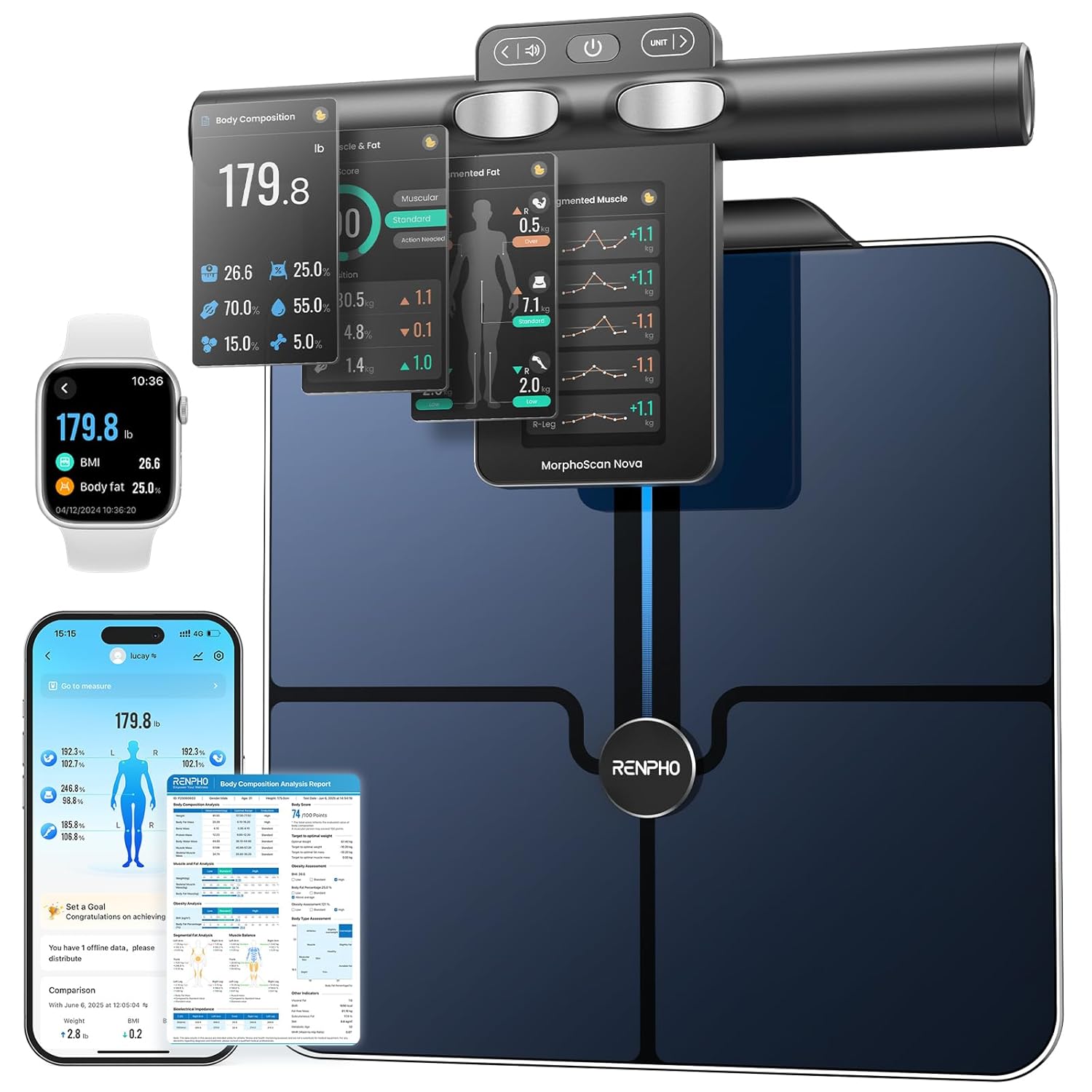
Image 1.1: The RENPHO MorphoScan Nova Smart Body Composition Scale, showcasing its main unit, handle with display, and a representation of its app interface.
2. Product Overview
2.1 Key Features
- Clear TFT-LCD Handle Display: A 4.3-inch screen on the handle displays 9 pages of detailed measurement data, including muscle and fat analysis, trends, and goals. Handle buttons allow for content scrolling and volume/unit changes.
- Precision in Measurement: Equipped with eight-electrode dual-frequency and segmental BIA technology, the scale delivers an accurate health overview, correlating to DEXA data with a correlation coefficient of ≥0.98.
- Comprehensive Body Report: Analyzes over 50 body metrics, including segmental muscle & fat analysis, and generates a report in the app for exercise and diet plan customization.
- Voice Broadcast & Personalized Avatar: Includes voice broadcast for measurement guidance and allows selection of an avatar for display on the scale's screen.
- Smart App Fitness Tracking: The RENPHO Health App tracks trends, sets goals, and syncs data with Apple Health, Google Fit, and MyFitnessPal. Supports unlimited user profiles.
- Sleek & Minimalist Design: Features ITO-coated glass and a 14.08 x 12.2-inch platform, supporting up to 400 lbs. Equipped with USB-C charging, offering up to 150 days of use on a single charge.
2.2 What's in the Box
- RENPHO MorphoScan Nova Smart Body Composition Scale
- User Manual
- USB-C Charging Cable
3. Setup
- Charge the Device: Before first use, fully charge the scale using the provided USB-C cable. The charging port is located on the handle unit. A full charge provides approximately 150 days of use.
- Download the App: Download the 'RENPHO Health' app from the Apple App Store or Google Play Store.
- Create a Profile: Open the RENPHO Health app and follow the on-screen instructions to create your user profile. You can set personal goals and select an avatar.
- Place the Scale: Position the scale on a hard, flat surface. Avoid carpets or uneven flooring, as this can affect measurement accuracy.
- Pair with App: Ensure Bluetooth is enabled on your smartphone. Open the RENPHO Health app, and the scale should automatically connect. If not, follow the app's pairing instructions.

Image 3.1: The RENPHO Health App demonstrating its compatibility with various fitness tracking platforms and an Apple Watch displaying synchronized data.
4. Operating Instructions
4.1 Standard Weight Measurement
For a quick weight measurement, simply step onto the scale barefoot. The scale will display your weight on the handle's TFT-LCD screen. You do not need to lift the handle for this basic function.
4.2 Full Body Composition Measurement
- Step On: Step onto the scale barefoot, ensuring your feet are positioned on the four foot electrodes.
- Lift Handle: Gently lift the handle unit from its magnetic attachment.
- Hold Handle: Hold the handle with both hands, ensuring your thumbs and fingers are touching all four handle electrodes. Keep your arms extended at a 45-degree angle away from your body, and ensure your arms do not touch your torso.
- Follow Voice Guidance: The scale will provide real-time voice prompts to guide you through the measurement process.
- View Results: Once the measurement is complete, your detailed body composition data will be displayed on the 4.3-inch TFT-LCD screen. You can use the left/right buttons on the handle to scroll through the 9 pages of metrics.
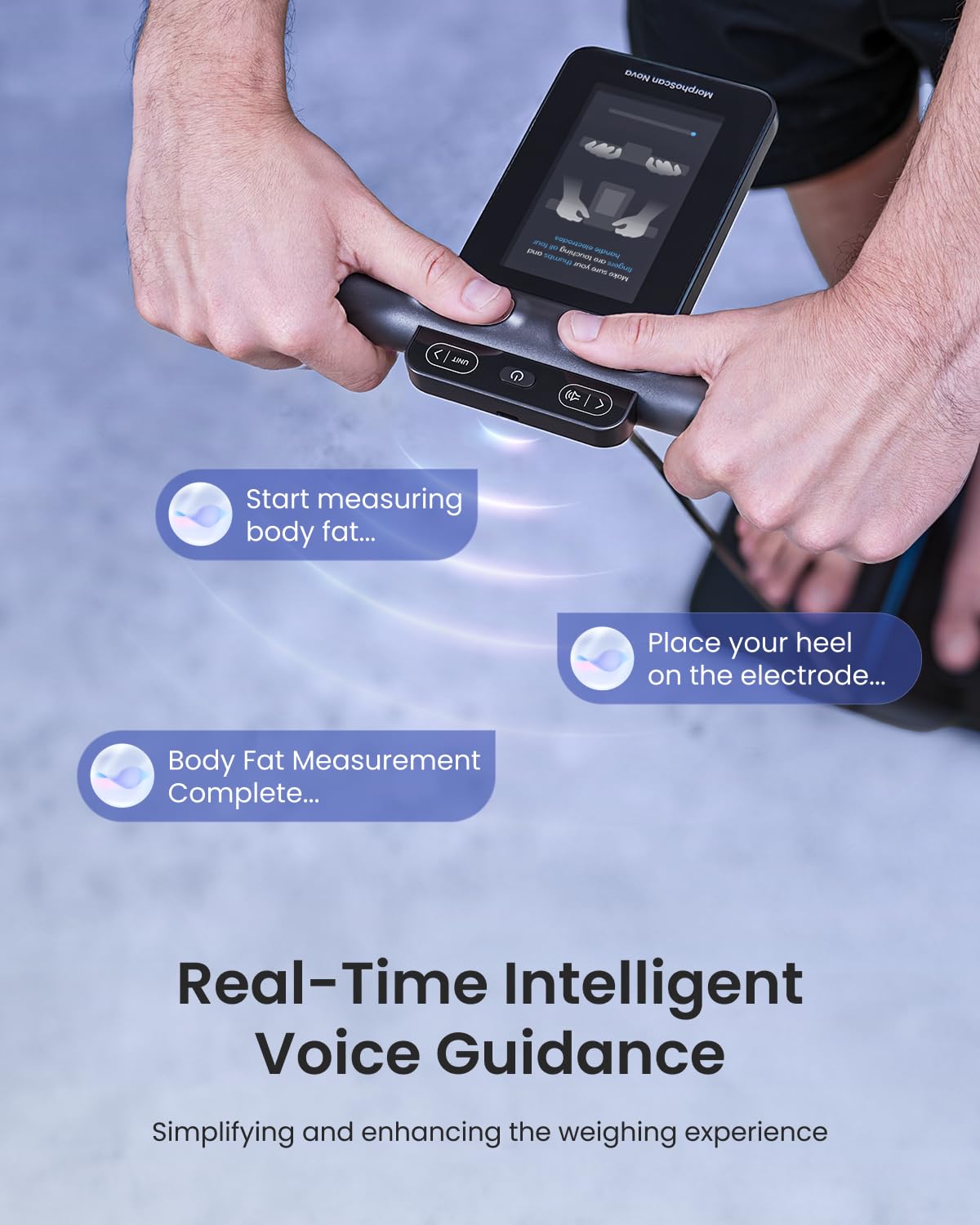
Image 4.1: Real-time intelligent voice guidance on the RENPHO MorphoScan Nova scale, simplifying the measurement process.

Image 4.2: The 4.3-inch full-color TFT screen on the handle displaying detailed body metrics.
4.3 App Synchronization
All measurement data will automatically sync to the RENPHO Health app via Bluetooth. The app provides historical data, trend analysis, and allows you to set and track goals. You can also sync your data with third-party apps like Apple Health, Google Fit, and MyFitnessPal.
Video 4.1: A demonstration of the RENPHO Smart Body Scale's full-color display and its features.
5. Maintenance
- Cleaning: Wipe the scale's surface with a soft, damp cloth. Do not use abrasive cleaners or immerse the scale in water.
- Charging: Recharge the scale when the battery indicator on the handle display is low. Use the provided USB-C cable.
- Storage: Store the scale in a cool, dry place. Ensure the handle is securely attached to the main unit when not in use.
- Avoid Extreme Conditions: Do not expose the scale to extreme temperatures, direct sunlight, or high humidity.
6. Troubleshooting
- Inaccurate Readings: Ensure the scale is placed on a hard, flat surface. Make sure your feet and hands are clean and dry, and properly positioned on all electrodes. Avoid moving during measurement.
- No Display/Power: Check if the scale is charged. Connect the USB-C cable to charge the handle unit.
- App Connectivity Issues: Ensure Bluetooth is enabled on your device and the RENPHO Health app is open. Try restarting both the scale and your smartphone.
- No Body Composition Data: Ensure you are standing barefoot and holding the handle correctly with all electrodes in contact with your skin.
For further assistance, refer to the in-app help section or contact RENPHO customer support.
7. Specifications
| Feature | Detail |
|---|---|
| Item Model Number | R-MSC04 |
| Brand | RENPHO |
| Display Type | LCD (4.3-inch TFT-LCD on handle) |
| Special Feature | Eight electrodes, TFT-LCD Display on Handle, USB-C Charging, Voice Broadcast |
| Recommended Uses | Adults |
| Power Source | 1 Lithium Polymer battery (rechargeable via USB-C) |
| Platform Dimensions | 14.08 x 12.2 inches |
| Maximum Capacity | 400 lbs / 180 kg |
8. Warranty and Support
For warranty information and customer support, please refer to the official RENPHO website or contact their customer service directly. Details are typically provided with your product packaging or within the RENPHO Health application.
Video 8.1: An overview of the RENPHO MorphoScan Nova Smart Scale's features and design.
Video 8.2: A quick demonstration of the Smart Body Weight Scale's functionality.


