
Introduction
Thank you for choosing the Tuni G3 64mm Flat Burr Coffee Grinder. This high-precision electric grinder is designed to deliver consistent and aromatic coffee grounds for various brewing methods, from espresso to French press. This manual provides essential information for the safe and efficient operation, maintenance, and care of your new coffee grinder. Please read it thoroughly before first use and keep it for future reference.
Important Safety Instructions
When using electrical appliances, basic safety precautions should always be followed to reduce the risk of fire, electric shock, and/or injury to persons, including the following:
- Read all instructions before using the appliance.
- Do not immerse the appliance, power cord, or plug in water or other liquids.
- Close supervision is necessary when any appliance is used by or near children.
- Unplug from outlet when not in use, before assembling or disassembling parts, and before cleaning.
- Avoid contact with moving parts.
- Do not operate any appliance with a damaged cord or plug, or after the appliance malfunctions or has been dropped or damaged in any manner.
- The use of attachments not recommended or sold by the manufacturer may cause fire, electric shock, or injury.
- Do not use outdoors.
- Do not let cord hang over edge of table or counter, or touch hot surfaces.
- Do not place on or near a hot gas or electric burner, or in a heated oven.
- Always attach plug to appliance first, then plug cord into the wall outlet. To disconnect, turn any control to "off", then remove plug from wall outlet.
- Do not use appliance for other than intended use.
Package Contents
Carefully unpack all items and ensure you have received the following components:
- Tuni G3 64mm Flat Burr Coffee Grinder x1
- Single Dose Hopper x1
- Portafilter Holder (Compatible with 51-58mm portafilters) x1
- Dosing Cup (100g) x1
- Dosing Ring x1
- Hopper Bellow x1
- Soft Brushes x2
- User Manual x1

Image: Tuni G3 grinder and included accessories.
Product Overview
The Tuni G3 is a robust coffee grinder featuring 64mm flat burrs for precise and consistent grinding. Its design incorporates user-friendly controls and versatile hoppers to suit various coffee preparation needs.

Image: Front view of the Tuni G3 Coffee Grinder.
Key Components:
- Bean Hopper: Available in 250g large capacity and 50g single dosing options.
- Grind Adjustment Dial: Offers 100 precision settings with stepless adjustment.
- 64mm Flat Burrs: Stainless steel burrs for rapid and uniform grinding at 550 RPM.
- LED Touch Display: Intuitive interface for controlling grind time and settings.
- Dosing Spout: Equipped with anti-static technology for mess-free operation.
- Portafilter Holder: Adjustable to fit 51mm to 58mm portafilters.

Image: Detail of the 64mm stainless steel flat burrs.
Setup
- Unpack: Carefully remove all components from the packaging.
- Placement: Place the grinder on a stable, flat, and dry surface. Ensure there is adequate space around the unit for ventilation.
- Install Hopper: Choose either the large capacity hopper or the single dosing hopper. Align the hopper with the opening on top of the grinder and twist to secure it in place.
- Power Connection: Plug the power cord into a grounded 120V electrical outlet.
Operating Instructions
1. Grind Settings
The Tuni G3 offers 100 continuously adjustable grind settings, allowing you to fine-tune the grind size for various brewing methods. Rotate the grind adjustment dial to select your desired setting.
- Fine Settings (1-20): Ideal for Espresso and Turkish coffee.
- Medium Settings (21-60): Suitable for Mocca pots, Pour Over, and Drip Coffee.
- Coarse Settings (61-100): Best for French Press and Cold Brew.
The grinder features a stepless adjustment ring for micro-adjustments between the numbered settings, providing ultimate precision. Please disregard any 'non-stepless' text on older packaging, as the machine has been upgraded to stepless adjustment.

Image: Grind adjustment dial with 100 precision settings.

Image: Stepless adjustment ring for fine-tuning grind size.
2. Touch Control & LED Display
The intuitive LED touch display allows for easy operation and precise control over grinding time.

Image: LED touch display for grind time and cup selection.
- Power Button: Press to turn the grinder on/off.
- Time Increase/Decrease: Use the '+' and '-' buttons to adjust the grinding duration in 0.5-second increments.
- Single Cup/Double Cup Presets: Select pre-programmed grind times for single or double servings. These can be customized.
- Start/Stop: Press the selected cup button or the general grind button to start grinding. Press again to stop.
3. Hopper Usage
The Tuni G3 comes with two bean hoppers to accommodate different grinding needs.
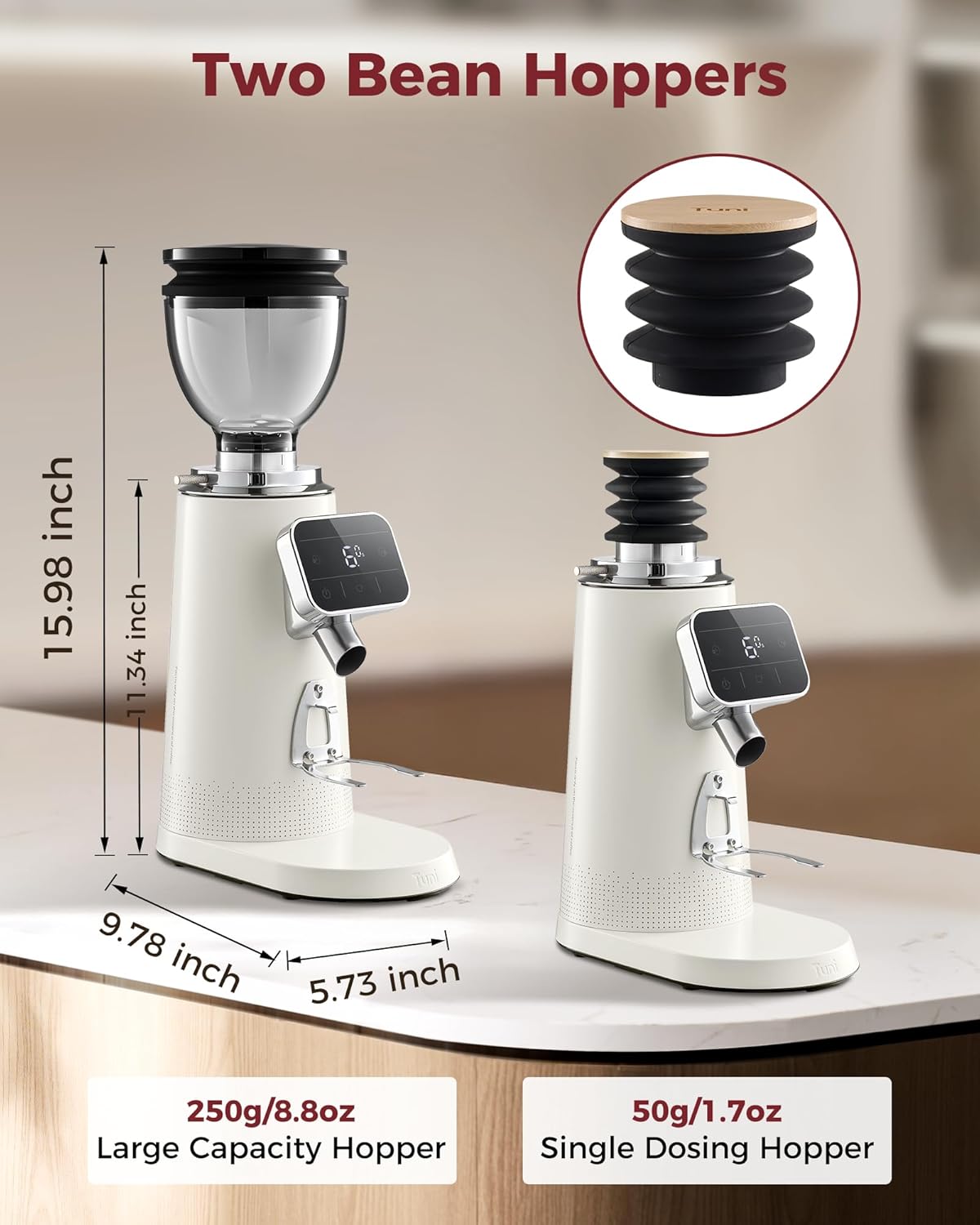
Image: Tuni G3 with large capacity and single dosing hoppers.
- Large Capacity Hopper (250g): Ideal for frequent grinding or when preparing multiple servings.
- Single Dosing Hopper (50g): Perfect for precise single doses or when switching between different bean types to maintain freshness.
4. Anti-Static Technology
The integrated anti-static system effectively minimizes static cling, preventing coffee grounds from flying and ensuring a clean, concentrated output into your dosing cup or portafilter. This keeps your countertop tidy and your dosing accurate.

Image: Anti-static technology in action, showing clean dispensing.
5. Portafilter Compatibility
The included portafilter holder is designed to accommodate a wide range of portafilter sizes, from 51mm to 58mm, ensuring versatility for various espresso machines.

Image: Portafilter holder compatibility with 51mm to 58mm sizes.
Maintenance and Cleaning
Regular cleaning ensures optimal performance and extends the lifespan of your Tuni G3 grinder.
- Unplug: Always ensure the grinder is unplugged from the power outlet before cleaning.
- Empty Hopper: Remove any remaining coffee beans from the hopper.
- Clean Burrs: Use one of the provided soft brushes to clean the grinding burrs. Remove the upper burr for thorough cleaning if necessary.
- Clean Dosing Spout: Use a brush or a soft cloth to clean any residual coffee grounds from the dosing spout and surrounding areas.
- Wipe Exterior: Wipe the exterior of the grinder with a damp cloth. Do not use abrasive cleaners or immerse the unit in water.
- Hopper and Dosing Cup: Wash the bean hopper and dosing cup with warm, soapy water, rinse thoroughly, and dry completely before reassembling.
Troubleshooting
If you encounter issues with your Tuni G3 grinder, refer to the following common problems and solutions:
| Problem | Possible Cause | Solution |
|---|---|---|
| Grinder does not turn on. | Not plugged in; power outage; faulty outlet. | Ensure the grinder is securely plugged into a working outlet. Check your circuit breaker. |
| Inconsistent grind. | Burrs are dirty or worn; incorrect grind setting. | Clean the burrs thoroughly. Adjust the grind setting to a finer or coarser level as needed. |
| Grinder is clogged. | Excessive coffee grounds buildup; oily beans. | Unplug the grinder. Remove the hopper and upper burr. Clean out any blockages with a brush. |
| Static cling of grounds. | Environmental factors; very dry beans. | While the grinder has anti-static tech, some static can occur. Lightly misting beans with water before grinding can help. Ensure all parts are clean. |
If the problem persists after attempting these solutions, please contact customer support.
Specifications
| Feature | Detail |
|---|---|
| Model | G3 |
| Brand | Tuni |
| Color | Ivory |
| Material | Stainless Steel |
| Burr Type | 64mm Flat Burrs |
| Grind Settings | 100 (continuously adjustable with stepless ring) |
| Motor Speed | 550 RPM |
| Item Weight | 7.3 Pounds |
| Dimensions (L x W x H) | 24.9 x 15 x 39.6 centimeters |
| Output Capacity | 250 g (large hopper) |
| Wattage | 260 watts |
| Voltage | 120 Volts |
| Recommended Uses | Espresso, French press, drip, pour over, coffee maker |
| Specific Product Use | Single dose, Grinding, Espresso grinder |
| UPC | 716597716483 |
Warranty and Support
Your Tuni G3 coffee grinder comes with a user manual and responsive support. For any questions, concerns, or assistance, please refer to the contact information provided with your purchase or visit the official Tuni website. We are committed to providing excellent customer service and are here to help when you need it.