
1. Introduction
Thank you for choosing the NEEWER PA138 Adjustable Magnetic Suction Phone Mount. This product is designed to provide a secure and flexible mounting solution for your smartphone in various environments, including your car, office, or gym. Featuring a strong vacuum suction cup and MagSafe compatibility, it ensures your device remains stable while offering optimal viewing angles. Please read this manual carefully before use to ensure proper installation and operation.
2. Safety Information
- Ensure the mounting surface is clean, dry, and smooth for optimal suction.
- Do not obstruct your view while driving. Position the mount in a safe location that does not interfere with airbags or vehicle controls.
- Avoid exposing the product to extreme temperatures or direct sunlight for prolonged periods, as this may affect the suction cup's performance and material integrity.
- Keep out of reach of children.
- Do not attempt to disassemble or modify the product.
3. Package Contents
Verify that all items are present in the package:
- 1 x NEEWER PA138 Suction Phone Mount
- 1 x Hard Protective Film
- 1 x Soft Protective Film
- 2 x Magnetic Rings (for non-MagSafe compatible phones/cases)
- 1 x Cleaning Kit
- 1 x User Manual

Image: Contents of the NEEWER PA138 package, showing the suction phone mount, two magnetic rings, hard and soft protective films, and a cleaning kit.
4. Setup Instructions
4.1 Preparing the Mounting Surface
For optimal suction, ensure the surface (dashboard, windshield, desk, etc.) is clean, dry, and smooth. Use the included cleaning kit to wipe the area thoroughly.
4.2 Applying Protective Films (Optional but Recommended)
If mounting on a textured or delicate surface, apply one of the included protective films first. Choose the hard film for rigid, slightly textured surfaces or the soft film for more flexible or sensitive areas. This helps improve adhesion and protects the surface from potential marks.
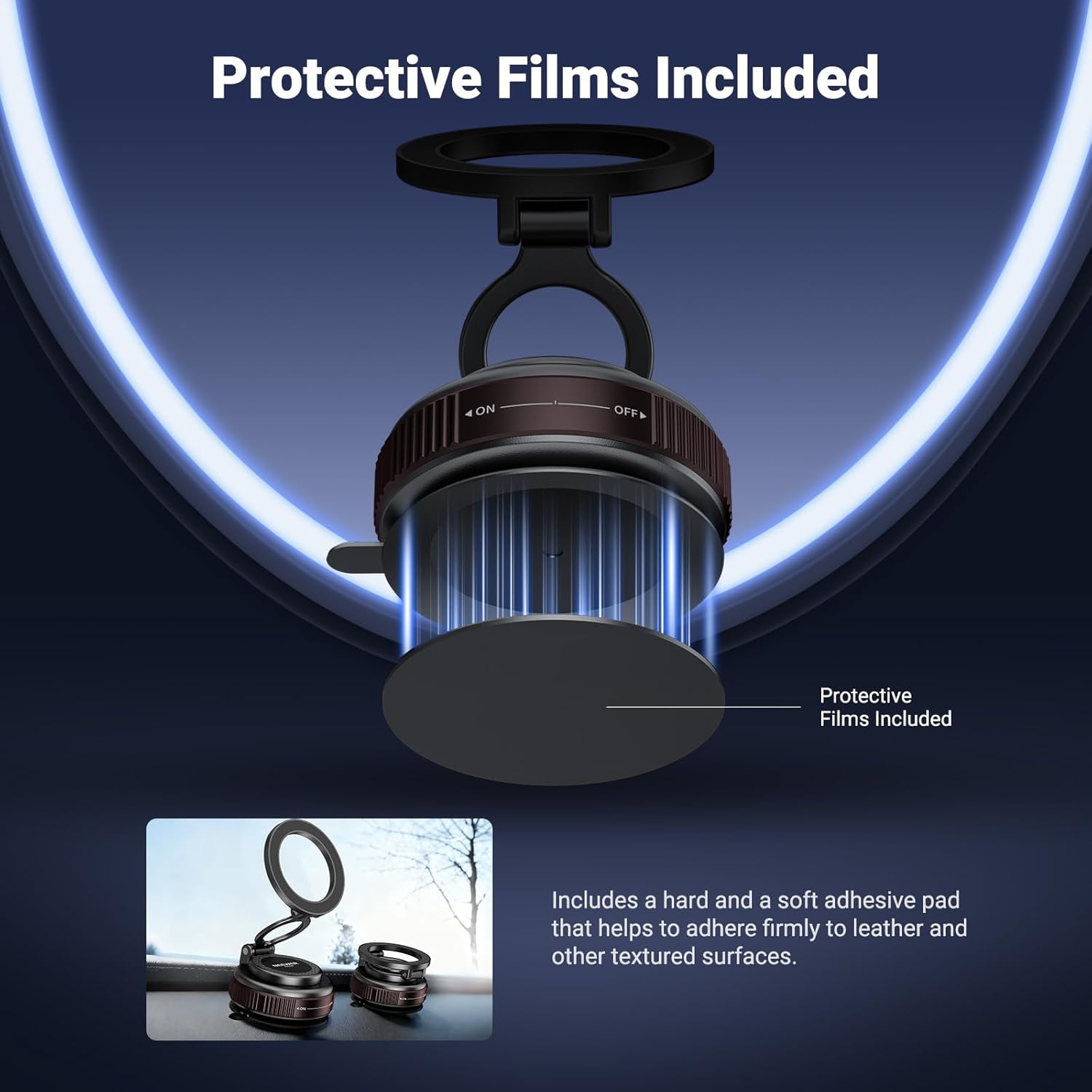
Image: Illustration of the protective film being applied to a surface before the suction mount is attached.
4.3 Attaching the Suction Mount
- Place the suction cup firmly against the prepared surface.
- Rotate the base of the mount clockwise from the "OFF" position to the "ON" position. This creates a vacuum seal, securing the mount in place.

Image: The suction mount demonstrating the rotation mechanism to engage the vacuum seal and the quick release lever.
4.4 Preparing Your Phone for Magnetic Attachment
- For MagSafe Compatible iPhones (iPhone 12 series and newer): Your phone or MagSafe compatible case can directly attach to the magnetic head of the mount. No additional magnetic ring is needed.
- For other smartphones (e.g., Samsung Galaxy, Google Pixel, Huawei) or non-MagSafe cases: Apply one of the included adhesive magnetic rings to the back of your phone or phone case. Ensure it is centered for optimal magnetic connection.
5. Operating Instructions
5.1 Attaching Your Phone
Once the mount is securely attached, simply bring your MagSafe compatible iPhone or phone with the applied magnetic ring close to the magnetic head of the mount. The magnets will automatically align and hold your phone firmly.

Image: A smartphone is shown magnetically attached to the mount, highlighting the strong magnetic connection.
5.2 Adjusting the Viewing Angle
The NEEWER PA138 features a flexible design allowing for 360° rotation and 180° tilt. Adjust the phone's position by gently rotating the magnetic head or tilting the arm to achieve your desired viewing angle. Ensure all adjustments are made carefully to avoid dislodging the phone or mount.

Image: Visual representation of the mount's adjustability, showing its ability to tilt and rotate for various viewing angles.
5.3 Detaching Your Phone
To remove your phone, simply pull it away from the magnetic head. The strong N55 magnets ensure a secure hold but allow for easy detachment when needed.
5.4 Removing the Suction Mount
To remove the entire mount from the surface, locate the quick-release lever on the side of the suction cup. Pull this lever to release the vacuum seal, then gently lift the mount off the surface.
6. Maintenance
- Cleaning: Wipe the suction cup and the magnetic head with a soft, damp cloth to remove dust and debris. Ensure the suction cup is clean before each use to maintain optimal adhesion.
- Storage: When not in use, store the mount in a cool, dry place away from direct sunlight.
- Inspection: Periodically check the suction cup for any signs of wear or damage. Replace if necessary to ensure secure mounting.
7. Troubleshooting
7.1 Suction Cup Not Holding Firmly
- Clean Surface: Ensure the mounting surface and the suction cup are completely clean and free of dust, grease, or moisture. Use the cleaning kit provided.
- Smooth Surface: The suction cup works best on smooth, non-porous surfaces. If your dashboard is textured, use the included hard protective film to create a smooth base.
- Proper Engagement: Make sure the base is fully rotated to the "ON" position to create a strong vacuum seal.
- Temperature: Extreme cold or heat can affect suction. Allow the vehicle interior to reach a moderate temperature before applying the mount.
7.2 Phone Not Attaching Magnetically
- MagSafe Compatibility: Verify if your iPhone model is MagSafe compatible. If not, or if using a non-MagSafe case, ensure the adhesive magnetic ring is correctly applied to your phone or case.
- Ring Placement: The magnetic ring must be centered on the back of your phone or case for optimal magnetic connection.
- Case Thickness: Very thick phone cases may weaken the magnetic connection. Consider using a thinner case or attaching the magnetic ring to the outside of the case.
8. Specifications
| Feature | Detail |
|---|---|
| Model Number | PA138 |
| Brand | NEEWER |
| Main Material | Acrylonitrile Butadiene Styrene (ABS) |
| Item Type | Suction Phone Mount |
| Main Features | Vacuum Suction, Rotatable |
| Product Dimensions | 2.7" x 2.4" x 1.8" (68 x 62 x 45 mm) |
| Product Weight | 2.75 Ounces (78g) |
| Compatible Devices | Smartphone |
| Compatible Phone Models | iPhone 12, 13, 14, 15, 16, 17 series (MagSafe compatible); Samsung Galaxy S24 Ultra, S25; Google Pixel 9 Pro, 10; Huawei Android (with magnetic ring) |
| Mounting Type | Dashboard, Windshield |
| Vehicle Service Type | Car, Truck, Van |
| UPC | 191073127692 |
| ASIN | B0FZV1TJ66 |
| Country of Origin | China |
9. Warranty and Support
NEEWER products are designed for quality and reliability. For information regarding warranty coverage, returns, or technical support, please refer to the retailer's policy where the product was purchased (e.g., Amazon's return policy) or visit the official NEEWER website for customer service contact details.
Please retain your proof of purchase for any warranty claims.