
1. Important Safety Information
Before operating your Skeri ET03 Electric Tricycle, please read this manual thoroughly. Failure to follow instructions can result in serious injury or property damage. Always wear a helmet and appropriate safety gear when riding.
- Pre-Ride Checks: Always inspect your tricycle before each ride. Check tire pressure, brake function, battery charge, and ensure all fasteners are tight.
- Battery Safety: The 48V 13Ah battery is UL Certified. Do not attempt to open or modify the battery. Use only the provided charger. Store the battery in a cool, dry place away from direct sunlight and extreme temperatures.
- Braking: Familiarize yourself with the hydraulic disc brakes. Practice braking in a safe, open area before riding in traffic.
- Visibility: Utilize the integrated LED headlight, LED brake light, and rearview mirrors, especially during low-light conditions. Wear reflective clothing.
- Weight Capacity: Do not exceed the maximum weight capacity of 330 lbs (rider + cargo).
- Certified Standards: This electric tricycle is officially certified to UL2272 & UL2849 safety standards, ensuring a safe riding experience.
2. Setup and Assembly
Your Skeri ET03 Electric Tricycle arrives 90% pre-assembled. Follow these steps for final assembly. For a visual guide, please refer to the 'Installation of ET03' video below.
Video: Installation of ET03. This video provides a step-by-step guide for assembling your Skeri ET03 Electric Tricycle.
- Unboxing and Packaging Removal:
Carefully open the packaging and remove all protective materials from the tricycle components. Ensure no parts are damaged during this process.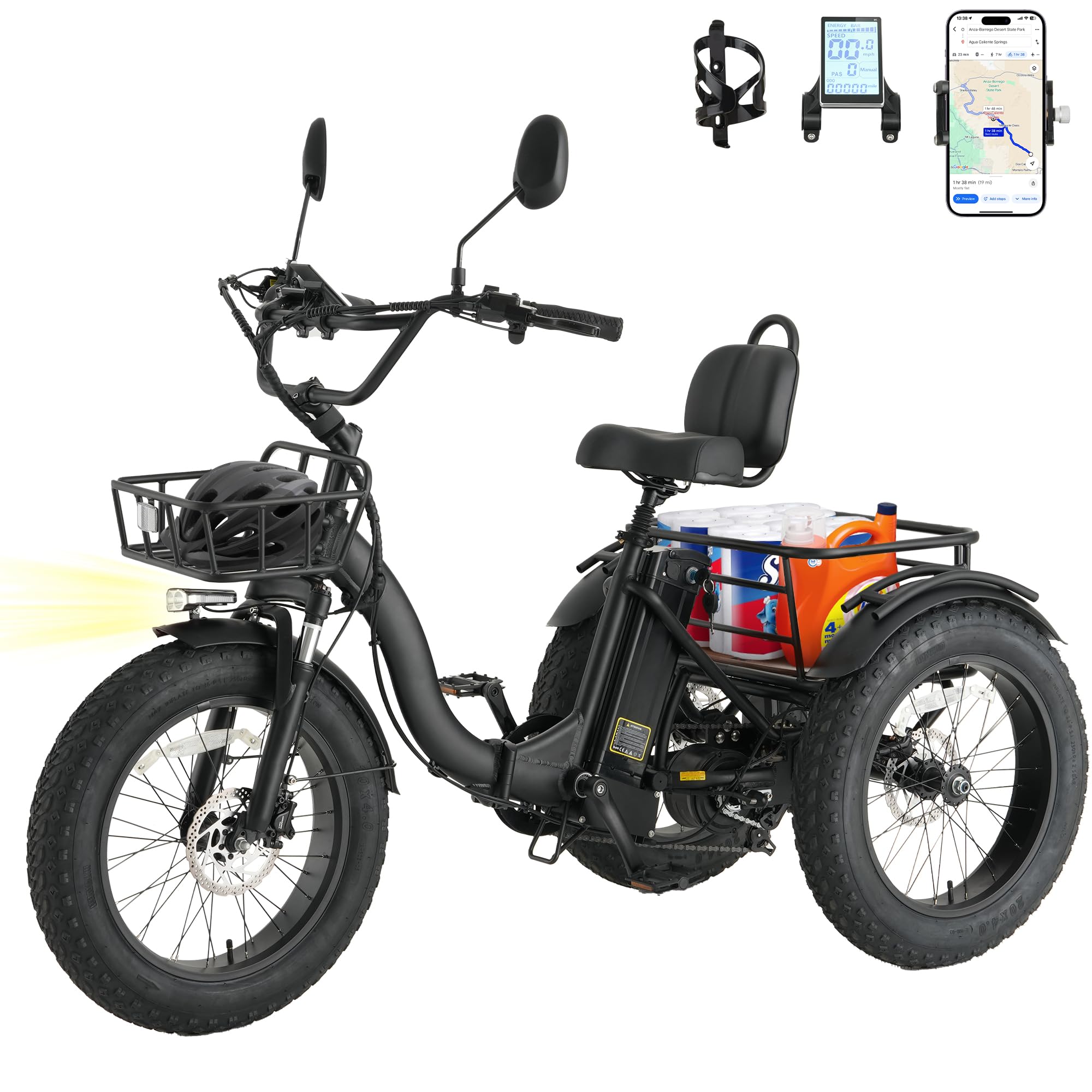
Image: The Skeri ET03 Electric Tricycle after initial unboxing, showing its main components.
(Refer to 'Installation of ET03' video: 0:00 - 0:12)
- Front Wheel Installation:
Install the front wheel onto the fork. Pay close attention to the correct sequence of gaskets and nuts to ensure proper and secure fitting. Tighten securely.(Refer to 'Installation of ET03' video: 0:13 - 0:50)
- Front Mudguard Installation:
Attach the front mudguard to the front fork using the provided screws and tools. Ensure it is centered over the wheel and securely fastened.(Refer to 'Installation of ET03' video: 0:52 - 1:49)
- Front Lamp Installation:
Mount the front lamp to its designated bracket on the front of the tricycle. Connect any necessary wiring.(Refer to 'Installation of ET03' video: 1:50 - 1:59)
- Handlebars Installation:
Insert the handlebar stem into the head tube and adjust to your preferred height. Securely tighten the handlebar clamp bolts. Ensure all controls (brakes, shifters, display) are correctly positioned and tightened.
Image: Detailed view of the handlebar components, including the LCD display and controls.
(Refer to 'Installation of ET03' video: 2:00 - 2:41)
- Water Bottle Holder Installation:
Attach the water bottle holder to the frame using the provided screws.(Refer to 'Installation of ET03' video: 2:42 - 2:56)
- Rear Mudguards Installation:
The rear mudguards are pre-installed on the rear basket. Ensure they are securely attached.(Refer to 'Installation of ET03' video: 2:57 - 4:36)
- Rear Basket Installation:
Mount the rear basket to the tricycle's rear rack using the provided hardware. Ensure it is stable and capable of holding cargo securely.
Image: The Skeri ET03 Electric Tricycle showcasing its ample cargo capacity with front and rear baskets.
(Refer to 'Installation of ET03' video: 4:37 - 5:49)
- Front Basket Installation:
Attach the front basket to the designated mounting points on the front of the tricycle, typically near the handlebars. Secure all fasteners.(Refer to 'Installation of ET03' video: 5:50 - 6:35)
- Pedals Installation:
Identify the left (L) and right (R) pedals. Thread the pedals into the crank arms. Remember that the left pedal is reverse-threaded. Tighten firmly with a wrench.(Refer to 'Installation of ET03' video: 6:36 - 6:59)
- Rearview Mirror Installation:
Screw the rearview mirrors into the designated mounts on the handlebars. Adjust their angle for optimal rear visibility.(Refer to 'Installation of ET03' video: 7:00 - 7:18)
- Wiring Harness Fixation:
Ensure all wiring harnesses are neatly routed and secured with zip ties or clips to prevent them from snagging or interfering with moving parts.(Refer to 'Installation of ET03' video: 7:27 - 7:33)
- Motor Shaft Plug Installation:
Connect the motor shaft plug securely. Ensure a tight connection to prevent power interruptions.(Refer to 'Installation of ET03' video: 7:34 - 7:41)
3. Operating Instructions
Familiarize yourself with the controls and functions of your Skeri ET03 Electric Tricycle for an optimal riding experience.
3.1 Battery Removal and Installation
To remove the battery, unlock it with the key and slide it out from its compartment. To install, slide the battery back into place until it clicks, then lock it with the key. Ensure the battery is securely locked before riding.
(Refer to 'Installation of ET03' video: 7:47 - 8:06)
3.2 Electrical Functions
The tricycle features an intuitive LCD display (M5) that shows battery status, speed, pedal assist system (PAS) level, riding mode, and distance. Use the handlebar controls to navigate the display and adjust settings.

Image: The central LCD display provides essential riding information at a glance.
(Refer to 'Installation of ET03' video: 8:07 - 8:32 for demonstration of electrical functions)
3.3 Riding Modes
Tailor your journey with multiple riding modes:
- Pedal-Assist (PAS) Mode: Provides motor assistance as you pedal, offering a gentle boost for light exercise or extended range.
- Full-Electric Mode: Engages the motor via the twist throttle for effortless cruising without pedaling.
- Manual Mode: Ride the tricycle like a traditional bike, relying solely on pedal power.
3.4 Gears and Braking
- Shimano 7-Speed Derailleur: Use the ergonomic thumb shifter on the handlebars to smoothly transition between 7 gears, adapting to various terrains and inclines.
- Hydraulic Disc Brakes: The front and rear hydraulic disc brakes provide powerful and responsive stopping power in all conditions.
- Parking Brake: Engage the hydraulic parking brake to securely hold the tricycle in place, especially on slopes, for added safety when loading or parking.
4. Maintenance
Regular maintenance ensures the longevity and safe operation of your Skeri ET03 Electric Tricycle.
- Battery Care: Charge the UL Certified 48V 13Ah removable battery regularly. Avoid completely draining the battery. Store it in a cool, dry place when not in use.
- Tire Pressure: Check the pressure of the 20"x4" fat tires before each ride. Maintain recommended pressure for optimal performance and safety.
- Brake System: Periodically inspect the hydraulic disc brakes for wear and tear. Ensure brake levers are responsive and brake pads are not excessively worn.
- Chain and Gears: Keep the chain clean and lubricated. Inspect the Shimano 7-speed gears for smooth operation.
- General Cleaning: Clean the tricycle regularly with a damp cloth. Avoid using high-pressure water jets directly on electrical components.
- Fasteners: Routinely check all bolts and nuts for tightness, especially on critical components like wheels, handlebars, and seat.
5. Troubleshooting
If you encounter any issues with your Skeri ET03 Electric Tricycle, refer to the following common troubleshooting tips. For complex problems, please contact customer support.
- No Power: Check if the battery is fully charged and securely installed. Ensure the key is turned to the 'ON' position.
- Motor Not Engaging: Verify that the motor shaft plug is properly connected. Check the PAS level on the LCD display.
- Brake Issues: If brakes feel spongy or are not stopping effectively, they may need adjustment or bleeding. Do not ride if brakes are not fully functional.
- Gear Shifting Problems: If gears are not shifting smoothly, the derailleur may need adjustment.
- Unusual Noises: Investigate any unusual sounds. This could indicate loose components or a need for lubrication.
6. Specifications
Detailed technical specifications for the Skeri ET03 Electric Tricycle.

Image: Size guide and dimensions for the Skeri ET03 Electric Tricycle.
| Feature | Detail |
|---|---|
| Model Name | ET03 |
| Bike Type | Fat Tire |
| Age Range (Description) | Adult |
| Brand | Skeri |
| Number of Speeds | 7 |
| Color | Classic Black |
| Wheel Size | 20 Inches |
| Frame Material | Aluminum |
| Suspension Type | Front |
| Special Feature | Basket (Front & Rear) |
| Included Components | Mirror, Rear Basket, Tool Kit, User Manual |
| Brake Style | Disc (Hydraulic) |
| Specific Uses For Product | Trail, Commuting, Errands |
| Power Source | Battery Powered |
| Wattage | 750 watts (Peak 1350W) |
| Wheel Material | Rubber |
| Lithium Battery Energy Content | 624 Watt Hours (48V 13Ah) |
| Assembly Required | Yes (90% pre-assembled) |
| Bicycle Drivetrain Type | Hub drive |
| Electric Assist Type | Pedal assist, Throttle assist |
| Frame Size | 18 Inches |
| Frame Type | Step-Through |
| Item Package Dimensions L x W x H | 72 x 36 x 12 inches |
| Package Weight | 95 Pounds |
| Max Speed | 20 MPH |
| Max Range | Up to 50 miles (PAS mode) |
| Max Slope | 25 degrees |
| Loading Capacity (Front Basket) | 33 lbs (3 Gallon) |
| Loading Capacity (Rear Basket) | 66 lbs (13 Gallon) |
| User Weight Capacity | 330 lbs |
| Suggested Rider Height | 4'11" - 6'3" |
7. Warranty and Support
Skeri is committed to providing reliable products and excellent customer service.
- Warranty: Your Skeri ET03 Electric Tricycle comes with a 24-month limited warranty. This covers manufacturing defects and ensures peace of mind.
- Customer Support: We offer 24/7 customer support to assist you with any questions or issues. You can reach us via online support or email.
- Safety Certifications: The tricycle and its battery are UL Certified (UL2272 & UL2849), meeting high safety standards for worry-free adventures.

Image: Skeri's dedicated customer service team is available to assist you.

