
Introduction
Upgrade your bedside experience with this multifunctional alarm clock radio that combines a 15W fast wireless charger, FM radio, Bluetooth speaker, digital clock, and adjustable night light. Perfect for modern lifestyles, this radio alarm clock keeps your nightstand neat and organized while enhancing your daily routine.
Key Features
- All-in-One Smart Nightstand Companion: Combines 15W fast wireless charger, FM radio, Bluetooth speaker, digital clock, and adjustable night light.
- Premium Stereo Sound & Bluetooth 5.3 Connectivity: Enjoy rich, crystal-clear audio through the high-fidelity 10W stereo Bluetooth speaker with stable Bluetooth 5.3.
- 15W Fast Wireless Charging & USB Port: Qi-certified wireless charging for smartphones and an extra USB port for simultaneous device charging.
- Adjustable Display & 12-Mode Ambient Light: 3-level dimmable LED display and 12 colorful lighting modes for personalized ambiance.
- Custom Alarms & White Noise for Better Sleep: 7 unique alarm tones and 7 soothing white noise options with a sleep timer for peaceful rest.
Package Contents
- GILLIER Wireless Charging Alarm Clock Radio (Model S300)
- USB-C Charging Cable
- User Manual
Product Overview
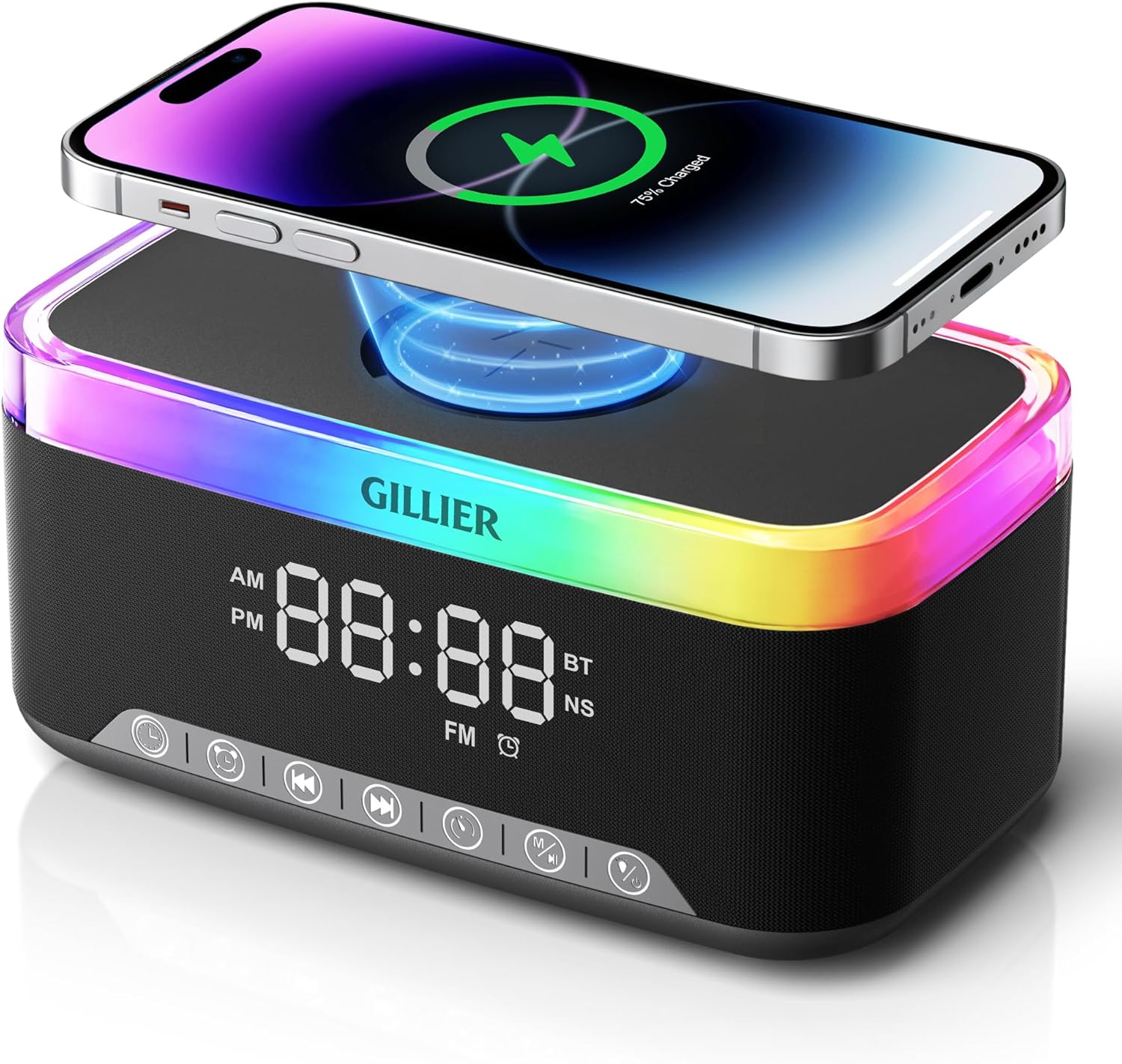
The GILLIER Wireless Charging Alarm Clock Radio, featuring a digital display, touch controls, and a top-mounted wireless charging pad. The device is illuminated with colorful ambient lighting.

An illustration showcasing the multi-functional capabilities of the GILLIER alarm clock, including wireless charging, Bluetooth connectivity, clock, alarm, FM radio, and night light.
Front Panel Controls
- Clock Setting Button: Adjusts time.
- Alarm Setting Button: Sets and activates/deactivates alarms.
- Previous / Volume Down Button: Navigates tracks/stations, decreases volume.
- Play / Pause Button: Controls media playback.
- Next / Volume Up Button: Navigates tracks/stations, increases volume.
- Timer Button: Sets sleep timer.
- Mode Switch Button (M/NL): Cycles through modes (Bluetooth, FM, White Noise) and changes night light colors.
- Power / Light Button: Turns device on/off, adjusts display brightness.
Rear Panel Ports

A detailed diagram illustrating the front control buttons and rear connectivity ports (Type-C for power, TF card slot, USB port, and AUX input) of the GILLIER alarm clock.
- DC IN (Type-C) Port: For power input.
- TF Card Slot: For playing audio from a TF (MicroSD) card.
- USB Port: For charging other devices.
- AUX Port: For wired audio input.
Top Panel
- Wireless Charging Pad: For Qi-compatible device charging.
Setup
Powering On
1. Connect the provided USB-C cable to the DC IN port on the rear of the device.
2. Plug the other end of the USB-C cable into a compatible USB power adapter (not included).
3. The device will power on automatically or can be turned on by long pressing the 'Power/Light' button.
Initial Time Setting
1. In clock mode, long press the 'Clock Setting' button. The hour digits will start flashing.
2. Use the 'Previous' or 'Next' buttons to adjust the hour.
3. Short press the 'Clock Setting' button again to switch to minute adjustment. Use 'Previous' or 'Next' buttons to adjust the minutes.
4. Short press the 'Clock Setting' button one more time to confirm and exit time setting mode.
Operating Instructions
Wireless Charging
Place your Qi-compatible smartphone on the wireless charging pad located on the top surface of the alarm clock. Ensure the device is plugged into a power source for wireless charging to function. The charging indicator on your phone will confirm charging status.

The GILLIER alarm clock demonstrating its 15W Qi-certified fast wireless charging for smartphones and an additional USB port for charging other devices like smartwatches.
Bluetooth Speaker
1. Press the 'Mode Switch' button (M/NL) until