
1. Introduction
Thank you for choosing the ANDELI MIG135 Multiprocess Welder. This machine is designed for versatility, offering MIG, Lift TIG, and MMA (Stick) welding capabilities in a single, portable unit. Operating on 110V, it is suitable for various applications, from home DIY projects to general maintenance work.
This manual provides essential information for the safe and efficient operation, setup, and maintenance of your ANDELI MIG135 welder. Please read it thoroughly before use and keep it for future reference.
2. Safety Instructions
WARNING: Welding can be dangerous. Always follow safety precautions to prevent injury or death.
- Electric Shock Can Kill: Ensure proper grounding. Do not touch live electrical parts. Wear dry insulating gloves and protective clothing.
- Fumes and Gases Can Be Hazardous: Keep your head out of the fumes. Use ventilation or exhaust to remove fumes from the breathing zone.
- Arc Rays Can Burn Eyes and Skin: Wear a welding helmet with a proper shade filter. Wear appropriate protective clothing to protect skin.
- Fire and Explosion Hazard: Remove all flammables from the welding area. Have a fire extinguisher readily available.
- Hot Parts Can Cause Severe Burns: Allow welded materials and equipment to cool before handling.
- Read the Entire Manual: Understand all instructions and warnings before operating the equipment.
3. Setup
3.1 Unpacking and Inspection
Carefully unpack the welder and all accessories. Inspect for any shipping damage. If damage is found, contact your supplier immediately.
3.2 Power Connection
The ANDELI MIG135 operates on 110V AC. Ensure your power supply meets the machine's requirements and is properly grounded. Use a dedicated circuit if possible to avoid overloading.
3.3 Wire Feeder Setup (MIG Mode)
This machine is designed to use 0.030 inch (0.8mm) 1kg flux-cored welding wire. No gas cylinder is required for flux-cored welding.
- Open the wire spool compartment.
- Place the flux-cored wire spool onto the spindle, ensuring it rotates freely.
- Thread the wire through the wire guide and into the drive roller mechanism.
- Close the drive roller tension arm and adjust the tension. It should be tight enough to feed the wire without slipping, but not so tight that it deforms the wire.
- Ensure the correct drive roller size (0.030 inch / 0.8mm) is installed.
3.4 Connecting Welding Cables
- Ground Clamp: Connect the ground clamp cable to the appropriate terminal on the welder (usually marked with a ground symbol or "-"). Securely attach the ground clamp to the workpiece, ensuring good electrical contact.
- MIG Torch: The MIG torch is typically integrated or connects via a specific port. Ensure it is securely attached.
- MMA Electrode Holder: For MMA welding, connect the electrode holder cable to the positive (+) terminal and the ground clamp to the negative (-) terminal for most common electrodes. Consult electrode manufacturer specifications.
- Lift TIG Torch: For Lift TIG welding, connect the TIG torch to the negative (-) terminal and the ground clamp to the positive (+) terminal.
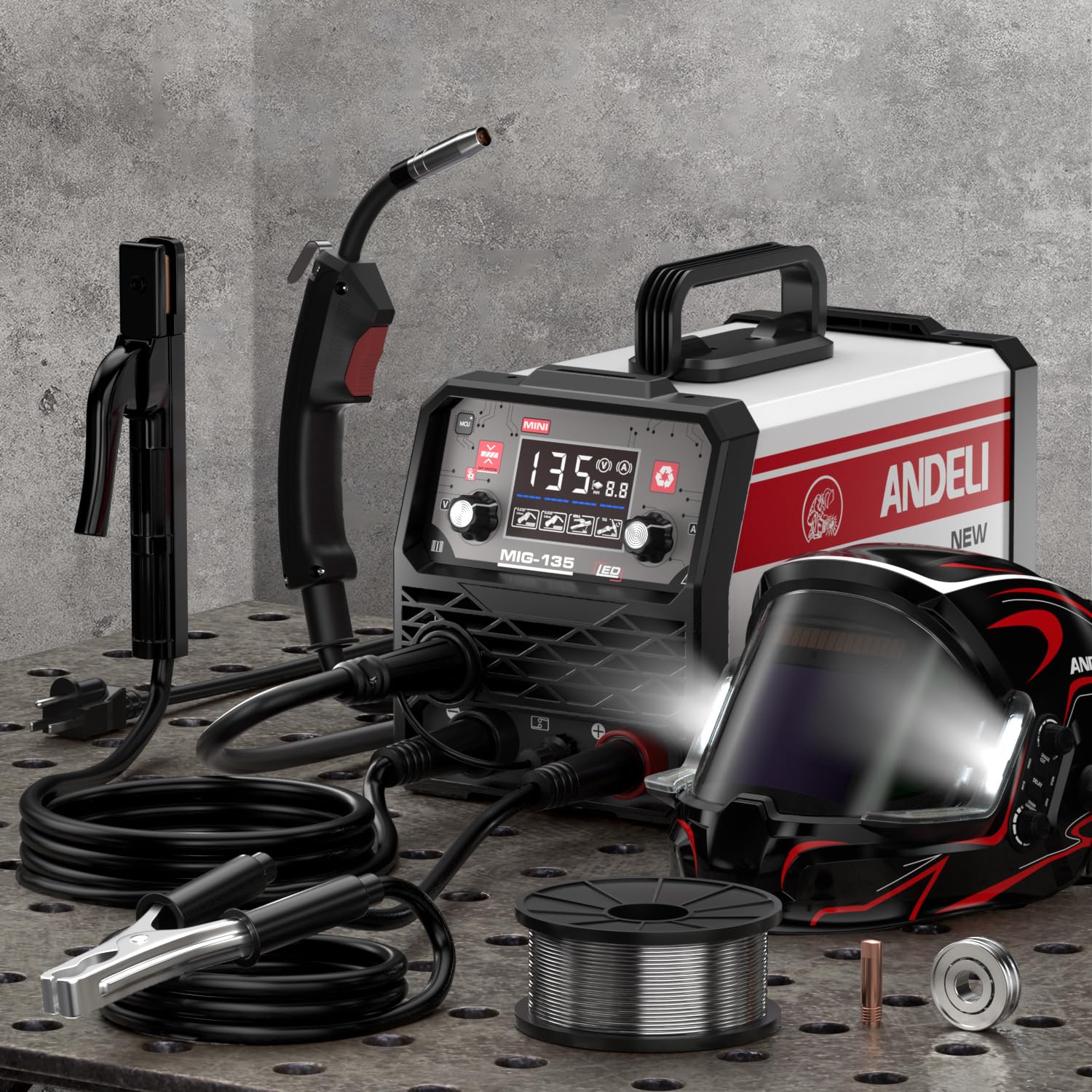
Figure 1: Front view of the ANDELI MIG135 Welder, showing the control panel and connection points.
4. Operating Instructions
4.1 Control Panel Overview
The ANDELI MIG135 features a simple control panel designed for ease of use. It includes a display and adjustment knobs for welding voltage and current, allowing for unified adjustment.
- Mode Selection: Select between MIG, MMA, or Lift TIG welding modes.
- Current/Voltage Adjustment: Use the main knob(s) to set the desired welding current (Amps) and voltage. Refer to welding charts for recommended settings based on material thickness and wire/electrode type.
- Display: Shows current welding parameters.
4.2 MIG Welding (Flux-Cored)
This mode is ideal for welding ordinary thin steel and iron without the need for shielding gas.
- Ensure the machine is set to MIG mode and flux-cored wire is loaded correctly.
- Set appropriate voltage and wire feed speed (often linked to voltage in unified adjustment).
- Position the ground clamp securely on the workpiece.
- Hold the MIG torch at the correct angle (typically 10-15 degrees from vertical in the direction of travel).
- Press the trigger to start welding. Maintain a consistent travel speed and arc length.
4.3 MMA (Stick) Welding
Suitable for various materials and outdoor conditions.
- Connect the electrode holder and ground clamp as described in Section 3.4.
- Select MMA mode.
- Insert the appropriate electrode into the holder.
- Set the welding current (Amps) according to the electrode manufacturer's recommendations.
- Strike an arc by lightly touching and quickly lifting the electrode from the workpiece.
- Maintain a consistent arc length and travel speed.
4.4 Lift TIG Welding
Provides precise control for cleaner welds, typically on thinner materials.
- Connect the TIG torch and ground clamp as described in Section 3.4. (Note: This machine supports Lift TIG, which means no high-frequency start. A gas supply for shielding is typically required for TIG welding, though the product description focuses on flux-cored MIG. If TIG is used, ensure appropriate shielding gas and regulator are connected, which are not included with the basic flux-cored setup.)
- Select Lift TIG mode.
- Set the welding current (Amps).
- Touch the tungsten electrode lightly to the workpiece to establish an arc, then lift it slightly to maintain the arc.
- Feed filler rod manually if required.
5. Maintenance
Regular maintenance ensures the longevity and reliable performance of your welder.
- Cleaning: Periodically clean the welder's exterior. The unique air channel design helps minimize dust absorption, but internal cleaning by qualified personnel may be necessary in dusty environments.
- Wire Feeder: Inspect the wire drive rollers and liner regularly for wear or blockages. Clean any debris to ensure smooth wire feeding.
- Cables and Connections: Check all welding cables, ground clamp, and torch connections for damage or loose fittings. Replace damaged components immediately.
- Storage: Store the welder in a clean, dry environment when not in use.
6. Troubleshooting
This section addresses common issues you might encounter. For problems not listed here, contact customer support.
| Problem | Possible Cause | Solution |
|---|---|---|
| No power to the machine | Power cord unplugged, circuit breaker tripped, faulty power switch | Check power connection, reset circuit breaker, contact service if switch is faulty |
| No arc (MMA/TIG) or wire feed (MIG) | Poor ground connection, incorrect settings, damaged cables, thermal overload | Ensure good ground, verify settings, inspect cables, allow machine to cool |
| Poor weld quality | Incorrect current/voltage, improper travel speed/angle, contaminated workpiece | Adjust settings, practice technique, clean workpiece thoroughly |
| Wire feeding issues (MIG) | Incorrect drive roller tension, clogged liner, wrong drive roller size, tangled wire | Adjust tension, clean liner, ensure correct roller, untangle wire spool |
| Overheat protection activated | Exceeded duty cycle, insufficient ventilation | Allow machine to cool down, ensure adequate airflow around the unit |
7. Specifications
| Feature | Detail |
|---|---|
| Model Number | MIG-135MINI |
| Input Voltage | 110V AC |
| Welding Processes | MIG (Flux-Cored), Lift TIG, MMA (Stick) |
| Compatible Wire (MIG) | 0.030 inch (0.8mm) 1kg Flux-Cored Wire |
| Item Weight | 18.85 pounds |
| Package Dimensions | 19.7 x 14.6 x 13.4 inches |
| Manufacturer | XINGYI |
| ASIN | B0FZT1BJ92 |
8. Warranty and Support
For warranty information, technical support, or service inquiries, please contact the manufacturer or your point of purchase. Keep your purchase receipt as proof of purchase.
Manufacturer: XINGYI
Brand: ANDELI
For further assistance, you may visit the ANDELI Store on Amazon.


