
UNIWEIGH UNI-PS4B-PRO-WI
UNIWEIGH 440lb Digital Postal Scale (Model UNI-PS4B-PRO-WI) Instruction Manual
Introduction
This manual provides detailed instructions for the proper setup, operation, and maintenance of your UNIWEIGH 440lb Digital Postal Scale, Model UNI-PS4B-PRO-WI. Designed for high capacity and precision, this scale is suitable for weighing packages, parcels, and mail with 10g accuracy. Please read this manual thoroughly before use to ensure optimal performance and longevity of your device.
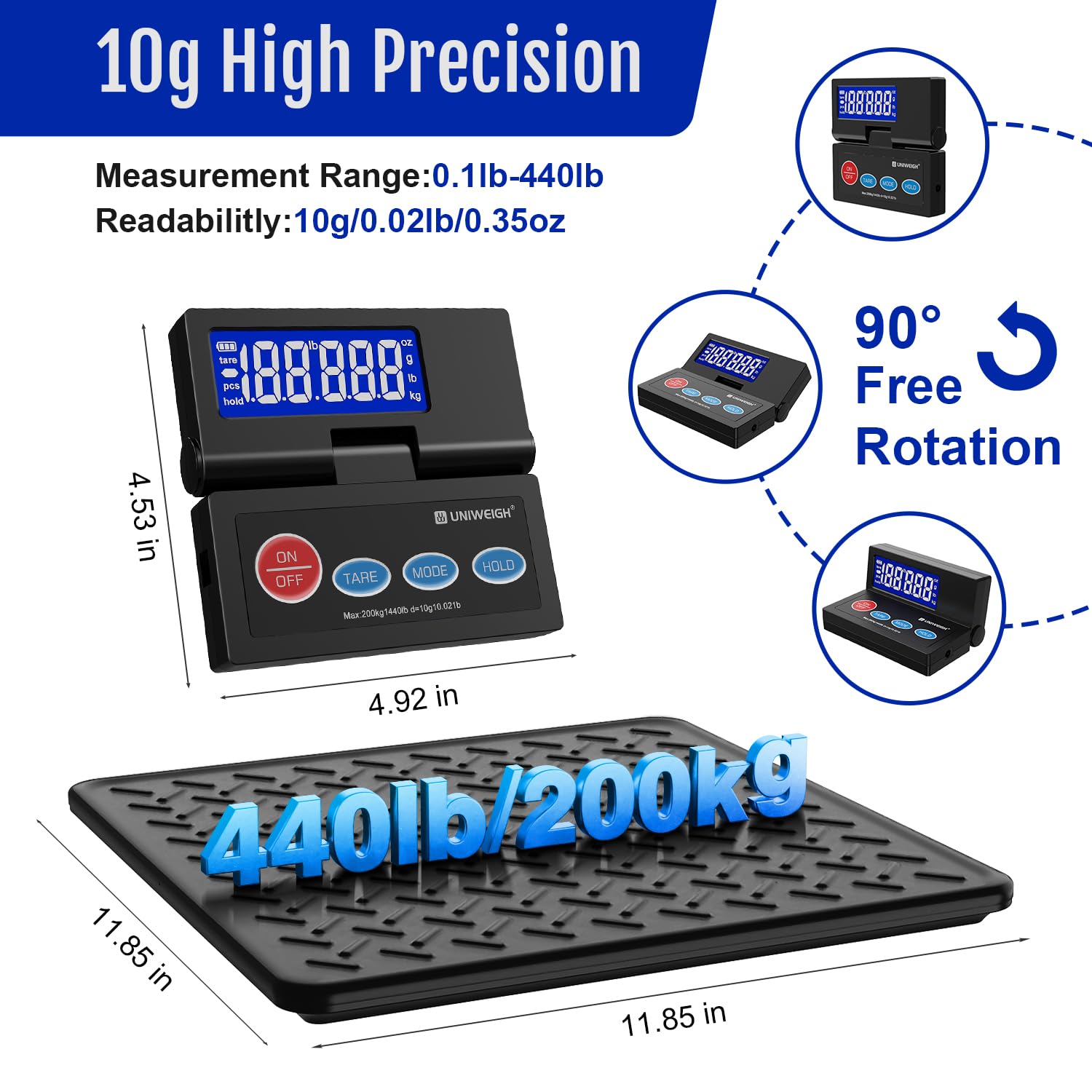
Image: Overview of the UNIWEIGH 440lb Digital Postal Scale, highlighting its 10g precision, 440lb/200kg capacity, and dimensions (11.85 in x 11.85 in platform, 4.92 in x 4.53 in display unit).
Setup Instructions
Follow these steps to set up your UNIWEIGH Digital Postal Scale:
- Unpack the Scale: Carefully remove all components from the packaging. Ensure you have the scale platform, the display unit, a USB-A cable, and 6 AAA batteries.
- Placement: Place the scale platform on a flat, stable, and level surface to ensure accurate readings. Avoid placing it near vibrations or drafts.
- Power Supply:
- Battery Power: Open the battery compartment on the underside of the display unit and insert the 6 AAA batteries, observing correct polarity.
- USB Power: Connect the provided USB-A cable to the display unit and plug the other end into a compatible USB power source (e.g., a wall adapter or computer USB port).
- Connect Display Unit: Connect the coiled cable from the scale platform to the display unit.
- Turn On: Press the "ON/OFF" button on the display unit to power on the scale. The display should light up and show "0.00" or "0.0".
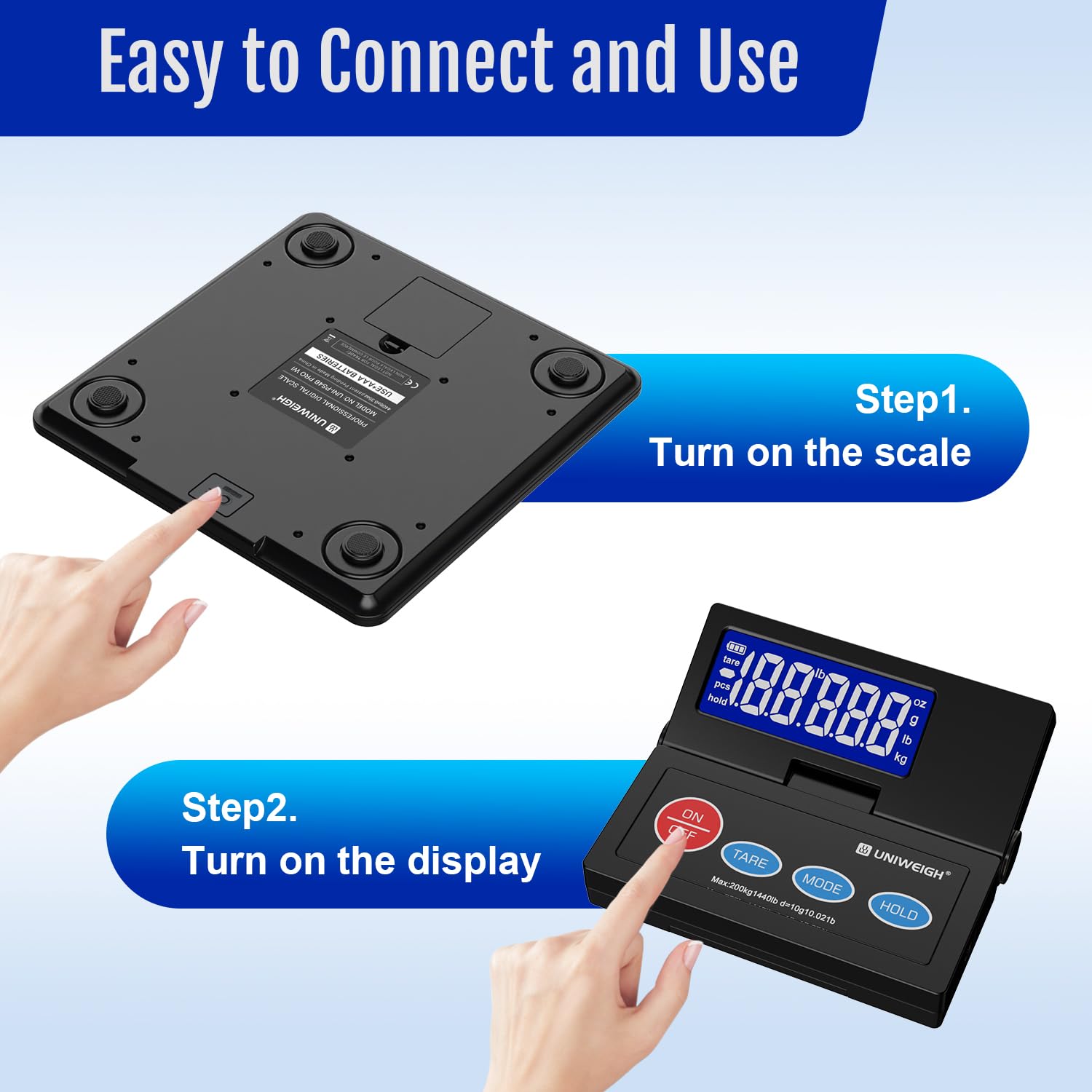
Image: Illustrates the two-step process of turning on the scale: first the main unit, then the separate display unit.

Image: Demonstrates the dual power options for the scale: via USB-A cable or 6 AAA batteries.
Operating Instructions
Basic Weighing
- Ensure the scale is on and displays "0.00".
- Place the item to be weighed gently on the center of the platform.
- Read the weight displayed on the LCD screen.
Unit Conversion
Press the "MODE" button to cycle through available weighing units: kilograms (kg), pounds (lb), and pounds:ounces (lb:oz).
Tare Function
The Tare function allows you to subtract the weight of a container, so you can weigh only the contents.
- Place an empty container on the scale platform.
- Wait for the weight to stabilize.
- Press the "TARE" button. The display will reset to "0.00".
- Add the items you wish to weigh into the container. The display will show the net weight of the items.

Image: Illustrates the Hold function (locking weight after item removal) and the Tare function (zeroing out container weight).
Hold Function
The Hold function allows you to lock the displayed weight even after removing the item from the scale, useful for large or awkwardly shaped packages that might obscure the display.
- Place the item on the scale.
- Wait for the weight to stabilize.
- Press the "HOLD" button. The displayed weight will be locked.
- You can now remove the item and read the locked weight. Press "HOLD" again to release the function.
Weighing Modes (C1/C2/C3)
The scale offers three specialized weighing modes:
- C1: Item Weighing Mode: Standard mode for weighing individual items.
- C2: Body Weighing Mode: Optimized for weighing people.
- C3: Mother and Baby Weighing Mode: Designed for weighing a baby while held by an adult, subtracting the adult's weight.
To select a weighing mode, press and hold the "HOLD" button for approximately 3 seconds, then cycle through the modes by pressing "HOLD" briefly until the desired mode (C1, C2, or C3) is displayed.

Image: Illustrates the three distinct weighing modes (C1, C2, C3) available on the scale.
Auto Shut-Off
The scale features an auto shut-off function to conserve battery life. It will automatically turn off after a period of inactivity. This setting can typically be adjusted (0/180/300 seconds) via the MODE button settings, as indicated in the display unit diagram.
Maintenance
Proper maintenance ensures the accuracy and longevity of your scale.
- Cleaning: Wipe the scale platform and display unit with a soft, damp cloth. Do not use abrasive cleaners or immerse the unit in water.
- Storage: Store the scale in a dry, cool place away from extreme temperatures and humidity. Avoid placing heavy objects on the platform when not in use.
- Battery Replacement: If using battery power, replace all 6 AAA batteries when the low battery indicator appears on the display.
- Calibration: While the scale is factory-calibrated, periodic calibration may be necessary for sustained accuracy. Refer to the detailed instructions in the included User's Manual for calibration procedures if needed.

Image: Close-up of the scale's alloy steel platform and non-slip foot mats, emphasizing durability and stability.
Troubleshooting
If you encounter issues with your scale, refer to the following common problems and solutions:
| Problem | Possible Cause | Solution |
|---|---|---|
| Scale does not turn on. | Low or dead batteries; loose USB connection; power switch off. | Replace batteries or ensure USB cable is securely connected. Check if the ON/OFF button is pressed. |
| Inaccurate readings. | Uneven surface; overloaded scale; scale not tared; environmental factors (vibrations, drafts). | Place scale on a flat, stable surface. Do not exceed maximum capacity. Use Tare function before weighing. Avoid unstable environments. |
| "Err" or "O-Ld" displayed. | Scale overloaded. | Remove the item immediately. The weight exceeds the maximum capacity (440lbs/200kg). |
| Display is dim or flickering. | Low batteries. | Replace batteries or ensure stable USB power supply. |
Specifications
- Model: UNI-PS4B-PRO-WI
- Brand: UNIWEIGH
- Weight Capacity Maximum: 440 lbs (200 kg)
- Readout Accuracy: 10g (0.35 oz)
- Minimum Weight: 40g (0.1 lb)
- Display Type: Backlit LCD
- Weighing Units: kg, lb, lb:oz
- Special Features: Tare Function, Hold Function, Auto Shut-Off, 3 Weighing Modes (Item, Body, Mother & Baby), Dual Power Options
- Platform Material: Alloy Steel
- Power Source: 6 x AAA Batteries (included) or USB-A Cable (included)
- Included Components: Postal scale, USB-C Cable, Batteries, User's Manual
Warranty and Support
Your UNIWEIGH Digital Postal Scale is designed for reliability and durability. For specific warranty information, please refer to the warranty card included with your product or contact UNIWEIGH customer support.
If you require technical assistance or have questions not covered in this manual, please contact UNIWEIGH customer service through the retailer where the product was purchased or visit the official UNIWEIGH website for support resources.
Related documentsUNI-PS4B-PRO-WI


Ask a question about this manual
Ask about setup, troubleshooting, compatibility, parts, safety, or missing instructions. Manuals+ will review the question and use this page’s manual context to help answer it.