
1. Introduction
This manual provides essential instructions for the safe and efficient operation of your BYINTEK R90 Max Mini Projector. Please read this manual thoroughly before using the product and retain it for future reference. The BYINTEK R90 Max is a Full HD 1080P projector supporting 4K and 3D content, featuring Android 11.0 OS, TOF automatic focus, and 2200 ANSI lumens brightness.
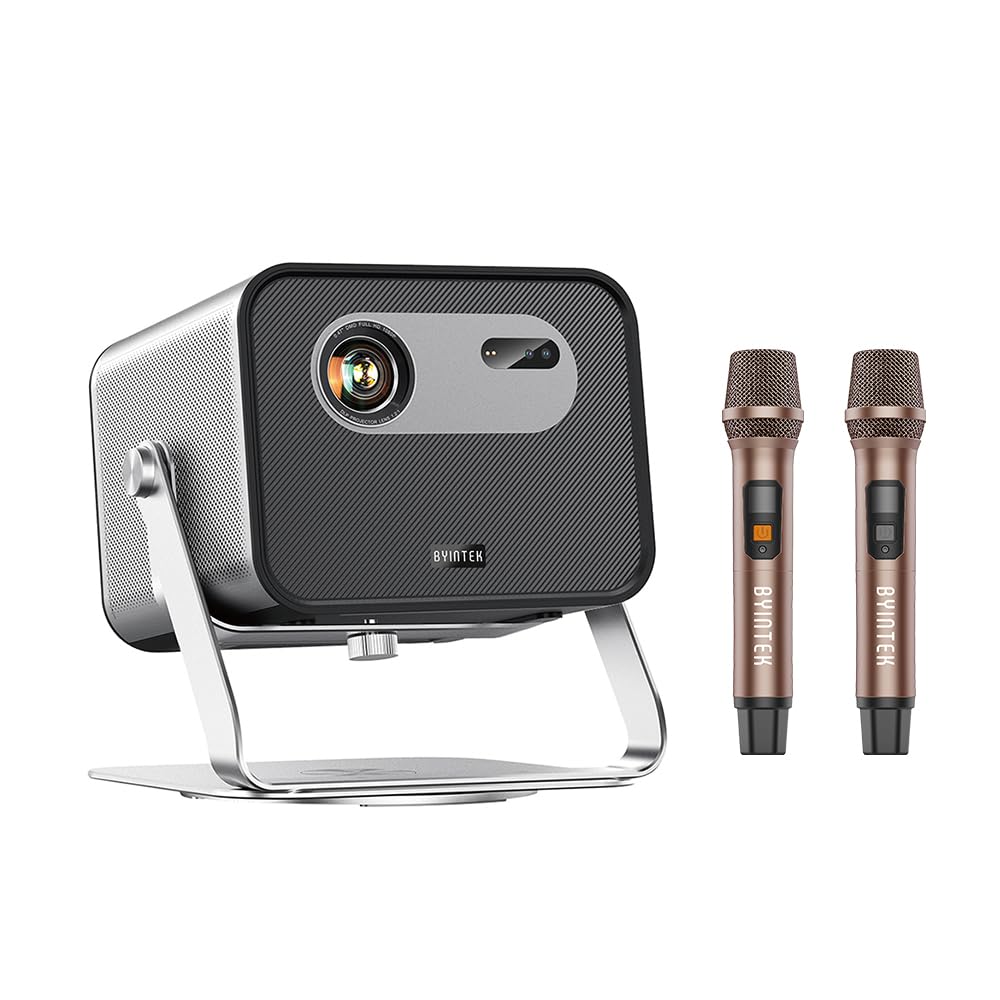
Figure 1: BYINTEK R90 Max Mini Projector - Front View
2. Safety Information
To ensure safe operation and prevent damage, observe the following precautions:
- Do not look directly into the projector lens when the lamp is on.
- Ensure proper ventilation around the projector to prevent overheating.
- Use only the power adapter supplied with the projector.
- Avoid placing the projector in unstable locations or near water.
- Do not attempt to disassemble or repair the projector yourself. Contact qualified service personnel.
- Keep the projector away from extreme temperatures, dust, and humidity.
3. Package Contents
Verify that all items are present in the package:
- BYINTEK R90 Max Mini Projector
- Power Adapter
- Power Cable
- Remote Control
- User Manual (this document)
- Dual Microphones (if included with specific model variant)
Note: Some accessories may vary based on the specific product bundle.
4. Product Overview
The BYINTEK R90 Max is a versatile mini projector designed for various entertainment and professional uses. Key features include:
- Native Full HD 1080P Resolution: Delivers crisp and clear images.
- 4K and 3D Support: Compatible with 4K input and active shutter DLP-LINK 3D content.
- 2200 ANSI Lumens Brightness: Provides vibrant images even in moderately lit environments.
- Android TV 11.0 OS: Access pre-installed apps like YouTube and Netflix, and download more from the Google Play Store.
- TOF Automatic Focus & Keystone Correction: Ensures a clear, perfectly shaped image automatically.
- Dual-band WiFi6: For fast and stable wireless connectivity and screen mirroring.
- Integrated Stereo Speakers: Two 20W speakers for immersive audio.
- Electronic Zoom: Adjust image size remotely without moving the projector.

Figure 2: Projector Rear Panel (Illustrative - actual ports may vary slightly)
5. Setup
5.1 Initial Placement
Place the projector on a stable, flat surface. Ensure there is adequate space around the projector for ventilation. The R90 Max supports 360-degree rotation, allowing for flexible projection angles, including ceiling projection.

Figure 3: Flexible placement with 360-degree rotation capability.
5.2 Power Connection
- Connect the power cable to the power adapter.
- Plug the power adapter into the projector's power input port.
- Insert the power plug into a suitable electrical outlet.
5.3 Automatic Focus and Keystone Correction
The R90 Max features standard TOF laser automatic focus and multi-point full keystone correction (vertical, horizontal, and corner). Upon startup or movement, the projector will automatically adjust the image for optimal clarity and shape within approximately 1 second. Manual adjustments can also be made via the remote control if needed.
6. Operating Instructions
6.1 Powering On/Off
- Power On: Press the power button on the projector or the remote control.
- Power Off: Press the power button on the remote control or projector. Confirm shutdown when prompted.
6.2 Android TV 11.0 OS Navigation
The projector runs on Android TV 11.0 (GTV system). Use the remote control to navigate the interface. Pre-installed applications like YouTube and Netflix are available. You can download additional applications from the Google Play Store.
Figure 4: Android TV 11.0 interface showing various streaming applications.
6.3 Connecting Devices
- Wi-Fi Connectivity: Go to Settings > Network & Internet to connect to your wireless network. The projector supports dual-band WiFi6 for stable streaming.
- Screen Mirroring: Use the built-in screen mirroring function to wirelessly display content from your Android or iOS smartphone/tablet.
- HDMI/USB: Connect external devices such as laptops, gaming consoles, or USB drives to the available ports (refer to Figure 2 for port locations).
6.4 3D Viewing
The projector supports DLP-LINK active shutter 3D. To experience 3D content, you will need compatible active shutter 3D glasses (sold separately) and 3D-enabled content.

Figure 5: Immersive 3D viewing experience.
6.5 Audio Output and Microphone Use
The R90 Max features powerful built-in stereo speakers (2x 20W). If your model includes dual microphones, connect them to the designated ports for karaoke or other audio input needs.

Figure 6: Projector setup for karaoke with dual microphones.
6.6 Remote Control Functions
The remote control allows for full navigation and adjustment. Utilize the electronic zoom function to adjust the image size (global zoom, horizontal zoom, vertical zoom) without physically moving the projector.
7. Maintenance
7.1 Cleaning the Lens
Gently wipe the projector lens with a soft, lint-free cloth specifically designed for optical surfaces. Do not use abrasive cleaners or excessive force.
7.2 General Cleaning
Wipe the projector's exterior with a soft, dry cloth. Avoid using liquid cleaners directly on the device. Ensure ventilation openings are free from dust and obstructions.
7.3 Storage
When not in use for extended periods, store the projector in a cool, dry place, protected from dust and direct sunlight.
8. Troubleshooting
| Problem | Possible Cause | Solution |
|---|---|---|
| No image displayed | Power cable disconnected; Projector off; Incorrect input source. | Check power connection; Power on the projector; Select correct input source. |
| Image is blurry | Autofocus issue; Lens dirty; Projector too close/far. | Allow autofocus to complete; Clean the lens; Adjust projector distance. |
| Image is distorted (trapezoid shape) | Keystone correction needed. | Allow automatic keystone correction to run; Manually adjust keystone via remote. |
| No sound | Volume too low; Muted; External audio device not connected properly. | Increase volume; Unmute; Check external audio connections. |
| Remote control not working | Batteries low/dead; Obstruction between remote and projector. | Replace batteries; Ensure clear line of sight to projector's IR receiver. |
9. Specifications
| Brand | Byintek |
| Model Name | R90 Max |
| Native Resolution | 1920 x 1080 (Full HD) |
| Maximum Display Resolution | 1920 x 1080 |
| Brightness | 2200 ANSI Lumens |
| Contrast Ratio | 20000:1 |
| Display Type | DLP |
| Connectivity Technology | Wi-Fi (Dual-band WiFi6) |
| Special Features | 3D integrated, TOF Automatic Focus, Android 11.0 OS |
| Light Source Life | 50,000 Hours |
| Maximum Projection Distance | 13.33 Meters |
| Maximum Image Size | 500 Inches |
| Power Consumption | 72 Watts |
| Voltage | 240 Volts |
| Dimensions (L x W x H) | 198 x 187 x 159 centimeters |
| Compatible Devices | Speaker, Laptop, Gaming Console, Smartphone, Tablet |
| UPC | 725889908253 |
10. Warranty and Support
10.1 Product Warranty
The BYINTEK R90 Max Mini Projector comes with an official 1-year warranty from the date of purchase. Please retain your proof of purchase for warranty claims.
10.2 Technical Support
For technical assistance, operational guidance, or troubleshooting, please contact BYINTEK customer service. Professional technical support is available 24 hours a day to assist you with any equipment-related inquiries.
Contact information can typically be found on the BYINTEK official website or your purchase documentation.
