
1. Product Overview
The llano 4-in-1 Card Reader (Model R604) is designed for efficient data transfer from various memory card types. It supports CFexpress Type A, CFexpress Type B, UHS-II SD, and Micro SD/TF cards, utilizing a USB 3.2 Gen 2 interface for high-speed data transmission.
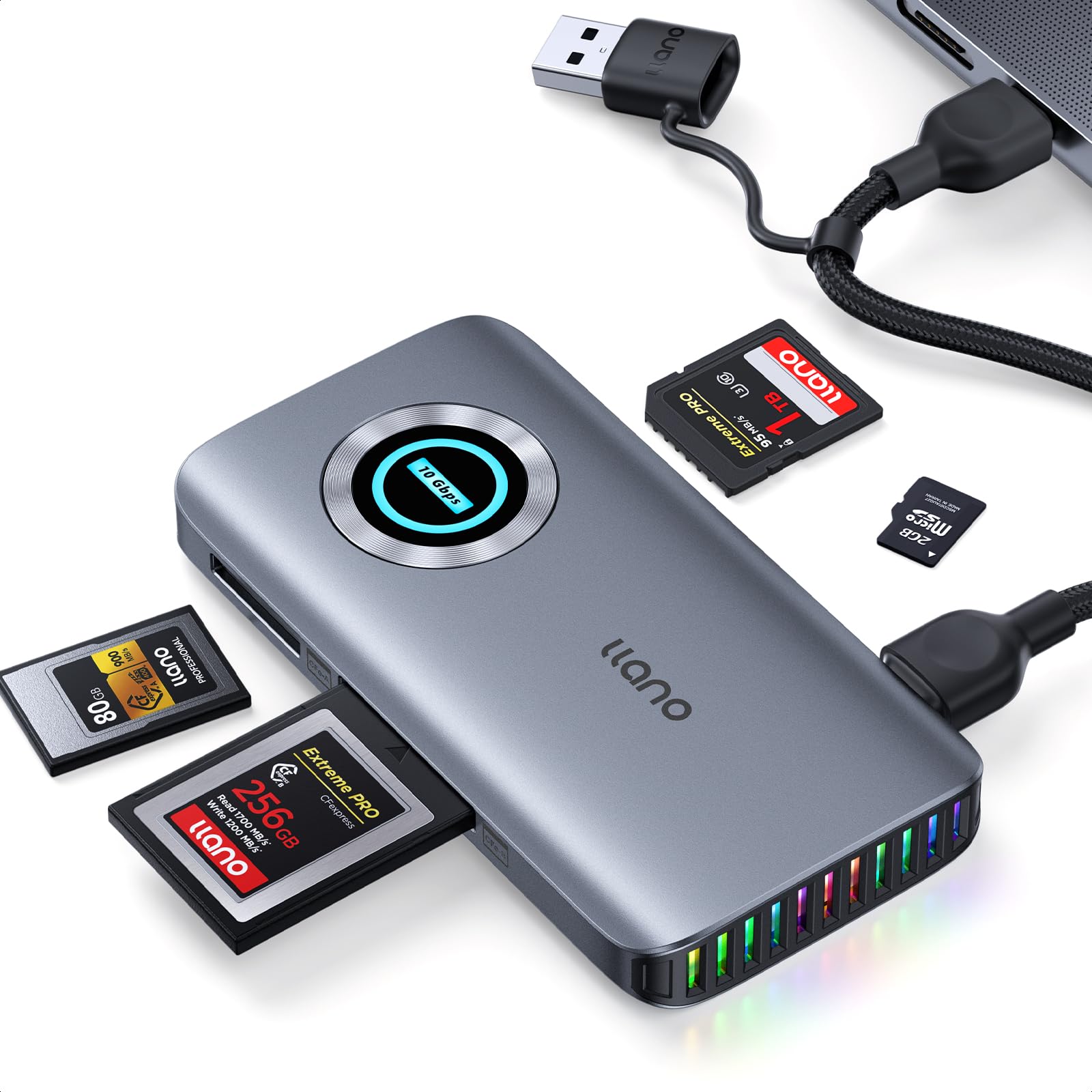
Image 1.1: The llano 4-in-1 Card Reader showing its multiple card slots and connectivity options.
What's in the Box
- llano 4-in-1 High-Speed Card Reader
- USB-C to USB-C Data Cable with USB-A Adapter
- Instruction Manual

Image 1.2: Packaging and included items for the llano 4-in-1 Card Reader.
2. Setup Instructions
Follow these steps to set up your llano 4-in-1 Card Reader:
- Connect the Data Cable: Plug the provided USB-C data cable into the USB-C port on the card reader. Ensure the cable is connected to the USB-C port located next to the Micro SD 4.0 port. Incorrect port usage will prevent the reader from functioning.
- Connect to Host Device: Connect the other end of the USB-C data cable to a compatible USB-C port on your computer, laptop, tablet, or smartphone. If your host device only has USB-A ports, use the included USB-A adapter.
- Auxiliary Power (Important for CFexpress Type A/B): For stable high-speed read/write operations with CFexpress Type A (CFxA) or CFexpress Type B (CFxB) cards, auxiliary power is required. These card types demand a peak current of 1.5A, which exceeds the standard 0.9A power limit of typical USB interfaces. Connect an auxiliary power source (e.g., a USB wall adapter) to the dedicated USB-C charging port on the card reader.
- Plug and Play: The device is plug and play and does not require driver installation for most operating systems.
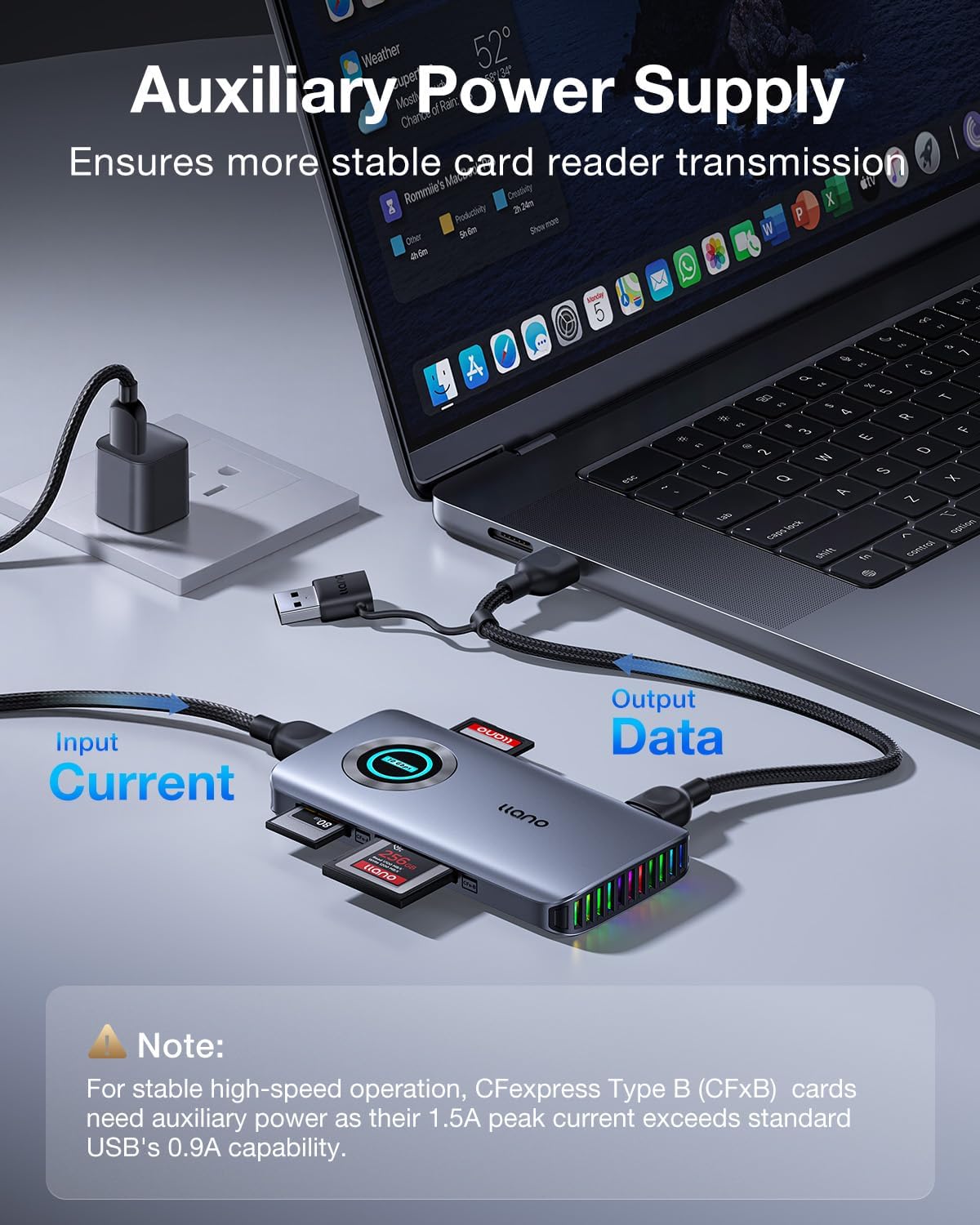
Image 2.1: Connecting the llano card reader to a laptop, illustrating the data and auxiliary power connections.

Image 2.2: Detailed view of the data transmission port on the llano card reader, highlighting the correct connection point.
3. Operating Instructions
Inserting Memory Cards
- Carefully insert your CFexpress Type A, CFexpress Type B, SD, or Micro SD/TF card into the corresponding slot on the card reader. Ensure the card is inserted correctly according to its orientation.
- The card reader features RGB lighting effects. A blue LED indicates standby status, and a green LED indicates operation status.
Data Transfer
- Once a card is inserted and the reader is connected to your device, the card will appear as a removable drive in your operating system's file explorer.
- You can now drag and drop files to and from the memory card, or use your preferred file management software.
- The USB 3.2 Gen 2 interface supports transfer speeds up to 10Gbps (1000MB/s), significantly reducing transfer times for large files.

Image 3.1: The llano card reader in use, demonstrating simultaneous card reading and a clutter-free desktop setup.

Image 3.2: Visual representation of the 10Gbps data transfer speed capability of the card reader.
Important Operating Notes
- CFexpress Type A/B Conflict: CFexpress Type A and CFexpress Type B cards are controlled by a single channel and cannot be read simultaneously. If both are inserted, the reader prioritizes Type A cards and automatically disables SD/TF card access.
- Non-Compatible Cards: This card reader is not compatible with Compact Flash/CF or XQD cards.
Official Product Videos
llano USB 3.2 Gen 2 (10Gbps) Card Reader Overview
Video 3.3: This video provides a general overview of the llano USB 3.2 Gen 2 card reader, highlighting its features and high-speed capabilities.
llano CFexpress Type A, CFexpress Type B, SD, TF Card Functionality
Video 3.4: A demonstration of the llano card reader's compatibility with CFexpress Type A, CFexpress Type B, SD, and TF cards.
4. Data Protection and Design
The llano card reader incorporates multiple features to ensure data integrity and product longevity.
Triple-Layered Data Protection
Built-in fuse resistors, safety circuits, and high-quality chips provide comprehensive protection against over-current, over-load, and over-temperature, safeguarding your memory card data during transfer.

Image 4.1: Illustration of the card reader's internal data protection mechanisms, including over-current, over-load, and over-temperature control.
Dual-Cooling Architecture
The composite shell, made of aluminum alloy and ABS, combined with dual-side vents, ensures rapid heat dissipation. This design prevents overheating during prolonged use, maintaining stable performance and extending the product's lifespan.

Image 4.2: The llano card reader showcasing its dual-cooling architecture with side vents for efficient heat dissipation.
5. Specifications
| Feature | Detail |
|---|---|
| Brand | llano |
| Model Number | R604 |
| Connectivity Technology | USB Type C |
| Hardware Interface | USB 3.2 Gen 2 |
| Data Transfer Rate | 10 Gigabits per second |
| Slot Count | 4 (CFexpress Type A, CFexpress Type B, UHS-II SD, Micro SD/TF) |
| Compatible Devices | CFexpress Type A, CFexpress Type B, UHS-II SD, Micro SD, Windows, Mac OS, Linux, iOS, iPadOS, Android |
| Special Features | CFexpress Type A/B Support, High Speed, Plug & Play, RGB Lighting, Auxiliary Power Supply |
| Color | Grey |
| Item Weight | 80 g |
6. Troubleshooting
If you encounter issues with your llano 4-in-1 Card Reader, please refer to the following common troubleshooting steps:
- Device Not Recognized:
- Ensure the data cable is securely connected to both the card reader and your host device.
- Verify that the data cable is plugged into the correct USB-C port on the card reader (next to the Micro SD 4.0 port).
- Try connecting the card reader to a different USB port on your host device.
- Test with a different USB-C data cable if available.
- Restart your computer or host device.
- Card Not Reading:
- Ensure the memory card is fully and correctly inserted into its designated slot.
- Confirm that the card type (CFexpress Type A/B, SD, Micro SD) is compatible with the reader. (Note: Not compatible with Compact Flash/CF or XQD cards).
- If using CFexpress Type A or B, ensure auxiliary power is connected for stable operation, especially during high-speed transfers.
- Check if the memory card is damaged or corrupted by testing it in another compatible device.
- Remember that CFexpress Type A and Type B cards cannot be read simultaneously. If both are inserted, Type A is prioritized, and SD/TF access is disabled.
- Slow Transfer Speeds:
- Ensure your host device's USB port supports USB 3.2 Gen 2 (10Gbps) for optimal performance. Connecting to a USB 2.0 or 3.0 port will result in lower speeds.
- For CFexpress Type A/B cards, ensure auxiliary power is connected to prevent power-related speed limitations.
- Verify that your memory cards themselves are high-speed rated.
7. Warranty and Support
llano is committed to providing reliable products and excellent customer service.
Warranty Coverage
This product is covered by a 24-month protection plan from the date of purchase, covering manufacturing defects and quality issues. Please retain your proof of purchase for warranty claims.
Customer Support
For detailed setup videos, FAQs, or personalized assistance, please refer to the official llano website or contact our customer support team. We offer unlimited support to ensure your satisfaction.
- 2-Year Coverage: Comprehensive warranty against defects.
- 24h Specialist Support: Access to expert assistance.
- 30-day Free Returns: Hassle-free returns within 30 days of purchase.