1. Introduction
The LILYGO T-Lora Pager is a versatile development board integrating an ESP32 microcontroller with LoRa 915Mhz communication, NFC, Real-Time Clock (RTC), and an AI Smart Sensor. It features a 2.3-inch IPS LCD and a QWERTY keyboard, designed for various smart sensor and communication applications. This manual provides essential information for setting up, operating, and maintaining your T-Lora Pager.
2. Product Overview
Key Features:
- LoRa Chip: SX1262 for long-range communication.
- Display: 2.3-inch IPS LCD with 480 x 222 resolution.
- Connectivity: LoRa 915Mhz, NFC (ST25R3916).
- Processor: ESP32-S3.
- Sensors: AI-capable IMU (BHI260AP).
- Audio: ES8311 (Microphone/Speaker) for audio input/output.
- Input: QWERTY keyboard, Encoder with button.
- Power: RTC, Battery Charger, Battery Gauge.
- Storage: TF Card slot.
- Expansion: GPIO Expand, 2.54mm 2*8 Expansion Port (Adaptation to NRF24L01).
Components:
The LILYGO T-Lora Pager includes the main development board, a 2.3-inch IPS LCD, a QWERTY keyboard, and integrated LoRa antennas. It also features various ports and buttons for functionality and expansion.

Figure 2.1: Front view of the LILYGO T-Lora Pager, showing the 2.3-inch IPS LCD and QWERTY keyboard.
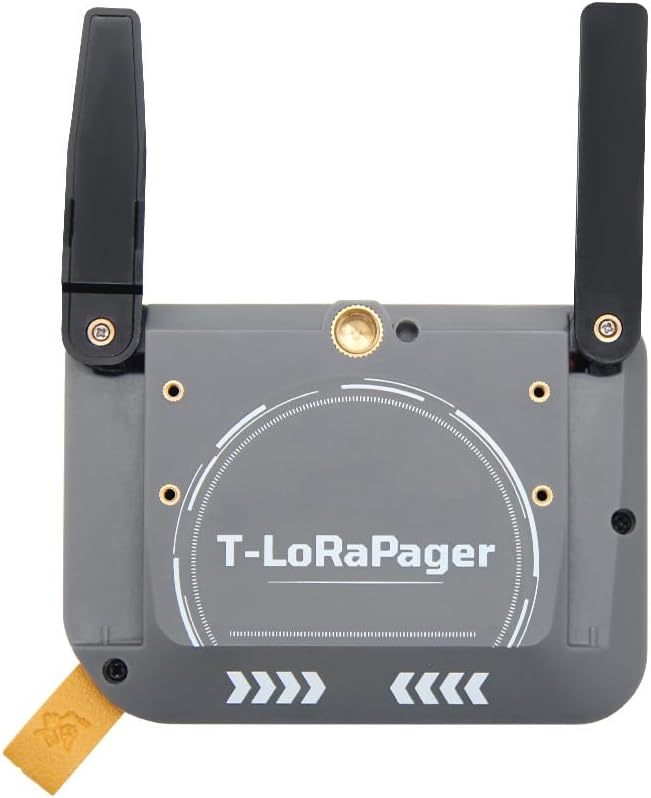
Figure 2.2: Back view of the LILYGO T-Lora Pager, displaying the 'T-LoRaPager' branding and integrated antennas.
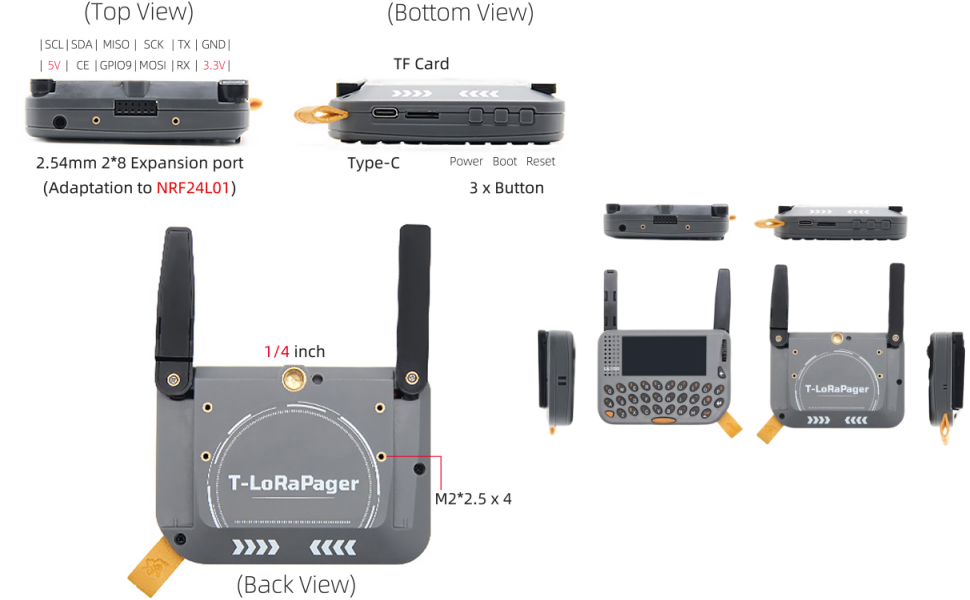
Figure 2.3: Detailed pinmap diagram for the LILYGO T-Lora Pager, showing connections for ESP32-S3, LCD, GNSS, LoRa, NFC, Smart Sensor, and RTC.
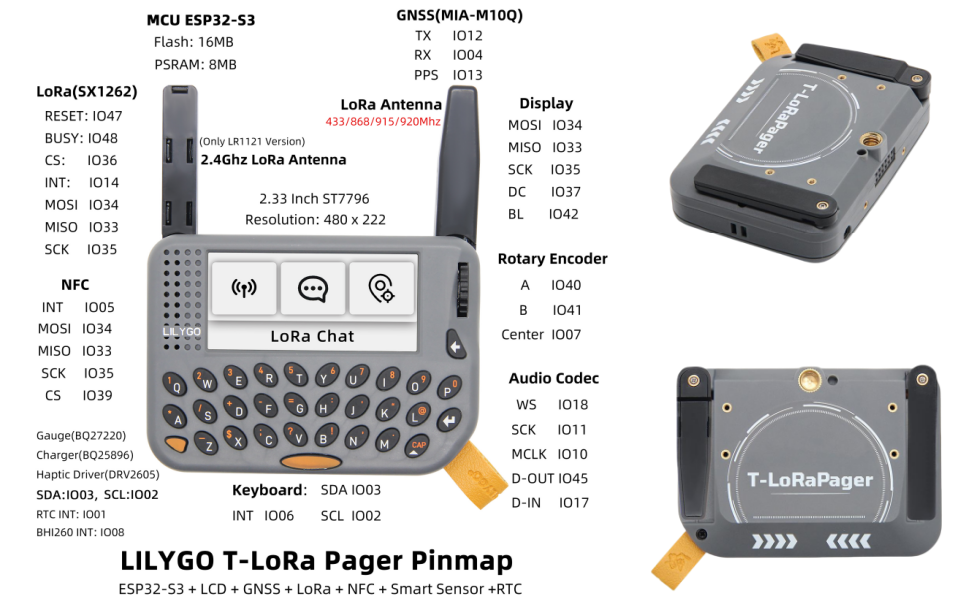
Figure 2.4: Various views of the LILYGO T-Lora Pager, highlighting the top, bottom, and back. This image details the TF Card slot, Type-C port, power/boot/reset buttons, 2.54mm 2*8 Expansion Port, 1/4 inch screw hole, and M2 standoff locations.
Video 2.1: An overview of the LILYGO T-Lora Pager, demonstrating its features and various functionalities including LoRa communication and NFC testing. This video provides a visual guide to the device's capabilities and physical attributes.
3. Setup
Before using your LILYGO T-Lora Pager, follow these setup steps:
- Initial Charge: Connect the device to a 5V USB power source using the Type-C port to fully charge the internal Lithium Ion battery.
- Firmware: The device comes with Meshcore Firmware. For development or custom applications, refer to the official LILYGO GitHub repository for flashing instructions and available firmware options. github.com/Xinyuan-LilyGO/LilyGoLib
- Antenna Connection: Ensure the LoRa antennas are securely attached to the appropriate connectors on the device.
- TF Card Insertion (Optional): If using a TF card for storage, carefully insert it into the designated slot.
For detailed setup guides and advanced configurations, please visit the LILYGO Wiki: wiki.lilygo.cc/get_started/en/LoRa_GPS/T-LoraPager/T-LoraPager.html
4. Operating Instructions
The LILYGO T-Lora Pager offers various functionalities through its integrated components:
- Power On/Off: Use the dedicated power button to turn the device on or off.
- Navigation: Utilize the QWERTY keyboard and the encoder with a button for menu navigation and data input on the 2.3-inch IPS LCD.
- LoRa Communication: The integrated SX1262 LoRa chip supports 915Mhz frequency for long-range, low-power wireless communication. Refer to the firmware documentation for specific LoRa chat or data transmission protocols.
- NFC Functionality: The ST25R3916 NFC module enables Near Field Communication. This can be used for various applications such as data exchange or tag reading, depending on the implemented firmware.
- Real-Time Clock (RTC): The RTC circuit maintains accurate timekeeping, even when the device is powered off, supported by the internal battery.
- AI Smart Sensor: The BHI260AP IMU provides motion sensing capabilities, which can be leveraged for AI-driven applications as defined by the firmware.
- Audio Features: The ES8311 audio codec allows for microphone input and speaker output. This can be used for voice communication or audio alerts.
- TF Card Usage: Insert a TF card to expand storage for data logging, firmware, or other files.
- GPIO Expansion: The GPIO pins and the 2.54mm 2*8 Expansion Port provide interfaces for connecting external sensors, modules, or custom hardware.
5. Maintenance
Proper maintenance ensures the longevity and optimal performance of your LILYGO T-Lora Pager:
- Cleaning: Use a soft, dry cloth to clean the device. Avoid using liquid cleaners or solvents, which can damage components.
- Battery Care: The device includes a Lithium Ion battery. Avoid extreme temperatures and prolonged periods of full discharge or full charge to maximize battery life.
- Firmware Updates: Regularly check the official LILYGO GitHub repository for firmware updates to ensure you have the latest features and bug fixes. Follow the provided instructions carefully during updates.
- Storage: When not in use for extended periods, store the device in a cool, dry place.
6. Troubleshooting
If you encounter issues with your LILYGO T-Lora Pager, consider the following:
- Device Not Powering On: Ensure the battery is sufficiently charged. Connect the device to a USB power source and allow it to charge for at least 30 minutes before attempting to power it on again.
- Display Issues: If the screen is blank or unresponsive, try restarting the device. Check for any physical damage to the screen.
- LoRa Communication Failure: Verify that both devices are configured to the correct frequency (915Mhz) and communication parameters. Ensure antennas are properly connected and unobstructed.
- NFC Not Working: Ensure the NFC feature is enabled in the firmware and that the NFC tag or device is within close proximity to the T-Lora Pager's NFC antenna.
- Firmware Related Problems: If issues arise after a firmware update, try reflashing the firmware or reverting to a previous stable version. Consult the LILYGO Wiki and GitHub for specific troubleshooting steps related to firmware.
For further assistance, refer to the LILYGO Wiki or contact customer support.
7. Specifications
| Feature | Detail |
|---|---|
| Brand | LILYGO |
| Model Name | T-Lora Pager |
| Item Model Number | Meshcore Firmware |
| MCU | ESP32-S3 |
| Flash | 16MB |
| PSRAM | 8MB |
| LoRa Chip | SX1262 |
| LoRa Frequency | 915Mhz (also supports 433, 868, 920Mhz) |
| Display | 2.3 inch IPS LCD, 480 x 222 Resolution, Drive Chip ST7796 |
| NFC Module | ST25R3916 |
| AI Smart Sensor | BHI260AP (Self-learning AI with IMU) |
| Audio Codec | ES8311 (ADC+DAC), 24-bit, 8 kHz to 96 kHz |
| Keyboard | QWERTY |
| Battery | 1 Lithium Ion battery (included) |
| USB Charging | 5V, 500mA (Type-C port) |
| Operating System | FreeRTOS |
| Dimensions | 106 x 89 x 23mm (L x W x H) |
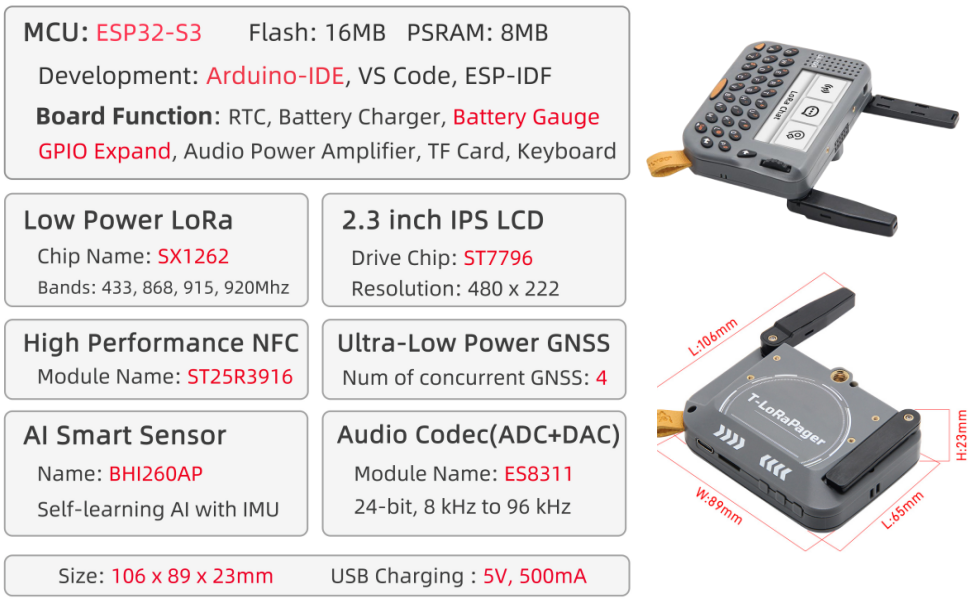
Figure 7.1: Detailed specifications and component breakdown of the LILYGO T-Lora Pager.
8. Warranty and Support
LILYGO is committed to providing quality products and support. If you have any questions, suggestions, or require technical assistance regarding your T-Lora Pager, please do not hesitate to contact us. We aim to answer your questions as soon as possible.
For comprehensive documentation, tutorials, and community support, please refer to the official resources:
- GitHub Repository: github.com/Xinyuan-LilyGO/LilyGoLib
- Official Wiki: wiki.lilygo.cc/get_started/en/LoRa_GPS/T-LoraPager/T-LoraPager.html


