
1. Introduction
Thank you for choosing the DUMOS 47-Inch L-Shaped Gaming Desk. This manual provides detailed instructions for assembly, operation, maintenance, and troubleshooting to ensure optimal performance and longevity of your desk. Please read this manual thoroughly before assembly and use, and retain it for future reference.
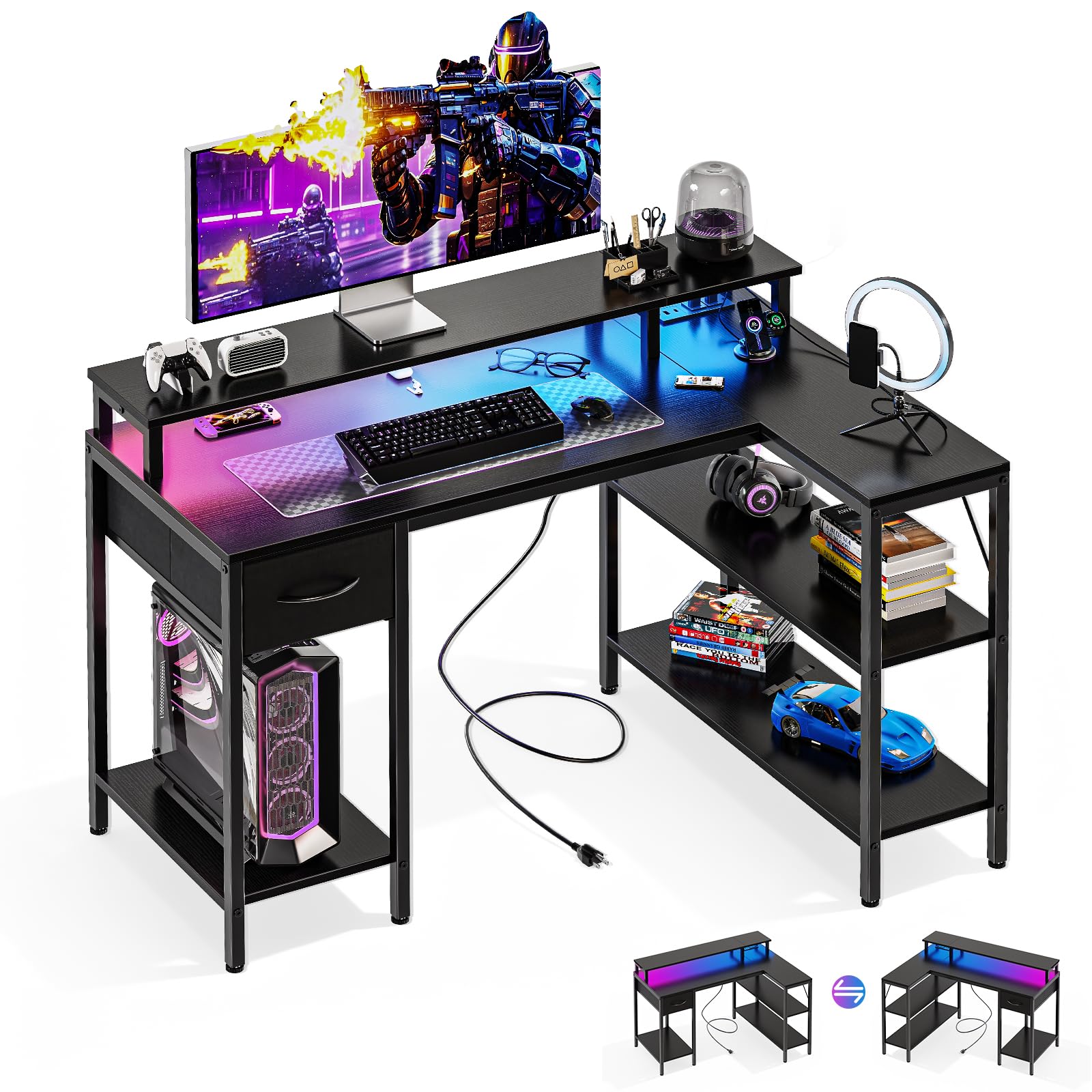
Image 1.1: DUMOS 47-Inch L-Shaped Gaming Desk in a typical setup.
2. Product Overview
2.1 Key Features
- Versatile L-Shape Layout: Designed for corner placement, featuring a drawer and multi-tier shelves for organized storage.
- Immersive RGB Lighting: Monitor riser equipped with customizable LED strips offering 7 colors, adjustable brightness, speed, and modes via remote control.
- Integrated Power Hub: Built-in power strip with 2 AC outlets, 1 USB port, and 1 Type-C port, conveniently located on the desktop with a 4.92ft (1.5m) power cord.
- Sturdy Design: Constructed from high-quality MDF for a smooth, scratch-resistant surface and a robust metal frame for stability.
- Adjustable Elements: Features adjustable feet for leveling and adjustable shelves for flexible storage configurations.
2.2 Dimensions and Components
The desk measures 31.5"D x 47.2"W x 31.8"H. The desktop has a load capacity of 200 lbs.

Image 2.1: Product dimensions and desktop load capacity.
Included Components:
- L-Shaped Desk components
- Monitor Stand
- Built-in USB Port/Power Strip
- LED Light Strip with Remote Control
- Assembly Tools
- Instruction Manual
3. Safety Information
- Always secure the desk to the wall using the provided wall mounting hardware to prevent tipping, especially in households with children or pets.
- Do not overload the desk. The maximum weight recommendation for the desktop is 200 pounds.
- Ensure all screws and fasteners are tightened securely during assembly and periodically check for looseness.
- Keep liquids away from the power outlets and LED light connections to prevent electrical hazards.
- Use only the provided power cord and avoid using damaged cords or adapters.
4. Setup and Assembly
Assembly of the DUMOS L-Shaped Gaming Desk requires careful attention to the included step-by-step instructions. While the desk is designed for straightforward assembly, two-person installation is recommended to ensure stability and safety during the process.
4.1 Before You Begin
- Unpack all components and verify against the parts list in the separate assembly guide.
- Ensure you have enough clear space for assembly.
- Gather the included assembly tools.
4.2 Assembly Steps (General Guidelines)
- Begin by assembling the main frame structure according to the diagrams in your assembly guide.
- Attach the desktop panels, ensuring proper alignment and secure fastening.
- Install the monitor stand, drawer, and multi-tier shelves as indicated.
- Attach the adjustable feet to the desk legs and adjust for stability on uneven surfaces.
- Install the LED light strip and connect the power hub.
- Once assembled, gently move the desk to its desired location and secure it to the wall using the anti-tip hardware.

Image 4.1: Two-person installation is recommended for easier and safer assembly.
5. Operating Instructions
5.1 LED Lighting System
The desk features an integrated RGB LED lighting system on the monitor riser. Use the provided remote control to manage the lighting effects.

Image 5.1: LED lights with remote control for customizable settings.
- Power On/Off: Press the power button on the remote.
- Color Selection: Choose from 7 static colors using the color buttons.
- Mode Selection: Cycle through 12 dynamic lighting modes (e.g., flash, fade, strobe) using the 'MODE' button.
- Brightness Adjustment: Increase or decrease light intensity using the brightness buttons.
- Speed Adjustment: Adjust the speed of dynamic modes using the speed buttons.
The LED strip is reinforced with sturdy clips to ensure it stays in place.
5.2 Integrated Power Hub
The desk includes a built-in power strip for convenient access to power and charging.

Image 5.2: Integrated power hub with various charging options.
- AC Outlets: Two 110-240V AC outlets for powering monitors, computers, or other devices.
- USB Port: One 5V/2.1A USB-A port for charging smartphones, tablets, and other USB-powered devices.
- Type-C Port: One 5V/2.1A USB-C port for charging compatible devices.
The 4.92ft (1.5m) power cord provides flexibility for connecting the desk to a wall outlet.
6. Maintenance
- Cleaning: Wipe the desk surface with a soft, damp cloth. Avoid harsh chemicals or abrasive cleaners that may damage the finish.
- Dusting: Regularly dust the desk and LED lights to maintain appearance and functionality.
- Fastener Check: Periodically check all screws and connections to ensure they remain tight. Retighten if necessary.
- Cable Management: Organize cables to prevent tangles and damage, ensuring they do not interfere with desk stability or movement.
7. Troubleshooting
7.1 LED Lights Not Working
- Check Power: Ensure the desk's main power cord is securely plugged into a working wall outlet.
- Remote Battery: Replace the battery in the remote control if the lights are unresponsive.
- Connections: Verify that the LED strip is properly connected to its power source on the desk.
- Damage: Inspect the LED strip for any visible damage.
7.2 Power Outlets/USB Ports Not Functioning
- Main Power: Confirm the desk's power cord is fully plugged into a live wall outlet.
- Device Compatibility: Ensure the device you are trying to charge or power is compatible with the outlet/port specifications (e.g., 5V/2.1A for USB).
- Overload: Avoid overloading the power strip. If too many high-power devices are connected, it may trip an internal breaker (if equipped) or cause issues.
- Cable Integrity: Check the cables connecting your devices to the power hub for damage.
7.3 Desk Wobbles
- Adjustable Feet: Adjust the leveling feet at the bottom of the desk legs to stabilize it on uneven floors.
- Tighten Screws: Re-check and tighten all assembly screws and fasteners.
- Wall Anchoring: Ensure the desk is properly anchored to the wall using the anti-tip hardware.
8. Specifications
| Feature | Detail |
|---|---|
| Brand | DUMOS |
| Model Number | ADU-LXZ2CDD-47BK |
| Shape | L-Shape |
| Product Dimensions (D x W x H) | 31.5" x 47.2" x 31.8" |
| Item Weight | 39.2 Pounds |
| Maximum Weight Recommendation | 200 Pounds |
| Color | Modern Black |
| Top Material Type | Wood (MDF) |
| Base Material | Metal |
| Special Features | Built-In USB Outlet, Ergonomic Monitor Stand, Reversible Layout, LED Lights |
| Power Outlets | 2 AC Outlets (110-240V) |
| USB Ports | 1 USB-A (5V/2.1A), 1 USB-C (5V/2.1A) |
| Power Cord Length | 4.92 ft (1.5 m) |
| Number of Drawers | 1 |
| Number of Shelves | 4 (multi-tier) |
| Assembly Required | Yes |
9. Warranty and Support
DUMOS products are manufactured with quality and customer satisfaction in mind. For specific warranty details, please refer to the warranty card included with your product or contact DUMOS customer support directly.
If you encounter any issues or have questions regarding your DUMOS 47-Inch L-Shaped Gaming Desk, please contact our customer support team for assistance. Our team is dedicated to providing prompt and helpful solutions.
Contact Information: Please refer to the contact details provided on the DUMOS official website or your purchase documentation.