
1. Product Overview
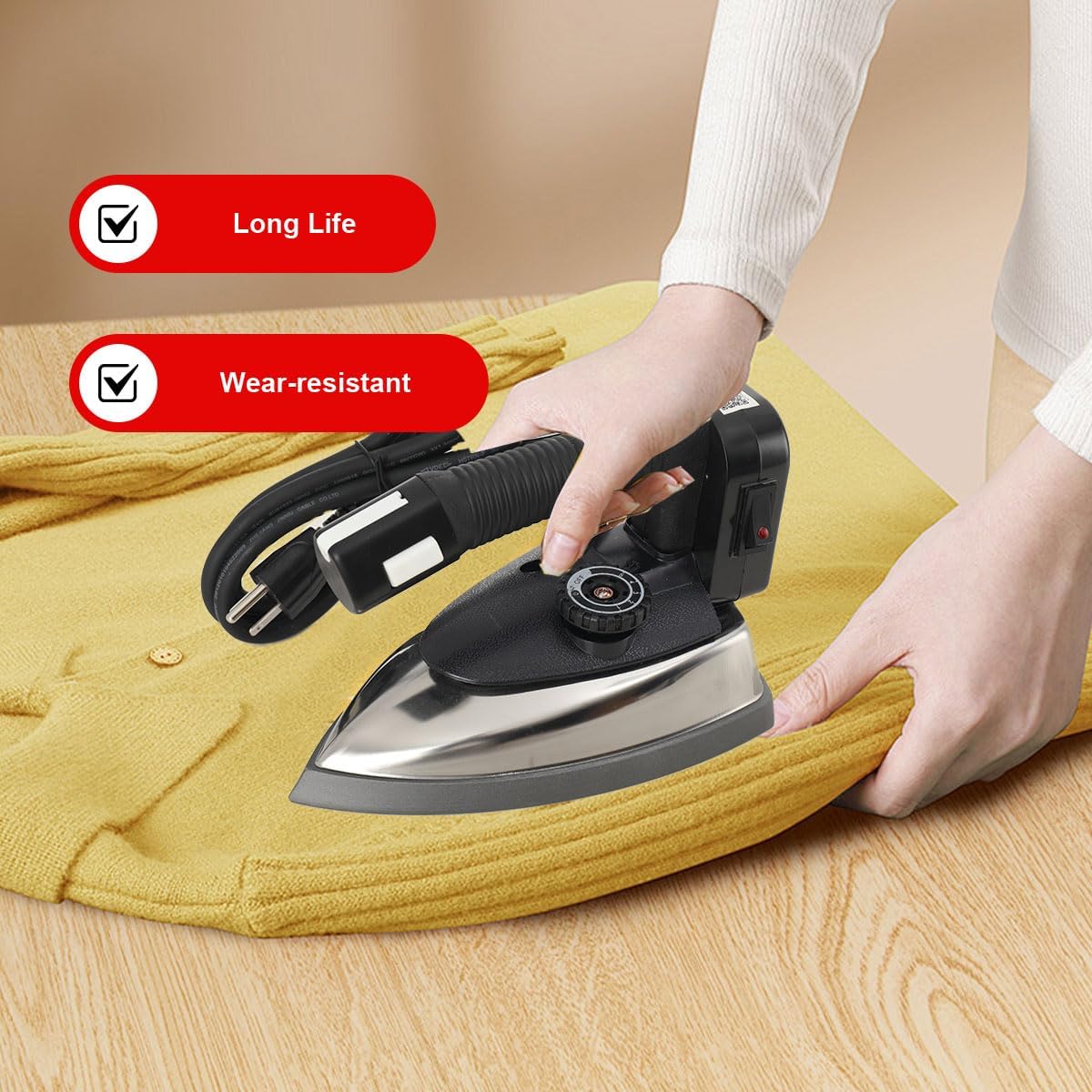
The TABODD YD201 is a 1200W gravity feed industrial electric steam iron designed for professional use in settings such as factories and clothing shops. It features a 4-liter water tank for extended operation, a wide temperature range of 60°C to 260°C (140°F to 500°F), and a durable, wear-resistant soleplate with ten air holes for effective wrinkle removal. Its compact and flexible design ensures ease of use and efficient performance.
2. Important Safety Instructions
Please read all instructions carefully before using the appliance and retain them for future reference. Failure to follow these instructions may result in electric shock, fire, or serious injury.
- Always ensure the voltage indicated on the iron matches your local power supply before plugging in.
- Do not leave the iron unattended while it is connected to the power supply or while it is hot.
- Keep the iron and its cord out of reach of children.
- Never immerse the iron, power cord, or plug in water or other liquids.
- Do not operate the iron with a damaged cord or plug, or if the iron has been dropped or damaged. Contact qualified service personnel for repair.
- Use the iron only for its intended purpose.
- Always unplug the iron from the electrical outlet before filling or emptying the water tank, and when not in use.
- Exercise caution when handling hot parts, hot water, or steam.
- Place the iron on a stable, heat-resistant surface when resting.
3. Package Contents
Carefully unpack the box and ensure all items are present and in good condition. If any items are missing or damaged, please contact your supplier.
- 1 x Industrial Electric Steam Iron
- 1 x 4L Water Tank
- 1 x Accessory Set (includes hose, spring, and other connectors)

4. Specifications
| Feature | Specification |
|---|---|
| Model | YD201 (ST-94A) |
| Voltage | 110V |
| Power | 1200W |
| Temperature Range | 60°C ~ 260°C (140°F ~ 500°F) |
| Water Tank Volume | 4 Liters |
| Base Material | Stainless Steel |
| Special Features | Non-Slip Handle, Wear-resistant, Heat-conductive, Non-sticky Soleplate with 10 air holes |
| Gross Weight | 2.1 kg (4.63 Lb) |
5. Setup
Follow these steps to set up your TABODD YD201 steam iron for first use:
- Position the Water Tank: Place the 4-liter water tank on a stable surface above the ironing level. The gravity feed system relies on gravity to supply water to the iron.
- Connect the Hose: Attach one end of the water hose (from the accessory set) to the outlet of the water tank and the other end to the water inlet on the iron. Ensure all connections are secure to prevent leaks.
- Fill the Water Tank: Open the cap of the water tank and fill it with distilled or demineralized water. Avoid using tap water, as mineral deposits can clog the iron over time. Close the cap securely.
- Connect Power: Plug the iron's power cord into a suitable 110V electrical outlet. The indicator light on the iron should illuminate.
- Prime the System: Before first use, or after refilling the tank, allow a few minutes for water to flow from the tank to the iron. You may need to press the steam button a few times to help prime the system and release any air.

6. Operating Instructions
Once the iron is set up and connected, follow these steps for operation:
- Power On: Flip the power switch on the iron to the 'ON' position. The indicator light will show that the iron is heating.
- Adjust Temperature: Rotate the temperature adjustment dial clockwise to select the desired temperature setting for your fabric type. Refer to the fabric guide below for recommendations. The iron will heat up to the selected temperature.
- Steam Function: Once the iron reaches the desired temperature, press the steam button (if available, or wait for steam to generate automatically in gravity feed systems) to release steam. For continuous steam, some models may have a lock feature for the steam button.
- Ironing: Begin ironing your garments. The special soleplate with ten air holes is designed for efficient wrinkle removal.
- Power Off: After use, turn the temperature dial to the 'OFF' position or minimum setting, and then flip the power switch to 'OFF'. Unplug the iron from the electrical outlet.
Fabric Temperature Guide:
- Low Temperature (60-100°C / 140-212°F): Nylon, Silk, Synthetics
- Medium Temperature (100-150°C / 212-302°F): Wool, Polyester
- High Temperature (150-260°C / 302-500°F): Cotton, Linen, Jeans

7. Maintenance
Proper maintenance ensures the longevity and optimal performance of your steam iron.
- Cleaning the Soleplate: Allow the iron to cool completely. Wipe the soleplate with a damp cloth and a mild, non-abrasive cleaner if necessary. Do not use harsh scouring pads or metallic cleaners, as these can damage the soleplate.
- Draining the Water Tank: Regularly drain any remaining water from the 4L tank when the iron is not in use for an extended period. This helps prevent algae growth and mineral buildup.
- Descaling (if needed): If you notice reduced steam output or mineral residue, consult a professional for descaling services or use a manufacturer-approved descaling solution following its instructions.
- Cord Care: Avoid wrapping the power cord tightly around the iron while it is still hot. Store the cord loosely to prevent damage.
- Storage: Store the iron in a cool, dry place, away from direct sunlight and moisture. Ensure the iron is completely cool before storing.
8. Troubleshooting
If you encounter issues with your TABODD YD201 steam iron, refer to the following common problems and solutions:
| Problem | Possible Cause | Solution |
|---|---|---|
| Iron does not heat up | Not plugged in; Power switch off; Faulty outlet | Check power connection; Ensure switch is ON; Test outlet with another appliance |
| No steam or insufficient steam | Water tank empty; Iron not hot enough; Hose kinked or blocked; Mineral buildup | Refill water tank; Allow iron to reach selected temperature; Check hose for obstructions; Consider descaling |
| Water leakage from soleplate | Temperature too low for steam; Tank overfilled; Loose hose connection | Increase temperature setting; Do not overfill tank; Secure hose connections |
| Iron leaves marks on fabric | Soleplate dirty; Temperature too high for fabric | Clean soleplate; Adjust temperature according to fabric guide |
If the problem persists after attempting these solutions, please contact customer support.
9. Warranty Information and Customer Support
This TABODD YD201 Industrial Electric Steam Iron comes with a standard manufacturer's warranty against defects in materials and workmanship. The specific terms and duration of your warranty may vary based on your region and point of purchase. Please retain your proof of purchase for warranty claims.
For technical assistance, troubleshooting beyond this manual, or warranty inquiries, please contact your retailer or the TABODD customer support team. Contact details can typically be found on the product packaging or the official TABODD website.