
Introduction
Thank you for choosing the HAMMER Ultra Pods HTWS003 True Wireless Earbuds. These earbuds are designed to provide a superior audio experience with advanced features and comfortable wear. This manual will guide you through the setup, operation, and maintenance of your new earbuds to ensure optimal performance and longevity.
What's in the Box
- HAMMER Ultra Pods HTWS003 True Wireless Earbuds
- Charging Case
- USB Type-C Charging Cable
- User Manual
Product Overview
The HAMMER Ultra Pods HTWS003 feature a semi-transparent design, ergonomic comfort fit, and powerful 13mm dynamic drivers for immersive sound. The compact charging case provides extended battery life, and the earbuds support Bluetooth v6.0 for stable connectivity.
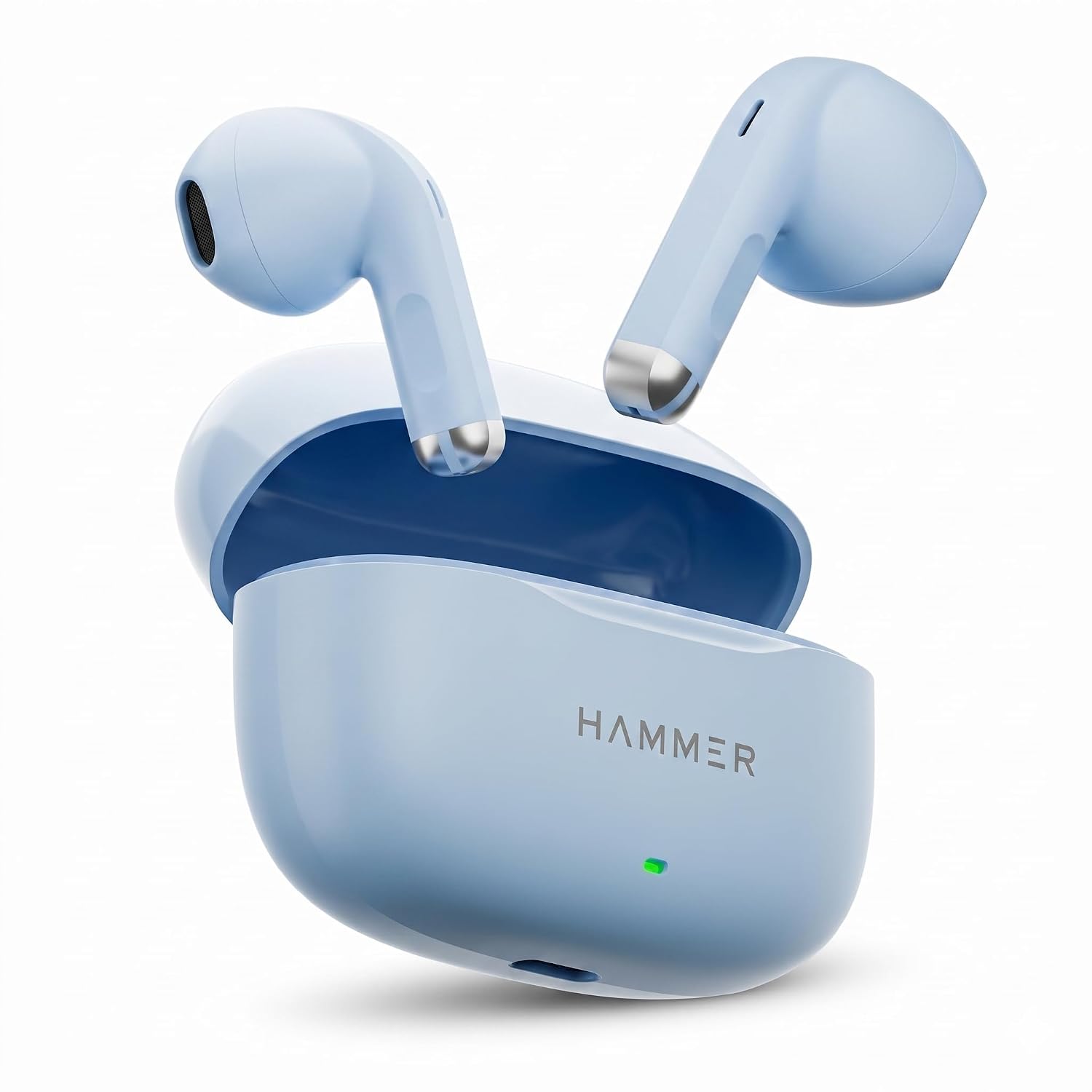
Image: HAMMER Ultra Pods HTWS003 Earbuds and Charging Case, highlighting semi-transparent design, ergonomic fit, 50 hours playtime, 13mm sound drivers, Bluetooth V6.0, and Type-C charging.

Image: Exploded view of a HAMMER Ultra Pods earbud, showcasing the 13mm dynamic driver for immersive sound.
Image: Diagram illustrating the Bluetooth V6.0 chip and its benefits: faster speed, lower latency, and stable connection for the HAMMER Ultra Pods.
Setup
1. Initial Charging
Before first use, fully charge the HAMMER Ultra Pods and their charging case. Connect the provided USB Type-C cable to the charging port on the case and a power source. The LED indicator on the case will show charging status. A full charge typically takes approximately 1 hour for the earbuds.

Image: HAMMER Ultra Pods HTWS003 earbuds in their charging case, connected via a USB Type-C cable, illustrating the charging process and highlighting 50 hours of total playtime.
2. Pairing with a Device
- Ensure the earbuds are charged.
- Open the charging case. The earbuds will automatically power on and enter pairing mode.
- On your device (smartphone, tablet, laptop), enable Bluetooth.
- Search for available Bluetooth devices and select "HAMMER Ultra Pods HTWS003" from the list.
- Once connected, you will hear a confirmation tone, and the earbuds will be ready for use.
The earbuds will automatically reconnect to the last paired device when removed from the case, if Bluetooth is enabled on the device.
Operating Instructions
The HAMMER Ultra Pods HTWS003 feature intuitive touch controls on each earbud.
Power On/Off
- Power On: Open the charging case, and the earbuds will automatically power on.
- Power Off: Place the earbuds back into the charging case and close the lid. They will automatically power off and begin charging.
Music Playback
- Play/Pause: Single tap on either earbud.
- Next Track: Double tap on the right earbud.
- Previous Track: Double tap on the left earbud.
Call Management
- Answer/End Call: Single tap on either earbud.
- Reject Call: Long press on either earbud for 2 seconds.
Voice Assistant
- Activate Voice Assistant: Triple tap on either earbud.
Charging
The charging case holds multiple charges for your earbuds, extending the total playtime up to 50 hours. To charge the case, use the provided USB Type-C cable. The LED indicator on the case will signal charging status and battery level. Ensure the charging contacts on the earbuds and inside the case are clean for efficient charging.
Maintenance
- Cleaning: Regularly clean the earbuds and charging case with a soft, dry, lint-free cloth. Do not use abrasive cleaners or solvents.
- Water Resistance: The earbuds are IPX5 water resistant, meaning they can withstand splashes and sweat. They are not designed for submersion in water. Ensure they are dry before placing them back in the charging case.
- Storage: When not in use, store the earbuds in their charging case to protect them and keep them charged. Avoid extreme temperatures.
Troubleshooting
| Problem | Solution |
|---|---|
| Earbuds not pairing |
|
| No sound from one earbud |
|
| Earbuds not charging |
|
| Poor sound quality |
|
Specifications
| Feature | Detail |
|---|---|
| Brand | HAMMER |
| Model Number | HTWS003 |
| Bluetooth Version | 6.0 |
| Audio Driver Size | 13mm Dynamic Drivers |
| Total Playtime | Up to 50 Hours (with charging case) |
| Earbud Charging Time | Approx. 1 Hour |
| Water Resistance Rating | IPX5 (Water & Sweat Resistant) |
| Microphone | In-Built |
| Charging Port | USB Type-C |
| Control Type | Touch Control |
| Ear Placement | In Ear |
| Item Weight | 32 Grams |
| Country of Origin | China |
Warranty Information
The HAMMER Ultra Pods HTWS003 True Wireless Earbuds come with a 6-month warranty from the date of purchase. This warranty covers manufacturing defects. It does not cover damage caused by misuse, accidents, unauthorized modifications, or normal wear and tear. Please retain your proof of purchase for warranty claims.
Customer Support
For any queries, support, or warranty claims, please contact HAMMER customer service:
- Email: Info@hammeronline.in
- Phone: 0180-4008081, 9991108081
- Manufacturer/Importer: Hammer Lifestyle Private Limited, SCO 4 Sector - 25 (TN), Behind Malik petrol pump, GT Road, Panipat Haryana - 132103, India