
1. Introduction
Thank you for choosing the Midea Master Connect 6L Humidifier. This device is designed to enhance your indoor environment by maintaining optimal humidity levels, offering aromatherapy, and providing chromotherapy lighting. With integrated Wi-Fi, it connects seamlessly with Midea AI ECOMASTER air conditioners and can be controlled via a mobile application or voice commands. Please read this manual thoroughly before use to ensure proper operation and maintenance.
2. Safety Information
- Always place the humidifier on a firm, flat, and waterproof surface, away from direct sunlight and heat sources.
- Do not immerse the base unit in water or other liquids.
- Unplug the humidifier from the power outlet before filling, cleaning, or moving it.
- Keep the humidifier out of reach of children and pets.
- Do not block the mist outlet.
- Use only clean, cool tap water. Distilled or demineralized water is recommended to prevent mineral buildup.
- Do not add essential oils directly into the water tank; use the designated aroma tray.
- If the power cord is damaged, it must be replaced by the manufacturer, its service agent, or similarly qualified persons to avoid a hazard.
- Do not attempt to repair or disassemble the unit yourself. Contact qualified service personnel.
3. Product Overview
3.1 Components
The Midea Master Connect Humidifier consists of the following main parts:
- Water Tank: Transparent tank with a 6-liter capacity for water.
- Base Unit: Contains the ultrasonic transducer, fan, and electronic controls.
- Mist Outlet: Rotatable nozzle for directing mist.
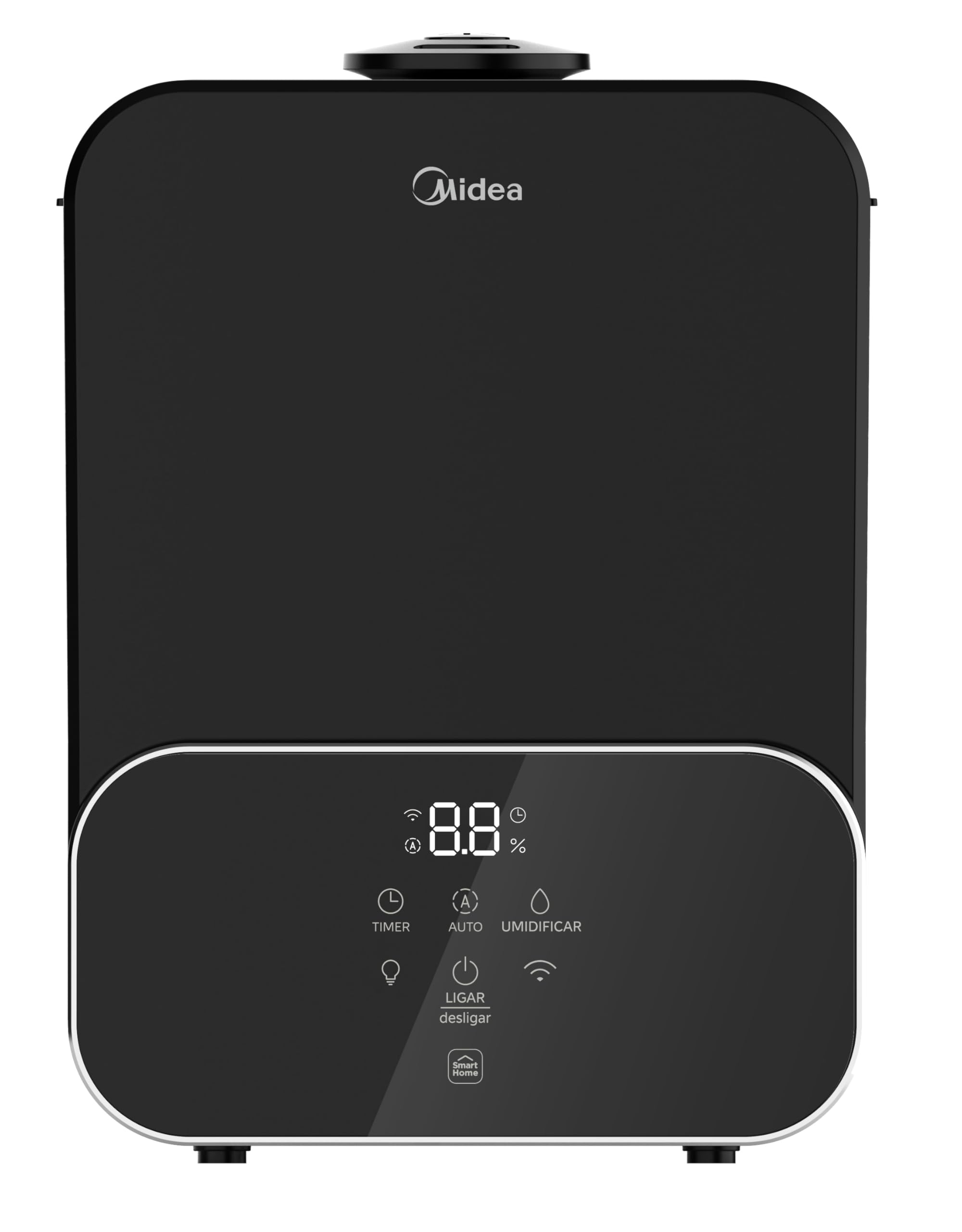
- Control Panel: Touch-sensitive display for operating functions.
- Aroma Tray: Small compartment for essential oils.

3.2 Key Features
- Smart Connectivity: Wi-Fi integrated for connection with Midea AI ECOMASTER air conditioners, enabling automatic humidity adjustment based on desired temperature and humidity levels.
- Remote Control: Control functions via the dedicated mobile application or voice commands through Alexa and Google Assistant.
- Chromotherapy: Offers a night light feature with blue, red, or green color options to create a relaxing ambiance.
- Aromatherapy: Includes a dedicated tray for adding essential oils to diffuse pleasant scents.
- Automatic Shut-off Timer: Program the device to turn off automatically after 1, 2, 4, or 8 hours.
- Automatic Humidity Function: Intelligently adjusts mist output to maintain a constant, desired humidity level.
- Large Capacity: 6-liter water tank ensures extended operation, suitable for overnight use.
- Easy Cleaning and Refilling: Wide opening and removable top cover allow for convenient cleaning and direct refilling.
- Intuitive Touch Panel: Digital touch controls for practical and easy operation.
- 360° Mist Outlet: Adjustable mist nozzle to direct humidity where needed.
4. Setup
4.1 Unpacking
Carefully remove the humidifier from its packaging. Retain the packaging materials for future storage or transport.
4.2 Placement
Place the humidifier on a flat, stable, and water-resistant surface at least 15 cm (6 inches) away from walls and furniture. Ensure the mist outlet is not directed towards any objects that could be damaged by moisture.
4.3 Filling the Water Tank
- Remove the top cover of the humidifier.
- Fill the water tank with clean, cool tap water. Do not exceed the maximum fill line indicated on the tank.
- Replace the top cover securely.
4.4 Power Connection
Plug the power cord into a suitable electrical outlet (110V or 220V, as per your model's specification). The humidifier is bivolt and automatically adapts to the voltage.
4.5 Wi-Fi Setup (Optional)
To utilize smart features, download the Midea SmartHome application from your device's app store. Follow the in-app instructions to connect your humidifier to your home Wi-Fi network and pair it with your Midea AI ECOMASTER air conditioner if applicable.

5. Operating Instructions
5.1 Control Panel Functions
The humidifier features a touch-sensitive control panel. Refer to Figure 4 for button layout.

- Power Button (LIGAR/desligar): Touch to turn the humidifier ON or OFF.
- Timer Button (TIMER): Press repeatedly to set the auto-off timer for 1, 2, 4, or 8 hours. The display will show the selected time.
- Auto Mode Button (AUTO): Activates the automatic humidity function. The humidifier will adjust mist output to maintain a preset humidity level.
- Humidify Button (UMIDIFICAR): Press to cycle through mist output levels (Low, Medium, High).
- Light Button (Light Bulb Icon): Touch to turn on the night light and cycle through blue, red, green, or off.
- Wi-Fi Indicator (Wi-Fi Icon): Indicates Wi-Fi connection status. Blinking means pairing mode, solid means connected.
5.2 Aromatherapy Function
To use the aromatherapy feature:
- Locate the small aroma tray, usually on the side or back of the base unit.
- Open the tray and add a few drops of your preferred essential oil onto the aroma pad (if included) or directly into the tray.
- Close the tray securely. The mist will carry the scent into the air.

5.3 Smart Home Integration
Once connected to the Midea SmartHome app, you can:
- Remotely control all humidifier functions.
- Set schedules and routines.
- Monitor current humidity levels.
- Integrate with Midea AI ECOMASTER air conditioners for synchronized climate control.
- Use voice commands via Amazon Alexa or Google Assistant for hands-free operation.

6. Maintenance
Regular cleaning is essential for optimal performance and hygiene.
6.1 Daily Maintenance
- Empty and rinse the water tank daily.
- Refill with fresh, cool water.
6.2 Weekly Cleaning
- Unplug the humidifier from the power outlet.
- Remove the water tank and empty any remaining water.
- Clean the water tank with a soft brush or cloth and mild detergent. Rinse thoroughly.
- Clean the base unit: Gently wipe the ultrasonic transducer and the inside of the base with a soft cloth. For mineral buildup, use a 50/50 mixture of white vinegar and water. Let it soak for 10-15 minutes, then gently scrub and rinse.
- Clean the aroma tray: Remove and wash with warm, soapy water. Rinse and dry completely.
- Ensure all parts are completely dry before reassembling.
6.3 Storage
If the humidifier will not be used for an extended period, clean all parts thoroughly, ensure they are dry, and store the unit in its original packaging in a cool, dry place.
7. Troubleshooting
Before contacting customer support, please refer to the following common issues and solutions:
| Problem | Possible Cause | Solution |
|---|---|---|
| No mist or weak mist | Low water level; Mineral buildup on transducer; Mist outlet blocked. | Refill water tank; Clean transducer with vinegar solution; Clear any obstructions from mist outlet. |
| Unusual noise | Unit not on a flat surface; Water tank not seated correctly; Foreign object in base. | Place on a flat surface; Re-seat water tank; Check for and remove any foreign objects. |
| Water leakage | Water tank cap not tightened; Unit overfilled; Crack in tank. | Ensure tank cap is tight; Do not overfill; If tank is cracked, contact support for replacement. |
| Wi-Fi connection issues | Incorrect Wi-Fi password; Router too far; App not updated. | Verify password; Move humidifier closer to router; Update Midea SmartHome app. |
8. Specifications
| Feature | Specification |
|---|---|
| Brand | Midea |
| Model Number | UMD6P3 |
| Capacity | 6 Liters |
| Power | 25 Watts |
| Voltage | 110 Volts, 220 Volts (Bivolt) |
| Operation Mode | Automatic |
| Special Features | Aroma Diffuser, Night Light, Wi-Fi Connectivity |
| Run Time | Up to 8 hours |
| Dimensions (D x W x H) | 20.5 cm x 23.5 cm x 32.5 cm |
| Material | Plastic |
9. Warranty and Support
9.1 Warranty Information
This Midea Master Connect 6L Humidifier comes with a standard manufacturer's warranty against defects in materials and workmanship. The duration of the warranty typically covers 12 months from the date of purchase. Please retain your proof of purchase for warranty claims. For detailed warranty terms and conditions, refer to the warranty card included with your product or visit the official Midea website.
9.2 Customer Support
If you encounter any issues not covered in the troubleshooting section or require further assistance, please contact Midea Customer Support. You can find contact information on the official Midea website or in the product packaging. When contacting support, please have your model number (UMD6P3) and purchase date ready.
For more information, visit the official Midea store: Midea Brasil Store