
1. Important Safety Instructions
Please read all instructions carefully before using this electric fireplace. Failure to follow these instructions may result in electric shock, fire, or personal injury.
- Electrical Safety: Ensure the power outlet matches the voltage requirements of the fireplace. Do not overload circuits. Do not use with damaged cords or plugs.
- Placement: Place the fireplace on a firm, level surface. Maintain a minimum distance of 1 meter (3 feet) from combustible materials such as furniture, curtains, bedding, paper, clothes, and other flammable objects.
- Ventilation: Do not block air vents. Ensure proper airflow around the unit.
- Children and Pets: Keep children and pets away from the fireplace, especially when it is operating. The surface can become hot.
- Overheat Protection: The unit is equipped with an automatic overheat protection system. If it overheats, it will shut off. Unplug the unit, allow it to cool, and check for obstructions before restarting.
- Water Exposure: Do not use the fireplace near water, in bathrooms, or in damp locations.
- Maintenance: Always unplug the fireplace before cleaning or performing any maintenance.
- Anti-Tip Function: This fireplace includes an anti-tip function for enhanced safety. Ensure the unit is stable.
2. Product Overview
The TRESKO Electric Fireplace (Model TKFEK) offers a realistic LED flame effect and powerful heating capabilities, controllable via remote, LCD display, or a smart app.
2.1 Key Features
- 1800W Heating Power: Efficiently heats rooms up to 30 m².
- LED Flame Effect: Realistic flickering fire with 9 flame colors and 9 ember bed colors.
- Adjustable Brightness: 5 levels of flame brightness.
- Multiple Control Options: Remote control, integrated LCD display, and Tuya Smart app (WiFi).
- Smart Home Compatibility: Works with Alexa and Google Home.
- Timer Function: Programmable timer from 1 to 8 hours.
- Thermostat: Adjustable temperature range from 15°C to 35°C.
- Safety Features: Overheat protection and anti-tip function.
- Modern Design: Robust powder-coated metal casing with a panoramic window.
2.2 Components
Familiarize yourself with the main parts of your electric fireplace:


- Main Unit: The fireplace body with panoramic window and LED flame display.
- Heating Vent: Located at the bottom front, where warm air is expelled.
- Control Panel: Integrated LCD display and buttons on the unit.
- Remote Control: Handheld device for convenient operation.
- Power Cord: For connecting to an electrical outlet.
- Storage Compartment: Located below the heating vent, suitable for decorative logs.
3. Setup
3.1 Unpacking
- Carefully remove the fireplace from its packaging.
- Check for any damage that may have occurred during shipping. If any damage is observed, do not operate the unit and contact customer support.
- Remove all protective films and packaging materials. Keep packaging for future storage or transport if needed.
3.2 Placement
- Place the fireplace on a hard, level, non-combustible surface.
- Ensure there is at least 1 meter (3 feet) of clear space around the front, sides, and top of the fireplace from any combustible materials.
- Do not place the unit directly under a power outlet.
- Avoid placing the unit in areas with high humidity or direct water exposure.

3.3 Initial Connection
- Ensure the main power switch on the back of the unit is in the "OFF" (0) position.
- Plug the power cord into a grounded 220-240V AC outlet.
- Flip the main power switch on the back of the unit to the "ON" (1) position. The unit is now ready for operation.
4. Operating Instructions
Your TRESKO Electric Fireplace can be controlled via the remote control, the integrated LCD display, or the Tuya Smart app.
4.1 Remote Control Functions

- Power Button (⏻): Turns the fireplace ON/OFF.
- Flame Effect Button (🔥): Cycles through 9 flame colors.
- Ember Bed Button (🔥): Cycles through 9 ember bed colors.
- Brightness Button (☀): Adjusts flame brightness (5 levels).
- Heating Level Button (♨): Selects heating mode (H0: Off, H1: 900W, H2: 1800W).
- Timer Button (⏲): Sets the auto-off timer (1-8 hours).
- Temperature Up/Down (+/-): Adjusts the thermostat temperature (15-35°C).
- °C/°F Toggle (℃/℉): Switches temperature display between Celsius and Fahrenheit.
4.2 Integrated LCD Display

The LCD display on the unit provides visual feedback for settings and allows direct control. The buttons on the unit mirror most remote control functions.
4.3 Tuya Smart App Control (WiFi)
- Download App: Download the "Tuya Smart" app from your smartphone's app store (iOS or Android).
- Register/Login: Create an account or log in to the Tuya Smart app.
- Add Device: Follow the in-app instructions to add a new device. Ensure your fireplace is powered on and your phone is connected to a 2.4GHz WiFi network.
- Pairing Mode: The fireplace will enter pairing mode (refer to the app for specific instructions, usually involves holding a button on the unit).
- Control: Once paired, you can control all fireplace functions (heating, flame effects, timer, thermostat) remotely via the app.
- Voice Control: Integrate with Alexa or Google Home through the Tuya Smart app for voice commands.

4.4 Heating Operation

- Press the Heating Level button on the remote or unit to cycle through:
- H0: Heating Off
- H1: Low Heat (900W)
- H2: High Heat (1800W)
- Use the Temperature Up/Down buttons to set your desired room temperature between 15°C and 35°C. The fireplace will automatically turn the heater on or off to maintain this temperature.
4.5 Flame Effect Operation
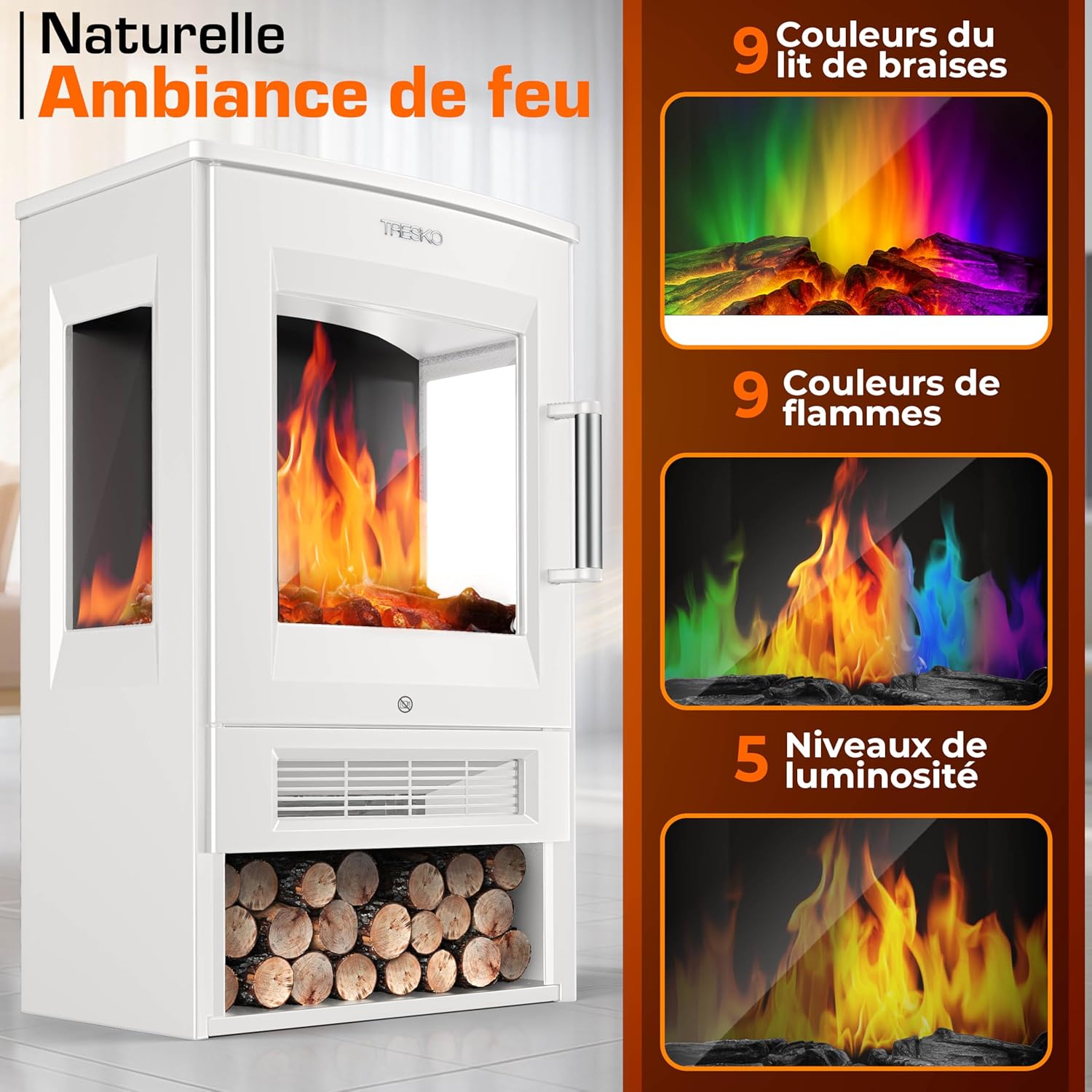
- Press the Flame Effect button to change the flame color. There are 9 different color options.
- Press the Ember Bed button to change the color of the ember bed. There are 9 different color options.
- Press the Brightness button to adjust the intensity of the flame effect. There are 5 brightness levels.
- The flame effect can be operated independently of the heating function.
4.6 Timer Function
- Press the Timer button to set the auto-off timer. Each press will cycle through 1-hour increments, from 1 hour up to 8 hours.
- The display will show the set timer duration. The fireplace will automatically turn off after the set time has elapsed.
5. Maintenance
Regular maintenance ensures the longevity and optimal performance of your electric fireplace.
5.1 Cleaning
- Always unplug the unit from the power outlet before cleaning.
- Allow the unit to cool completely before cleaning.
- Exterior: Wipe the exterior surfaces with a soft, damp cloth. Do not use abrasive cleaners, sprays, or harsh chemicals as they may damage the finish.
- Glass Panel: Clean the glass panel with a soft, lint-free cloth and a non-abrasive glass cleaner. Spray the cleaner onto the cloth, not directly onto the glass.
- Vents: Use a vacuum cleaner with a brush attachment to gently remove dust and debris from the air intake and exhaust vents. Ensure vents are clear for proper operation.
5.2 Storage
- If storing the fireplace for an extended period, unplug it and allow it to cool.
- Clean the unit thoroughly as described above.
- Store the fireplace in a cool, dry place, preferably in its original packaging, to protect it from dust and damage.
6. Troubleshooting
If you encounter issues with your TRESKO Electric Fireplace, refer to the following table for common problems and solutions.
| Problem | Possible Cause | Solution |
|---|---|---|
| Unit does not turn on. |
|
|
| No heat output. |
|
|
| Flame effect not working. |
|
|
| Remote control not working. |
|
|
| WiFi app not connecting. |
|
|
If the problem persists after trying these solutions, please contact TRESKO customer support.
7. Specifications
| Feature | Detail |
|---|---|
| Brand | TRESKO |
| Model Number | TKFEK |
| Color | White |
| Material | Metal (Powder-coated) |
| Product Dimensions (D x W x H) | 34.5 cm x 44 cm x 74.5 cm |
| Item Weight | 13.8 Kilograms |
| Power Source | Electric |
| Heat Output | 1800 Watts (2 levels: 900W / 1800W) |
| Voltage | 220-240V (implied from 1800W and typical European standards) |
| Installation Type | Freestanding |
| Special Features | LED Flame Effect (9 colors), Multicolor Ember Bed (9 colors), 5 Brightness Levels, Timer (1-8h), Thermostat (15-35°C), Remote Control, WiFi App Control, Smart Home Compatible, Overheat Protection, Anti-tip Function, Portable |
| Heats Area Up To | 30 m² |
8. Warranty and Support
Specific warranty information is not available in the provided product data. Please refer to the retailer's purchase terms or contact the manufacturer directly for warranty details.
For technical support, troubleshooting assistance beyond this manual, or warranty claims, please contact TRESKO customer service through their official website or the retailer where the product was purchased.
Manufacturer: DWD-Company GmbH & Co. KG