
Introduction
Thank you for choosing the PSOS Dehumidifier, Model 1. This manual provides essential information for the safe and proper use, maintenance, and troubleshooting of your new appliance. Please read it thoroughly before operation and retain it for future reference.
Safety Instructions
- Only use this dehumidifier indoors; avoid outdoor use.
- Place the appliance on a flat, stable surface away from direct sunlight to prevent damage.
- Keep the appliance upright to prevent water leakage.
- Always unplug the appliance before cleaning or removing the water tank.
- Do not use the power adapter in damp locations to avoid electric shock. Keep it well-ventilated.
- Keep the power adapter away from high traffic areas, never placing cords under rugs or near heat sources.
- Do not use the appliance if the cord or plug is damaged.
- Do not move or tilt the appliance while in use.
- Keep air inlet and outlet unblocked for proper performance.
- Never insert foreign objects into the air outlet to prevent damage.
- Do not use sharp objects to clean or scrape the appliance.
- Do not place heavy objects on top of the appliance to avoid damage.
- If not in use for an extended period, drain the water tank and turn off the appliance.
- Only allow persons 8 years and above, or persons with supervision, to use the appliance after they have been instructed on safe use and hazards.
- Use the included power supply only.
Product Overview
The PSOS Dehumidifier is designed for high-efficiency moisture removal with user-friendly features.

Figure 1: The PSOS Dehumidifier in its sleek grey design, ready for use.
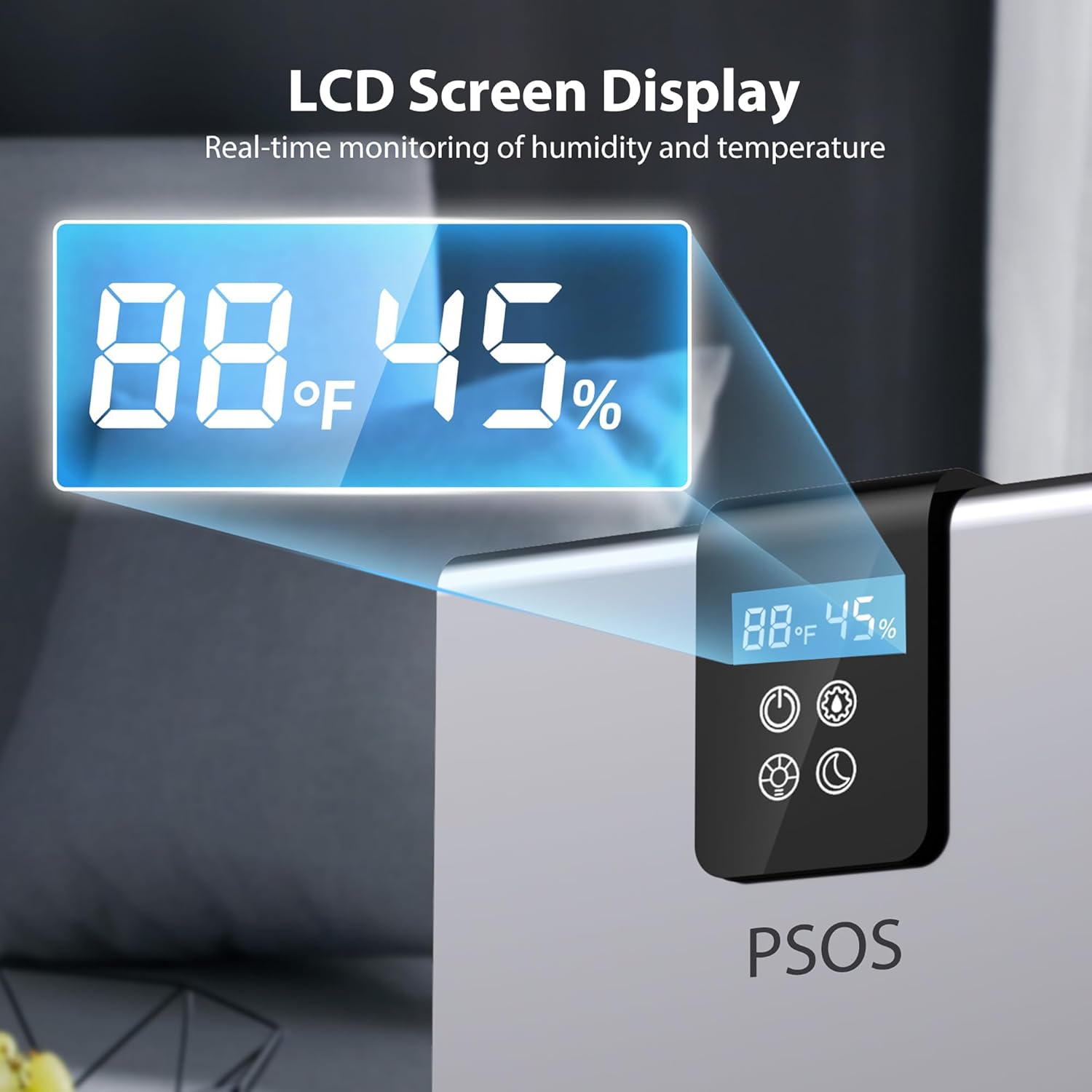
Figure 2: Close-up of the dehumidifier's LCD screen, displaying real-time ambient temperature and humidity levels.

Figure 3: The dehumidifier operating in a bedroom, highlighting its quiet performance suitable for sleep environments.

Figure 4: The dehumidifier showing a red indicator light, signifying that the water tank is full and the unit has automatically shut off to prevent overflow.
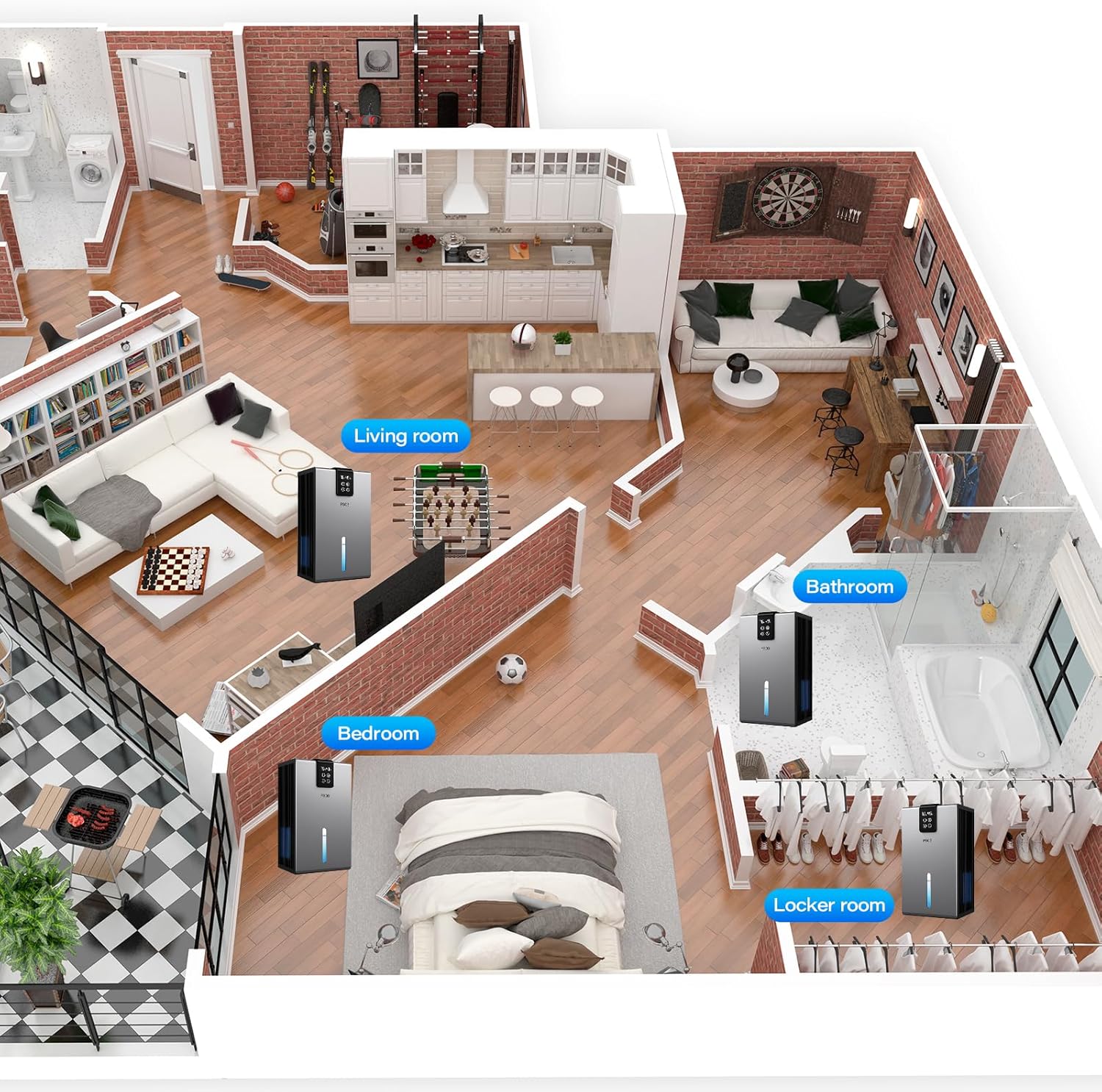
Figure 5: An illustration demonstrating the versatility of the PSOS Dehumidifier, suitable for various spaces including living rooms, bathrooms, bedrooms, and closets.

Figure 6: Visual representation of the dehumidifier's effectiveness in combating common humidity issues such as mirror mist, mold growth on surfaces, and damp clothing.
Setup
- Unboxing: Carefully remove the dehumidifier and all accessories from the packaging. Ensure all components listed in the 'Included Components' section are present.
- Placement: Place the dehumidifier on a flat, stable surface in the desired room. For optimal performance, ensure there is at least 10cm (4 inches) of clearance around the air inlet and outlet. Close all doors and windows in the room during operation to maximize efficiency.
- Power Connection: Connect the power adapter to the dehumidifier and then plug it into a suitable electrical outlet.
Operating Instructions
Control Panel
The dehumidifier features a smart touch LCD display for easy operation and real-time monitoring of ambient humidity and internal temperature.
Video 1: This video demonstrates the basic operation of the dehumidifier, including power on/off, setting modes, and the process of removing and emptying the water tank. It also shows the continuous drainage option.
Power On/Off
- Tap the Power button (U) to turn on the dehumidifier. The LED light will illuminate.
- Tap the Power button (U) again to turn off the dehumidifier.
Dehumidification Modes
The dehumidifier offers two primary modes:
- High-Efficiency Mode: This mode utilizes advanced dual-core semiconductor technology for rapid moisture removal, extracting up to 40 oz/day (tested at 86°F, 80% RH). Ideal for quickly reducing high humidity levels.
- Sleep Mode: Operating at less than 28dB, this mode ensures whisper-quiet operation, making it suitable for bedrooms or nurseries. It maintains optimal humidity without disturbing sleep.
Humidity Control
The LCD display allows you to monitor ambient humidity. Adjust the mode to maintain your desired humidity level. For best results, aim for humidity below 45%.
7-Color LED Ambient Light
The dehumidifier features a relaxing 7-color ambient light. You can cycle through the colors or lock your favorite color to use as a night light.
Timer Function
Set the timer for 8, 16, or 24 hours to automatically turn off the unit. This feature provides convenience and energy saving.
Auto Shut-Off & Auto Defrost
- Auto Shut-Off: When the 98 oz water tank is full or the unit is improperly placed, the dehumidifier will illuminate a red light and automatically shut off to prevent overflow.
- Auto Defrost: The automatic defrosting system senses temperature drops and prevents frost buildup on the condenser coils, ensuring smooth operation even at low temperatures of 41°F (5°C).
Maintenance
Emptying the Water Tank
When the water tank is full, the unit will automatically shut off and a red light will indicate it's time to empty. To empty:
- Unplug the power cord.
- Carefully remove the water tank from the back of the unit.
- Remove the tank cover and pour out the collected water.
- Replace the tank cover securely and reinsert the water tank into the unit.
- Plug in the power cord to resume operation.
Video 2: This video provides a detailed look at the 98 oz water tank, demonstrating its removal, emptying, and reinstallation process.
Continuous Drainage
For continuous operation without manual tank emptying, you can attach a drain hose (included) to the continuous drainage port on the back of the unit. Ensure the hose is directed to a suitable drain.
Filter and Aroma Pad
The dehumidifier includes a filter and an aroma pad. You can add your favorite essential oils to the aroma pad to freshen the air while dehumidifying.
Video 3: A short video clip showing how to add essential oils to the dehumidifier's aroma pad to freshen the air while dehumidifying.
Troubleshooting
| Problem | Possible Cause | Solution |
|---|---|---|
| The 'Red LED' is flashing first when power connected | The water tank is full | Empty the water tank |
| The float gets jammed | Press the float | |
| The dehumidifier does not work | The power supply is cut off | Check if the power adapter is plugged in |
| AC power socket loose | Check the AC power socket and the power cord | |
| The air outlet is blocked | Maintain the minimum clearance of at least 10cm around the dehumidifier when the appliance is operating |
Frequently Asked Questions
- Q: What is the difference between the efficient dehumidification mode and the sleep mode?
A: The efficient dehumidification mode has a faster dehumidification speed, while the machine operates with a quieter sound in sleep mode. Therefore, it is recommended to activate the sleep mode when sleeping to provide a quiet sleep environment. - Q: Will this dehumidifier stop working under 59°F or over 104°F?
A: When the temperature falls below 59°F or rises above 104°F, the dehumidifier will not completely cease operation. However, it may result in decreased or zero dehumidification effect. - Q: Why is the dehumidification speed so slow? Only collect little water after 8 hours?
A: The electric semiconductor dehumidifier is great for home use due to its quiet operation and stable dehumidification effect, while compressors are noisy and meant for industrial use. The effectiveness of dehumidifiers depends on humidity, room size, and temperature. Higher humidity levels and smaller rooms lead to better performance. - Q: Can I keep it running all the time?
A: We do not recommend running the dehumidifier continuously. After 48 hours of use, please disconnect the power cord and let it rest for at least 10 minutes to improve its lifespan.
Specifications
- Brand: PSOS
- Model Name: 1
- Color: grey
- Floor Area Coverage: 1000 Square Feet
- Tank Volume: 98 Fluid Ounces
- Product Dimensions: 8.25"D x 5.5"W x 13.75"H
- Item Weight: 5.83 pounds
- Material: Eco-friendly BPA-free plastic
- Number of Speeds: 2
- Operation Mode: Automatic
- Special Features: Powerful Mode, Sleep Mode, Quiet Operation, 7 Color Ambient Light, Removable Tank, Automatic Shut-off, Air Filter, Automatic Defrost, Ergonomic Handle, Digital Display, Portable, Comfort Operation, Anti-Spill
- Included Components: 1× Dehumidifier, 1× Water tank, 1× User Manual
Warranty and Support
Warranty
We appreciate your feedback and will do our best to guarantee your satisfaction. Within 1 year after your purchase, should the product have defects, we will provide a refund or send you a new one. Please email us with your order number or contact the seller on Amazon. Your inquiries will be taken care of as soon as possible.
This warranty does not cover normal wear of product and damage caused by misoperation of buyers.
This warranty only covers orders from authorized Amazon Store and our official website. We are not responsible for any purchases from other distribution channels.
This warranty does not cover damage resulting from any unauthorized attempts to repair or from any use not in accordance with the instruction manual.
Support
If you have any questions or concerns, please reach out to us. We hope you enjoy your new dehumidifier!
Contact Information:
- Seller: BreezeDry-LFLshop

