1. Introduction
This manual provides comprehensive instructions for the safe and efficient operation and maintenance of your Jingkey HQ-JS915 Large Room Humidifier. Please read this manual thoroughly before first use and retain it for future reference.
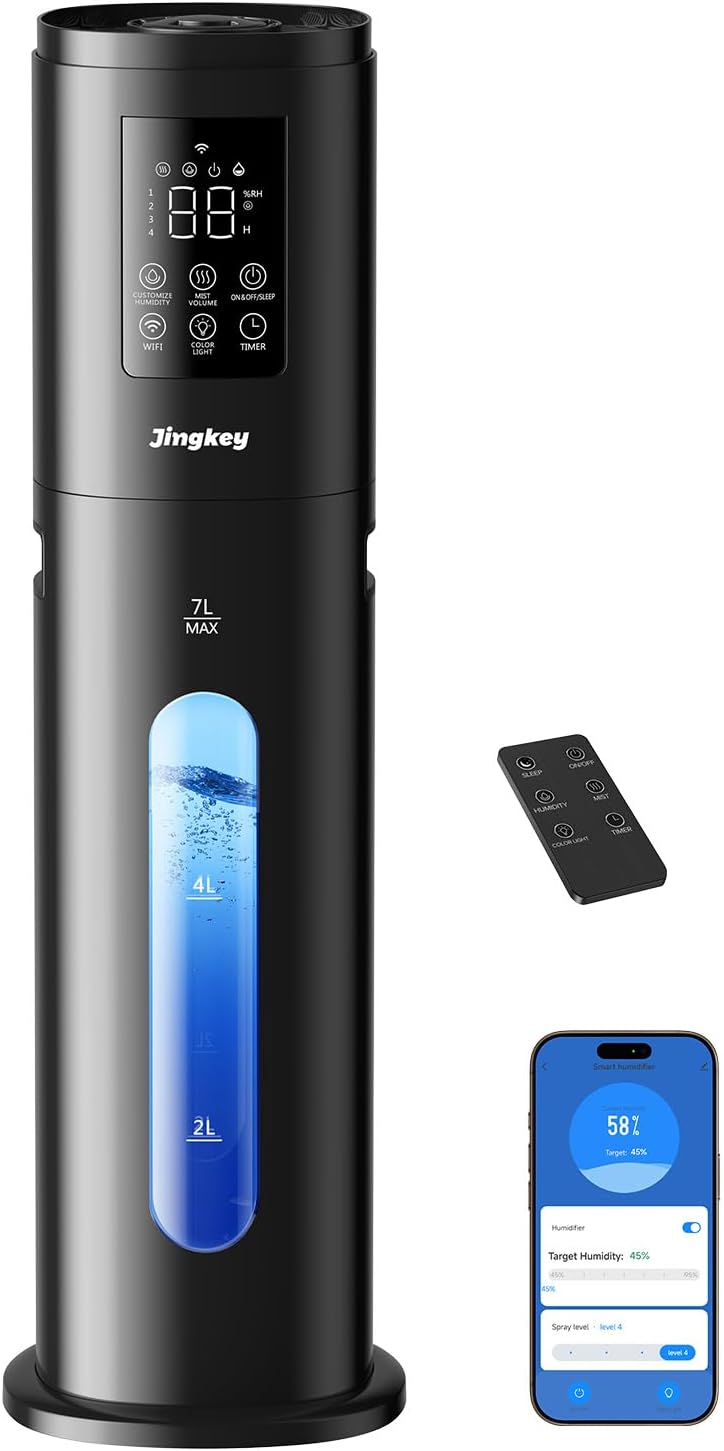
The Jingkey HQ-JS915 is designed to balance indoor humidity, covering areas up to 500 square feet with a 7-liter capacity for continuous misting up to 60 hours. Key features include adjustable humidity control, a night light, quiet operation, and a water level window.
2. Setup
- Unpack: Carefully remove all components from the packaging.
- Placement: Place the humidifier on a flat, stable, and water-resistant surface. Ensure it is at least 6 inches (15 cm) away from walls and furniture.
- Fill Water Tank: The HQ-JS915 features an easy top-fill design. Open the top cover and pour clean, cool tap water directly into the water tank. Do not exceed the 'MAX' fill line. Avoid adding water into the mist nozzle.
- Power On: Plug the power cord into a suitable electrical outlet. The unit will enter standby mode.
- Remote Control: The humidifier comes with an infrared remote control for convenient operation within 4 meters.
- Wi-Fi Connection (Optional): For smart control via your smartphone, download the 'Tuya Smart' app from your app store. Follow the in-app instructions to connect your humidifier to your home Wi-Fi network. This typically involves turning on Bluetooth, opening the app, adding the device (Humidifier Wi-Fi), confirming the indicator is blinking, inputting your Wi-Fi account and password, and finishing the connection.

3. Operating Instructions
Your Jingkey HQ-JS915 Humidifier offers various settings for optimal comfort. All functions can be controlled via the touch panel, remote control, or the connected smartphone app.
- Power On/Off: Press the power button on the control panel, remote, or app to turn the humidifier on or off.
- Mist Volume: Adjust the mist output level (e.g., Low, Medium, High) to suit your preference and room size.
- Custom Humidity: Set your desired humidity level. The humidifier will automatically maintain this level, turning on and off as needed.
- Sleep Mode: Activate sleep mode for quiet operation and dimmed display lights, ideal for nighttime use.
- Night Light: The humidifier features a 7-color night light. Cycle through colors or set it to auto-change to regulate mood.
- Timer: Set an operating timer for automatic shut-off after a specified duration.
- Aromatherapy Box: Locate the aromatherapy box (often a small tray) on the unit. Add a few drops of essential oil to the aroma pad (do not add essential oils directly into the water tank).
- 360° Nozzle: The mist nozzle can be rotated 360 degrees to direct mist in any desired direction.


4. Maintenance
Regular cleaning and maintenance are crucial for optimal performance and longevity of your humidifier. Always unplug the humidifier before cleaning or refilling.
- Routine Cleaning (Weekly):
- Remove and rinse the water tank cover and water inlet tank.
- Remove the humidifier base and clean the base chamber with a dry cloth.
- Clean the inside of the tank with a cleaning brush, then rinse with room-temperature water.
- Place the humidifier base and water inlet tank back.
- Fill the water inlet tank with room-temperature water.
- Descaling (Monthly): For optimal performance, descale the humidifier at least once a month. Use white vinegar to remove mineral buildup. Refer to the user manual for detailed instructions on descaling.
- Filter: The humidifier includes a filter to help keep the mist clean. Check and clean the filter regularly as per the user manual.
5. Troubleshooting
If you encounter any issues with your humidifier, please refer to the following common troubleshooting tips:
- No Mist: Ensure the unit is plugged in, the water tank is filled, and the power is on. Check if the mist nozzle is blocked.
- Leaking: Ensure the water tank is correctly seated and not overfilled. Verify that the humidifier is placed on a flat surface. Make sure water is not added into the mist tube.
- White Dust: This can occur with hard water. Use distilled or demineralized water to reduce mineral buildup. Regular descaling is also recommended.
- Unusual Noise: Check for proper water levels. Ensure all components are correctly assembled.
- Wi-Fi Connection Issues: Ensure your Wi-Fi network is 2.4GHz. Restart your router and humidifier, then attempt to reconnect via the app.
For further assistance, please consult the full user manual or contact customer support.
6. Specifications
| Feature | Specification |
|---|---|
| Brand | Jingkey |
| Model Name | HQ-JS915 |
| Special Feature | Adjustable Humidity Control, Night Light, Quiet, Water Level Window |
| Color | Charcoal |
| Capacity | 7 Liters |
| Floor Area | 500 Square Feet |
| Product Dimensions | 7.09"D x 7.09"W x 24.41"H |
| Item Weight | 4.63 Pounds |
| Included Components | Aromatherapy Box |
7. Warranty & Support
For warranty information, please refer to the product packaging or contact the retailer where the product was purchased. For technical support or any questions regarding your Jingkey HQ-JS915 Humidifier, please contact Jingkey customer service directly.


