1. Introduction
This manual provides essential information for the safe and efficient operation, maintenance, and troubleshooting of your GENMAX GM6250iET Tri-Fuel Inverter Generator. Please read this manual thoroughly before operating the generator and keep it for future reference.
The GM6250iET is a versatile tri-fuel inverter generator designed for various applications, including home backup, RV travel, and jobsite use. It features advanced technology for stable power output, quiet operation, and multiple starting methods.

Figure 1: GENMAX GM6250iET in multiple scenarios, highlighting its versatility for home, camping, and work.
2. Safety Information
Operating a generator safely is crucial to prevent injury or damage. Always follow these guidelines:
- Carbon Monoxide (CO) Hazard: Generators produce carbon monoxide, an odorless, colorless, and deadly gas. Operate the generator outdoors in a well-ventilated area, far from windows, doors, and vents. The GM6250iET includes a CO sensor that will shut down the engine if hazardous CO levels are detected.
- Electrical Safety: Do not operate the generator in wet conditions. Ensure all connections are secure. The unit features GFCI outlets for protection against electric shock and various other protection devices like overload, overvoltage, and short circuit protection.
- Fuel Safety: Handle fuels (gasoline, propane, natural gas) with extreme care. Store fuels in approved containers away from ignition sources. Do not refuel a hot or running engine.
- Grounding: Always ensure the generator is properly grounded before operation.
- Overload Protection: Avoid overloading the generator. The unit is equipped with overload protection to prevent damage.
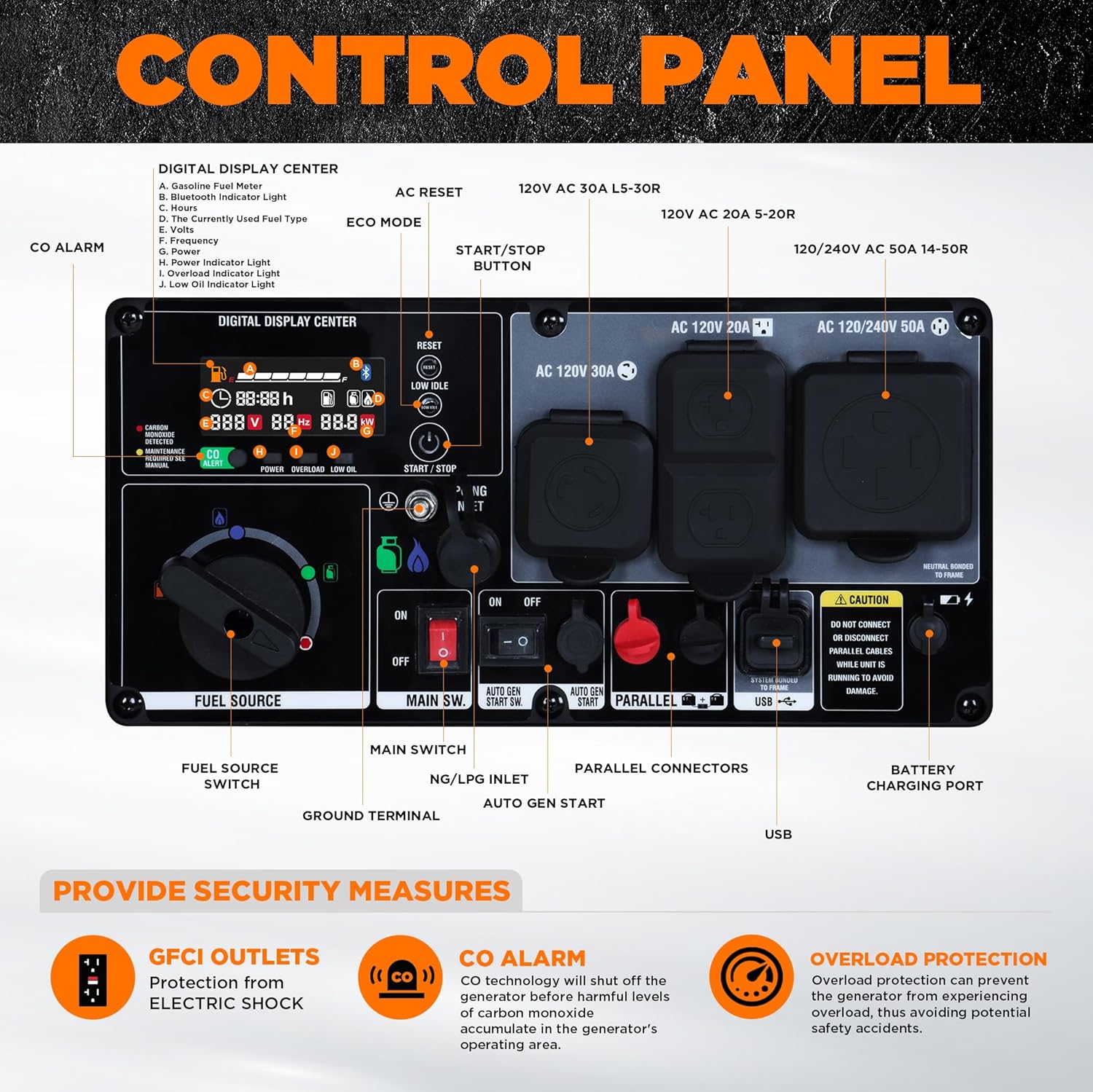
Figure 2: Control panel highlighting GFCI outlets, CO alarm, and overload protection features.
3. Product Features
- Tri-Fuel Capability: The GM6250iET operates on gasoline, propane (LPG), and natural gas (NG). A dedicated fuel-source selector allows for easy switching. An independent LPG/NG inlet ensures safe fuel delivery.
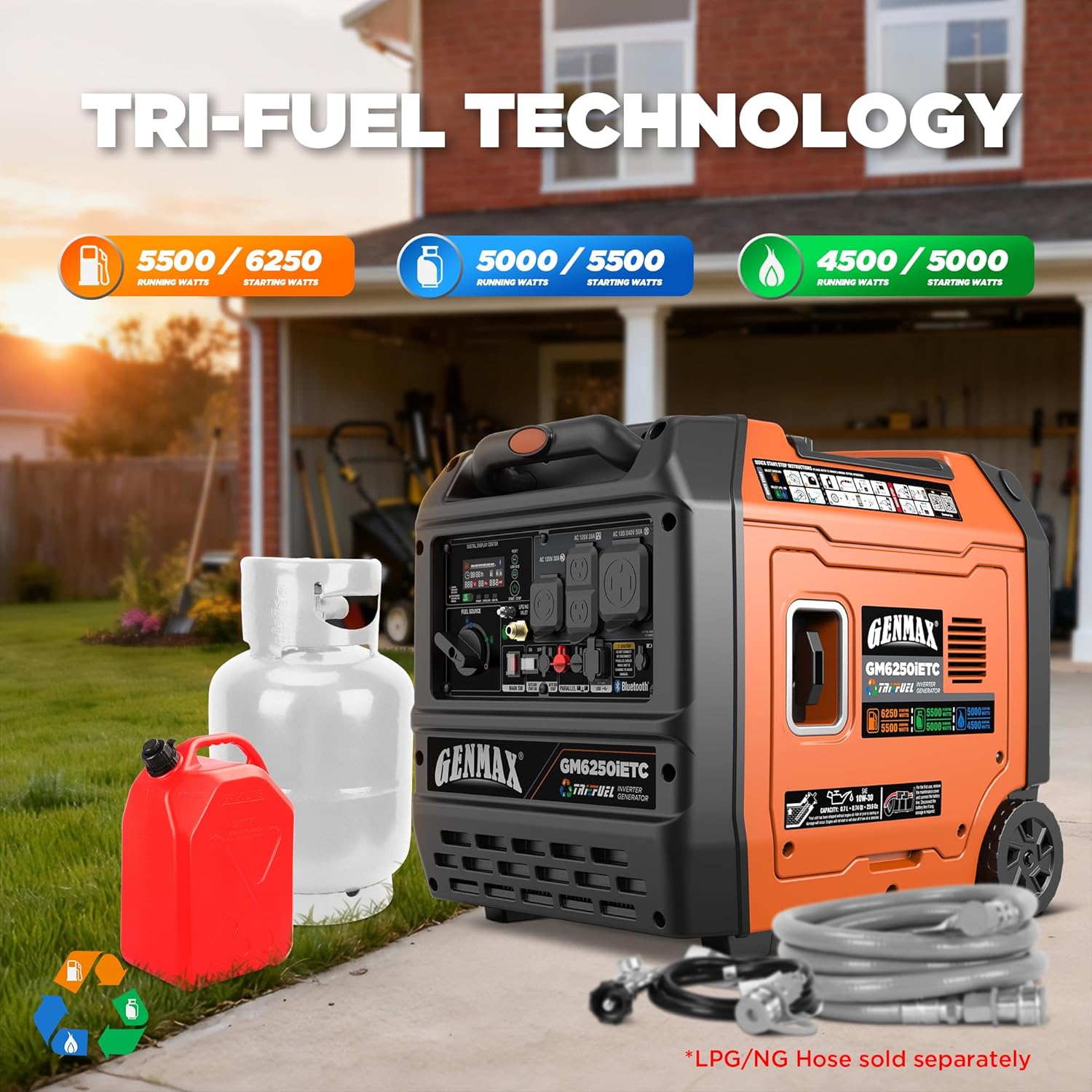
Figure 3: Tri-Fuel Technology overview, showing power output for gasoline, LPG, and NG.
- High Output Performance: When running on gasoline, the generator provides 5500 running watts and 6250 starting watts. Inverter technology and ECO idle mode adjust engine speed based on load, improving fuel efficiency and reducing noise. Total Harmonic Distortion (THD) is ≤3%, making it safe for sensitive electronics.
- Smart Digital Control Panel: Features electric start, remote key fob start, Bluetooth App start, 2-wire auto gen start, and recoil start. Outlets include two 120V 20A 5-20R, one 120V 30A L5-30R, one 120/240V 50A 14-50R, a 5V USB-A/C port, and a battery charging port. The digital display monitors wattage load, runtime, voltage, frequency, fuel level, oil alerts, CO warnings, and Bluetooth status.

Figure 4: Bluetooth App Smart Control for remote operation and status monitoring.
- Ultra-Quiet & Portable Design: Advanced forced air cooling and low-speed ECO mode reduce noise to approximately 66dB at 25% load. Equipped with a durable frame, wheel kit, and foldable handle for easy transport.

Figure 5: Easy Transport Design with telescopic handle and durable wheels.
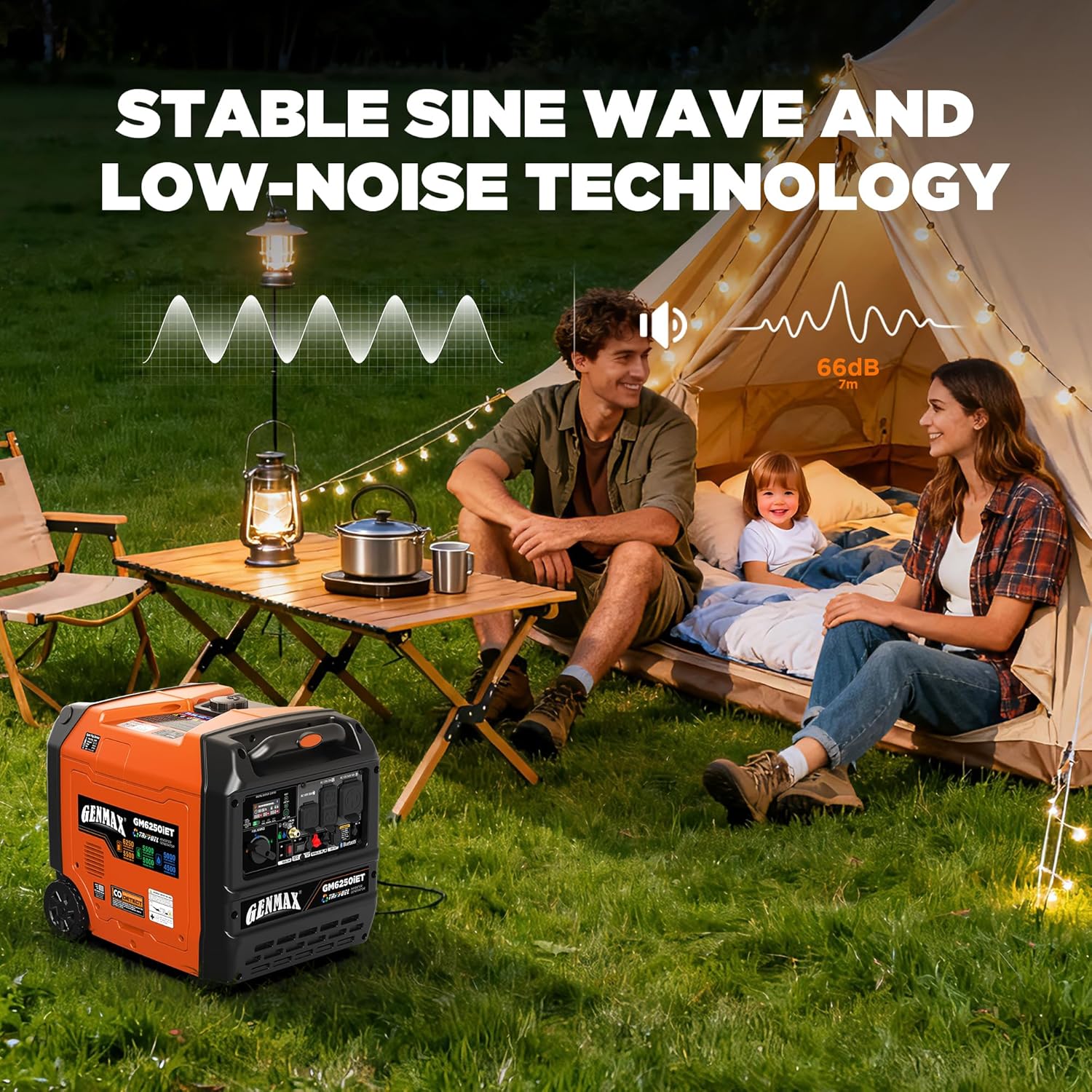
Figure 6: Stable Sine Wave and Low-Noise Technology for quiet operation.
- Perfect Protection Devices: Includes overload protection, thermal protection, overvoltage protection, undervoltage protection, overcurrent protection, short circuit protection, and overspeed protection.
4. Setup
4.1 Unboxing and Included Components
Carefully remove the generator and all components from the packaging. Inspect for any shipping damage. The following items are included:
- Funnel (1)
- Battery Charger (1)
- Automatic Start/Stop Cable (1)
- Rain Cover (1)
- 14-50P TO TT-30R Adapter (1)
- Remote Control Key (1)
- Spark Plug Socket Wrench (1)
- Dual-Purpose Screwdriver (1)

Figure 7: What Comes in the Box - Generator and accessories.
4.2 Adding Engine Oil
The generator is shipped without engine oil. Before first use, add the recommended type and amount of oil. Refer to the engine oil specifications in Section 7. Use the provided funnel for easier filling. Do not overfill.
4.3 Connecting the Battery
Connect the battery terminals according to the instructions provided in the battery compartment. Ensure connections are tight and secure.
4.4 Fueling the Generator
The GM6250iET supports three fuel types:
- Gasoline: Fill the fuel tank with unleaded gasoline. Do not use E85 or mixed fuels.
- Propane (LPG): Connect a standard propane tank to the LPG inlet using a compatible hose (sold separately).
- Natural Gas (NG): Connect to a natural gas supply via the NG inlet using a compatible hose (sold separately).
Always ensure the generator is off and cooled before refueling. Do not overfill the gasoline tank.
5. Operating Instructions
5.1 Starting the Generator
Ensure the generator is placed on a level surface in a well-ventilated outdoor area. Select your desired fuel source using the fuel selector switch on the control panel.
- Electric Start: Turn the main switch to 'ON'. Press and hold the 'START/STOP' button until the engine starts.
- Remote Key Fob Start: Use the provided remote control key to start the generator from a distance.
- Bluetooth App Start: Download the GENMAX app, pair your device, and use the app interface to start the generator.
- 2-Wire Auto Gen Start: Connect the provided communication cable to enable automatic starting and stopping based on external signals (e.g., from an Automatic Transfer Switch).

Figure 8: Auto Gen Start feature, showing the connection for automatic operation.
- Recoil Start: If other methods are unavailable, use the recoil starter handle to manually start the engine.
5.2 ECO Mode Operation
Activate ECO mode to automatically adjust engine speed to match the load, optimizing fuel consumption and reducing noise. This is ideal for lighter loads or extended runtimes.
5.3 Connecting Electrical Loads
Once the generator is running and stable, connect your electrical devices to the appropriate outlets. Do not exceed the generator's rated wattage. Monitor the digital display for real-time load information.
5.4 Shutting Down the Generator
Before shutting down, disconnect all electrical loads. Allow the generator to run for a few minutes without load to cool down. Then, turn the main switch to 'OFF'. For gasoline operation, it is recommended to turn off the fuel valve and let the engine run until it stops from fuel starvation to prevent carburetor issues.
6. Maintenance
Regular maintenance ensures optimal performance and longevity of your generator. Always perform maintenance when the engine is off and cool.
- Engine Oil: Check oil level before each use. Change oil regularly as per the maintenance schedule in the full user manual. The generator features an oil filter and low oil shutdown protection.
- Air Filter: Inspect and clean the air filter regularly. Replace if damaged.
- Spark Plug: Inspect and clean the spark plug periodically. Replace if necessary. Use the provided spark plug wrench.
- Fuel System: Inspect fuel lines and connections for leaks or damage. For gasoline, drain the fuel system if storing for extended periods.
- General Inspection: Check for loose fasteners, damaged components, and proper operation of controls.
7. Troubleshooting
This section addresses common issues. For more complex problems, contact GENMAX support.
| Problem | Possible Cause | Solution |
|---|---|---|
| Engine will not start | No fuel, low oil, battery discharged, fuel selector incorrect, spark plug issue. | Check fuel level and type. Add oil. Charge battery. Ensure correct fuel source is selected. Inspect spark plug. |
| No power output | Overload, circuit breaker tripped, ECO mode engaged with high load. | Reduce load. Reset circuit breakers. Disengage ECO mode for higher loads. |
| CO Warning / Engine Shutdown | High carbon monoxide levels detected. | Move generator to a more open, well-ventilated outdoor area. Allow to clear before restarting. |
| Low Oil Alert | Engine oil level is too low. | Check oil level and add recommended oil. |
8. Specifications
| Feature | Detail |
|---|---|
| Model Name | GM6250iET |
| Brand | GENMAX |
| Fuel Type | Tri Fuel (Gasoline, Propane, Natural Gas) |
| Starting Wattage | 6250 Watts |
| Running Wattage | 5500 Watts (Gasoline) |
| Engine Type | 4 Stroke |
| Ignition System Type | Electric and Recoil Start |
| Item Weight | 113.3 Pounds |
| Product Dimensions (L x W x H) | 22.8" x 17.8" x 19.7" |
| Special Features | 50A Plug, Voltage Transfer Switch, ATS, CO Shutoff, Remote Start, Bluetooth APP Control, 2-Wire Auto Start/Stop, Rain Cover, Oil Filter, Resettable Circuit Breaker, Bluetooth Indicator Light, Neutral Floating, Digital Display Center, Low Oil Shutdown |
| Recommended Uses | Camping, Commercial, Residential |
9. Warranty and Support
The GENMAX GM6250iET generator comes with a 3-year warranty. Additionally, GENMAX provides FREE lifetime technical support from experts. For assistance, please refer to the contact information provided in your product packaging or visit the official GENMAX website.


