1. Introduction
Welcome to your MobiCyc MS08 4-Wheel Mobility Scooter. This manual provides essential information for the safe and effective operation, assembly, maintenance, and troubleshooting of your new mobility device. Please read this manual thoroughly before using your scooter to ensure proper function and safety.

Figure 1: The MobiCyc MS08 4-Wheel Mobility Scooter.
2. Important Safety Information
Your safety is paramount. Adhere to all safety guidelines to prevent injury or damage.
- Weight Capacity: Do not exceed the maximum weight capacity of 330 lbs (150 kg).
- Terrain: Operate the scooter on stable, level surfaces. Avoid steep inclines exceeding 15 degrees.
- Visibility: Use LED headlights and rear reflectors during low-light conditions.
- Battery: Use only the provided charger. Do not expose the battery to extreme temperatures or puncture it.
- Obstacles: Be aware of obstacles and uneven surfaces. The scooter has a 45mm ground clearance.
- Anti-Tip Wheels: The scooter is equipped with anti-tip wheels for enhanced stability.
3. Package Contents
Verify that all items are present in your package:
- MobiCyc MS08 Mobility Scooter (main unit)
- Removable 24V 15Ah Battery
- Front Basket
- Rear Basket
- Seat with Armrests
- Mobile Phone Stand
- Cup Holder
- Charger
- Keys (2)
- User Manual
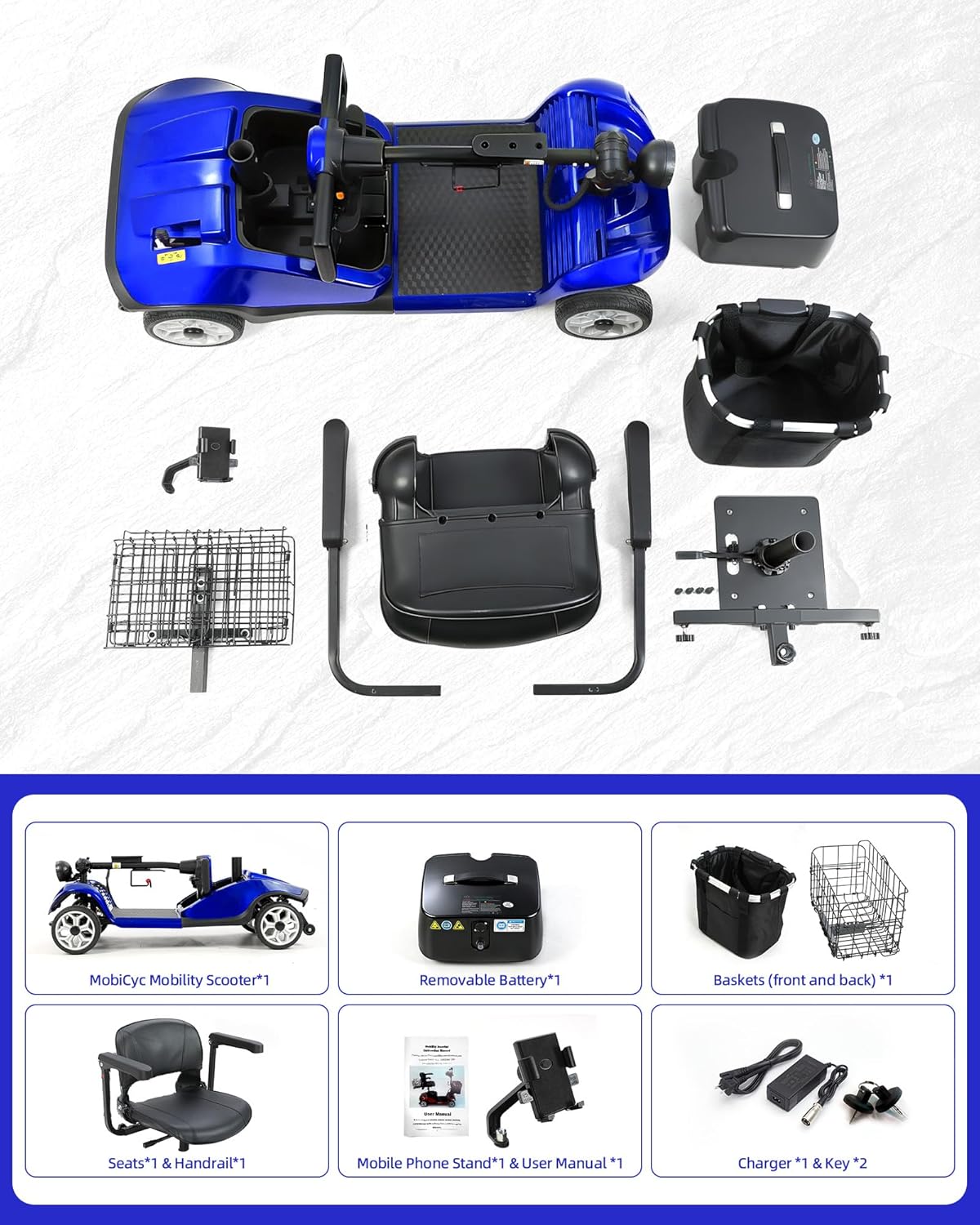
Figure 2: All components included in the MobiCyc MS08 package.
4. Setup and Assembly
The MobiCyc MS08 is designed for easy assembly. Follow these steps:
4.1. Unpacking and Initial Setup
Carefully remove all components from the packaging. Place the main scooter body on a flat, stable surface.
4.2. Attaching the Tiller (Steering Column)
Insert the tiller into the designated slot at the front of the scooter base. Secure it by tightening the screw located underneath the tiller base using the provided tools.
4.3. Installing the Seat
Lift the seat fixing rod on the scooter base. Align the seat with the rod and press down firmly until it locks into place. Ensure the seat is securely attached and can swivel freely when unlocked.
4.4. Attaching Armrests
Slide the armrests into the slots on either side of the seat. Tighten the securing knobs to fix them at your desired width.
4.5. Attaching Baskets, Phone Holder, and Cup Holder
Attach the front basket to the tiller by aligning it with the hole and pushing it down. The rear basket attaches to the back of the seat frame. Secure the phone holder and cup holder to the tiller as desired.

Figure 3: Scooter with front accessories installed.
Assembly Videos:
Video 1: MS08 Installation Video. This video demonstrates the complete assembly process for the MobiCyc MS08 scooter.
Video 2: MS08 PRO Product Installation Guide. A detailed guide for installing the MS08 PRO model, applicable to the MS08's main assembly steps.
5. Operating Instructions
Familiarize yourself with the controls before operating the scooter.
5.1. Power On/Off
Insert the key into the ignition and turn it to the 'ON' position. The LED dashboard will illuminate. To turn off, turn the key to 'OFF'.
5.2. Speed Control
Use the speed adjustment knob on the tiller to set your desired speed. The scooter offers 8-level speed adjustment with a maximum speed of 5 mph.
5.3. Driving (Forward/Reverse)
Gently press the throttle lever to move forward. To engage reverse, use the reverse switch (if applicable) and then press the throttle.
5.4. Braking
Release the throttle lever to engage the electromagnetic braking system, which will bring the scooter to a smooth stop. For emergency stops, apply the manual brake lever.
5.5. Lights and Horn
Activate the LED headlights and horn using the dedicated buttons on the tiller for enhanced safety and visibility.
Video 3: Mbxcooter M1 Budget-Friendly Electric Mobility Scooter. This video provides a general overview of operating a similar mobility scooter, demonstrating basic controls and features.
6. Battery and Charging
The MobiCyc MS08 is powered by a removable 24V 15Ah battery, offering up to 15 miles of range per charge.
6.1. Charging Procedure
- Ensure the scooter is turned off.
- Locate the charging port on the lower left side of the tiller.
- Connect the charger cable to the charging port.
- Plug the charger into a standard wall outlet.
- The charger indicator light will show charging status (typically red for charging, green for fully charged).
- Charging typically takes approximately 8 hours. Do not overcharge.

Figure 4: Removable battery for convenient charging.
7. Features and Adjustments
The MS08 offers several features for comfort and convenience.
7.1. Seat Adjustments
The seat features 360° swivel for easy on/off access, adjustable height, and width-adjustable armrests to customize your riding posture.

Figure 5: Seat adjustment features.
7.2. Tiller Angle Adjustment
The tiller angle can be adjusted to suit your comfort and reach. Loosen the adjustment knob, set the desired angle, and re-tighten.
7.3. Storage Baskets
Utilize the front and rear baskets for carrying personal items, groceries, or other necessities.
7.4. Phone Holder and Cup Holder
The scooter includes a standard-fit mobile phone holder and a sturdy cup holder for added convenience during your travels.

Figure 6: Integrated phone and cup holders.
7.5. Safety Features
The MS08 is equipped with several safety features:
- High-Visibility LED Headlights
- Rear Reflective Strips
- Anti-Tip Rear Wheels
- Front Collision Guard

Figure 7: Comprehensive 360-degree safety protection.
8. Portability and Storage
The MobiCyc MS08 is designed for easy transport and storage, quickly disassembling into four lightweight, tool-free sections. The heaviest piece weighs only 75 lbs.
- For smooth loading and transport, a two-person lift is recommended for the heaviest section.
- The compact design allows it to fit easily into most car trunks, especially SUVs.

Figure 8: Scooter disassembled for transport in an SUV trunk.

Figure 9: Folding sequence for compact storage.
9. Maintenance
Regular maintenance ensures the longevity and optimal performance of your scooter.
- Cleaning: Wipe down the scooter regularly with a damp cloth. Avoid using harsh chemicals or excessive water.
- Tires: The 8-inch puncture-proof tires require minimal maintenance. Periodically check for debris or damage.
- Battery Care: Charge the battery fully after each use. If storing for an extended period, charge it at least once a month.
- Connections: Ensure all electrical connections are secure and free from corrosion.
10. Troubleshooting
If you encounter issues, refer to this section for common problems and solutions.
- Scooter Not Turning On: Check if the key is fully inserted and turned to 'ON'. Ensure the battery is charged and properly connected.
- Reduced Range: This may indicate a low battery charge or an aging battery. Ensure full charge before each trip.
- Unusual Noises: Inspect for loose components or obstructions around the wheels and motor.
Video 4: Common Alarm Issues with Mobility Scooters. This video addresses typical alarm signals and how to resolve them for mobility scooters.
11. Specifications
| Feature | Detail |
|---|---|
| Model Number | MS08 |
| Product Dimensions | 39.37"D x 19.09"W x 35.43"H |
| Item Weight | 101.4 Pounds |
| Color | Blue |
| Motor | 350W Brushless |
| Battery | 24V 15Ah Removable |
| Max Speed | 5 mph |
| Max Load Capacity | 330 lbs |
| Range per Charge | Up to 15 miles |
| Climbing Ability | 15° |
| Ground Clearance | 45mm |
| Tires | 8-inch Puncture-Proof |
12. Customer Support
For any questions, assistance, or parts replacement, please contact MobiCyc customer support:
- Reply within 24 hours
- Rapid delivery
- Free replacement of parts
- Service TEL: +1(833)866-0007
- Available Mon-Fri, 9AM-5PM PST

Figure 10: MobiCyc Customer Support team.


