
Introduction
The Fuzion Ultra Mini Gram Scale, Model MT-100-N, is a compact and portable digital scale designed for precise measurements of small items. With a capacity of 100 grams and an accuracy of 0.01 grams, it is suitable for weighing jewelry, coins, food ingredients, gemstones, and other small objects. This manual provides essential information for the proper setup, operation, maintenance, and troubleshooting of your scale.
Product Features
- Ultra Mini Design: Extremely compact and lightweight for easy portability.
- High Precision: Measures with 0.01g accuracy up to 100g capacity.
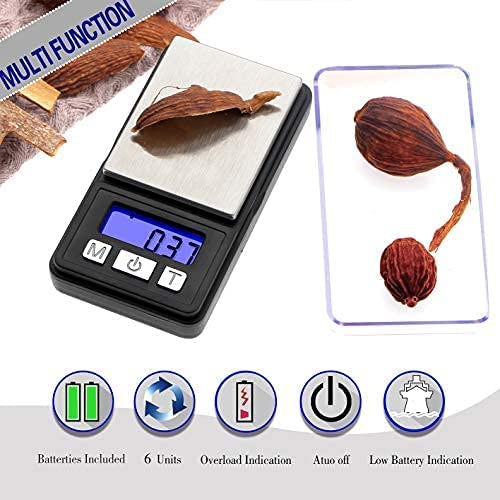
- Multiple Units: Supports 6 weighing modes: grams (g), ounces (oz), grains (gn), carats (ct), pennyweights (dwt), and troy ounces (ozt).
- Tare Function: Allows you to subtract the weight of a container for net weight measurement.
- Backlit LCD Display: Provides clear readings in various lighting conditions.
- Durable Construction: Made from high-quality stainless steel and ABS material.
- Automatic Shut-off: Conserves battery life by turning off after a period of inactivity.
- Overload and Low Battery Indication: Alerts users to potential issues.
What's in the Box
Upon unpacking, please ensure all items are present:
- 1 x Fuzion Ultra Mini Gram Scale (Model MT-100-N)
- 1 x Weighing Tray (also serves as a protective cover)
- 2 x AAA Batteries
Setup
- Battery Installation: Open the battery compartment located on the underside of the scale. Insert the two AAA batteries, ensuring correct polarity (+/-). Close the compartment securely.
- Placement: Place the scale on a hard, flat, and stable surface. Avoid placing it on soft, uneven, or vibrating surfaces, as this can affect accuracy.
- Initial Power On: Press the [ON/OFF] button to turn on the scale. The display will show "88888" then "0.00" or "0.0" indicating it is ready for use.

Operating Instructions
Power On/Off
- Press the [ON/OFF] button to turn the scale on.
- Press and hold the [ON/OFF] button for a few seconds to turn the scale off. The scale will also automatically shut off after a period of inactivity to save battery life.
Unit Conversion
- With the scale on, press the [M] (Mode) button to cycle through the available weighing units: g (grams), oz (ounces), gn (grains), ct (carats), dwt (pennyweights), and ozt (troy ounces).
- The selected unit will be displayed on the LCD screen.

Tare Function
The Tare function allows you to weigh items in a container by subtracting the container's weight.
- Turn on the scale and wait for it to display "0.00".
- Place the empty container (e.g., the included tray) onto the weighing platform. The display will show the container's weight.
- Press the [T] (Tare) button. The display will reset to "0.00".
- Add the items you wish to weigh into the container. The display will now show only the net weight of the items.
- To clear the tare, remove all items from the platform and press the [T] button again, or turn the scale off and on.

Calibration
Your scale is factory calibrated. However, if you experience consistent inaccuracies, recalibration may be necessary. This typically requires a precise calibration weight (e.g., 100g). Refer to the manufacturer's website or contact support for specific calibration instructions for your model, as the procedure can vary.
Maintenance
- Cleaning: Wipe the scale with a slightly damp cloth. Do not immerse the scale in water or use abrasive cleaners.
- Storage: Store the scale in a clean, dry environment. Avoid extreme temperatures and humidity. Keep the protective cover on when not in use.
- Battery Replacement: When the display shows "LO", replace the AAA batteries promptly to ensure accurate readings and proper function.
Troubleshooting
| Problem | Possible Cause | Solution |
|---|---|---|
| Scale does not turn on | Dead batteries; Incorrect battery installation | Replace batteries; Check battery polarity |
| Display shows "LO" | Low battery power | Replace batteries |
| Display shows "O-Ld" | Overload; Weight exceeds 100g capacity | Remove excess weight immediately to prevent damage |
| Inaccurate readings | Unstable surface; Drafts; Needs calibration | Place on a stable, level surface; Avoid drafts; Recalibrate if necessary |
| Display is dim or flickering | Low battery power | Replace batteries |
Specifications
- Brand: Fuzion
- Model: MT-100-N
- Capacity: 100g
- Accuracy: 0.01g
- Units: g, oz, gn, ct, dwt, ozt
- Display: Backlit LCD
- Power: 2 x AAA Batteries (included)
- Material: Acrylonitrile Butadiene Styrene (ABS), Stainless Steel
- Item Weight: 0.05 kg
- Recommended Uses: Coins, Food, Gemstones, Jewelry

Warranty and Support
The Fuzion Ultra Mini Gram Scale (Model MT-100-N) comes with a 10-year warranty. For warranty claims, technical support, or any inquiries regarding your product, please contact Fuzion customer service through their official website or the retailer where the product was purchased.