
Introduction
This manual provides essential instructions for the safe and efficient use of your CUKTECH 10000mAh Magnetic Wireless Portable Charger Power Bank, Model WPB100L. Please read this guide thoroughly before operating the device and retain it for future reference.
Product Overview
The CUKTECH WPB100L is a versatile 10000mAh power bank designed for portable and desktop charging. It features strong magnetic attachment for compatible devices and a built-in USB-C cable for wired charging. It also functions as a charging stand.

This image illustrates the 10,000mAh high capacity of the CUKTECH power bank, capable of fully charging an iPhone 17 up to 1.8 times. It also provides charging estimates for iPhone 15 (approx. 2 charges), iPhone 16 (approx. 1.8 charges), and iPhone 17 Pro (approx. 1.5 charges).

This image highlights the 2-in-1 functionality of the CUKTECH power bank, serving as both a magnetic mobile power bank that snaps onto your phone and a desktop charging dock for stable, hands-free charging.

This image demonstrates the strong magnetic attachment feature of the CUKTECH power bank, detailing the 15 N52 rare-earth magnets inside. It visually confirms the power bank's ability to securely hold devices, equivalent to the weight of up to 5 smartphones.
Setup
Initial Charging
Before first use, fully charge your CUKTECH power bank. Connect the built-in USB-C cable to a compatible USB power adapter (not included) and a power outlet. The indicator lights will show the charging progress. Once all lights are solid, the power bank is fully charged.
Operating Instructions
Wireless Charging (Magnetic)
- Ensure your device is compatible with magnetic wireless charging (e.g., iPhone 12 series and newer).
- Align your compatible device with the magnetic charging area on the power bank. The magnets will snap into place, securing the device and initiating wireless charging.
- The power bank provides up to 7.5W wireless charging for iPhones.
Note: Magnetic function is exclusive to iPhone 12 and newer models. It is not compatible with Android devices for magnetic attachment, though some Android devices may support standard Qi wireless charging if placed correctly.

This image displays the CUKTECH power bank being used as a charging stand, with an iPhone placed horizontally in StandBy Mode. This feature allows for convenient viewing of time and notifications while charging.
Wired Charging (USB-C)
- Locate the built-in USB-C cable on the power bank.
- Connect the USB-C cable to the charging port of your device.
- The power bank will automatically begin charging your device. It supports up to 20W fast charging via the built-in cable.
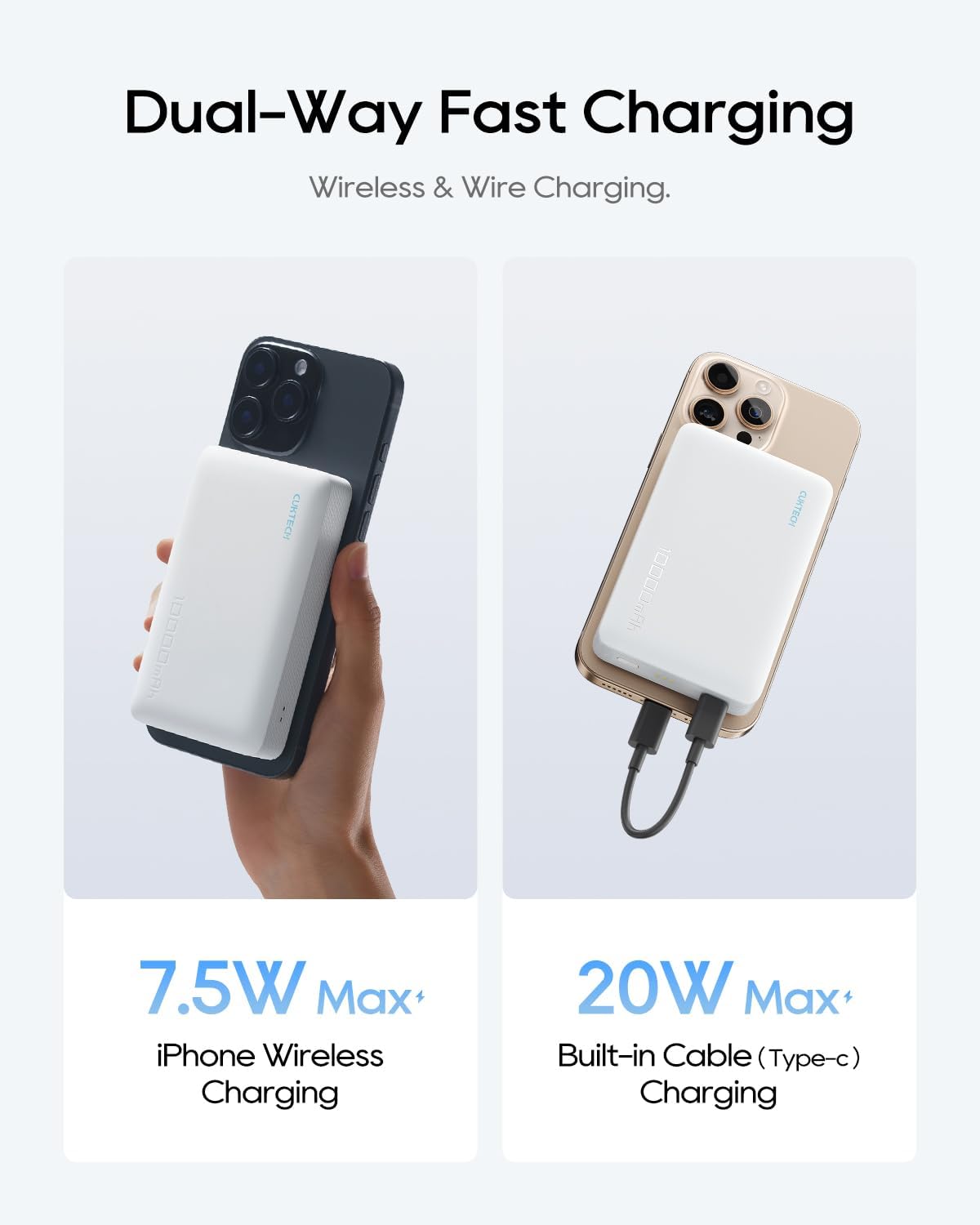
This image illustrates the dual-way fast charging capabilities of the CUKTECH power bank. It shows wireless charging for an iPhone at up to 7.5W Max and wired charging using the integrated USB-C cable at up to 20W Max.
Charging Multiple Devices
The power bank can charge two devices simultaneously: one wirelessly via magnetic attachment and another via the built-in USB-C cable.

This image demonstrates the CUKTECH power bank's ability to charge two devices concurrently. One iPhone is shown charging wirelessly via magnetic attachment, while another is connected and charging using the built-in USB-C cable.
Using as a Charging Stand
The power bank can be used as a stable wireless charging stand, supporting both horizontal and vertical orientations. This is ideal for watching videos or making calls while your device charges.
Maintenance
- Cleaning: Use a soft, dry cloth to clean the surface of the power bank. Avoid liquid cleaners or aerosols.
- Storage: Store the power bank in a cool, dry place away from direct sunlight and extreme temperatures.
- Battery Care: To prolong battery life, fully charge the power bank at least once every three months if not in regular use.
Troubleshooting
- Device not charging wirelessly: Ensure your device is magnetically aligned and compatible with magnetic wireless charging (iPhone 12 or newer). Remove any thick cases that might interfere with the magnetic connection or wireless charging.
- Device not charging via cable: Check if the built-in USB-C cable is securely connected to both the power bank and your device. Ensure the power bank has sufficient charge.
- Power bank not charging: Verify that the USB-C cable is properly connected to a working power adapter and outlet. Try a different power adapter or cable if available.
- Slow charging: Ensure your device and power bank are not overheating. Fast charging requires compatible devices and cables.
Specifications
| Feature | Specification |
|---|---|
| Model Number | WPB100L |
| Battery Capacity | 10000 mAh |
| Wireless Charging Output | Up to 7.5W (for iPhone) |
| Wired Charging Output (USB-C) | Up to 20W Max |
| Input (USB-C) | 10 Volts (Corded Electric) |
| Battery Cell Composition | Lithium Polymer |
| Dimensions | 11.7 x 9.9 x 7.9 cm |
| Weight | 300 g |
| Special Features | Pocket-sized, Fast Charging, Wireless Charging, Integrated Stand |
| Color | Grey |
Safety Information
- Do not expose the power bank to extreme temperatures (above 45°C or below 0°C).
- Avoid dropping, disassembling, or modifying the device.
- Keep away from water and high humidity.
- Do not use if the device is damaged or swollen.
- Keep out of reach of children.
- Dispose of the product responsibly according to local regulations.
Warranty and Support
Your CUKTECH power bank comes with a 24-month stress-free warranty against manufacturing defects. For any product inquiries, technical support, or warranty claims, please contact our friendly customer service team.
Customer Support Email: service@cuktech.com


