
1. Introduction
This manual provides essential information for the safe and efficient operation of your OUKITEL C68 smartphone. Please read it thoroughly before using your device.

Figure 1: OUKITEL C68 Smartphone, showcasing its sleek design and camera module.
2. Setup
2.1. Unboxing and Package Contents
Carefully open the package and ensure all items are present. The standard package includes:
- 1x OUKITEL C68 Cell Phone
- 1x 18W Charger
- 1x Data Cable
- 1x Phone Case
- 1x Manual
- 1x Quick Start Guide
- 1x SIM Pin
- 1x Warranty Certificate
Video 1: OUKITEL C68 Android 15 Smartphone Packaging List. This video demonstrates the contents of the retail package.
2.2. SIM Card and Storage Installation
The OUKITEL C68 supports a dual-slot design for either two Nano SIM cards or one Nano SIM card and one TF (microSD) card for storage expansion up to 1TB.
- Locate the SIM tray on the side of the device.
- Insert the provided SIM pin into the small hole next to the tray to eject it.
- Place your Nano SIM card(s) and/or TF card into the appropriate slots on the tray. Ensure they are correctly oriented.
- Carefully reinsert the tray into the device until it clicks into place.

Figure 2: The SIM tray and various connectivity features of the OUKITEL C68, including NFC and GPS icons.
2.3. Initial Power On and Charging
Press and hold the power button located on the side of the device until the OUKITEL logo appears. For optimal performance, it is recommended to fully charge the device before first use. Use the provided 18W charger and data cable for fast charging.

Figure 3: Visual representation of the OUKITEL C68's 6000mAh battery and 18W fast charging capability.
3. Operating Your Device
3.1. Display and User Interface
The OUKITEL C68 features a 7.2-inch HD+ display with a 120Hz refresh rate for smooth visuals and a 500 nits brightness for clear viewing in various lighting conditions. The device runs on Android 15, offering a user-friendly interface and access to a wide range of applications.
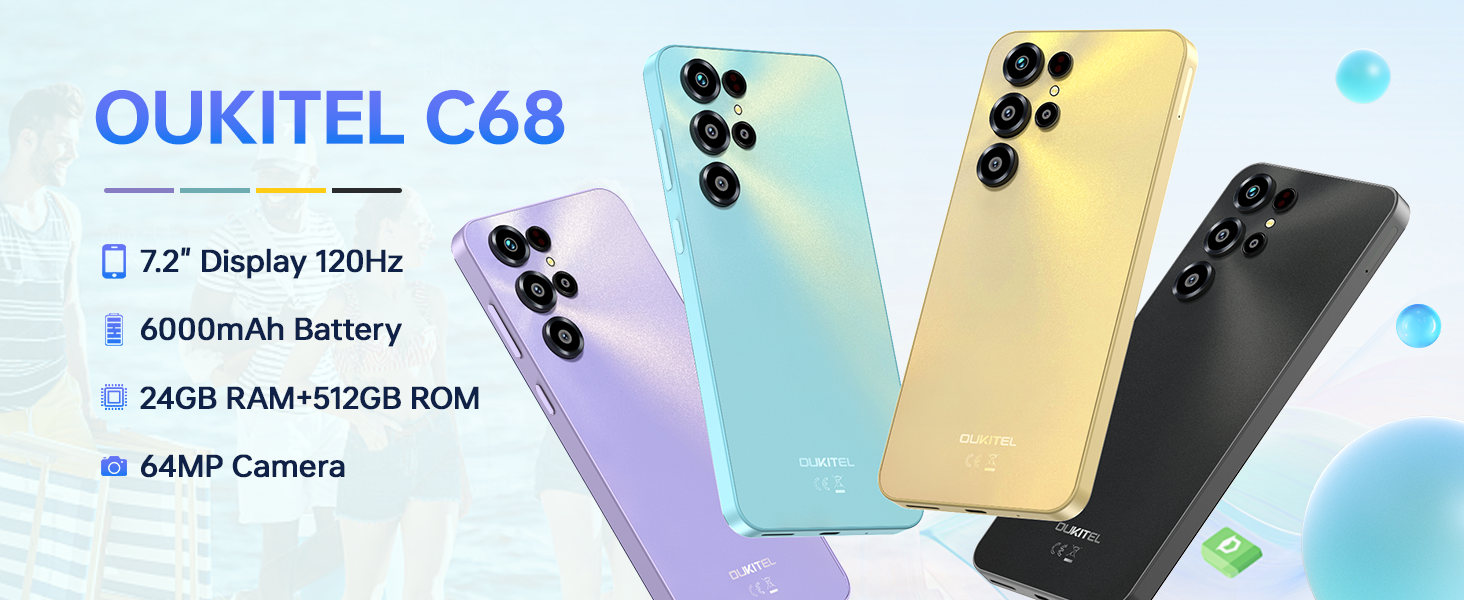
Figure 4: Key features of the OUKITEL C68's 7.2-inch 120Hz display, including brightness and resolution.
3.2. Performance and Storage
Equipped with a 12nm octa-core processor, 24GB RAM (8GB physical + 16GB virtual), and 512GB internal storage (expandable up to 1TB via TF card), the C68 is designed for responsive multitasking and ample space for your data.

Figure 5: Illustration of the OUKITEL C68's 24GB RAM and 512GB ROM, highlighting its storage capacity.
3.3. Camera Functions
Capture moments with the 64MP main camera and take clear selfies with the 8MP front camera. The camera system includes various modes such as HDR, Beauty Mode, AI, Portrait Mode, Panorama, and Pro Mode to enhance your photography experience.

Figure 6: The OUKITEL C68's 64MP main camera and 8MP front camera, demonstrating their use in capturing images.
3.4. Security and Connectivity
The C68 offers side fingerprint recognition and facial unlocking for secure access. It supports NFC for contactless payments, Bluetooth 5.0, FM radio, and a Type-C port. For navigation, it integrates GPS, GLONASS, Galileo, and BeiDou multi-satellite systems. The device is 4G Dual-SIM compatible and supports T-Mobile carriers.

Figure 7: Overview of the OUKITEL C68's security features (fingerprint, Face ID) and navigation systems (GPS, GLONASS, BeiDou, Galileo).
3.5. OTG Functionality
The OUKITEL C68 supports On-The-Go (OTG) functionality, allowing you to connect external USB devices such as flash drives, keyboards, or even charge other devices like headphones and speakers.
4. Maintenance
4.1. General Care
To maintain your device's performance and appearance, keep it clean and avoid exposure to extreme temperatures, direct sunlight, or harsh chemicals. Use a soft, dry cloth for cleaning.
4.2. Battery Care
To prolong battery life, avoid completely draining the battery frequently. It is recommended to keep the battery charge between 20% and 80% for optimal longevity. Use only the original charger and cable provided with your device.
5. Troubleshooting
5.1. Device Not Powering On
- Ensure the battery is sufficiently charged. Connect the device to the charger for at least 30 minutes.
- Press and hold the power button for 10-15 seconds to perform a forced restart.
5.2. Network Connectivity Issues
- Check if your SIM card is correctly inserted and activated.
- Verify that mobile data is enabled in your device settings.
- Ensure you are within your carrier's network coverage area.
- Restart the device.
5.3. App Crashes or Freezing
- Close and reopen the problematic application.
- Clear the app's cache and data in Settings > Apps.
- Ensure the device's software is up to date.
6. Specifications
| Brand | OUKITEL |
| Model Name | OUKITEL C68 |
| Operating System | Android 15 |
| Screen Size | 7.2 Inches |
| Resolution | 720*1560 |
| Refresh Rate | 120Hz |
| RAM Memory Installed Size | 24 GB (8GB physical + 16GB virtual) |
| Memory Storage Capacity | 512 GB (Expandable up to 1TB) |
| Battery Capacity | 6000 Milliamp Hours |
| Phone Talk Time | 40 Hours |
| Connectivity Technologies | BT5.0, NFC, Wi-Fi 2.4/5G |
| GPS | True (GPS, GLONASS, Galileo, BeiDou) |
| Special Features | Built-In GPS, Dual SIM, Expandable Memory, Fast Charging Support, Supports USB OTG |
| Wireless Carrier Support | T-Mobile (GSM: B2/B3/B5/B8, WCDMA: B1/2/4/5/8, TDD: B34/38/39/40/41, FDD: B1/2/3/4/5/7/8/12/17/18/19/20/25/26/28AB/66) |
| Item Weight | 1.06 pounds |
7. Warranty and Support
Your OUKITEL C68 smartphone comes with a warranty. Please refer to the 'Warranty Certificate' included in your package for detailed terms and conditions. For technical support or further assistance, please visit the official OUKITEL website or contact their customer service.
For more information, visit the OUKITEL Store.