Introduction
This manual provides essential information for the safe and effective operation, maintenance, and troubleshooting of your FCX FMS 1/24 FCX24M Toyota Tacoma RC Crawler. Please read this manual thoroughly before using the product to ensure optimal performance and longevity.
What's in the Box
Your FCX FMS 1/24 FCX24M Toyota Tacoma RC Crawler package includes the following items:
- RC Crawler (FMS 1/24 FCX24M Toyota Tacoma)
- Remote Control
- Battery (380mAh 2S Lithium Battery)
- Charger
- Charging Cable
- Product Manual
Product Features
The FCX FMS 1/24 FCX24M Toyota Tacoma RC Crawler is engineered for detailed realism and robust off-road performance:
- Officially Licensed Toyota Tacoma: Built with attention to detail, mirroring its real-world counterpart.
- Faithfully Reproduced Paint Scheme: ABS hard-body shell with precision molding, capturing details like the grille, bumpers, wheel arches, mirrors, tailgate, wipers, and door handles. Available in Gray, Red, and Blue.
- Counter-Rotating Driveshafts: Advanced design to counteract front-end lift during acceleration, ensuring smoother, more stable, and realistic driving dynamics.
- FCX24M Chassis: Features an extended wheelbase of 153 mm (6.02 inches), a robust ladder frame, and high-strength solid axles for exceptional rigidity and torsional strength.
- Off-Road Designed Tires: Soft rubber compound and deep treads provide superior grip and ground clearance for various obstacles and rough terrain.
- Dual-Speed Transmission: Allows for switching between high and low speeds to conquer different terrains.
- Powerful Motor and Battery: Equipped with a 050 motor and a standard 380mAh 2S lithium battery, providing approximately 30 minutes of high-speed driving time.

Image: Three FMS 1/24 Toyota Tacoma RC Crawlers (red, black, blue) on a rocky terrain, showcasing the officially licensed design.

Image: Close-up of the FMS 1/24 Toyota Tacoma RC Crawler's front, highlighting the remote control lighting system with illuminated headlights.
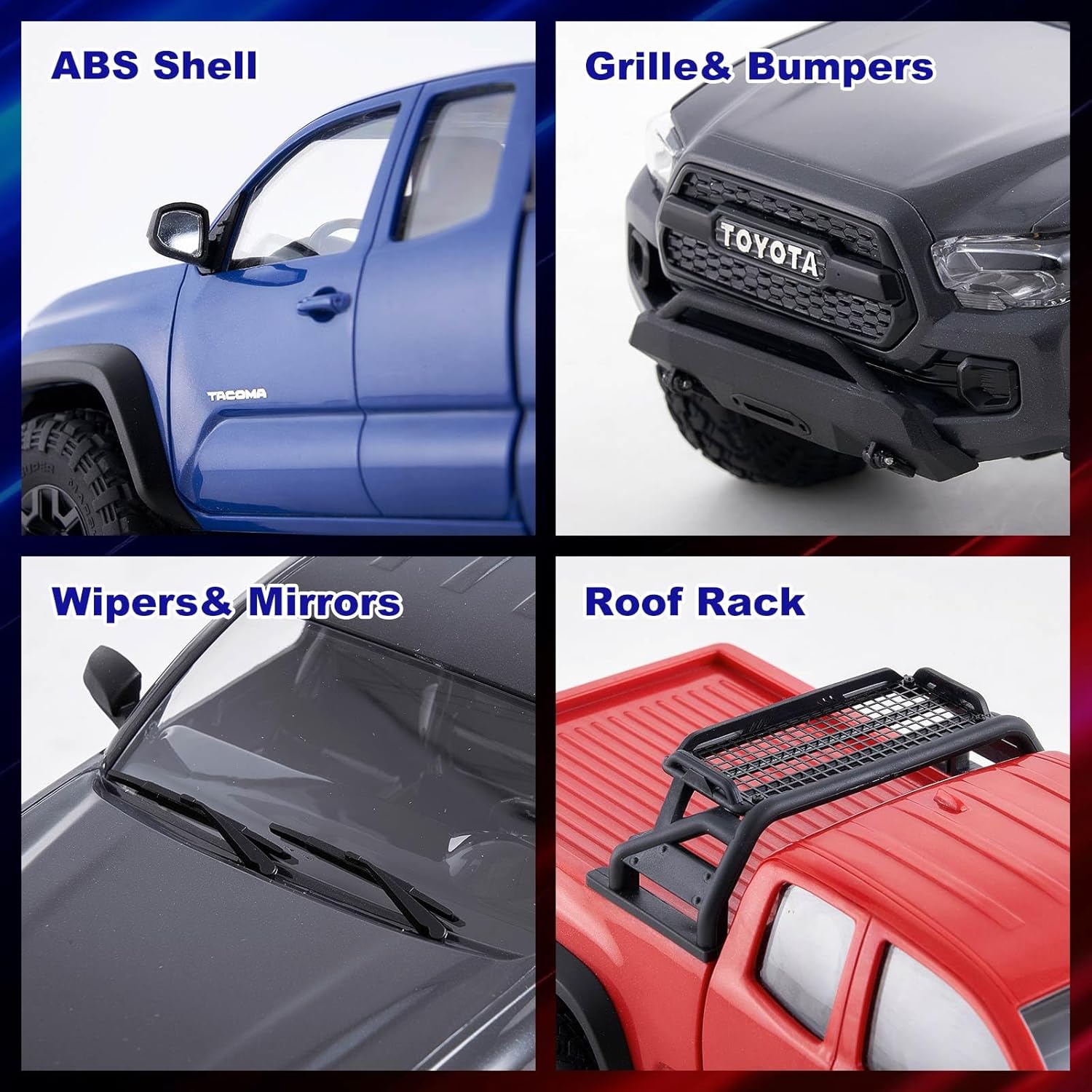
Image: A collage displaying various detailed features of the FMS 1/24 Toyota Tacoma RC Crawler's ABS hard-body shell, including the side profile, front grille and bumper, windshield wipers and side mirrors, and the roof rack.

Image: An underside view of the FCX24M chassis, illustrating its robust construction with a metal frame, large-diameter tires, full metal gears, and full bearings for enhanced durability and performance.

Image: Two FMS 1/24 Toyota Tacoma RC Crawlers in red, demonstrating the dual-speed transmission with one truck in high-speed motion and another in a crawling pose. Insets show the 050 motor and 380mAh 2S battery.

Image: The FMS 1/24 Toyota Tacoma RC Crawler in blue navigating a rocky incline, accompanied by an inset illustrating the counter-rotating driveshafts, which provide smoother and more realistic handling by reducing torque twist.
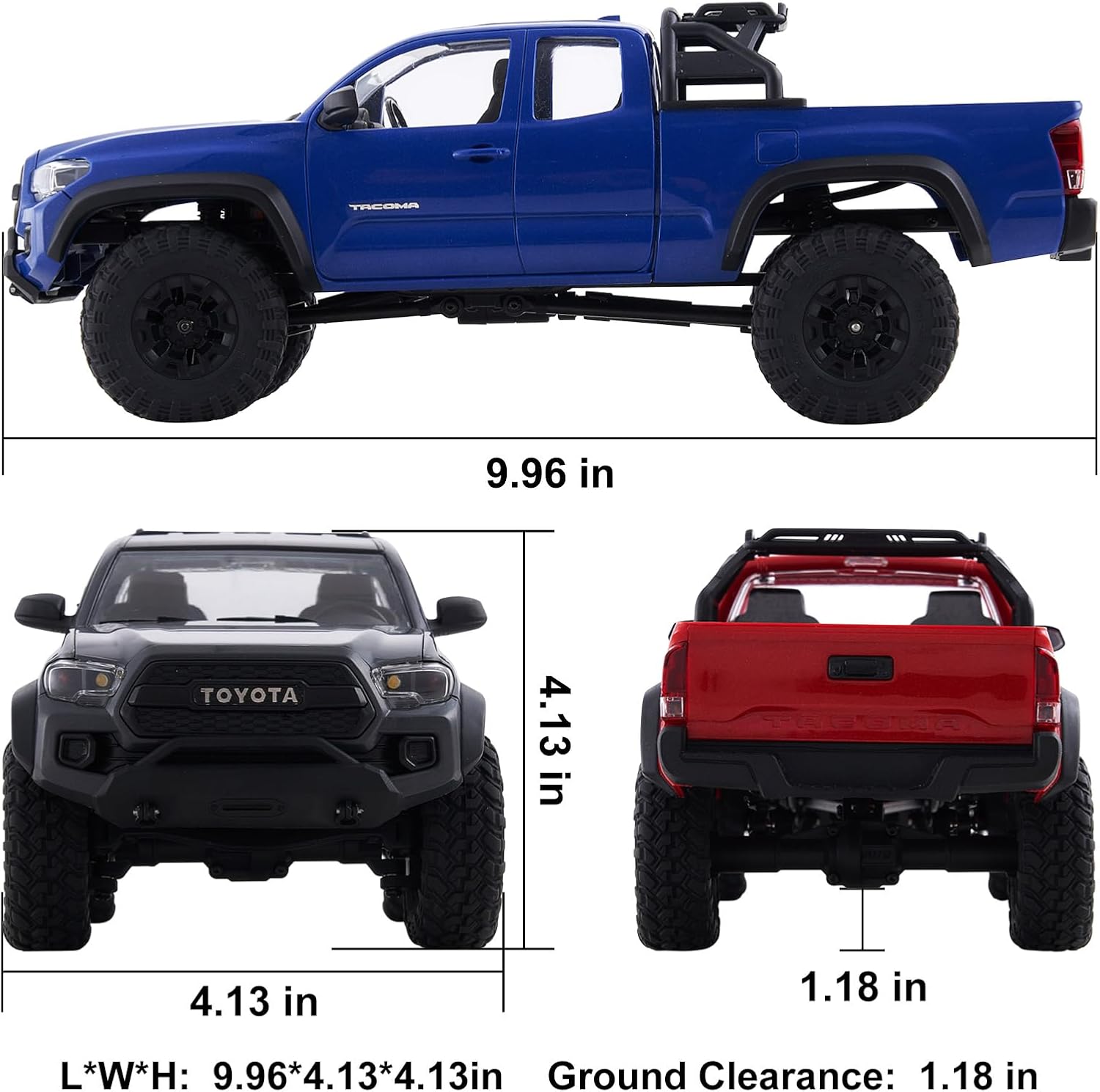
Image: A diagram detailing the physical dimensions of the FMS 1/24 Toyota Tacoma RC Crawler, including its length, width, height, and ground clearance.
Video: Official product video showcasing the FMS 1/24 FCX24M Toyota Tacoma RC Crawler in action, highlighting its features and performance.
Setup
- Charge the Battery: Connect the provided 380mAh 2S lithium battery to the charger using the charging cable. Plug the charger into a suitable power source. The indicator light on the charger will show the charging status. Ensure the battery is fully charged before first use.
- Install Battery in Vehicle: Carefully open the battery compartment on the RC Crawler. Insert the fully charged battery, ensuring correct polarity, and secure the compartment cover.
- Install Batteries in Remote Control: Open the battery compartment on the remote control and insert the required batteries (typically AA, not included unless specified). Close the compartment.
- Power On: First, turn on the remote control. Then, turn on the RC Crawler. The indicator lights on both devices should confirm a successful connection.
- Binding (if necessary): If the remote control and vehicle do not connect automatically, refer to the remote control's specific binding instructions in the included product manual.
Operating Instructions
Familiarize yourself with the remote control functions before operating the vehicle:
- Steering: Use the steering wheel on the remote control to turn the vehicle left or right.
- Throttle: Use the trigger on the remote control to move the vehicle forward (pull) or backward (push).
- Dual-Speed Transmission: Your RC Crawler features a dual-speed transmission. Use the designated button on the remote control (refer to remote manual for exact button) to switch between high-speed mode for faster driving and low-speed mode for precise crawling over obstacles.
- LED Lights: The vehicle is equipped with LED lights. Use the light control button on the remote control to turn them on or off.
Always operate the vehicle in an open area, away from people, pets, and obstacles. Avoid operating in wet conditions unless the product is specifically rated as waterproof.
Maintenance
Regular maintenance will help prolong the life and performance of your RC Crawler:
- Cleaning: After each use, especially after off-road driving, clean the vehicle to remove dirt, dust, and debris. Use a soft brush or compressed air. Avoid using water directly on electronic components.
- Lubrication: Periodically check and lubricate moving parts such as gears and bearings as recommended in the detailed product manual.
- Battery Care: Always fully charge the battery before storage and store it in a cool, dry place. Do not overcharge or over-discharge the battery.
- Inspection: Regularly inspect all parts for wear and tear, especially tires, suspension components, and body shell. Replace damaged parts promptly.
Troubleshooting
If you encounter issues with your RC Crawler, refer to the following common problems and solutions:
- Vehicle Not Responding:
- Ensure both the vehicle and remote control are powered on.
- Check if the battery in the vehicle is charged and properly connected.
- Verify that the remote control batteries are fresh and correctly installed.
- Re-bind the remote control to the vehicle if necessary (refer to setup section).
- Poor Performance/Weak Power:
- The vehicle battery may be low; recharge it fully.
- Check for any obstructions in the drivetrain or wheels.
- Inspect the motor for signs of damage or overheating.
- Steering Issues:
- Check for obstructions around the front wheels.
- Adjust the steering trim on the remote control.
- Inspect the steering servo and linkages for damage.
For persistent issues, consult the full product manual or contact customer support.
Specifications
| Feature | Detail |
|---|---|
| Product Dimensions | 15 x 7 x 5 inches |
| Item Weight | 2.6 pounds |
| ASIN | B0FYNP55SD |
| Manufacturer Recommended Age | 17 years and up |
| Manufacturer | Fms |
Safety Information
Please use under adult supervision.
- Always operate the vehicle in a safe environment, away from traffic, water, and hazardous areas.
- Keep fingers, hair, and loose clothing away from moving parts.
- Do not modify the product in any way not specified by the manufacturer.
- Ensure all connections are secure before operation.
- Dispose of batteries responsibly according to local regulations.
Warranty and Support
For warranty information, technical support, or replacement parts, please refer to the contact details provided in the original product packaging or visit the official FCX website. Keep your purchase receipt as proof of purchase.


