
Introduction
Thank you for choosing the RunStar Digital Bathroom Scale. This manual provides essential information for safe and effective use of your new scale. Please read it thoroughly before operation and retain it for future reference.
Important Safety Information
- Do not use on wet or slippery surfaces. Ensure the scale is placed on a hard, flat, and dry surface.
- Do not jump on the scale. Step on and off gently.
- The scale is designed for household use only. It is not intended for medical or commercial purposes.
- Keep the scale away from strong electromagnetic fields.
- Do not disassemble or modify the scale. This will void the warranty.
- Keep out of reach of children.
Package Contents
Verify that all items are present in the package:
- 1x RunStar Digital Bathroom Scale (Model: BG2403-S)
- 3x AAA Batteries
- 1x User Manual
Setup Instructions
1. Battery Installation
Before first use, open the battery compartment on the underside of the scale and remove the plastic insulation strip. Insert the 3 AAA batteries, ensuring correct polarity (+/-). Close the battery compartment securely.

Image: Underside of the scale with the battery compartment and unit switch. The battery compartment is located on the back of the scale. The unit switch is a small button next to the battery compartment.
2. Initial Placement
Place the scale on a hard, flat, and stable surface. Avoid carpets or uneven flooring, as this may affect accuracy. The scale features anti-slip foot pads for stability.
3. Unit Conversion (lbs/kg)
To switch between pounds (lb) and kilograms (kg), locate the 'UNIT' button on the underside of the scale, near the battery compartment. Press this button to toggle between the desired units.

Image: Close-up of the 'UNIT' button on the bottom of the scale, used for switching between measurement units.
Operating Instructions
1. Basic Weighing
- Ensure the scale is on a hard, flat surface.
- Gently step onto the center of the scale with bare feet. The scale will automatically turn on.
- Stand still until your weight measurement is displayed and stabilizes on the LED screen.
- The display will flash a few times, then show your final weight.
- Step off the scale. The scale will automatically turn off after a few seconds to conserve battery life.

Image: A person standing on the RunStar digital bathroom scale, with their weight clearly visible on the LED display.
2. Auto-Calibration
The scale features auto-calibration. If you move the scale, it will recalibrate itself when you step on it. For best results, allow the scale to display '0.0' before stepping on it.
3. LED Display Indicators
- 'Lo': Low battery indicator. Replace batteries when this appears.
- 'Err': Overload indicator. The maximum weight capacity is 400 lb (180 kg).
- 'C': Calibration in progress.
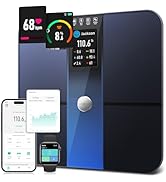
Image: The scale's LED display showing error messages: 'Err' for overload, 'Lo' for low battery, and 'C' for calibration.
Maintenance and Care
- Clean the scale with a soft, damp cloth. Do not use abrasive cleaners or immerse the scale in water.
- Store the scale in a cool, dry place.
- If the scale is not used for an extended period, remove the batteries to prevent leakage.
Troubleshooting
No Display / 'Lo' Indicator
Replace the 3 AAA batteries. Ensure they are inserted with correct polarity.
Inaccurate Readings
- Ensure the scale is on a hard, flat surface. Avoid carpets.
- Step onto the scale gently and stand still.
- Ensure the scale displays '0.0' before each measurement.
- Check if the scale is overloaded ('Err' indicator).
'Err' Indicator
The weight exceeds the maximum capacity of 400 lb (180 kg). Step off the scale immediately to prevent damage.
Specifications
| Feature | Detail |
|---|---|
| Model Number | BG2403-S |
| Weight Capacity | 400 lb / 180 kg |
| Measurement Increments | 0.1 lb / 0.05 kg |
| Display Type | LED Backlight |
| Platform Material | 6mm Tempered Glass |
| Power Source | 3 x AAA Batteries (included) |
| Special Features | Auto Shut Off, Auto Calibration, Non-Slip Platform |
| Dimensions | 11 x 11 inches (approx. 280 x 280 mm) |
Warranty and Support
Warranty Information
The RunStar Digital Bathroom Scale Model BG2403-S comes with a manufacturer's warranty. Please refer to the product packaging or the official RunStar website for specific warranty terms and conditions. To activate your warranty, visit the RunStar website or scan the QR code provided on the packaging within 15 days of purchase.
Customer Support
For any questions, concerns, or technical assistance, please contact RunStar customer support:
- Website: www.runstar.com
- Email: service@runstar.com


