
1. Introduction and Overview
This manual provides detailed instructions for the installation, operation, and maintenance of your LongPlus Smart 4K 8CH Home Security Camera System, model LP8ME84D1. This system is designed to provide comprehensive surveillance with advanced features for both indoor and outdoor environments.
Key Features:
- 4K UHD Resolution: Captures clear video footage with 3840x2160 resolution and a 132° wide viewing angle.
- AI Motion Detection: Features intelligent detection for humans and vehicles, reducing false alarms.
- Multiple Night Vision Modes: Offers IR Night Vision, Color Night Vision, and Smart Night Vision for optimal visibility in various lighting conditions up to 100ft/30m.
- Two-Way Audio & Strobe Light Alarm: Enables communication and deters intruders with an audible alarm and flashing lights.
- Flexible Storage: Includes a 2TB HDD, expandable up to 10TB, with optional cloud storage. Utilizes H.265+ compression for efficient storage.
- PoE (Power over Ethernet): Simplifies installation with a single cable for power and data transmission.
- Weatherproof Design: IP67 rated metal cameras suitable for extreme weather conditions (-4°F/-20°C to 140°F/60°C).
- Remote Access: View live footage and playback via the Longvision APP/Client on iOS, Mac, Windows, and Android devices. Supports up to 32 users.
2. What's in the Box
Carefully unpack the box and ensure all items are present and in good condition. If any items are missing or damaged, please contact customer support.

Image: Overview of the LongPlus 4K Dome Security Camera System components.
- 1 x 8CH NVR with 48/1.875V Adaptor
- 4 x 4K PoE Dome Cameras
- 1 x USB Mouse
- 1 x 1M Cat5 Cable
- 1 x 1M HDMI Cable
- 4 x 18M Cat5 Cables
- 2 x Extra Connectors
- 4 x Packs of Screws and Other Accessories
- 1 x Quick Start Guide
3. Setup Instructions
Follow these steps to set up your LongPlus security camera system. For a visual guide, please refer to the setup video below.
Video: LongPlus 8MP 16CH NVR Security System Unboxing & Setup. This video demonstrates the unboxing and initial setup process for the NVR and cameras.
- Connect NVR to Monitor: Connect the NVR to a monitor using the provided HDMI or VGA cable. Ensure the monitor is powered on and set to the correct input source.
- Power on NVR: Connect the NVR to a power outlet using the provided power adapter. Turn on the NVR power switch.
- Connect NVR to Router: Connect an Ethernet cable from the LAN port of the NVR to a LAN port on your internet router. This provides network access for remote viewing and updates.
- Connect Cameras to NVR: Connect each PoE camera to any of the PoE camera ports on the NVR using the provided Ethernet cables. The cameras will receive both power and data through these cables.
- Connect USB Mouse: Connect the USB mouse to a USB port on the NVR for navigation and control of the system interface.
- System Initialization: The system should automatically detect and display the camera feeds. Follow any on-screen prompts for initial setup, such as setting a password and configuring basic network settings.
4. Operating Instructions
4.1 Video Quality and Viewing Angle
Your LongPlus system delivers crystal-clear 4K UHD (3840x2160) video, ensuring sharp details for effective surveillance. The cameras feature a 132° wide viewing angle, providing extensive coverage with fewer blind spots.

Image: Demonstrates the superior clarity of 4K UHD video quality.

Image: Illustrates the broader coverage provided by the 132° wide-angle lens.
4.2 Night Vision Modes
The system offers three night vision modes to adapt to different lighting conditions:
- Full-Color Mode: Provides vibrant, full-color footage in low-light conditions.
- IR Mode (Infrared): Standard black and white night vision for complete darkness.
- AI Mode (Smart Night Vision): Automatically activates lighting when people or vehicles are detected, offering color vision only when needed.

Image: Visual representation of the three available night vision modes.
4.3 Smart AI Motion Detection
The system's AI capabilities accurately detect humans and vehicles, minimizing false alarms from other movements. You can configure activity zones to focus detection on specific areas and ignore irrelevant motion.
- Person/Vehicle Detection: Receive alerts only when a person or vehicle is identified.
- Activity Zones: Define specific areas within the camera's view for motion detection, ignoring activity outside these zones.
- Privacy Mask: Exclude certain areas from recording to protect privacy.

Image: Smart AI detection distinguishing between a person and a vehicle.

Image: Setting up motion detection zones and privacy masks for customized surveillance.
4.4 Two-Way Audio and Strobe Light Alarm
Engage with visitors or deter unwanted guests using the integrated two-way audio. The cameras can also trigger a strobe light alarm and siren upon detection of suspicious activity.

Image: Demonstrates the two-way audio function for communication.

Image: Visual of the strobe light alarm and siren activating to deter potential intruders.
4.5 Recording and Storage
The NVR supports 24/7 continuous recording to the included 2TB HDD, which is expandable up to 10TB. H.265+ video compression technology saves over 75% of storage space compared to H.264, allowing for longer recording times. Cloud storage options are also available.
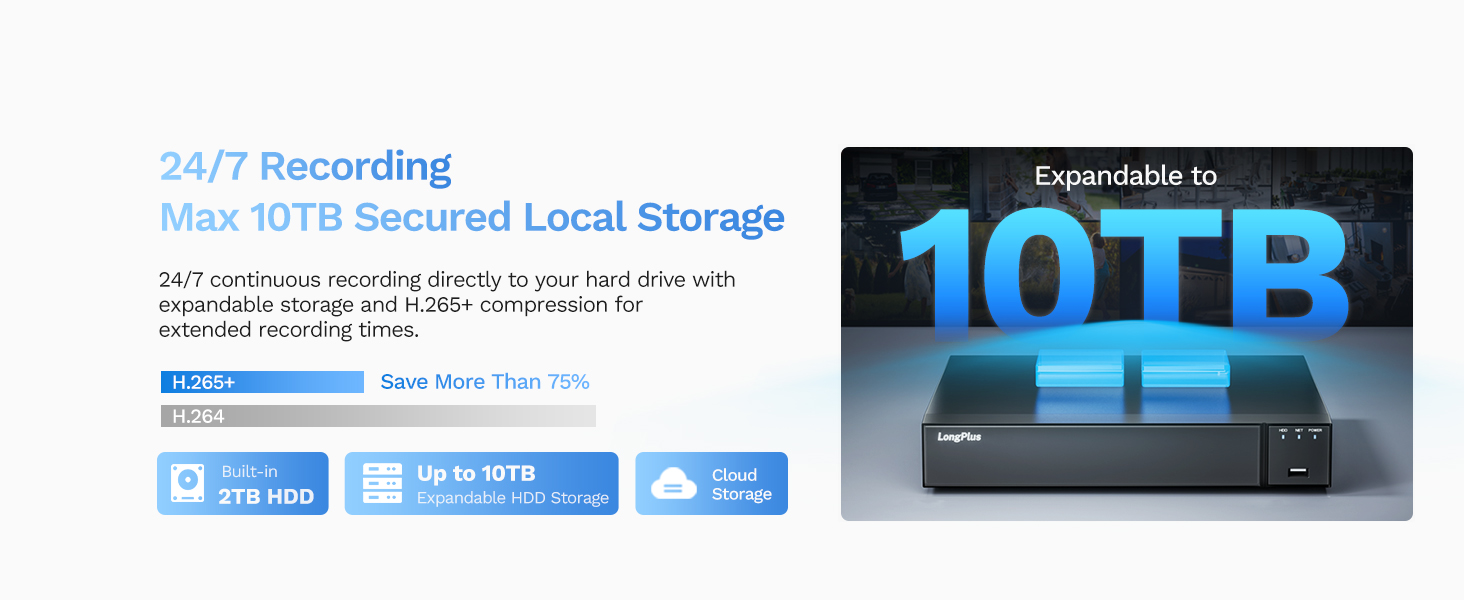
Image: The NVR supports up to 10TB of local storage for extensive recording.
4.6 Remote Access and Sharing
Access your security system from anywhere using the Longvision APP/Client on your smartphone, tablet, or computer. You can view live feeds, playback recorded footage, and manage settings remotely. The system also allows sharing access with up to 31 other users.

Image: Demonstrates remote viewing capabilities on various devices.

Image: Illustrates the feature of sharing live video access with family members.
5. Maintenance
Regular maintenance ensures optimal performance and longevity of your security system.
- Clean Cameras: Periodically clean camera lenses with a soft, damp cloth to remove dust, dirt, or water spots that may affect image clarity. Do not use harsh chemicals.
- Check Connections: Ensure all cable connections (PoE, HDMI, power) are secure and free from damage.
- Firmware Updates: Check for and install available firmware updates for the NVR and cameras through the Longvision APP/Client or NVR interface. Updates often include performance improvements and security enhancements.
- Hard Drive Health: Monitor the health of the NVR's hard drive through the system settings. Consider replacing the HDD if errors are detected or after several years of continuous operation.
- Backup Important Footage: Regularly back up any critical recorded footage to an external storage device or cloud service.
6. Troubleshooting
If you encounter issues with your LongPlus security system, refer to the following common troubleshooting steps:
- No Video Display:
- Check if the NVR and monitor are powered on.
- Verify HDMI/VGA cable connections between the NVR and monitor.
- Ensure the monitor input source is correctly selected.
- Cameras Not Displaying:
- Check PoE cable connections from cameras to NVR.
- Ensure the NVR's PoE ports are functioning (check indicator lights).
- Restart the NVR.
- No Remote Access:
- Verify the NVR is connected to your router via Ethernet and has internet access.
- Check your router's internet connection.
- Ensure the Longvision APP/Client is updated to the latest version.
- Confirm correct network settings on the NVR.
- Recording Issues:
- Check the NVR's hard drive status; ensure it's initialized and has sufficient space.
- Verify recording schedules and motion detection settings.
- Poor Image Quality:
- Clean camera lenses.
- Check for obstructions in the camera's field of view.
- Ensure cameras are securely mounted and not vibrating.
For further assistance, please contact LongPlus customer support.
7. Specifications
| Feature | Specification |
|---|---|
| Brand | LongPlus |
| Model Number | LP8MEF8 |
| Connectivity Technology | Wired (PoE) |
| Video Capture Resolution | 4K (3840x2160) |
| Number of Channels | 8 |
| Memory Storage Capacity | 2 TB (expandable up to 10 TB) |
| Color | White |
| Power Source | Corded Electric |
| Item Dimensions (L x W x H) | 13.3 x 9.23 x 9.4 inches |
| Operating System Compatibility | Android, Mac OS, Windows, iOS |
| Recommended Uses | Indoor, Outdoor |
| Low Light Technology | Night Vision (IR, Color, Smart) |
| Night Vision Range | 100 Feet |
| Frame Rate | 30 FPS |
| Recording Mode | Motion-triggered, Scheduled, 24/7 |
| Hardware Interface | Ethernet, HDMI, USB, VGA |
| Lens Type | Wide Angle |
| Viewing Angle | 132 Degrees |
| Weatherproof Rating | IP67 |
8. Warranty and Support
LongPlus provides a 2-year warranty for this product, covering manufacturing defects and malfunctions under normal use. Additionally, lifetime technical support is available to assist you with any inquiries or issues you may encounter.
If you have any questions, require technical assistance, or need to claim warranty service, please contact LongPlus customer support. Our professional technical team aims to respond to your queries within 24 hours.
For the most up-to-date contact information, please refer to the official LongPlus website or the contact details provided in your Quick Start Guide.