
1. Product Overview
The UGREEN NASync DH4300 Plus is a 4-bay desktop Network Attached Storage (NAS) solution designed for efficient data management and high-speed networking. This bundle includes a 2.5Gb Ethernet switch, enhancing connectivity and data transfer capabilities within your network. It offers a robust platform for centralized data storage, automatic backups, and seamless file sharing across various devices and operating systems.
With support for up to 120TB of storage capacity (disks sold separately), the NAS provides ample room for millions of documents, songs, and movies, ensuring your digital life is preserved without the need for constant deletion. Its user-friendly app facilitates quick setup and remote access from Windows, macOS, Android, iOS, web browsers, and smart TVs.

Figure 1: UGREEN NASync DH4300 Plus and 2.5Gb Switch integrated into a personal workstation for efficient data management and high-speed operations.
2. Setup
Setting up your UGREEN NASync DH4300 Plus is designed to be straightforward. The device supports quick connection via NFC, allowing for easy initial configuration. Follow the steps below to install your hard drives and connect the NAS to your network.
2.1 Hard Drive Installation
The NAS supports up to four 3.5-inch or 2.5-inch SATA HDDs/SSDs. Storage disks are not included and must be purchased separately. Ensure the NAS is powered off before installing or removing any drives.
- Gently pull the drive bay handle to slide out an empty drive tray.
- Mount your 3.5-inch or 2.5-inch drive into the tray using the provided screws. For 3.5-inch drives, secure the drive from the sides. For 2.5-inch drives, secure it from the bottom.
- Slide the loaded drive tray back into the NAS until it clicks securely into place.
- Repeat for all desired drives.

Figure 2: The UGREEN NASync DH4300 Plus with its four drive bays, illustrating the potential for massive storage capacity up to 120TB.
2.2 Network and Power Connection
Connect the NAS to your network and power source.
- Connect one end of the Ethernet cable to the LAN port on the NAS and the other end to your router or the included 2.5Gb switch.
- Connect the power adapter to the DC 12V port on the NAS and plug it into a power outlet.
- Press the power button on the front of the NAS to turn it on.

Figure 3: The UGREEN 6-Port 2.5Gb Switch, showing its DC 12V Power Port, 5x 2.5Gb ports, and 10Gb SFP+ port for flexible network connections.
3. Operating
The UGREEN NASync DH4300 Plus operates on a user-friendly system accessible via a dedicated app or web interface. This allows for easy file management, sharing, and remote access.
3.1 User-Friendly App and Remote Access
The UGREEN NAS app simplifies interaction with your device. It supports quick connection via NFC and allows you to set up and share files across various platforms including Windows, macOS, Android, iOS, web browsers, and smart TVs. Remote access to your data is available from any of your connected devices.
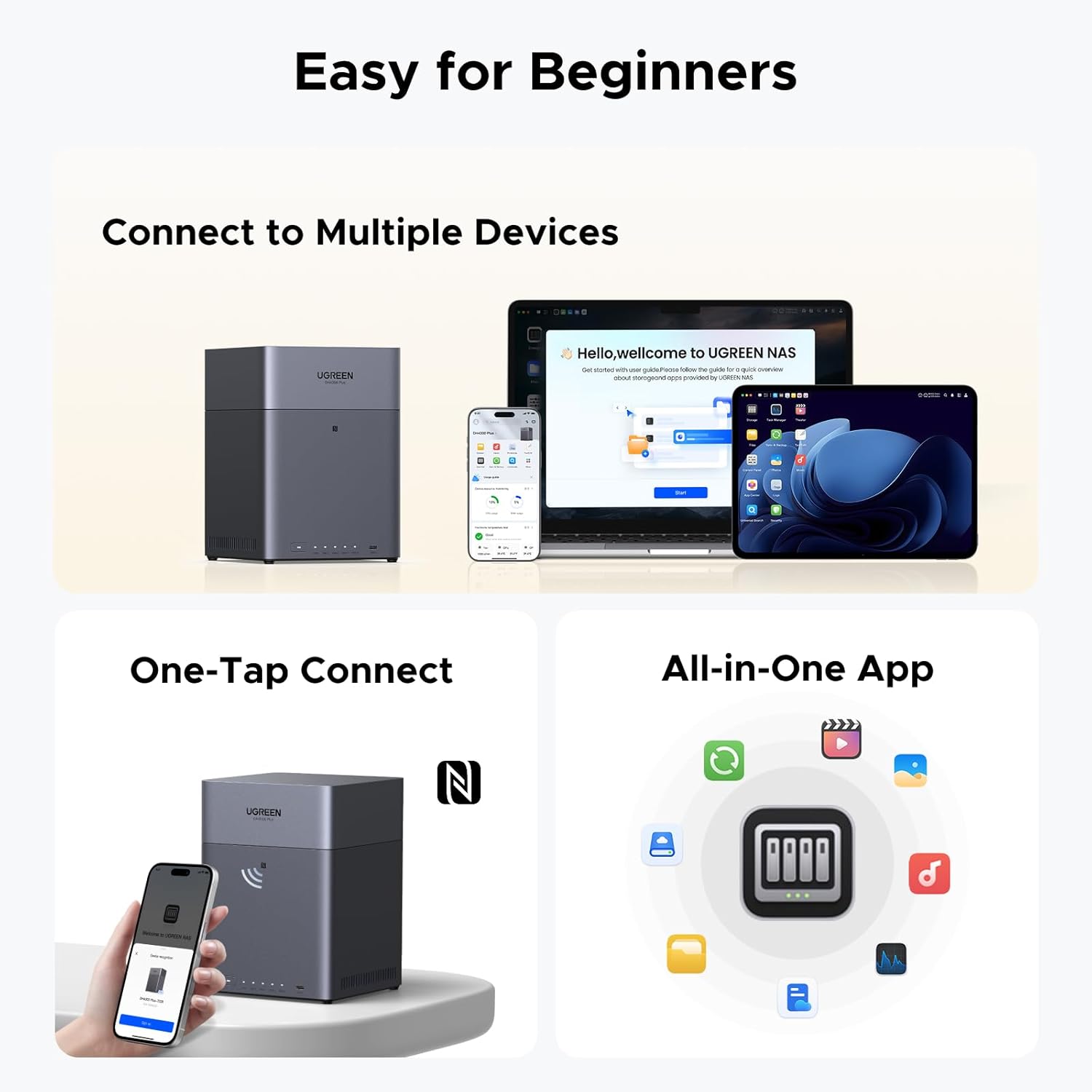
Figure 4: The UGREEN NAS app demonstrating multi-device connectivity and one-tap connect functionality for seamless user experience.
3.2 AI Photo Assistant
The NAS features an AI Photo Assistant that automatically backs up and intelligently sorts your memories. This includes smart categorization, baby albums, live photo backup, semantic search, and a duplicate photo cleaner, ensuring your photos are always organized and easily accessible.

Figure 5: The AI Photo Album feature of the UGREEN NAS, highlighting smart categorization, live photo backup, and duplicate photo cleaner functionalities.
4. Network Configuration
The UGREEN NAS bundle includes a 6-Port 2.5Gb Switch to optimize your network performance. This switch features 5 x 2.5Gb uplink ports and 1 x 10Gb SFP+ port, allowing for high-speed data transfers and flexible connectivity.
4.1 Switch Modes
The Ethernet switch offers three operational modes, selectable with a single touch:
- Standard Mode: All ports connect to the network normally.
- Link Aggregation Mode: Ports 4 and 5 are aggregated to increase bandwidth to 5Gbps for multi-port devices like the NAS.
- VLAN Mode: Ports 1-4 are isolated from each other but can communicate with ports 5-6, improving network management and preventing broadcast storms.

Figure 6: Visual representation of the UGREEN 6-Port 2.5Gb Switch's speed capabilities, highlighting 2.5Gb for RJ45 ports and 10Gb for the SFP+ port.

Figure 7: Close-up of the UGREEN 6-Port 2.5Gb Switch's mode selection switch, detailing Standard, VLAN, and Link Aggregation modes.
4.2 10Gb SFP+ Port
The 10Gb SFP+ port provides flexible high-speed backbone connections. It supports 1G/2.5G/10G optical modules and RJ45 copper modules (module not included), making it ideal for connecting to 10GbE NAS, servers, or high-performance routers via fiber or Ethernet cables.
5. Data Management
The UGREEN NASync DH4300 Plus offers robust data management features, including massive storage capacity and various RAID options for data protection and performance.
5.1 Massive Storage Capacity
The NAS supports up to 120TB of storage, allowing you to store a vast amount of data, including approximately 41.2 million pictures, 4 million songs, or 80.6K movies. This capacity ensures you have ample space for all your digital content.
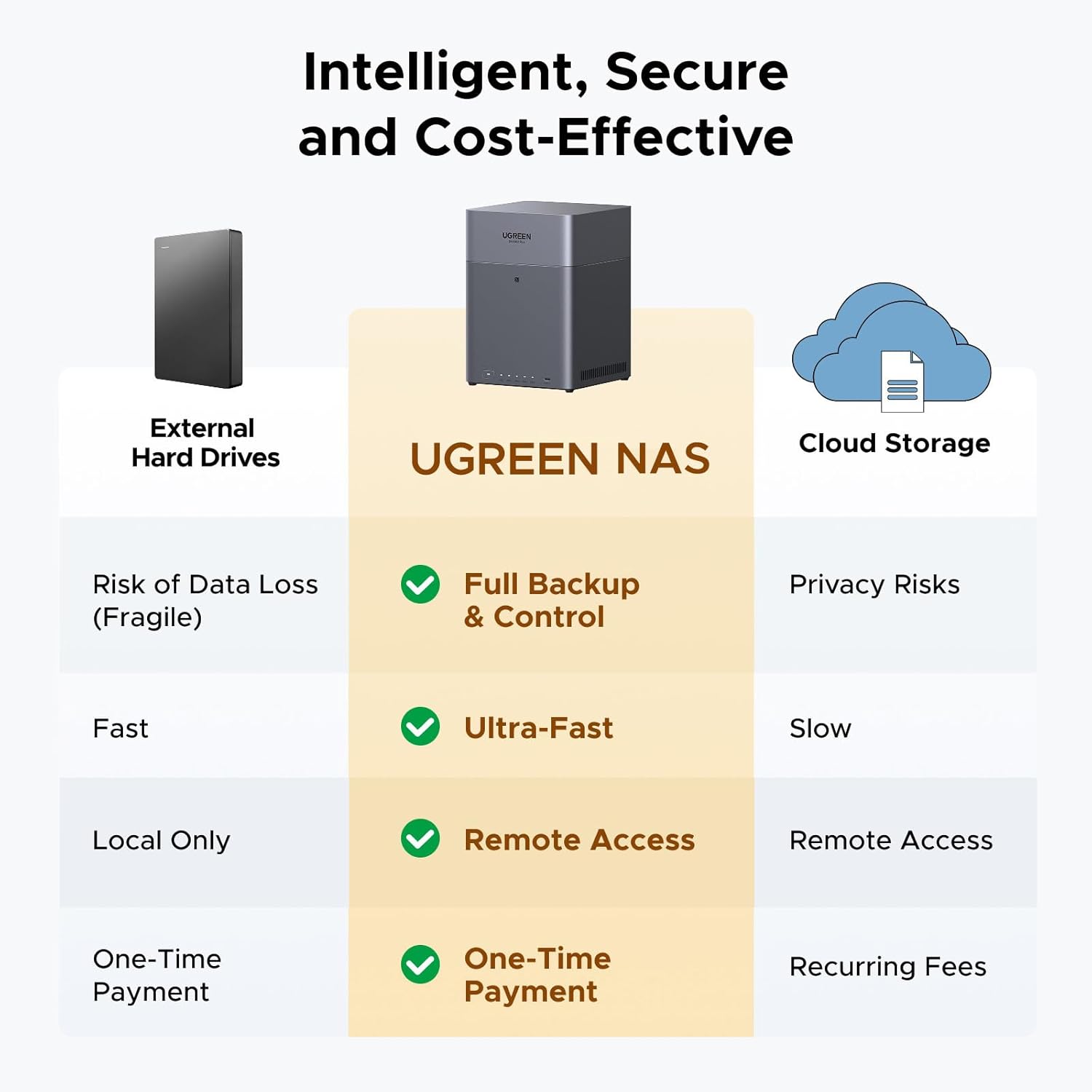
Figure 8: Comparison highlighting the benefits of UGREEN NAS over external hard drives and cloud storage, emphasizing full backup, ultra-fast speeds, and remote access.
5.2 RAID Options
The NAS supports various RAID configurations to balance performance, capacity, and data redundancy. Consult the user manual for detailed instructions on setting up RAID levels based on your specific needs.
6. Maintenance
Regular maintenance ensures the longevity and optimal performance of your UGREEN NASync DH4300 Plus.
- Firmware Updates: Periodically check for and install firmware updates through the NAS app or web interface to ensure you have the latest features and security patches.
- Drive Health Check: Monitor the health status of your hard drives regularly. Replace any failing drives promptly to prevent data loss, especially if not using a redundant RAID configuration.
- Cleaning: Keep the NAS unit clean and free from dust to ensure proper airflow and prevent overheating. Use a soft, dry cloth for external cleaning.
7. Troubleshooting
If you encounter issues with your UGREEN NASync DH4300 Plus, refer to the following common troubleshooting tips:
- NAS Not Powering On: Ensure the power adapter is securely connected to both the NAS and a working power outlet. Try a different outlet if necessary.
- Cannot Access NAS on Network: Verify that the Ethernet cable is properly connected to the NAS and your router/switch. Check your router's settings to ensure the NAS is assigned an IP address. Restart both the NAS and your router.
- Hard Drive Not Detected: Ensure the hard drives are correctly seated in their trays and the trays are fully inserted into the NAS. Check the drive health status in the NAS app.
- Slow Performance: Check your network connection speed. Ensure your router, server, and Ethernet port on the device support 2.5Gb Ethernet for optimal performance. If using RAID, verify the RAID status.
8. Specifications
| Brand | UGREEN |
| Model | DH4300 Plus |
| Color | Black |
| Material | Metal |
| Drive Bays | 4-Bay (supports 3.5" or 2.5" SATA HDDs/SSDs) |
| Max Capacity | Up to 120TB (4 x 30TB) |
| Network Ports | UGREEN 6-Port 2.5Gb Switch: 5 x 2.5Gb uplink ports, 1 x 10Gb SFP+ port |
| USB Ports | Multiple USB 3.2 ports |
| HDMI Output | Yes, 4K HDMI ports |
| RAM | 8GB |
| Compatible Devices | Desktop, Laptop, NAS, Server |
| Mounting Type | Floor Mount, Surface Mount |
9. Warranty and Support
UGREEN provides comprehensive support for its products. For any technical assistance or warranty claims, please refer to the contact information provided in your product packaging or visit the official UGREEN website.
The UGREEN NASync DH4300 Plus comes with a standard manufacturer's warranty. Please retain your proof of purchase for warranty validation.