
1. Introduction
This manual provides essential information for the safe and effective operation, maintenance, and care of your ByteTecpeak XP02 Electric Wheelchair. Please read this manual thoroughly before using the wheelchair to ensure proper understanding and to prevent injury or damage. The XP02 is a lightweight, folding motorized wheelchair designed for adults, featuring a durable magnesium-aluminum alloy frame, powerful 500W dual motors, and intelligent electromagnetic braking for enhanced mobility and safety.
2. Safety Information
Your safety is paramount. Always adhere to the following safety guidelines:
- First-time Use: For initial use, operate the wheelchair at a low speed to familiarize yourself with its controls and handling characteristics. This helps prevent unexpected bumps or collisions.
- Weight Capacity: Do not exceed the maximum weight recommendation of 330 pounds (150 kg).
- Slope Operation: The wheelchair is designed to handle slopes up to 12 degrees. Exercise caution on inclines and declines. The electromagnetic brakes prevent rollback on slopes.
- Environmental Conditions: Avoid operating the wheelchair in extreme weather conditions, such as heavy rain or snow, to prevent damage to electronic components.
- Obstacles: Always be aware of your surroundings and avoid sudden movements when encountering obstacles.
- Maintenance: Regularly inspect all components, especially brakes, tires, and battery connections, to ensure they are in good working order.
- Children and Pets: Keep children and pets away from the wheelchair during operation and when it is charging.
3. Product Features
The ByteTecpeak XP02 Electric Wheelchair is engineered with advanced features for comfort, convenience, and performance:
- Lightweight Magnesium-Aluminum Alloy Frame: Constructed for superb durability and reliability, supporting up to 330 lbs while weighing only 40 lbs for easy transport.
- Intelligent Electromagnetic Braking System: Ensures instant stops, even on hills. The system activates within 0.5 seconds when the joystick is released, preventing tipping or rolling.
- Extended Exploration Range: Equipped with a 24V 10AH lithium battery and upgraded high-efficiency 500W dual motors, providing a 12-mile travel range on a single charge.
- 360° Joystick Control: Offers smooth, precise maneuverability in tight spaces with a responsive joystick and 5-level speed adjustment.
- Potent 500W Motors: Capable of tackling inclines, gravel, grass, and uneven surfaces with ease.
- Comfortable Design: Features a breathable cushion, ergonomic seat, and foldable armrests for enhanced user comfort. The controller display shows speed and battery status.
- Flight-Ready Design: Removable battery and compact folded size (23.6" x 13.8" x 27.6") make it suitable for airline travel as luggage.
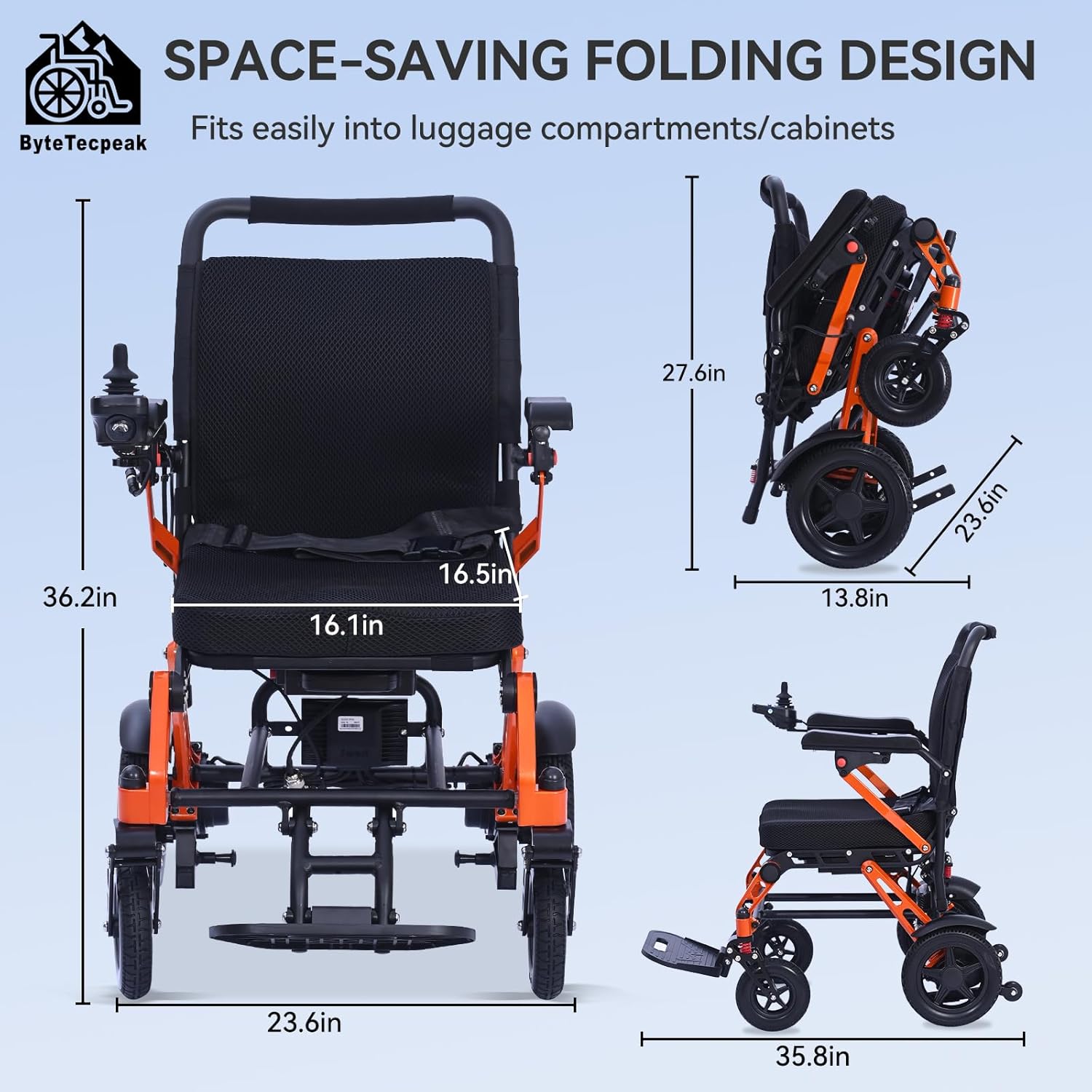
Image: The ByteTecpeak XP02 Electric Wheelchair showcasing its compact design and key dimensions, including seat width and overall height.

Image: An infographic highlighting key features such as 5-6H charging time, foldable design, 5-speed adjustable, 12.4 mi range, stable frame, and 330 lb load capacity.
4. Setup and Assembly
The ByteTecpeak XP02 Electric Wheelchair is designed for quick and easy setup. Follow these steps to prepare your wheelchair for use:
- Unfolding the Wheelchair: Gently lift the wheelchair from its folded position. Push down on the seat frame until it locks securely into place. Ensure all locking mechanisms are engaged.
- Attaching the Joystick Controller: The joystick controller can be mounted on either the left or right armrest. Slide the controller onto the designated bracket on the armrest and secure it with the provided knob. Connect the cable to the corresponding port.
- Adjusting Footrests: Lower the footrest into the operational position. Ensure it is stable before use.
- Battery Installation: Ensure the battery is securely inserted into its compartment. Press the red button to release or secure the battery.
- Anti-Tip Wheels: Verify that the anti-tip wheels are properly extended and secured for stability.
Video: This video demonstrates the unfolding process, attachment of the joystick, adjustment of footrests, and battery installation for the XP02 Electric Wheelchair.

Image: This image illustrates the one-button folding system, showing how the wheelchair unfolds in 3 seconds for instant use without tools.
5. Operating Instructions
Operating your ByteTecpeak XP02 Electric Wheelchair is intuitive. Follow these steps for safe and efficient use:
- Power On/Off: Press the power button on the joystick controller to turn the wheelchair on or off.
- Speed Adjustment: Use the speed adjustment buttons (+/-) on the joystick to select one of the 5 available speed levels. Start at a low speed and increase as comfort and conditions allow.
- Directional Control: Gently push the joystick in the desired direction (forward, backward, left, right) to move the wheelchair. The further you push, the faster the wheelchair will move up to the selected speed limit.
- Braking: Release the joystick to engage the intelligent electromagnetic braking system. The wheelchair will come to a smooth stop.
- Horn and Lights: The joystick controller includes a horn button for alerts and a function to switch lights (if equipped) by long-pressing the horn button.
Video: This video demonstrates the ByteTecpeak XP02 Electric Wheelchair in motion, showcasing its maneuverability and ease of control with the joystick.

Image: A close-up of the 360° control joystick, showing the speed reduction, on/off switch, horn, and speed increase buttons.
6. Battery and Charging
The XP02 is powered by a removable lithium battery. Proper charging and care are essential for battery longevity and performance.
- Removing the Battery: Press the red release button on the battery pack and slide it out of the compartment.
- Charging the Battery: Connect the charger to a standard electrical outlet and then to the charging port on the battery pack. The indicator light on the charger will show the charging status (typically red for charging, green for fully charged). Charging time is approximately 5-6 hours.
- Re-installing the Battery: Slide the charged battery back into its compartment until it clicks securely into place.

Image: An illustration detailing the 12Ah removable battery, 12.4 mi range, and 5-hour fast charge capability with a charge indicator on the display.
7. Maintenance
Regular maintenance ensures the longevity and optimal performance of your wheelchair.
- Cleaning: Wipe down the frame and seat with a damp cloth. Avoid using harsh chemicals or abrasive cleaners.
- Tires: Check tire pressure regularly and inflate as needed. Inspect tires for wear and tear.
- Battery Care: Store the battery in a cool, dry place. If not in use for an extended period, charge the battery at least once a month to maintain its health.
- Connections: Periodically check all electrical connections and fasteners to ensure they are secure.
- Moving Parts: Keep moving parts free of debris and lubricate as recommended by the manufacturer (if applicable).
8. Troubleshooting
If you encounter issues with your ByteTecpeak XP02, refer to the following common troubleshooting tips:
- Wheelchair Not Powering On: Check if the battery is fully charged and properly installed. Ensure the power button on the joystick is pressed.
- Loss of Power During Operation: The battery may be low. Recharge the battery immediately.
- Unresponsive Joystick: Ensure the joystick cable is securely connected. If the issue persists, power cycle the wheelchair (turn off, then on).
- Unusual Noises: Stop using the wheelchair immediately and inspect for loose parts or obstructions in the wheels or motors.
- Braking Issues: Verify that the electromagnetic brakes are engaging when the joystick is released. If not, contact customer support.
For issues not covered here, please contact ByteTecpeak customer support.
9. Specifications
| Feature | Specification |
|---|---|
| Product Dimensions (Unfolded) | 35.8"D x 23.6"W x 36.2"H |
| Product Dimensions (Folded) | 23.6"D x 13.8"W x 27.6"H |
| Item Weight | 40 Pounds |
| Maximum Weight Recommendation | 330 Pounds |
| Motor Power | 500W (Dual Motors) |
| Battery | 24V 10AH Lithium Battery |
| Travel Range | Up to 12 Miles |
| Maximum Speed | 3.7 Miles per Hour (5-level adjustment) |
| Frame Material | Magnesium-Aluminum Alloy |
| Brake Style | Electromagnetic |
| Wheel Size | Front: 7 Inches, Rear: 9 Inches |
| Maximum Slope Capacity | 12 Degrees |

Image: A visual representation of the wheelchair's unfolded, folded, and seat dimensions, along with its weight.
10. Warranty and Support
For warranty information, technical support, or service inquiries, please refer to the warranty card included with your purchase or contact ByteTecpeak customer service directly. Keep your purchase receipt as proof of purchase for warranty claims.