
Introduction
This manual provides essential information for the safe and efficient use of your Litime 12V 165Ah LiFePO4 Bluetooth Battery. Please read all instructions carefully before installation and operation. This battery is designed for deep cycle applications in RVs, travel trailers, trolling motors, and other off-grid power solutions.
Key features include:
- 2 Upgraded Heating Modes: Regular and Energy-Efficient options for cold-weather charging.
- Maximized Power, Compact Size: 172.3Wh/L energy density in a Group 31 form factor.
- Secure Bluetooth Password Control: Enhanced data security and exclusive device control.
- Bluetooth 5.0 Real-Time Monitoring: Check battery status via the LiTime App.
- 10-Year Lifespan: 4000+ deep cycles at 100% DOD, with automotive-grade cells and zero maintenance.
Setup
Follow these steps to set up your Litime LiFePO4 battery and connect it to the LiTime App for monitoring.
1. Initial Power On
The battery is powered off when you first receive it. To power it on, you need to charge it for 3-10 seconds. Connect a compatible LiFePO4 charger to the battery terminals. The battery will activate and be ready for use.
2. LiTime App Download and Connection
The LiTime App allows for real-time monitoring and control of your battery. Ensure your mobile device's Bluetooth is enabled before proceeding.
- Download the App: Scan the QR code printed on the battery label or in the manual to download the LiTime App from your device's app store.
- Register & Log In: Register for a new account and log in to the LiTime App.
- Add Battery: In the app, select 'Add Device'. You can either scan the QR code on the battery or use the Bluetooth search function to find and connect to your battery.

Figure 1: Litime 12V 165Ah LiFePO4 Battery. This image shows the top of the battery with its terminals and carrying strap, highlighting its compact design.
Video 1: Bluetooth Connection Guide and Troubleshooting. This video provides a step-by-step guide on how to connect your Litime battery to the LiTime App via Bluetooth, including troubleshooting tips for common connection issues.
Operating
Your Litime battery offers advanced features for optimal performance and safety.
1. Heating Modes
The 12V 165Ah Self-Heating Battery features two upgraded heating modes to ensure safe charging in cold environments:
- Regular Mode: Automatically activates heating below 41°F (5°C) when charged, stopping at 50°F (10°C) to begin charging. This mode is suitable for general cold-weather needs.
- Energy-Efficient Mode: Remotely activated via the LiTime App, this mode uses the battery's own energy for preheating, saving waiting time.
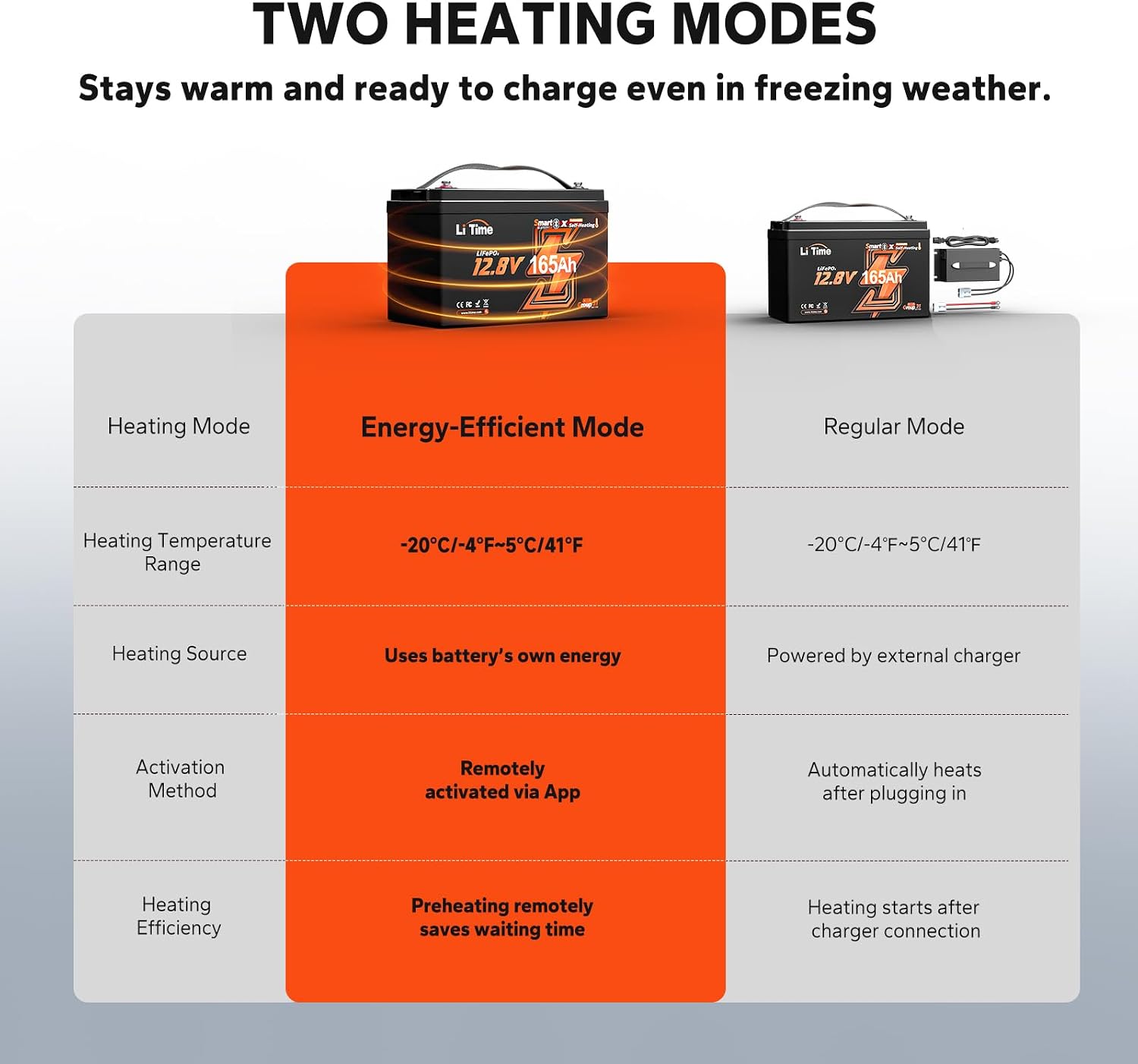
Figure 2: Two Heating Modes. This diagram compares the Regular and Energy-Efficient heating modes, detailing their activation methods, heating sources, and temperature ranges.
2. Bluetooth 5.0 Real-Time Monitoring & Control
The LiTime App provides comprehensive real-time monitoring and control capabilities:
- Secure Password Access: Protect your battery data and settings with a Bluetooth password control system.
- Data & Status Monitoring: View remaining battery capacity, power, current, voltage, internal temperature, serial number, and cycle times.
- Battery Power Off: Remotely power off the battery. Note: If connected to a charging source, the power off function cannot be enabled.
- Discharge Switch: Control whether the battery powers the load or not.

Figure 3: Smart & Secure Bluetooth 5.0 Control. This image displays the LiTime App interface on a smartphone, showing various real-time battery data points and control options like secure password access and battery power off.
3. Battery System Monitoring
The LiTime App also supports monitoring multiple batteries configured as a system (series or parallel). Ensure all individual batteries are added to the app first.
- Add Battery System: In the app, select 'Add Battery System'.
- Configure System: Name your battery system, set the system configuration (e.g., 2S2P for 2 series, 2 parallel), and choose the application type (RV, household, etc.).
- Add Batteries to System: Add the previously added individual batteries to the system. Ensure they are of the same model.
- Match Connection Order: Adjust the order and structure of the battery series and parallel connections in the app to match your physical setup.
- Monitor System Data: The app will automatically collect and display system data, including total voltage, charging/discharging power, current, and remaining capacity.
Maintenance
The Litime LiFePO4 battery is designed for minimal maintenance, offering a long lifespan and robust performance.
- Long Lifespan: Expect 4000+ deep cycles at 100% Depth of Discharge (DOD), significantly outperforming lead-acid batteries.
- Low-Temperature Protection: The battery features built-in protection that prevents charging below 32°F (0°C) and discharging below -4°F (-20°C), extending its overall life. Charging recovery begins at 41°F (5°C).
- IP65 Waterproof and Dust Resistant: Engineered to endure extreme conditions, providing moisture and salt spray resistance.

Figure 4: Extending Battery Life Even In Low-Temp. This image illustrates the battery's temperature protection features, showing charging off below 32°F, charging recovery at 41°F, and discharging off below -4°F.

Figure 5: IP65 Waterproof and Dust Resistant. This image shows the battery being exposed to water, emphasizing its IP65 rating for protection against water and dust.
Troubleshooting
If you encounter issues with your Litime battery or the LiTime App, refer to the following common scenarios:
- Bluetooth Auto-Disconnect: Bluetooth may automatically disconnect in the following situations:
- The battery is completely discharged or in under-voltage protection. (Solution: Charge the battery to power it on, then reconnect Bluetooth.)
- The LiTime App is closed.
- The distance to the battery is outside the Bluetooth communication range (normal unobstructed distance needs to be less than 10 meters).
- Abnormal Data Acquisition: If the app fails to acquire battery information, try the following:
- Ensure the device is powered on and bring your phone close to the device.
- Open the app to see if the device's Bluetooth signal can be found.
- If the signal is not found or found but unable to connect, try rebooting the device.
- You can try draining the battery, waiting for it to be turned off, and then recharging it.
- Other Abnormal Disconnections: If you experience any other abnormal disconnections or issues, please contact customer support.
Specifications
| Specification | Value |
|---|---|
| Brand | Litime |
| Model Number | L12V165-165-HBT-4-A100 |
| Nominal Voltage | 12.8 Volts |
| Battery Capacity | 165 Amp Hours |
| Amperage | 165 Amps |
| Battery Cell Composition | Lithium Ion |
| Reusability | Rechargeable |
| Item Dimensions | 13 x 6.77 x 8.5 inches |
| Item Weight | 32.15 Pounds |
| Recommended Uses | Indoor/Outdoor |
Warranty
This Litime 12V 165Ah LiFePO4 Battery comes with a 5 Years warranty. Please retain your proof of purchase for warranty claims.
Support
For any questions, feedback, or technical assistance, please contact Litime customer service:
- 24 Hours Service: Prompt response to your inquiries.
- Up to 5-Year Service: Dedicated support for your product.
- Local Warehouse: Efficient service and delivery from local warehouses in the US.
You can also find user guidelines and check for app updates within the LiTime App's personal center page.