
Introduction
Thank you for choosing the Inwa MZ-511C Outdoor Bluetooth Speakers. This manual provides essential information for the safe and efficient use of your speakers. Please read it thoroughly before installation and operation, and retain it for future reference.
Safety Information
Please observe the following safety precautions to prevent damage to the product and ensure user safety:
- Do not expose the speakers to extreme temperatures, direct sunlight for prolonged periods, or open flames.
- Ensure power adapters are connected to appropriate power sources and are protected from water exposure.
- Do not attempt to disassemble or modify the speakers. Refer all servicing to qualified personnel.
- Keep speakers away from children and pets.
- Use only the provided power adapters.
- While IPX5 rated for water resistance, avoid submerging the speakers in water.
What's in the Box
Carefully unpack your Inwa MZ-511C speakers and ensure all items are present:
- 2 x Inwa MZ-511C Outdoor Speakers
- 2 x Power Adapters (Cord Length: 6.6 ft)
- 1 x Remote Control
- 1 x User Manual (This document)
- Installation Accessories (Mounting brackets, screws)

Image: Contents of the Inwa MZ-511C package, including two speakers, remote, and power adapters.
Product Features
The Inwa MZ-511C speakers are designed for robust outdoor audio performance:
- Powerful Audio: 200W peak power (20W RMS) with dual full-range drivers and dual passive radiators for clear, strong sound.
- Auracast Multi-Speaker Connection: Wirelessly sync multiple compatible speakers for expanded sound coverage.
- Customizable Sound Modes: Switch between Left Channel, Right Channel, or Full Stereo mode.
- Dual Connectivity: Bluetooth 6.0 for wireless streaming and a 3.5mm AUX input for wired connections.
- Weather-Resistant: IPX5 waterproof rating protects against rain, splashes, and dust.
- Convenient Control: Includes a remote control for easy adjustment of volume, tracks, and settings.
- Versatile Mounting: Designed for wall mounting in various outdoor and indoor environments.

Image: An exploded view of the speaker, illustrating its internal full-range drivers and passive radiators for powerful sound output.
Setup
1. Mounting the Speakers
The Inwa MZ-511C speakers are designed for wall mounting. Use the included installation accessories for secure placement.
- Choose a suitable location for each speaker, ensuring it is within reach of a power outlet and provides optimal sound dispersion.
- Mark the drilling points on the wall using the mounting bracket as a template.
- Drill pilot holes and insert wall anchors if necessary (for drywall or masonry).
- Attach the mounting bracket to the wall using the provided screws.
- Secure the speaker to the mounting bracket. Adjust the angle for desired sound direction.

Image: An Inwa MZ-511C speaker shown with its adjustable wall-mount bracket.
2. Power Connection
Each speaker requires its own power adapter.
- Connect the power adapter to the power input port on the back of each speaker.
- Plug the power adapter into a standard electrical outlet.
- The speakers will power on automatically or can be turned on using the remote control.

Image: Illustration of a speaker connected to a power source, emphasizing its plug-in design.
Operating Instructions
1. Bluetooth Pairing
To connect your device via Bluetooth:
- Ensure the speaker is powered on. The Bluetooth indicator light will flash, indicating it's in pairing mode.
- On your audio device (smartphone, tablet, etc.), enable Bluetooth and search for available devices.
- Select "Inwa MZ-511C" from the list.
- Once connected, the Bluetooth indicator light will become solid.
2. Auracast Multi-Speaker Connection
Auracast allows you to wirelessly connect multiple Inwa MZ-511C speakers for a synchronized audio experience. Note: Only pairs with other Inwa MZ-511C speakers.
- Ensure all speakers are powered on and within range.
- Pair your primary audio device to one speaker via Bluetooth (as described above). This will be your master speaker.
- On the master speaker, press and hold the Auracast button (if available, or refer to remote instructions for multi-speaker pairing mode).
- On the other speakers, activate their Auracast pairing mode. They will automatically search for and connect to the master speaker.
- Once connected, all speakers will play audio from your primary device simultaneously.

Image: A visual representation of how multiple Inwa speakers can be wirelessly linked using Auracast technology to create an expanded sound system.
3. AUX Input
For wired connections to non-Bluetooth devices like TVs or projectors:
- Connect one end of a 3.5mm audio cable (not included) to the AUX input port on the speaker.
- Connect the other end of the cable to the audio output jack of your device.
- The speaker will automatically switch to AUX mode, or you may need to select it using the remote control.
Image: A speaker shown connected to a television via an AUX cable, demonstrating wired audio input.
4. Stereo and Mono Sound Modes
When using two speakers, you can customize the audio output:
- Left Channel: Designates a speaker to play only the left audio channel.
- Right Channel: Designates a speaker to play only the right audio channel.
- Full Stereo (Mono): Both speakers play the full audio mix, ideal for wider coverage or when using a single speaker.
Use the remote control to switch between these modes. Refer to the remote control section for specific button functions.

Image: A remote control displaying buttons for selecting Left, Right, or Mono audio channels, alongside a smartphone playing music.
5. Remote Control Functions
The included remote control provides convenient access to speaker functions:
- Power Button: Turns speakers on/off.
- Volume Up/Down: Adjusts audio volume.
- Track Skip: Skips to the next or previous track (Bluetooth mode).
- Play/Pause: Controls media playback (Bluetooth mode).
- Mode Button: Switches between Bluetooth and AUX input.
- L/R/Mono Buttons: Selects Left, Right, or Full Stereo (Mono) channel output.
- EQ Button: Cycles through sound modes (News/Music).
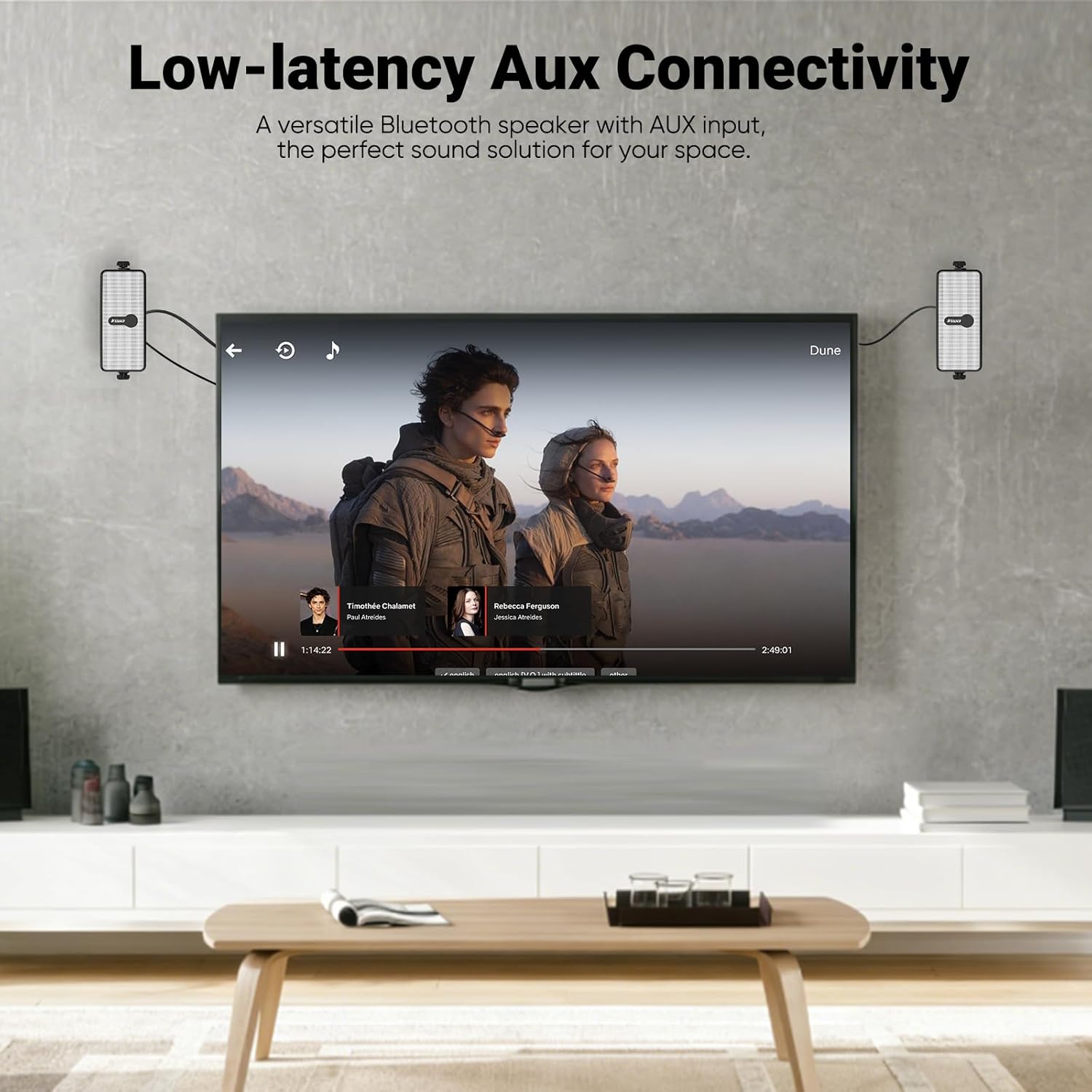
Image: An Inwa MZ-511C speaker positioned next to its remote control, highlighting the ease of wireless operation.
6. News & Music Modes
Optimize your listening experience with dedicated sound modes:
- News Mode: Enhances vocal clarity, ideal for podcasts, audiobooks, and spoken content.
- Music Mode: Boosts bass and optimizes overall sound for music playback.
Press the EQ button on the remote control to switch between these modes.

Image: A remote control with the EQ button highlighted, illustrating the selection of News and Music sound modes for different audio types.
Maintenance
To ensure the longevity and performance of your Inwa MZ-511C speakers:
- Cleaning: Wipe the speaker surfaces with a soft, damp cloth. Do not use abrasive cleaners or solvents.
- Storage: If storing for extended periods, especially in harsh weather conditions, disconnect power and store in a cool, dry place.
- Water Exposure: While IPX5 rated, it is recommended to protect the speakers from heavy, continuous rainfall or direct water jets to maximize lifespan.

Image: Two Inwa speakers shown with water splashing over them, illustrating their IPX5 waterproof and weather-resistant design.
Troubleshooting
If you encounter issues with your speakers, refer to the following common problems and solutions:
| Problem | Possible Cause | Solution |
|---|---|---|
| No power | Power adapter not connected or faulty outlet. | Ensure power adapters are securely plugged into speakers and a working electrical outlet. |
| No sound | Volume too low; incorrect input mode; device not paired. | Increase volume on speakers and source device. Check if the correct input mode (Bluetooth/AUX) is selected. Re-pair Bluetooth device. |
| Bluetooth connection unstable | Device too far; interference; low battery on source device. | Move device closer to the speaker (within 66 ft). Avoid obstacles. Charge source device. |
| Auracast pairing fails | Speakers are not the same model; incorrect pairing procedure. | Ensure all speakers are Inwa MZ-511C models. Follow Auracast pairing steps carefully. |
| Remote control not working | Battery depleted; line of sight blocked. | Replace remote control battery. Ensure no obstructions between remote and speaker. |
Specifications
| Feature | Specification |
|---|---|
| Brand | Inwa |
| Model Number | MZ-511C |
| Speaker Maximum Output Power | 20 Watts (RMS) |
| Connectivity Technology | Auxiliary, Bluetooth 6.0 |
| Audio Output Mode | Stereo |
| Mounting Type | Wall Mount |
| Speaker Type | Outdoor |
| Waterproof Rating | IPX5 |
| Maximum Range | 80 Feet |
| Bluetooth Range | 66 Feet |
| Control Method | Remote |
| Item Dimensions (D x W x H) | 4"D x 7"W x 6"H |
| Number of Audio Channels | 2.0 |
| Audio Driver Type | Dynamic Driver |
| Power Source | Corded Electric |
| Color | White |
Warranty and Support
Your Inwa MZ-511C Outdoor Bluetooth Speakers come with a limited manufacturer's warranty.
- Warranty Type: Limited
- Warranty Description: 1 Year Manufacturer
For warranty claims, technical support, or further inquiries, please refer to the contact information provided on the product packaging or the official Inwa website.