
Introduction
Welcome to the KppeX-X1 Smart Health Ring user manual. This guide provides essential information for setting up, operating, and maintaining your smart ring. The KppeX-X1 is designed to monitor various health metrics, including sleep patterns, heart rate, and activity levels, to help you understand and improve your overall well-being.
What's in the Box
Upon opening your KppeX-X1 Smart Health Ring package, you should find the following items:
- KppeX-X1 Smart Ring (1)
- 400mAh Charging Case (1)
- Magnetic USB Charging Cable (for ring) (1)
- Type-C Charging Cable (for charging case) (1)
- Instruction Manual (1)

Image: The KppeX-X1 Smart Ring and its charging case, as typically found in the product packaging.
Setup
1. Ring Sizing
The KppeX-X1 Smart Health Ring follows US ring sizing standards. For optimal comfort and accurate data collection, ensure you select the correct size. If you are unsure of your size, it is recommended to use a sizing kit or measure your finger carefully.
- Wrap a thin thread around the thickest part of the finger where you intend to wear the ring. Pull it snugly but comfortably.
- Mark the point where the thread overlaps.
- Remove the thread and measure its length. This measurement corresponds to the inner circumference of the ring.
- Refer to the sizing chart to find your corresponding US ring size.
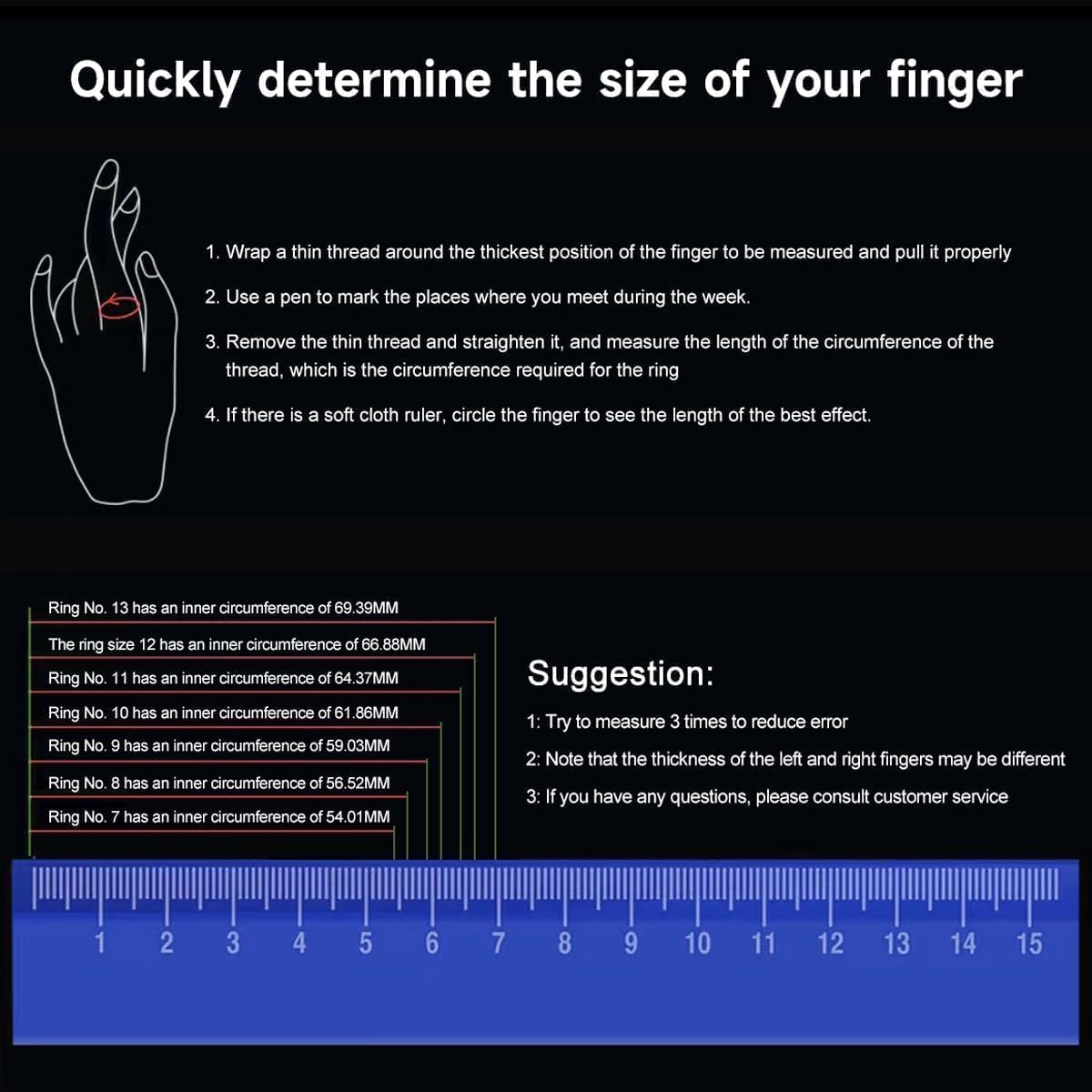
Image: Instructions and a chart for determining the correct ring size for the KppeX-X1 Smart Health Ring.
2. Initial Charging
Before first use, fully charge your KppeX-X1 Smart Health Ring and its charging case.
- Charging the Ring: Place the smart ring into the charging case. Connect the magnetic USB charging cable to the charging case and a power source. A full charge typically takes approximately 2 hours.
- Charging the Case: Use the provided Type-C charging cable to charge the charging case itself. The 400mAh charging case can fully charge the ring approximately 15 times, extending usage time up to 60 days.
3. App Installation and Pairing
The KppeX-X1 Smart Health Ring requires a companion application for full functionality and data viewing. The ring is compatible with smartphones running Android 4.4 / iOS 8.4 or above.
- Download the official KppeX Smart Health Ring application from your device's app store (Google Play Store for Android, Apple App Store for iOS).
- Ensure Bluetooth is enabled on your smartphone.
- Open the KppeX app and follow the on-screen instructions to create an account and pair your smart ring.
- The app will guide you through the initial setup process, including personal profile creation for accurate data calibration.
There are no subscription fees required to download or use the companion application.
Operating Instructions
The KppeX-X1 Smart Health Ring is designed for continuous wear to provide comprehensive health monitoring.
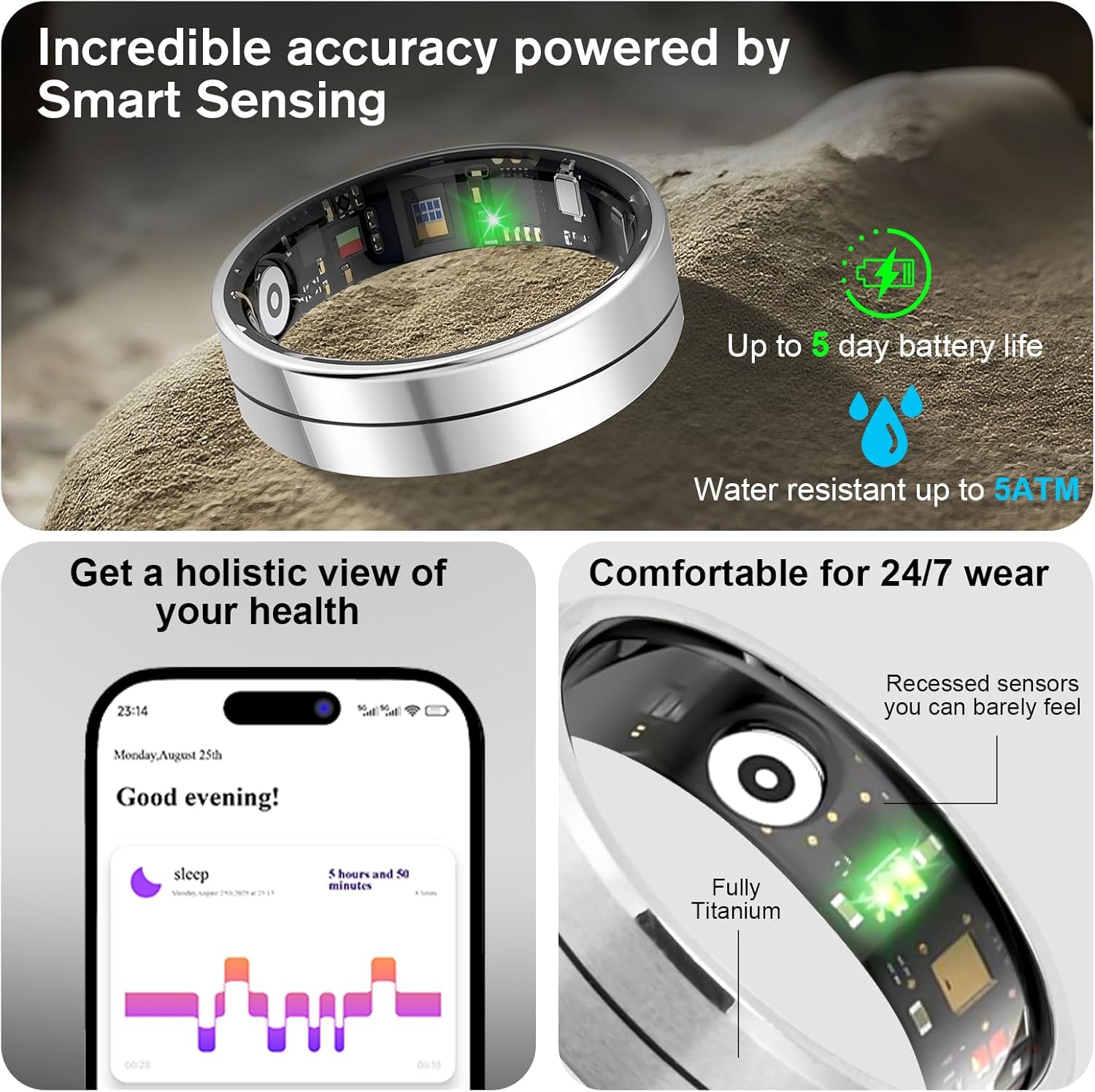
Image: The KppeX-X1 Smart Health Ring features smart sensing technology, up to 5 days battery life, 5ATM water resistance, and provides a holistic view of health data through its app.
1. Continuous Wear
Wear the KppeX-X1 Smart Health Ring on your finger for 24/7 monitoring. The recessed sensors are designed for comfort, making it suitable for extended wear, including during sleep.
2. Sleep Tracking
The ring automatically monitors your sleep patterns when worn at night. It tracks:
- Falling asleep and waking up times
- Sleep quality (deep and light sleep stages)
View daily, weekly, and monthly sleep data graphs within the companion app to understand your sleep habits and identify areas for improvement.
3. Health Monitoring
The KppeX-X1 continuously tracks your heart rate and blood oxygen levels with high accuracy. All health data is accessible through the app, providing daily, weekly, and monthly insights into your cardiovascular health and blood oxygen saturation.
4. Activity Tracking
The ring automatically records your daily activity, including:
- Steps taken
- Calories burned
- Distance traveled
For specific workouts, activate the relevant sport mode in the companion app. Supported modes include running, cycling, jump rope, walking, hiking, yoga, dancing, and golf. The app will provide detailed metrics such as exercise route, duration, heart rate, speed, and calorie expenditure for effective training analysis.
5. App Integration
The KppeX app serves as your central hub for all collected data. It can also integrate with Apple Health for a unified view of your health metrics.

Image: The KppeX app displays various health metrics and offers integration with Apple Health.
Maintenance
1. Water Resistance
The KppeX-X1 Smart Health Ring is IP68 rated and water-resistant up to 5 ATM, allowing for immersion up to 1.5 meters. This means it is suitable for showering, swimming in shallow water, and other daily activities involving water exposure.

Image: The KppeX-X1 Smart Health Ring is shown being used in water, highlighting its waterproof design.
Note: While water-resistant, avoid exposing the ring to high-velocity water, extreme temperatures, or chemical solvents, as these can compromise the seals over time.
2. Cleaning
To maintain hygiene and sensor accuracy, regularly clean your smart ring:
- Wipe the ring and its sensors with a soft, damp, lint-free cloth.
- Avoid using abrasive materials, harsh chemicals, or ultrasonic cleaners.
- Ensure the ring is completely dry before placing it back in the charging case or wearing it.
Troubleshooting
If you encounter issues with your KppeX-X1 Smart Health Ring, refer to the following common solutions:
- Ring Not Charging:
- Ensure the magnetic charging cable is securely connected to both the charging case and a working power source.
- Verify that the ring is correctly seated in the charging case.
- Check if the charging case itself has sufficient power or is connected to its Type-C charging cable.
- Clean the charging contacts on both the ring and the case with a dry, soft cloth to remove any debris.
- Connectivity Issues (Bluetooth):
- Ensure Bluetooth is enabled on your smartphone.
- Make sure the ring is within Bluetooth range of your phone.
- Restart the KppeX app.
- Try turning your phone's Bluetooth off and on again.
- If the issue persists, unpair the ring from your phone's Bluetooth settings and re-pair it through the KppeX app.
- Inaccurate Data Readings:
- Ensure the ring is worn correctly and snugly on your finger. A loose fit can affect sensor accuracy.
- Clean the sensors on the inside of the ring to ensure no dirt or sweat is obstructing them.
- Ensure your personal profile information (age, height, weight) in the app is accurate.
- Sync the ring with the app regularly to ensure all data is transferred.
- App Not Syncing:
- Check your phone's internet connection.
- Ensure the KppeX app has the necessary permissions (e.g., Bluetooth, location) enabled in your phone's settings.
- Close and reopen the app.
- Update the app to the latest version.
Specifications
| Feature | Detail |
|---|---|
| Model Name | X1 |
| Brand | KppeX |
| Operating System Compatibility | iOS 8.4+ / Android 4.4+ |
| Connectivity Technology | Bluetooth |
| Metrics Measured | Heart Rate, Blood Oxygen, Sleep Duration, Steps, Calories, Distance |
| Water Resistance Level | IP68, Waterproof (up to 1.5 meters) |
| Battery Charge Time | Approx. 2 hours |
| Battery Life (Ring) | 3-5 days (continuous use) |
| Charging Case Battery Capacity | 400mAh (approx. 15 full ring charges) |
| GPS | No built-in GPS (uses phone's GPS for activity routes) |
| Display Type | No Display |
| Target Audience | Unisex Adults |
Warranty Information
The KppeX-X1 Smart Health Ring comes with a limited one-year maintenance and warranty from the date of purchase. This warranty covers manufacturing defects and issues arising from normal use.
Please retain your proof of purchase for warranty claims. The warranty does not cover damage caused by misuse, accidents, unauthorized modifications, or failure to follow the instructions in this manual.
Customer Support
For further assistance, technical support, or warranty inquiries, please contact KppeX customer service. Refer to the contact information provided with your product packaging or visit the official KppeX website for support details.