1. Introduction
Thank you for purchasing the HOMCOM 71.5" Tall Pantry Cabinet. This freestanding storage unit is designed to provide ample and flexible storage solutions for your kitchen, dining room, or living space. Featuring adjustable shelves and integrated door spice racks, it combines functionality with a farmhouse aesthetic. This manual provides essential information for safe assembly, proper operation, and effective maintenance of your new cabinet.

Image 1.1: Overview of the HOMCOM Tall Pantry Cabinet with its storage compartments.
2. Safety Information
- Anti-Tipping Kit: Always secure the cabinet to the wall using the anti-tip kit provided. This is crucial to prevent accidental tipping, especially in households with children or pets.
- Proper Assembly: Assemble the cabinet properly, ensuring all components and shelves are securely attached according to the instructions. Loose parts can compromise stability.
- Weight Capacity: Do not exceed the specified weight capacities for the top, shelves, and door racks to maintain structural integrity and prevent damage or injury.
- Placement: Place the cabinet on a flat, level surface to ensure stability. Avoid placing it in high-traffic areas where it might be easily bumped.
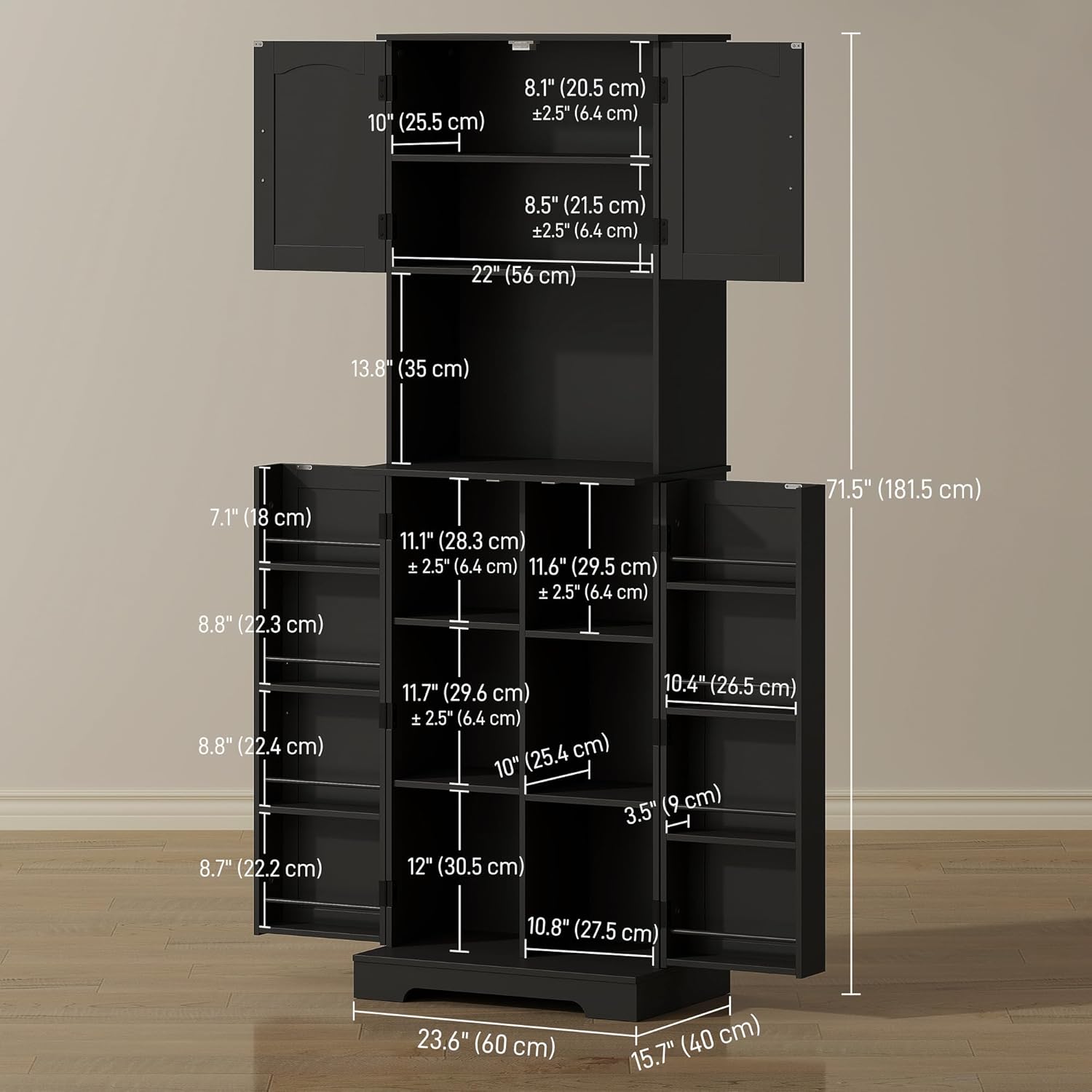
Image 2.1: Illustration of the anti-tipping hardware installation.
3. Package Contents
Before beginning assembly, verify that all parts and hardware are present. Refer to the parts list included in your packaging. If any components are missing or damaged, please contact customer support.
- Cabinet panels (sides, top, bottom, back)
- Doors (upper and lower)
- Adjustable shelves
- Door spice racks
- Hardware pack (screws, dowels, hinges, handles, anti-tip kit)
4. Assembly Instructions
Follow the step-by-step instructions provided in the included assembly guide. Ensure you have adequate space and the necessary tools (e.g., screwdriver, hammer) before starting. It is recommended to assemble the cabinet with two people.
- Unpack and Identify Parts: Lay out all components on a clean, soft surface to prevent scratches. Identify each part using the labels in your assembly guide.
- Assemble Main Frame: Connect the side panels to the base and top panels using the provided hardware. Ensure all connections are tight and secure.
- Install Shelves: Insert the shelf pins into the desired height settings for the adjustable shelves. Place the shelves onto the pins. The cabinet features three height settings for flexible storage.
- Attach Doors: Secure the hinges to the cabinet frame and then attach the doors. Ensure the doors align properly and open/close smoothly.
- Install Door Spice Racks: Attach the spice racks to the inside of the doors as indicated in the assembly guide.
- Attach Handles: Secure the vintage alloy handles to the doors.
- Install Anti-Tipping Hardware: Crucially, attach the anti-tip kit to the top rear of the cabinet and secure it to a wall stud using the provided hardware. This step is essential for safety.

Image 4.1: Adjustable shelf mechanism.
5. Operating Instructions
Your HOMCOM pantry cabinet is designed for versatile storage. Utilize its features to organize your items efficiently.
- Adjustable Shelves: The internal shelves can be adjusted to three different height settings, allowing you to customize the storage space for items of various sizes, from small jars to larger appliances or dishes. To adjust, remove items, lift the shelf, reposition the shelf pins, and then place the shelf back.
- Door Spice Racks: The eight built-in door spice racks are ideal for storing spices, small jars, and other compact items. The guardrails help prevent items from falling out when the doors are opened or closed.
- Countertop: The central countertop provides a convenient surface for small kitchen appliances like toasters or coffee makers, or for displaying decorative items.
- Enclosed Storage: The two main cabinets offer enclosed storage to keep your kitchen or dining area tidy and organized.

Image 5.1: Internal storage layout and features.
6. Maintenance
- Cleaning: Wipe the cabinet surfaces with a soft, damp cloth. Avoid using harsh chemicals or abrasive cleaners, which can damage the painted doors and melamine-faced panels.
- Spills: Clean up spills immediately to prevent staining or damage to the engineered wood and melamine surfaces.
- Hardware Check: Periodically check all screws and connections to ensure they remain tight. Retighten if necessary to maintain stability.
- Anti-Tip Kit: Regularly inspect the anti-tip kit to ensure it is securely fastened to both the cabinet and the wall.
7. Troubleshooting
- Cabinet Feels Wobbly:
- Ensure all assembly screws are fully tightened.
- Verify that the cabinet is placed on a flat, level surface.
- Confirm that the anti-tip kit is correctly installed and securely anchored to the wall. - Doors Do Not Align:
- Check the hinge installation. Adjust hinges as needed to ensure proper door alignment.
- Ensure the cabinet frame is square and level. - Shelves Not Fitting:
- Ensure shelf pins are inserted correctly and fully into the pre-drilled holes.
- Verify that you are using the correct shelves for the designated sections.
8. Specifications
| Brand | HOMCOM |
| Model Number | CA83A-420V80BK0231 |
| Colour | Black |
| Product Dimensions | 40D x 60W x 181.5H Centimetres (15.7" D x 23.6" W x 71.5" H) |
| Item Weight | 33.6 kg (74.07 lbs) |
| Material | Engineered Wood, Melamine |
| Maximum Weight Capacity (Top) | 20 kg (44 lbs) |
| Maximum Weight Capacity (Shelf) | 10 kg (22 lbs) |
| Maximum Weight Capacity (Food Rack) | 2 kg (4.4 lbs) |
| Total Maximum Weight Capacity | 86 kg (189 lbs) |
| Special Features | Adjustable Shelf, Anti-Tipping, Scratch Resistant |

Image 8.1: Product dimensions.
9. Warranty and Support
For warranty information, returns, or customer support, please refer to your purchase documentation or contact the retailer where the product was purchased. You may also visit the official HOMCOM website for further assistance.
Manufacturer: Aosom Canada
Place of Business: Markham, Ontario, CA
Telephone: 1-416-792-6088