
HEAD Raptor WCR 140S
HEAD Raptor WCR 140S Ski Boot Instruction Manual
Model: Raptor WCR 140S
Introduction
This manual provides essential information for the proper setup, operation, and maintenance of your HEAD Raptor WCR 140S ski boots. Designed for high-performance alpine skiing, these boots feature innovative thermoplastic construction for absorption, a 96-mm last, deep heel pocket, and a long toe box for precise control. Understanding these instructions will help ensure optimal performance and longevity of your ski boots.
Product Overview
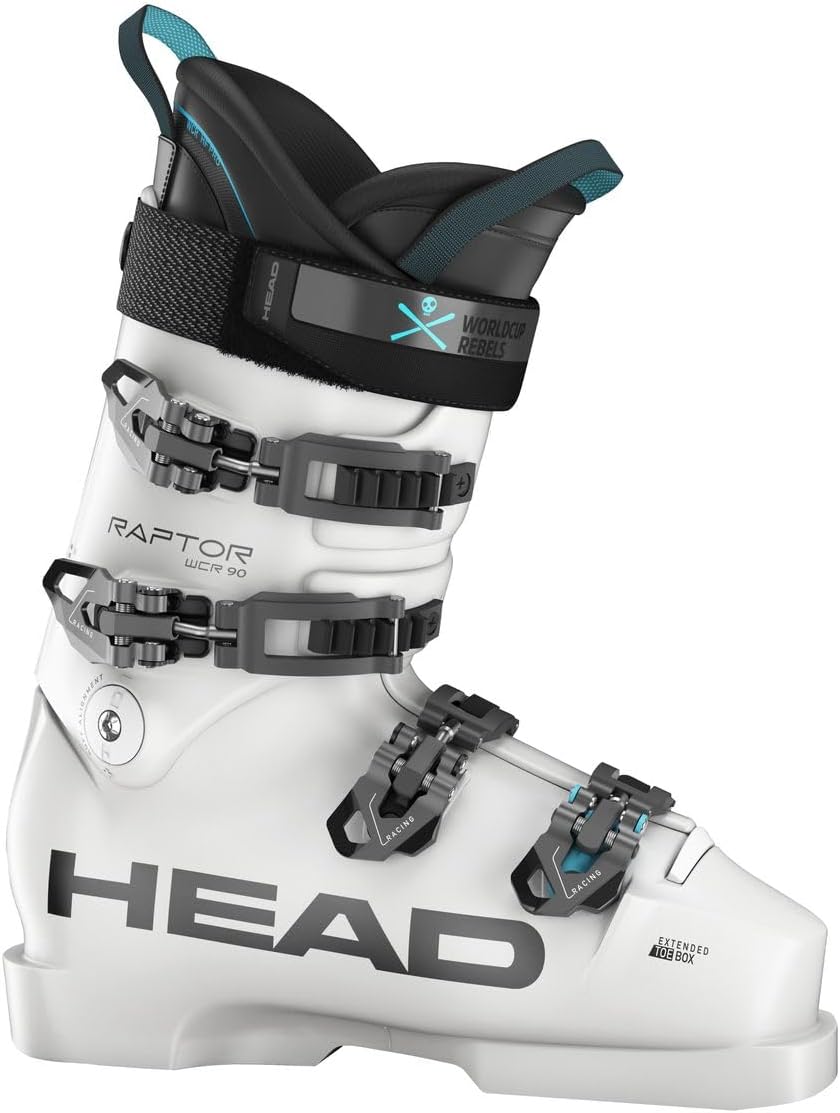
Figure 1: The HEAD Raptor WCR 140S ski boot. This image displays the overall design, including the four micro-adjustable buckles, power strap, and the 'Raptor WCR' branding on the side.
The HEAD Raptor WCR 140S ski boot is engineered for competitive and advanced skiers. Key features include:
- Shell: Constructed with innovative thermoplastic for enhanced absorption and responsiveness.
- Last: 96-mm width, providing a precise and performance-oriented fit.
- Liner: WCR Pro liner, customizable with Liquid Fit technology, an adjustable tongue, and a double power booster Velcro strap for a secure and comfortable fit.
- Buckles: Four micro-adjustable low-profile Spineflex racing alloy buckles for precise closure.
- Flex: Adjustable flex from 150 to 140, allowing customization for different skiing styles and conditions.
- Sole: FIS-approved sole for compliance with racing regulations.
Setup and Adjustment
1. Putting on the Boots
- Ensure all buckles are unlatched and the power strap is loosened.
- Pull the tongue forward and outward to create space for your foot.
- Slide your foot into the boot, ensuring your heel is seated firmly in the heel pocket.
- Tap your heel on the ground a few times to fully seat your foot.
2. Buckle Adjustment
The four micro-adjustable low-profile Spineflex buckles allow for precise tensioning. Start by closing the buckles loosely, then progressively tighten them from the bottom (forefoot) upwards (cuff). The Spineflex design ensures even pressure distribution.
- Forefoot Buckles: Secure the foot over the instep without causing pressure points.
- Cuff Buckles: Provide support and control around the lower leg. Do not overtighten, as this can restrict circulation.
- Micro-Adjustment: Rotate the buckle levers to fine-tune the tension.
3. Power Strap Adjustment
The double power booster Velcro strap at the top of the cuff provides additional support and responsiveness. Tighten it firmly but comfortably to enhance power transmission to your skis.
4. Flex Adjustment
The Raptor WCR 140S offers an adjustable flex from 150 to 140. This adjustment typically involves a mechanism on the rear of the cuff or side of the shell. Refer to the specific markings on your boot for detailed instructions on how to change the flex setting to match your preference and skiing conditions.
5. Liner Customization (Liquid Fit)
The WCR Pro liner features Liquid Fit technology, allowing for personalized fit around the ankle and heel. This process is usually performed by an authorized HEAD dealer. Consult your dealer for professional liner customization to achieve the best possible fit and comfort.
Operating the Ski Boots
Once properly adjusted, your HEAD Raptor WCR 140S boots are ready for skiing. These boots are designed to provide maximum power transmission and control for aggressive skiing.
- Forward Lean: The boot's design promotes an aggressive forward lean, crucial for modern ski technique.
- FIS-Approved Sole: Ensures compatibility and performance on race courses.
- Flex-Performance Tuning: Provides a consistent and powerful flex for dynamic skiing.
- Rear-Support Tuning: Enhances rearward support, critical for maintaining balance and control at high speeds.
- Toe Articulation: The long toe box allows for natural toe articulation, improving feel and control.
Always ensure your ski bindings are correctly adjusted by a certified technician to match your boots and personal settings before skiing.
Maintenance and Care
Proper maintenance will extend the life of your ski boots and ensure consistent performance.
- Cleaning: After each use, wipe down the exterior of the boots with a damp cloth to remove dirt, snow, and salt. Avoid harsh chemicals.
- Drying: Remove the liners and footbeds to allow them to air dry completely. Do not use direct heat sources like radiators or open flames, as this can damage the liner and shell material. A boot dryer with gentle heat is acceptable.
- Storage: Store boots in a cool, dry place away from direct sunlight. Buckle the boots loosely to maintain their shape during storage.
- Buckles and Straps: Periodically check buckles and straps for wear and tear. Ensure all screws are tight. Replace any damaged components immediately.
- Soles: Inspect the soles for excessive wear, especially around the toe and heel pieces, which are critical for binding release. Replace worn sole parts as needed.
Troubleshooting
Here are solutions to common issues you might encounter:
- Discomfort or Pressure Points:
- Ensure buckles are not overtightened.
- Check sock thickness and fit.
- Consider professional liner customization (Liquid Fit) or custom footbeds.
- Consult a boot fitter for shell modification if necessary.
- Loose Fit / Heel Lift:
- Tighten buckles, especially the instep and cuff buckles.
- Ensure the power strap is snug.
- Consider professional liner customization (Liquid Fit) to fill voids around the ankle.
- Check if the boot size is appropriate (refer to size chart).
- Difficulty Getting Boots On/Off:
- Ensure all buckles are fully unlatched and the power strap is completely loosened.
- Pull the tongue forward and outward as much as possible.
- Warm the boots slightly (e.g., indoors) before putting them on, as cold plastic is less flexible.
Specifications
| Feature | Detail |
|---|---|
| Brand | HEAD |
| Model | Raptor WCR 140S |
| Part Number | head-raptor-wcr-24 |
| Color | White |
| Material | Thermoplastic |
| Last Width | 96 mm |
| Flex Adjustment | 150 to 140 |
| Liner | WCR Pro liner with Liquid Fit, adjustable tongue, double power booster Velcro strap (also JR-WCR HF-Pro with Lace-Up Option) |
| Buckles | Four micro-adjustable low-profile Spineflex racing alloy buckles |
| Strap | 40mm Velostrap (Double Power Booster Velcro Strap) |
| Sole | FIS-Approved |
| Toe Articulation | Long Toe Box |
| Size (Current Variant) | 22.5 Mondo Point |
Ski Boot Size Chart

Figure 2: A comprehensive ski boot size conversion chart, showing equivalent sizes across EURO, US, UK, and Mondo Point systems, along with corresponding boot sole lengths. Use this chart to determine the correct boot size.
Refer to the size chart above to ensure you have the correct boot size. Mondo Point is the standard measurement for ski boots.
Warranty and Support
For detailed warranty information regarding your HEAD Raptor WCR 140S ski boots, please refer to the official HEAD website or contact an authorized HEAD dealer. Warranty terms and conditions may vary by region and retailer.
If you require technical support, service, or have questions about your product, please visit the official HEAD website or contact their customer service department. You can also visit the HEAD Store on Amazon for more product information.
Related documentsRaptor WCR 140S


Ask a question about this manual
Ask about setup, troubleshooting, compatibility, parts, safety, or missing instructions. Manuals+ will review the question and use this page’s manual context to help answer it.