
1. Welcome and Overview
Thank you for choosing the ORNIN D1015 DECT 6.0 Cordless Phone System. This manual provides detailed instructions for setting up, operating, and maintaining your new phone system. The D1015 system offers clear communication, an integrated answering machine, and user-friendly features designed for convenience in both home and small business environments.
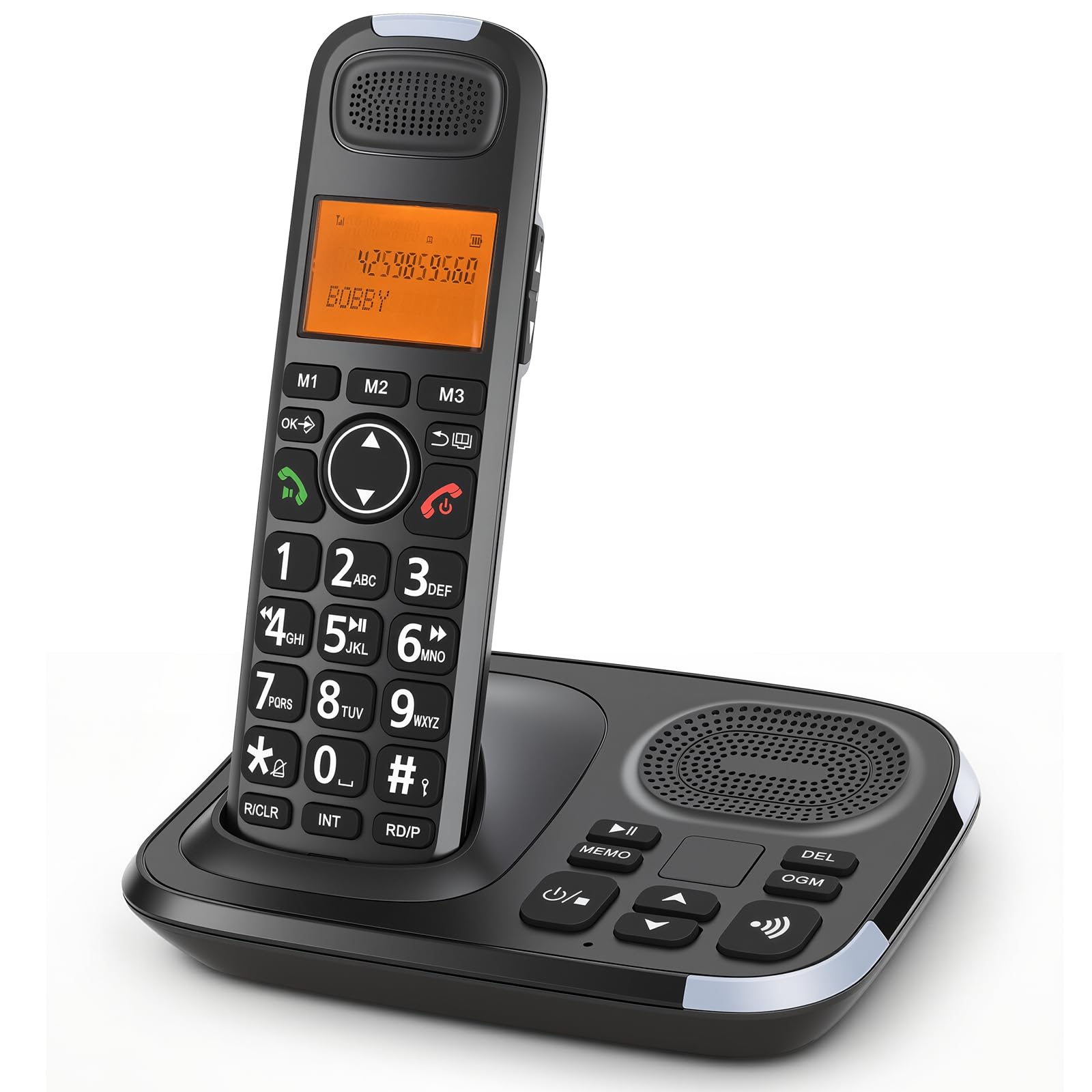
Image 1.1: The ORNIN D1015 Cordless Phone System, featuring a handset and base unit.
Key Features:
- DECT 6.0 Technology: Provides enhanced sound quality and security.
- Digital Answering Machine: Records messages with easy playback and management.
- Caller ID: Displays incoming caller information.
- Big Buttons: Large, easy-to-read buttons for simplified dialing.
- Speakerphone: Full-duplex speakerphone for hands-free conversations.
- Audio Assist: Amplifies sound for improved call clarity.
- Expandable System: Supports additional handsets for multi-room coverage.
2. Package Contents
Verify that your package contains the following items:
- ORNIN D1015 Cordless Telephone Handset
- Telephone Base Unit
- AC Power Adapter for Base Unit
- Telephone Line Cord
- 2 AAA Rechargeable Batteries (for handset)
- User Manual (this document)
3. Setup
3.1. Battery Installation
- Locate the battery compartment on the back of the cordless handset.
- Open the battery compartment cover.
- Insert the two AAA rechargeable batteries, observing the correct polarity (+ and -).
- Close the battery compartment cover securely.
3.2. Base Unit Connection
- Connect the small end of the AC power adapter to the power jack on the back of the telephone base unit.
- Plug the large end of the AC power adapter into a standard electrical outlet.
- Connect one end of the telephone line cord to the TEL LINE jack on the back of the base unit.
- Plug the other end of the telephone line cord into a telephone wall jack.

Image 3.1: The ORNIN D1015 handset placed on its base unit, indicating proper charging and connection.
3.3. Initial Charge and Handset Registration
Place the handset on the base unit. The handset will begin charging. Allow the handset to charge for at least 12 hours before initial use to ensure optimal battery performance. The handset is pre-registered to the base unit. If you purchase additional handsets, refer to the expansion instructions for registration.
4. Operating Instructions
4.1. Making and Receiving Calls
- To Make a Call: Press the TALK/FLASH button, then dial the phone number.
- To Receive a Call: When the phone rings, press the TALK/FLASH button.
- To End a Call: Press the OFF button or place the handset back on the base unit.
4.2. Using the Speakerphone
During a call, press the SPEAKER button to activate the speakerphone. Press it again to switch back to the handset earpiece.

Image 4.1: Close-up of the ORNIN D1015 handset, highlighting the speakerphone and Audio Assist (AMP) button for enhanced sound.
4.3. Caller ID
When a call comes in, the caller's name and number will be displayed on the handset's LCD screen (if Caller ID service is subscribed through your telephone provider).

Image 4.2: The ORNIN D1015 handset displaying a large LCD screen and a visual ringer indicator at the top.
4.4. Digital Answering Machine
The integrated digital answering machine records incoming messages when you are unavailable. Controls are located on the base unit.
- Play/Stop: Press the PLAY/STOP button to listen to messages.
- Skip: Press the SKIP button to advance to the next message.
- Delete: Press the DEL button to delete the current message.
- OGM: Press the OGM button to record or play your outgoing message.

Image 4.3: The ORNIN D1015 base unit, showing the digital answering machine controls for playback, skip, delete, and outgoing message management.
4.5. Audio Assist
Press the AMP button on the side of the handset during a call to amplify the audio for better clarity. Press it again to return to normal volume.
4.6. Intercom and 3-Way Conference Calls
If you have multiple handsets, you can use the intercom feature for internal communication or conduct 3-way conference calls.
- Intercom: Press the INT button on the handset and select the desired handset to call.
- 3-Way Conference: During an external call, press INT, call another handset, and then press CONF (or similar button) to join all three parties.

Image 4.4: Two ORNIN D1015 handsets illustrating two-way communication capabilities, such as intercom between handsets.

Image 4.5: Three ORNIN D1015 handsets and a base unit, demonstrating the ability to conduct a 3-way conference call.
4.7. Phonebook and Quick Dial
Store frequently called numbers in the phonebook for quick access. Use the dedicated M1, M2, M3 buttons for quick dial functions.
5. Maintenance
5.1. Cleaning
Wipe the phone and base unit with a soft, damp cloth. Do not use harsh cleaning agents or abrasive materials. Avoid getting moisture into any openings.
5.2. Battery Care
To prolong battery life, always return the handset to the base unit when not in use. If the phone will not be used for an extended period, remove the batteries to prevent leakage.
6. Troubleshooting
If you experience issues with your ORNIN D1015 phone system, try the following solutions:
| Problem | Solution |
|---|---|
| No dial tone | Ensure the telephone line cord is securely connected to both the base unit and the wall jack. Check if the AC power adapter is plugged in correctly. |
| Handset not charging | Ensure the handset is properly seated in the base unit. Clean the charging contacts on both the handset and base unit with a dry cloth. Verify batteries are correctly installed. |
| Cannot hear caller / Caller cannot hear me | Adjust the volume using the volume buttons on the handset. Ensure the handset is fully charged. Check the telephone line connection. |
| Answering machine not recording | Check if the answering machine is turned on. Ensure there is sufficient memory available. Record a new outgoing message if necessary. |
| Poor range or static | Move the base unit away from other electronic devices (e.g., microwaves, Wi-Fi routers) that may cause interference. Ensure the handset is within the operational range of the base unit. |
7. Specifications
| Feature | Detail |
|---|---|
| Product Dimensions | 6 x 3.4 x 7.7 inches |
| Item Weight | 14.9 ounces |
| Model Number | D1015-S |
| Batteries | 2 AAA rechargeable batteries (included) |
| Telephone Type | Cordless |
| Material | Electronic Components, Plastic |
| Power Source | Corded Electric |
| Dialer Type | Big Button |
| Answering System Type | Digital |
| Compatible Devices | Landline |
8. Warranty Information
ORNIN products are manufactured to high-quality standards. This product is covered by a limited warranty against defects in materials and workmanship under normal use. Please retain your proof of purchase for warranty claims. For specific warranty terms and conditions, refer to the documentation included with your purchase or contact customer support.
9. Support
If you require further assistance or have questions not covered in this manual, please contact ORNIN customer support. Contact information can typically be found on the product packaging or the official ORNIN website.
- Online Support: Visit the ORNIN website for FAQs and support resources.
- Email Support: Refer to your product packaging for the support email address.
- Phone Support: Refer to your product packaging for the support phone number.