
Introduction
The Hydra Turbo Electronic Cigar Humidifier is designed to maintain ideal humidity levels in large cabinet and walk-in humidors up to 100 square feet. This device ensures cigars remain fresh, flavorful, and perfectly preserved by eliminating uneven humidity zones and creating a stable environment. It features dual directional air vents, Hygroset adjustable calibration, and real-time temperature and humidity monitoring.
Safety Information
- Read all instructions before operating the humidifier.
- Use only distilled water to prevent mineral buildup and ensure optimal performance.
- Ensure the humidifier is placed on a stable, level surface.
- Do not immerse the unit in water or expose it to excessive moisture.
- Keep the power cord away from heated surfaces and ensure it is not pinched or walked on.
- Unplug the unit before cleaning or refilling the water reservoir.
- Do not block air vents during operation.
- This appliance is not intended for use by persons (including children) with reduced physical, sensory or mental capabilities, or lack of experience and knowledge, unless they have been given supervision or instruction concerning use of the appliance by a person responsible for their safety.
Package Contents
Verify that all items are present in the package:
- Hydra Turbo Humidifier Unit
- Handheld Remote Control with 6' cord
- Power Adapter
- Funnel for manual water filling
- Float for water level indication
- Direct waterline connection components (optional use)
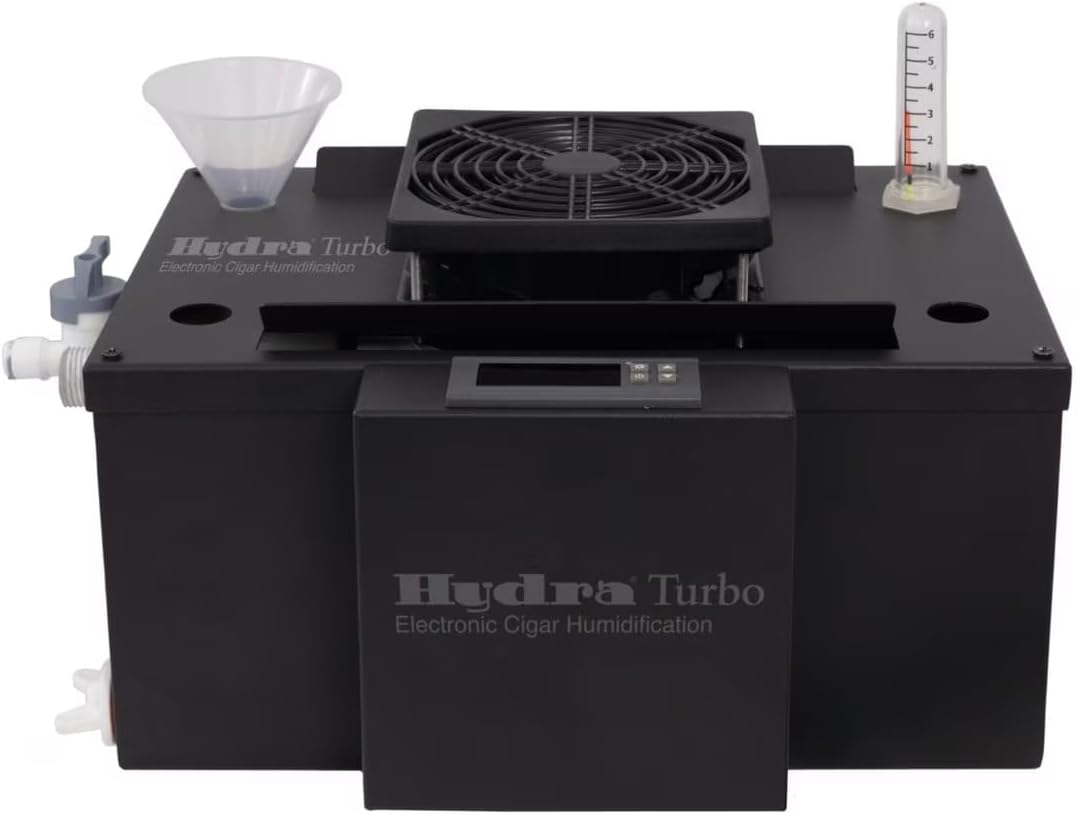
Image: The Hydra Turbo humidifier unit shown with the funnel and flow meter, illustrating typical package contents.
Product Features
- Automatic Humidity Regulation: Utilizes HygroSet adjustable technology to automatically maintain desired humidity levels.
- Wide Coverage: Effectively humidifies spaces up to 100 square feet, suitable for large cabinet and walk-in humidors.
- Dual Directional Airflow: Features two angled air-flow vents for even moisture distribution.
- Remote Control: Handheld remote unit with a 6-foot cord allows for convenient control and monitoring of temperature and humidity.
- Direct Waterline System: Optional-use direct waterline connection with an overflow shut-off switch, manual on/off valve, and drain valve for continuous operation.
- User-Friendly Control Panel: Easy-to-use interface for setting and monitoring functions.

Image: An angled view of the Hydra Turbo humidifier, highlighting its design and the top-mounted fan for air circulation.
Setup
- Placement: Place the Hydra Turbo humidifier on a flat, stable surface within your humidor. Ensure there is adequate space around the unit for proper airflow. Avoid placing it near direct heat sources or in direct sunlight.
- Water Filling (Manual):
- Locate the water fill port on the unit.
- Using the provided funnel, carefully pour distilled water into the reservoir until the float indicates a full level. Do not overfill.
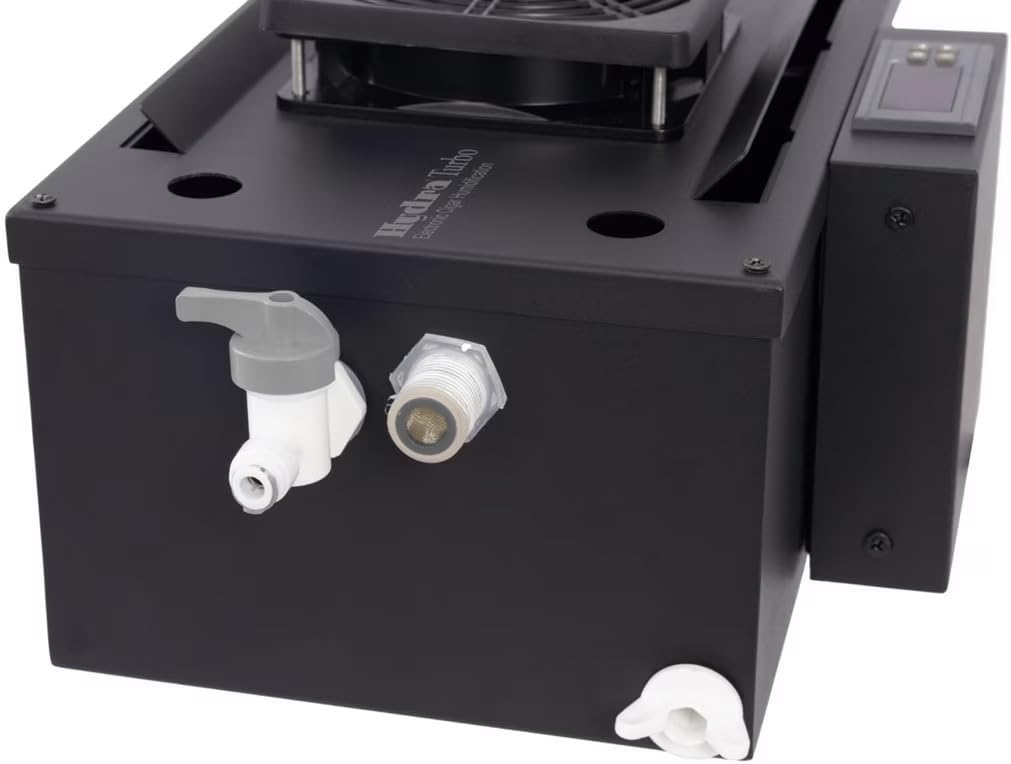
Image: A detailed view of the humidifier's side, showing the water inlet connection point and the drain valve, used for both manual and direct waterline setup.
- Water Filling (Direct Waterline - Optional):
- Connect a suitable water supply line to the humidifier's direct waterline inlet.
- Ensure all connections are secure to prevent leaks.
- The unit features an overflow shut-off switch to prevent overfilling when using the direct waterline.
- Connect Remote Control: Plug the 6-foot cord of the handheld remote control into the designated port on the main humidifier unit.
- Power Connection: Plug the power adapter into the humidifier and then into a standard 110V AC electrical outlet.
- Initial Power On: The unit will power on and display current humidity and temperature readings.
- Sensor Placement: Position the remote sensor (if separate from the main remote unit) within the humidor to accurately monitor conditions.

Image: A close-up of the remote humidity sensor, which connects to the main unit to provide accurate readings within the humidor.
Operating Instructions
- Power On/Off: Press the power button on the control panel or remote to turn the unit on or off.
- Setting Desired Humidity:
- Use the 'Set' button on the control panel or remote to enter humidity setting mode.
- Adjust the desired humidity percentage using the up/down arrows.
- Confirm your selection by pressing 'Set' again or wait a few seconds for the setting to save automatically.

Image: A close-up view of the digital control panel, displaying humidity percentage and control buttons for setting adjustments.
- Monitoring: The display on the control panel and remote will show the current humidity and temperature within the humidor. The unit will automatically activate to maintain the set humidity level.
- Water Level Indication: The float indicator provides a visual cue of the water level in the reservoir. Refill when the level is low.

Image: Top view of the humidifier, featuring the central fan and a clear tube indicating water flow or level, essential for monitoring operation.
Maintenance
- Water Refill: Regularly check the water level. When low, refill the reservoir with distilled water using the funnel or ensure the direct waterline system is functioning correctly.
- Reservoir Cleaning: Every 1-2 months, or as needed, unplug the unit and drain any remaining water. Clean the reservoir with a mild soap solution and rinse thoroughly. Ensure no soap residue remains before refilling.
- Exterior Cleaning: Wipe the exterior of the unit with a soft, damp cloth. Do not use abrasive cleaners or solvents.
- Drainage (Direct Waterline): If using the direct waterline system, periodically check the drain valve for any blockages and ensure proper drainage.
Troubleshooting
| Problem | Possible Cause | Solution |
|---|---|---|
| Unit not powering on | No power, loose connection | Check power cord connection, ensure outlet is functional. |
| Humidity not increasing | Low water level, blocked vents, incorrect setting | Refill water reservoir, clear any obstructions from vents, verify humidity setting. |
| Water leakage | Overfilling, loose waterline connection, damaged reservoir | Do not overfill. Check direct waterline connections for tightness. Inspect reservoir for cracks. |
| Inaccurate humidity reading | Sensor obstruction, sensor malfunction | Ensure sensor is not blocked. If problem persists, contact customer support. |
Specifications
| Feature | Specification |
|---|---|
| Brand | Hydra |
| Model Name | HYDRA-TBBK |
| Special Feature | Automatic |
| Color | Black |
| Capacity | 1 Gallon |
| Floor Area Coverage | 100 square feet |
| Operation Mode | Automatic |
| Voltage | 110 volts AC |
| Power Source | Corded Electric |
| Control Method | Remote |
| Item Dimensions (D x W x H) | 8"D x 14.25"W x 5.25"H |
| Item Weight | 10 pounds |
| Material | Stainless Steel coated Black |
| UPC | 810147553952 |
Warranty and Support
For warranty information or technical support, please refer to the warranty card included with your product or visit the official Hydra website. You may also contact customer service through the retailer where the product was purchased.
Online Resources:
- Visit the Hydra Store on Amazon for more products and information.


