
1. Introduction
The CINMOORE BC22U0C 2.5K Wireless Outdoor Security Camera is designed to provide reliable and versatile home surveillance. Featuring a 5200mAh rechargeable battery, it offers wire-free operation and flexible mounting options for both indoor and outdoor use. This camera includes advanced features such as 2.5K QHD resolution, full-color night vision, smart AI person detection, two-way audio, and an integrated siren and spotlight for enhanced security.

Figure 1: CINMOORE BC22U0C Camera Overview
2. Setup
2.1 What's in the Box
- 1 x CINMOORE Wireless Home Security Camera
- 1 x Mounting Bracket
- 1 x Mounting Screws kit
- 1 x Iron Plate
- 1 x Location Sticker
- 1 x Charging Cable
- 1 x User Manual
2.2 Charging the Camera
Before initial use, fully charge the camera using the provided charging cable. The 5200mAh rechargeable battery ensures long-term wire-free operation. The mobile application will notify you when the battery level is low.

Figure 2: Camera Battery and Charging Reminder
2.3 Mounting Options
The camera offers versatile mounting options due to its strong magnetic base. It can be attached to any metal surface, or mounted using screws for permanent placement. The included iron plate and double-sided adhesive provide additional flexibility for installation.

Figure 3: Flexible Mounting Options
2.4 Wi-Fi Connection
The camera connects via 2.4 GHz Wi-Fi for stable transmission. Note: 5G Wi-Fi is not supported. Ensure your mobile device is connected to a 2.4 GHz network during the initial setup process with the CINMOORE app.

Figure 4: Connecting to 2.4 GHz Wi-Fi Network
3. Operation
3.1 Video Quality
The camera captures crystal-clear footage in 2.5K QHD resolution (2560x1440), ensuring important details like faces and license plates are clearly visible. This provides superior clarity compared to standard 1080p resolutions.
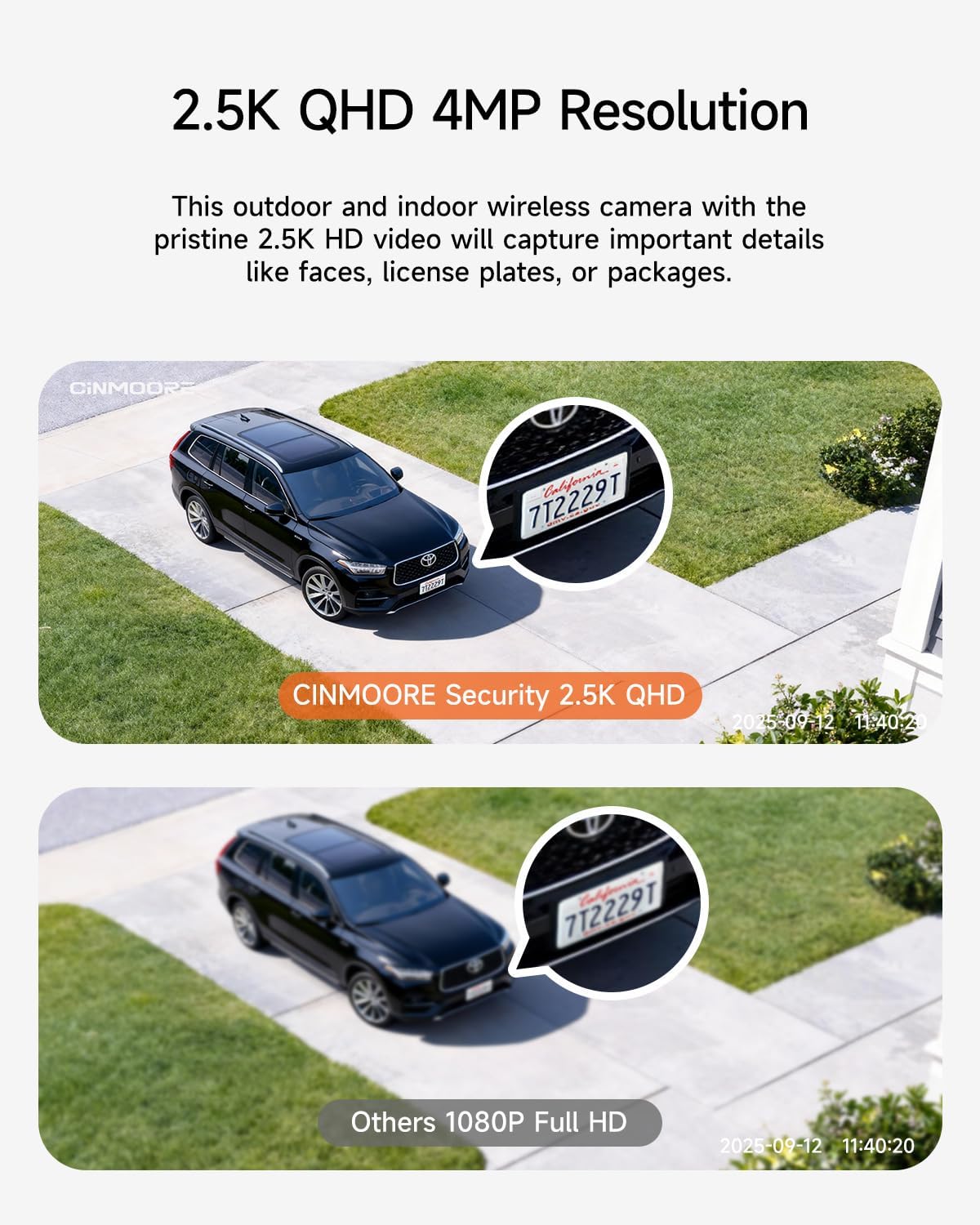
Figure 5: 2.5K QHD Resolution Clarity
3.2 Night Vision Modes
The camera features advanced night vision capabilities. It offers both full-color night vision, activated by integrated LED lighting and a 4MP ultra-low light sensor, and infrared night vision for reliable surveillance in low-light conditions.

Figure 6: Full-Color and Infrared Night Vision
3.3 Smart AI Person Detection & Custom Zones
Utilize advanced human detection to differentiate people from animals, reducing false alarms. You can also define custom activity zones to monitor specific areas and receive alerts only when relevant activity occurs. All intelligent features are available without a subscription.

Figure 7: AI Person Detection and Custom Activity Zones
3.4 Two-Way Audio & Siren
The built-in microphone and speaker enable real-time, two-way audio communication via the mobile app. This allows you to greet visitors, communicate with delivery personnel, or deter intruders. The integrated spotlight and siren provide an additional layer of security, illuminating dark areas and sounding an alarm when needed.

Figure 8: Two-Way Audio and Instant Siren Activation
3.5 Storage Options
The camera supports both local storage via a Micro SD card (up to 256GB, not included) and secure cloud storage. Cloud storage offers a 90-day free trial, followed by a subscription option.

Figure 9: Local and Cloud Storage Options
3.6 Official Product Video
Video 1: CINMOORE 2.5K Wireless Magnetic Security Camera Overview. This video provides a visual introduction to the camera's features and capabilities.
4. Maintenance
4.1 Battery Care
To ensure optimal battery life, regularly charge your camera when the app indicates a low battery. Avoid completely draining the battery frequently. For continuous operation, consider providing a constant power source.
4.2 Weather Resistance
The camera is IP65-rated weatherproof, providing protection against dust and rain. It is also heat-resistant, ensuring reliable performance year-round in various outdoor climates. Periodically clean the camera lens to maintain clear image quality.

Figure 10: IP65 Weatherproof Design
5. Troubleshooting
- Camera not connecting to Wi-Fi: Ensure your router is broadcasting a 2.4 GHz Wi-Fi signal. This camera does not support 5 GHz Wi-Fi. Move the camera closer to the router if signal strength is weak.
- Frequent false alarms: Adjust the sensitivity of the human detection feature within the app. Utilize custom activity zones to focus monitoring on critical areas and exclude areas with frequent non-human movement (e.g., pets, passing cars).
- Poor video quality: Check your Wi-Fi connection strength. Ensure the camera lens is clean and free from obstructions. If using an SD card, ensure it is properly inserted and formatted.
- Battery draining quickly: Reduce the frequency of live view access and recorded events. Ensure the camera is in an optimal location with good Wi-Fi signal to minimize power consumption. Consider providing continuous power if frequent usage is required.
- SD Card Error: Ensure the Micro SD card is correctly inserted and formatted through the camera's app. The camera supports cards up to 256GB. Try a different SD card if the issue persists.
6. Specifications
| Feature | Detail |
|---|---|
| Brand | CINMOORE |
| Model Name | Wireless Wi-Fi Battery Camera |
| Model Number | BC22U0C |
| Connectivity Technology | Wireless (2.4 GHz Wi-Fi only) |
| Power Source | Battery Powered (5200mAh rechargeable) |
| Video Capture Resolution | 2.5K QHD (2560x1440) |
| Special Features | 2-Way Audio, AI Person Detection, Color Night Vision, Spotlight, Siren Alarm |
| Indoor/Outdoor Usage | Indoor, Outdoor |
| Weatherproof Rating | IP65 |
| Storage Options | Micro SD Card (up to 256GB), Cloud Storage |
| Compatible Devices | Smartphone (via CINMOORE app) |
| Item Dimensions | 2.64 x 2.28 x 3.5 inches |
| Item Weight | 0.38 Kilograms |
7. Support & Warranty
7.1 Customer Support
For any questions, technical assistance, or support, please contact CINMOORE customer service:
- Email: official@cinmoore.com
- 7x24 Support available
7.2 Warranty Information
The CINMOORE BC22U0C camera comes with 12 months of protection.
7.3 Return Policy
A 30-day return policy is available for this product.